


.webp)
The Ultimate Guide to Using AI Cold Calling for Real Estate
Updated at Sep 24, 2026
10 min to read
.webp)
Missed calls and delayed responses impact customer trust and revenue. A voice bot automates interactions through natural voice conversations, answering queries and routing calls instantly.
With AI voice bots, businesses handle communication 24/7 without needing developers or coding skills.
By 2027, 70% of customer interactions will involve voice automation, making it a necessity. Modern no-code platforms help build a voice bot easily for support, lead management, or scheduling.
This guide explains how to build a voice bot or start your own AI voice agents businesses in a few clear steps to help you automate communication efficiently and understand how voice bots transform customer engagement.
A voice bot is an AI assistant that communicates with users through speech. It listens, understands intent using natural language processing, and responds in real time with a human like voice.
Unlike a text based voice chatbot, it uses voice input and output to enable faster and more natural interactions.
Modern AI voice bots are designed to manage queries, capture leads, provide updates, and even handle transactions. They eliminate typing, reduce response time, and offer consistent support across industries such as retail, healthcare, and finance.
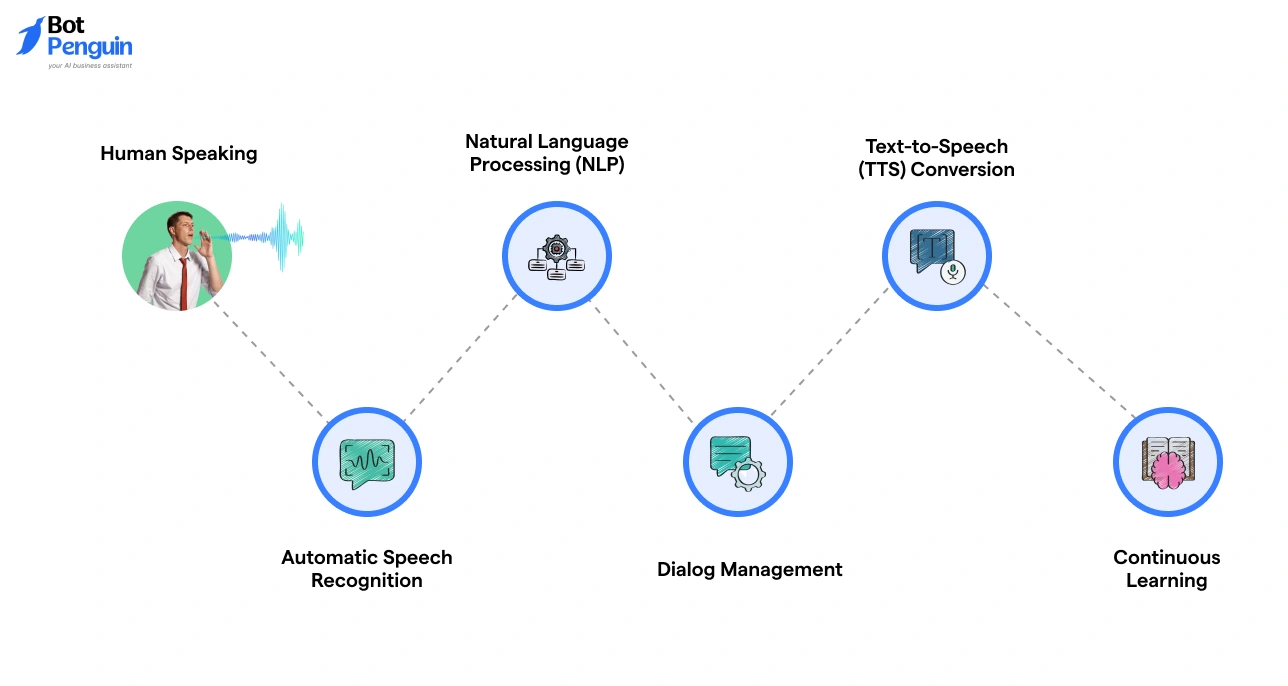
A voice bot uses a combination of speech recognition, language understanding, and AI-based response generation to communicate intelligently.
The process involves several coordinated systems working in real time to ensure accuracy and natural communication.
Flow of operation: Speech → Text → AI Understanding → Spoken Reply
This layered system ensures that an AI voice bot not only answers questions but also improves contextual accuracy with every interaction.
Understanding this architecture helps businesses see why voice automation performs better than static IVR systems. The next section discusses why creating a voice bot in 2026 is both practical and profitable for growing organizations.
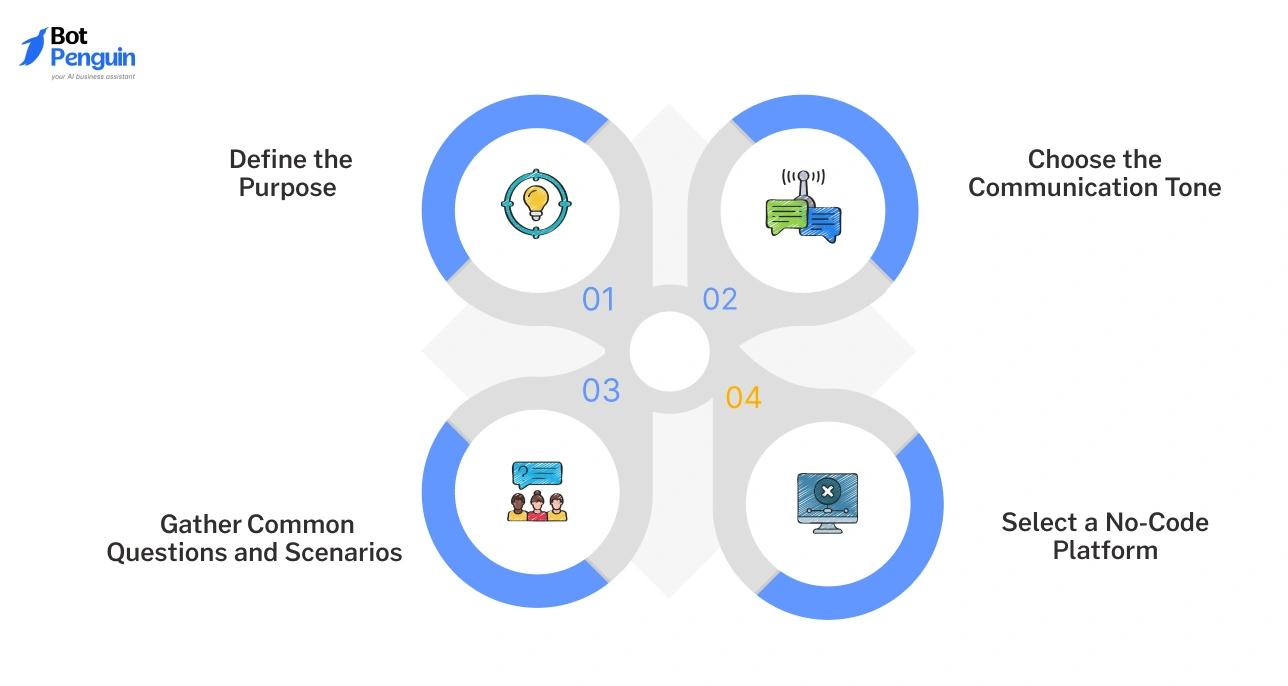
Building a voice bot becomes easier when you begin with the right preparation. Many projects fail because the setup lacks clarity or structure.
Before you start designing, outline what your bot should achieve and who it will serve. A strong foundation ensures your automation works effectively and aligns with business goals.
The following preparation steps will help you plan a functional and adaptable voice bot setup.
Identify what your bot will do. It could handle customer support, manage lead capture, schedule appointments, or collect feedback.
Defining the use case helps in structuring a precise conversation flow and selecting the right data inputs.
Decide whether your bot will sound friendly, professional, or bilingual. A healthcare provider might prefer an empathetic tone, while a financial service may need a formal approach.
Tone consistency enhances customer trust and improves response perception.
List the frequent queries or requests your team receives through calls or emails. For example, “Where is my order?” or “Can I reschedule my appointment?”
These help design natural dialogues and ensure that your voice bot design covers real customer needs.
Opt for a no-code voice bot builder that allows quick setup without technical expertise. Tools like BotPenguin provide ready templates, conversational flows, and AI capabilities that simplify creation and reduce setup time.
Agencies can take this further by offering it as a service through BotPenguin's white-label AI agents programme
By following these steps, you will avoid confusion during deployment and gain control over your bot’s performance. A structured foundation builds confidence and keeps your automation aligned with your objectives.
The next section will explain how to build a voice bot step by step and bring this plan into execution.
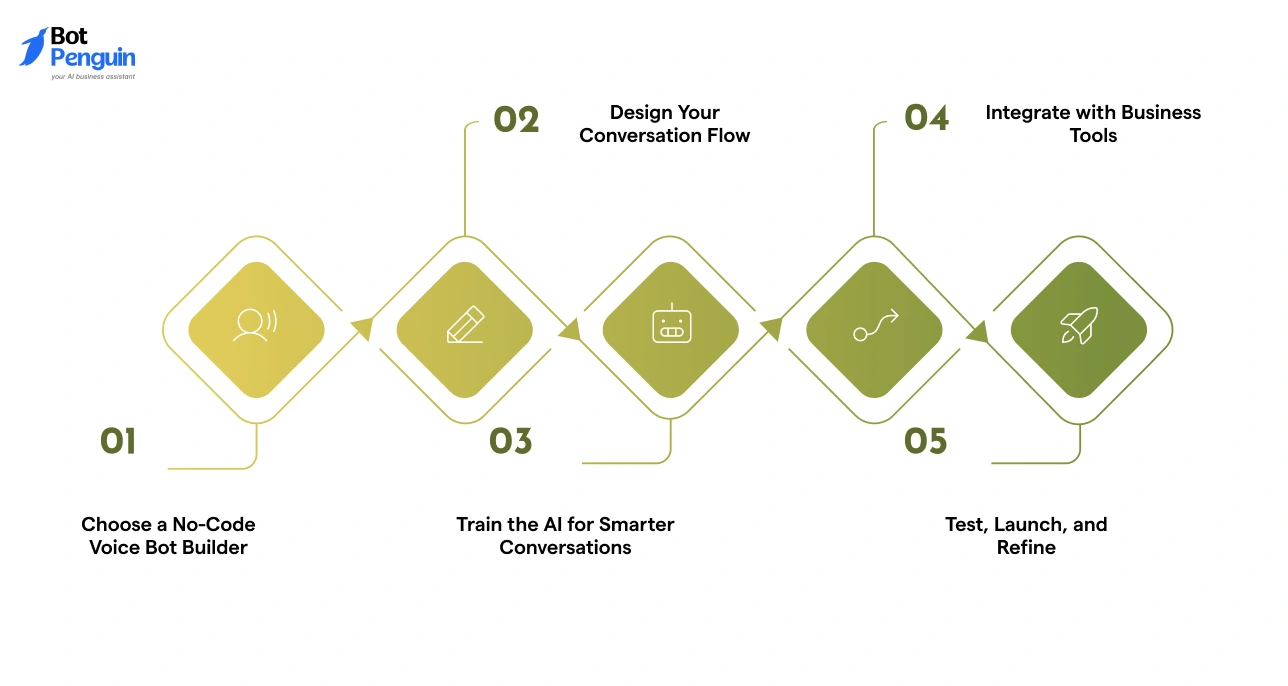
If you prefer learning visually, think of building a voice bot as putting together a simple flowchart. Each box represents one action — greeting, question, response, or integration.
Using a no-code voice bot builder like BotPenguin, you can drag and connect these boxes to create a full conversation.
Start with your workspace. On BotPenguin, you’ll see visual blocks for messages, actions, and integrations. Pick a template or drag new blocks to create your bot.
You can connect it to WhatsApp, your website, or CRM tools — all from one dashboard.
Imagine your customer’s journey as a map. Begin with a start block that greets the user. Add branches for different needs like “Book an Appointment” or “Check Order.”
Each path ends with a clear action — confirmation, feedback, or follow-up. Visual flow design helps you see how users move through each conversation step.
In your builder, find the training section. Add real phrases your customers use. For example, “I want to reschedule” or “Where is my package?”
This helps the AI voice bot recognize natural language patterns. The system highlights how the bot interprets each query so you can adjust and improve accuracy.
Look for the integrations panel. Choose from icons representing CRMs, WhatsApp, or calendars.
Connect these directly to your conversation flow — for example, when a booking block triggers a calendar entry. A visual interface makes these links clear and easy to track.
Preview the full conversation on your screen. Run test calls or voice messages to see if each path works as planned. Adjust tone or wording where users drop off. When satisfied, hit Launch and monitor analytics through charts showing success rates and response times.
With this visual, block-based setup, building an AI-powered voice bot becomes more like designing a map than writing code.
The next section will show how real businesses use these visual builders to automate communication and improve service efficiency.
Voice bots have become a key part of modern business operations. They help companies improve customer experience, save time, and reduce support workload.
The following voice bot use cases show how industries like healthcare, ecommerce, education, and finance use automation to simplify daily communication and enhance efficiency.
Healthcare providers use AI voice bots for healthcare to manage appointments, send reminders, and share medical updates.
When a patient books a consultation, the bot automatically confirms the date, sends a reminder, and provides directions or preparation instructions. It can also gather feedback after appointments.
This ensures patients stay informed and hospitals reduce no-shows and manual coordination.
Online retailers use voice bots for ecommerce to confirm orders, share shipping updates, and manage delivery notifications.
For example, after a purchase, the bot calls the customer to confirm payment, provide an estimated delivery time, and offer assistance with returns. This automation saves support time and keeps customers informed, improving trust and retention.
Colleges and universities use AI voice bots to handle admission inquiries, course details, and fee-related questions. Prospective students can call anytime to get information or schedule counseling sessions.
Institutions benefit from 24-hour availability, reduced call volumes, and better engagement during peak admission periods.
Financial organizations use AI voice bots to remind customers of upcoming payments, verify transactions, and respond to account-related questions.
For instance, a bank can automate payment reminders and let customers check balances or loan details instantly. These voice bot examples improve communication speed and ensure compliance while reducing call center pressure.
Industries across sectors are using AI voice bots to manage conversations efficiently and improve service quality.
If businesses in healthcare, ecommerce, education, and finance can achieve these results, yours can too. The next section explains common mistakes to avoid when creating a voice bot to ensure smooth setup and reliable performance.

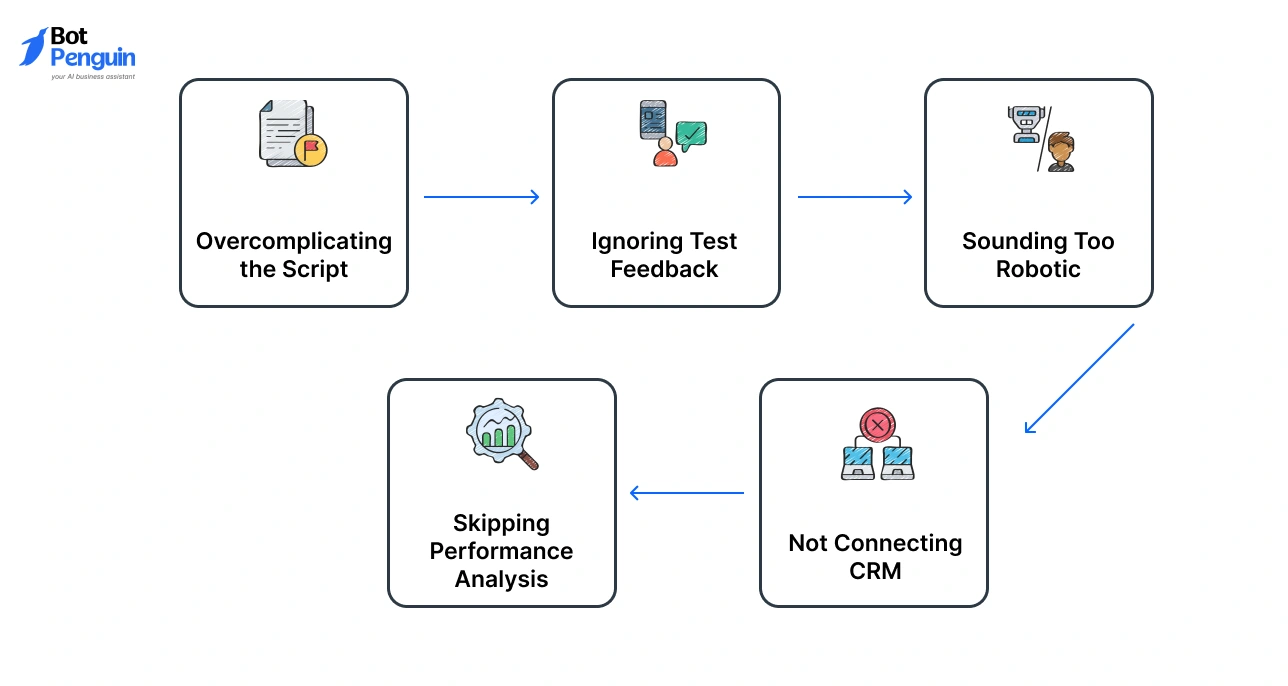
Even with the right plan and tools, small errors during setup can affect how your voice bot performs. Identifying these issues early helps avoid rework and ensures a smooth experience for users.
The following are some of the most frequent voice bot mistakes and how to fix them effectively.
Many first-time builders try to include too many questions or conversation branches. This makes the flow confusing and increases user drop-off. Keep the structure simple with clear responses that lead to a defined goal.
Quick Fix: Focus on one intent per flow such as order tracking or appointment booking. Expand only after testing user responses.
Testing is where most AI bot testing issues appear. Ignoring user feedback leads to recurring errors such as wrong responses or delayed replies.
Quick Fix: After initial deployment, record and analyze 10 to 20 real conversations. Identify repeated phrases or misunderstood intents and refine your bot accordingly.
A monotone or repetitive voice can make users lose interest quickly. Even with automation, customers expect natural-sounding communication.
Quick Fix: Use varied sentence structures, add polite confirmations, and maintain a conversational tone. Regularly review responses for clarity and warmth.
Without CRM integration, your voice bot setup becomes isolated. It cannot log customer data or update records automatically, limiting its usefulness.
Quick Fix: Connect your bot with CRM platforms like HubSpot or Zoho. This allows real-time updates, accurate lead tracking, and improved personalization during calls.
Some builders forget to monitor analytics after launching their bots. Without data, it is hard to measure efficiency or identify gaps.
Quick Fix: Check reports weekly for call success rates, completion times, and user satisfaction. Small, consistent adjustments improve long-term performance.
Avoiding these voice bot setup problems ensures your automation runs smoothly and delivers measurable results.
In the next section, you will learn expert tips for making your AI voice bot sound more natural and engaging while keeping conversations professional.
A human-like voice bot improves engagement, builds trust, and provides a better overall AI voice experience. After creating the technical setup, the next step is making your bot sound more natural.
The following expert techniques will help you design a professional, conversational AI voice bot that feels closer to real interaction.
Empathy helps users feel heard and understood. Small, thoughtful responses make a big difference in customer perception.
Using such phrases makes the bot sound considerate and professional, building user trust from the first interaction.
Lengthy responses can cause users to lose focus. Keep replies brief, simple, and relevant.
Short replies ensure that the conversation flows smoothly and users get quick answers without confusion.
Monotone voices can sound robotic and disengaging. Adding small pauses and adjusting tone makes your bot sound more like a real person.
These adjustments help create a more comfortable listening experience and maintain the user’s attention.
Personalization increases engagement by making users feel recognized. Addressing users directly adds warmth to your bot’s tone.
This personal touch makes conversations memorable and improves satisfaction levels.
Guided options make navigation easier and prevent confusion. They help users find what they need without frustration.
Providing quick options helps users stay engaged and complete tasks faster, improving their overall experience.
Using these techniques ensures your conversational AI bot delivers interactions that sound natural, polite, and efficient.
In the next section, we will explain how BotPenguin helps businesses create these intelligent and human-like voice bots with powerful AI and no-code tools.
After learning how to design and optimize a voice bot, the next step is selecting the right platform to bring your automation to life.
Your choice should make setup easy, support integration with existing tools, and deliver consistent performance. BotPenguin checks all these boxes, making it one of the most trusted solutions for businesses of every size.
The BotPenguin voice bot platform helps users build, launch, and manage voice automation without coding. It combines AI capabilities, visual design tools, and actionable analytics in one place.
Here is why BotPenguin stands out as the best voice bot builder for modern businesses.
Build your bot visually using a drag-and-drop interface. Prebuilt templates and smart AI voice features allow anyone to design realistic conversations in minutes.
BotPenguin helps you build an AI bot for business faster, reducing time spent on technical development.
BotPenguin supports over 80 integrations with platforms like WhatsApp, Instagram, and Telegram. It also connects easily with CRMs such as HubSpot, Zoho, and Salesforce.
These integrations ensure your bot handles communication and data management efficiently across multiple channels.
Measure your bot’s success using real-time analytics. The dashboard shows call volume, response quality, and customer satisfaction.
Data-driven insights help you refine conversations and maximize results continuously.
Reach a broader audience with support for multiple languages. Choose from natural-sounding voices for different regions to make your bot more relatable and accessible to global users.
Get started immediately with a free account. The platform includes ready-made templates so you can deploy a bot within minutes. BotPenguin’s fast setup helps you test, launch, and scale quickly without needing developers.
Trusted by more than 200 global companies, BotPenguin offers a powerful yet easy-to-use AI voice bot platform that helps businesses automate communication effectively.
Ready to give your business a voice? Start free with BotPenguin today! - Don't want to build from scratch? Check white-label AI voice agents
Building a voice bot is no longer a complex technical project. With the right platform and a clear plan, any business can automate communication and improve customer engagement effectively.
You do not need a large development team; you only need the right tool and a focused mindset.
Start small by testing one use case such as appointment reminders or order updates. Measure performance regularly, identify what works best, and scale confidently.
Modern solutions like BotPenguin make it easy to create an AI voice bot that fits your goals, connects with your tools, and grows with your business.
If your goal is to build a voice bot for business that saves time and increases customer satisfaction, the opportunity is right in front of you. Ready to give your business a voice?
Start free with BotPenguin today.
A no-code platform like BotPenguin allows businesses to build and launch a fully functional voice bot within one to two days, depending on complexity and integrations.
Yes, AI-powered voice bots can manage unlimited simultaneous conversations efficiently, ensuring consistent performance and response accuracy without human intervention or delays.
Modern AI voice bots follow strict data protection standards, including encryption, GDPR compliance, and secure API connections to safeguard sensitive customer information and communication logs.
Yes, AI models within platforms like BotPenguin continuously adapt through machine learning, improving recognition of regional accents, dialects, and pronunciation for more accurate and inclusive conversations.
Analytics track user interactions, conversation drop-offs, and satisfaction rates, allowing businesses to identify weak areas, refine responses, and continuously improve overall communication quality and engagement.
Subscribe to Our Newsletter
Get the latest business insights straight into your inbox.
Checkout our related blogs you will love.
Updated at Sep 24, 2026
10 min to read

Updated at Sep 21, 2026
17 min to read

Updated at Sep 12, 2026
9 min to read
Updated at Jul 3, 2026
16 min to read
Updated at Jul 3, 2026
14 min to read
Updated at Jun 16, 2026
15 min to read
Table of Contents
