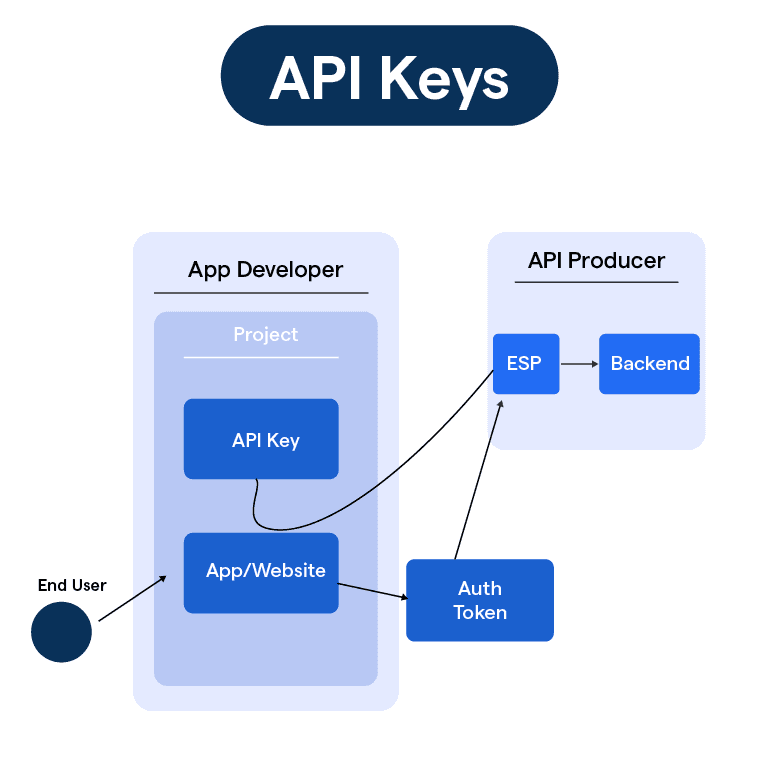


API keys are unique credentials that authenticate a chatbot platform connection to external systems, allowing secure data exchange between BotPenguin and other software.
What is an API Key in a Chatbot Platform?
An API key is a unique string of characters that identifies and authenticates an application or system when it requests access to another system. In a chatbot context, the key proves the request is coming from an authorised source.
When a chatbot platform connects to a CRM, payment gateway, ERP, or any external tool, the API key acts as a credential that confirms the connection is permitted, without exposing the underlying system to unauthorised access.
API keys differ from passwords. A password authenticates a person. An API key authenticates an application or integration, and is typically scoped to specific actions or data the connected system is allowed to perform.
BotPenguin is a no code chatbot platform that uses API keys to securely connect chatbot flows to external systems such as CRMs, ERPs, payment gateways, and custom databases, without requiring developer involvement to maintain the connection.
Keeping API keys secure matters because anyone holding a valid key can perform the actions it permits. Businesses are advised to store keys securely and rotate them periodically.
How BotPenguin Handles This
BotPenguin stores API keys securely within the platform and uses them to authenticate outbound requests to connected systems, so chatbot flows can read and write data without exposing credentials in the conversation builder.
Businesses on BotPenguin generate, view, and revoke API keys for their connected integrations directly from the platform settings, giving them control over which systems remain connected at any time.
Agency partners manage API key based integrations for multiple client accounts from one white labelled BotPenguin dashboard, configuring each clients connections independently without sharing credentials across accounts.
Key Uses
eCommerce businesses use API keys to connect BotPenguin to Shopify or WooCommerce, allowing the chatbot to pull live order status, inventory, and product data into customer conversations.
Financial services businesses use API keys to connect chatbots to core banking or account systems, enabling secure retrieval of balance and transaction information during a conversation.
Healthcare providers use API keys to connect booking chatbots to scheduling systems, so appointment availability shown to a patient reflects the actual calendar in real time.
SaaS businesses use API keys to connect support chatbots to their own product systems, allowing the bot to check account status or usage data before responding to a customer query.
Frequently Asked Questions (FAQs)
1. What's the difference between an API key and a password?
Password authenticates a person. API key authenticates an application. Keys are scoped to specific actions; passwords typically grant broad access.
2. Should I share API keys between integrations?
No. Generate a unique key per integration. If one key is compromised, only that integration is at risk, not all of them.
3. How often should I rotate API keys?
At least quarterly. More frequently if the key is widely used or if you suspect any unauthorized access.
4. What happens if someone gets my API key?
They can perform any action the key permits. Immediately revoke it in your platform settings and generate a new one.
5. Can I limit what an API key can do?
Yes. Most platforms let you scope keys to read-only, write-only, or specific data types. Use the most restrictive scope that still works.
6. How do I know if my API key is being abused?
Check your integrations for unexpected data access, changes to connected systems, or unusual API request patterns in your logs.
7. Should I store API keys in environment variables or the platform?
Let the platform manage them. Most no-code platforms store keys securely internally. Don't paste keys into chat flows or public code.
8. What if an integration needs multiple API keys?
Generate one key per unique integration. One key might handle Shopify, another for Stripe, another for CRM. Separates risk.
Related Terms
