


Generative AI in Ecommerce: Use Cases, Benefits, and How to Implement It for Growth
Updated at Oct 13, 2026
11 min to read
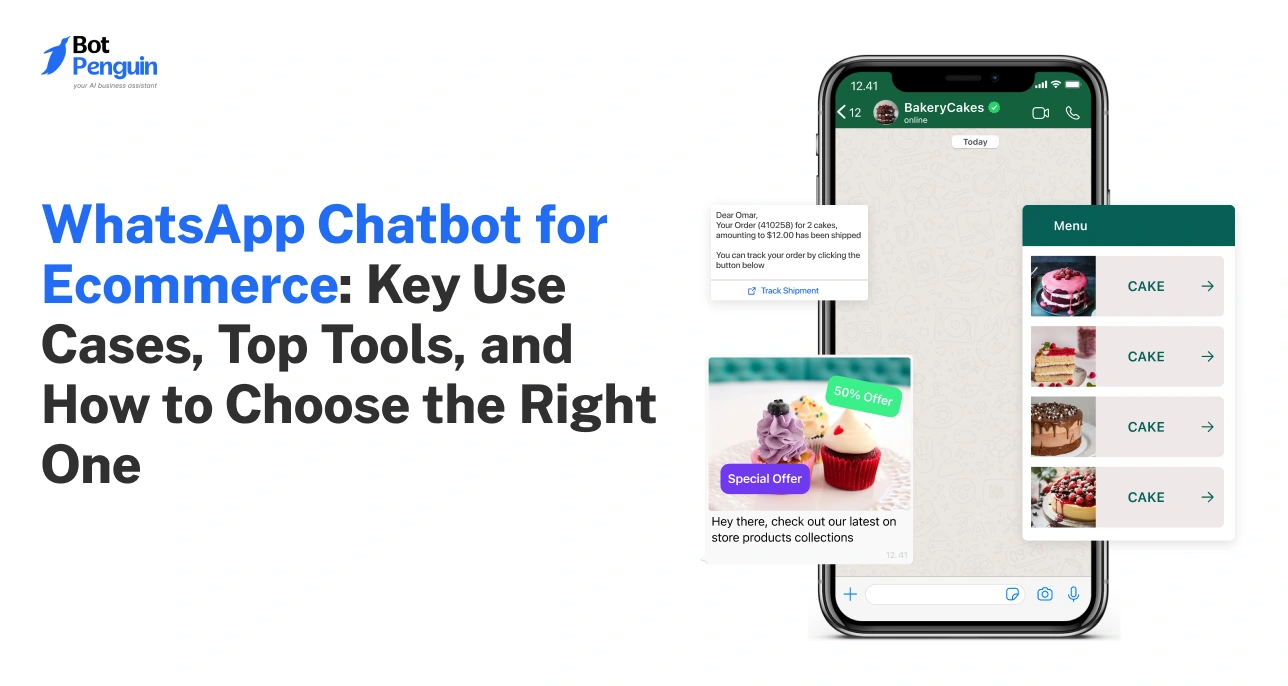
A WhatsApp chatbot for ecommerce automates customer conversations across the buying journey. It can guide product discovery, recover abandoned carts, share order updates, and handle common support requests. The highest-value uses focus on increasing conversions, reducing manual workload, and giving shoppers faster help when purchase intent is highest.
Ecommerce teams often handle the same conversations every day.
Shoppers ask about products, abandoned carts, orders, returns, and delivery updates. Managing these chats manually becomes harder as order volume grows.
A WhatsApp chatbot for ecommerce helps automate these recurring conversations without removing human support. It can respond instantly, trigger workflows, and route complex cases to agents. This makes conversational automation easier to scale across the customer journey.
These workflows also support a broader WhatsApp for ecommerce strategy.
This guide explains the most valuable use cases, practical chatbot flows, setup steps, and best practices for ecommerce teams.
A WhatsApp chatbot for ecommerce is an automated conversational layer designed for the online shopping journey. It handles customer interactions inside WhatsApp while connecting with relevant store data.
These chatbots typically operate through the WhatsApp Business Platform/API. That connection lets the bot respond, trigger actions, and use ecommerce data at scale.
A chatbot can follow predefined flows, use AI, or combine both. Structured flows work well for predictable tasks like order tracking or returns. AI helps with broader product questions and support requests.
Most WhatsApp chatbots can also connect with ecommerce systems. This lets them use product, cart, customer, and order information during conversations.
Together, these capabilities show how ecommerce chatbots support automated journeys and live assistance.
The goal is not to automate every interaction. Human agents should step in when judgment or deeper support is required.
Once these capabilities are in place, their real value appears in the ecommerce use cases they enable.
A WhatsApp chatbot for ecommerce can support customers across the entire buying journey. The strongest use cases connect conversations with clear shopping actions.
Here are eight applications that provide the most practical ecommerce value.
Cart recovery starts when a shopper leaves without completing checkout. The chatbot can follow up using relevant cart details.
Example workflow: Cart abandoned → reminder → cart details → checkout link → follow-up
The shopper can also ask questions before returning to checkout. This helps address hesitation around:
Why it matters: The workflow reaches shoppers while purchase intent remains high. It also replaces manual follow-ups with recovery conversations triggered by the system.
Real-world example: 6thStreet used WhatsApp messages for abandoned carts during an eight-month 2024 test. The retailer reported 6X higher abandoned-cart conversions compared with push notifications and email.
A chatbot can act as a conversational shopping assistant. It asks questions before recommending products that match the shopper's needs.
Example workflow: Customer need → preferences → recommendations → product details → purchase
The chatbot can narrow recommendations using details such as:
Why it matters: Shoppers spend less time browsing irrelevant products. The conversation also moves them closer to a purchase decision.
Real-world example: Trendyol used an AI-powered agent on WhatsApp to recommend products using customer history and preferences. In one week, 13% of conversations included personalized shoppable recommendations, with a median response time of under 7 seconds.
Not every ecommerce question requires a support agent. Chatbots can handle common requests using approved store information.
Common requests include:
Example workflow: Customer question → chatbot response → follow-up → resolution or agent handoff
When the bot can't safely resolve an issue, it should escalate. The agent can continue with relevant conversation context.
Why it matters: Routine support stays automated without trapping customers inside bot-only conversations.
After checkout, the chatbot can continue supporting the customer. It can share updates without requiring repeated tracking requests.
Example workflow: Order placed → confirmation → verification → shipping update → tracking → delivery
The chatbot can support:
Customers can also request the latest order status. The bot can retrieve connected order data and respond within WhatsApp.
Why it matters: Customers stay informed while support teams receive fewer repetitive order-status questions.
Real-world example: Magalu built an AI-powered shopping experience on WhatsApp that continued after checkout with real-time shipping updates. Its broader six-week 2025 WhatsApp experience delivered a 3X higher conversion rate than its app and ecommerce site.
Returns usually require several pieces of information. A chatbot can collect them through a guided conversation.
Example workflow: Identify order → select item → reason → preferred resolution → confirmation or handoff
The chatbot can collect:
Straightforward requests can follow the configured workflow. Exceptions can move to a human agent for review.
Why it matters: Customers get a structured process, while agents get the information they need before taking over.
Click-to-WhatsApp ads can send interested shoppers directly into a chatbot conversation. The chatbot then continues from the intent created by the ad.
Example workflow: Ad click → WhatsApp conversation → intent capture → recommendation → checkout or lead capture
The chatbot can:
Why it matters: This shortens the path between ad engagement and the next meaningful shopping action.
Some shoppers leave because the right product is unavailable or too expensive. The chatbot can reconnect when that barrier disappears.
Example workflow: Product interest → alert preference saved → trigger occurs → WhatsApp message → product revisit
The chatbot can notify interested shoppers when:
Why it matters: These messages target shoppers who already showed purchase intent, making them more relevant than broad promotions.
The chatbot can continue useful conversations after the first purchase. These interactions should rely on customer history and relevant triggers.
Example workflow: Customer segment → trigger → personalized message → conversation → reorder or offer
Common applications include:
The chatbot can also answer questions before customers act.
Why it matters: Brands can re-engage existing customers without treating every buyer the same.
Real-world example: Styli used WhatsApp to re-engage customers inactive for more than 180 days. During its 2024 trial, WhatsApp messages delivered 50% higher conversion rates than email and 67% higher than push notifications.
These use cases show where chatbot automation creates practical value. The next step is turning the strongest opportunities into repeatable ecommerce conversation flows.
The best chatbot flows define more than a conversation sequence. They also specify triggers, required data, exceptions, and clear stopping points.
These four blueprints cover the most important stages of ecommerce.
Trigger: A shopper leaves checkout with products still in their cart.
Flow: Cart abandoned → reminder → objection or question → checkout → stop
Data needed:
The chatbot should restore cart context and answer purchase questions. If the shopper completes checkout, opts out, or the recovery window ends, messaging should stop.
Trigger: A shopper asks for help choosing a product.
Flow: Need → preferences → recommendation → product details → purchase
Data needed:
The chatbot should narrow down choices based on the shopper's requirements. If no suitable option exists, it should avoid forcing an irrelevant recommendation.
A human handoff can support unusual or high-consideration requests.
Trigger: A customer asks about an existing order.
Flow: Order identification → current status → tracking → additional support
Data needed:
The chatbot should first identify the correct order. It can then retrieve and present the latest available status.
Delivery exceptions, missing shipments, or conflicting information should move to support.
Trigger: A customer requests a return or exchange.
Flow: Identify order → select item → collect reason → resolution → confirmation or handoff
Data needed:
The chatbot should collect required information before determining the next path. Eligible requests can continue automatically.
Policy exceptions, damaged products, or disputed requests should be directed to an agent with the collected context.
Together, these blueprints give a WhatsApp chatbot for ecommerce clear operating rules. The next step is connecting those flows with WhatsApp, store data, AI responses, and human support.
Setting up a WhatsApp chatbot for ecommerce starts with the right connections. The goal is to give the chatbot reliable data and clear operating rules.
Start with a solution built for ecommerce automation. Your WhatsApp chatbot platform should support:
Focus on capabilities that match your planned workflows. Avoid choosing based on feature count alone.
Next, connect the chatbot with the WhatsApp Business Platform. Then link your Shopify, WooCommerce, or other ecommerce system.
The basic connection looks like this:
WhatsApp Business Platform → chatbot platform → ecommerce store
This allows conversations and store actions to work together. Exact setup steps depend on your chatbot and ecommerce platforms.
A useful ecommerce chatbot needs accurate business context. Generic AI responses cannot replace current store information.
Connect the data required for your chosen workflows, such as:
Give the chatbot access only to data it actually needs.
Do not automate every customer journey immediately. Start with a few measurable workflows.
Prioritize:
1. Abandoned cart recovery
2. Order tracking
3. Common customer-support questions
Define the trigger, chatbot actions, exceptions, and stopping point for each flow. Expand only after these journeys work reliably.
AI needs clear boundaries before customer conversations begin.
Configure:
Customers should contact an agent when automation cannot confidently resolve the request.
Test the chatbot as a customer would before launch.
Check:
After launch, review conversations and flow performance regularly. Adjust weak paths using actual customer behavior.
A working setup is only the foundation. The next priority is ensuring the chatbot has the ecommerce capabilities needed to perform well at scale.
A good WhatsApp chatbot for ecommerce should support real shopping workflows. Basic automated replies are not enough for growing ecommerce operations.
Use the following criteria to evaluate whether a chatbot is a good fit for your store.
The strongest platforms connect these capabilities rather than treating them separately. Product data should inform recommendations, while order data should power post-purchase support.
Human handoff matters just as much as automation. Customers need a clear path to an agent when the chatbot reaches its limits.
BotPenguin brings AI chatbots, ecommerce integrations, broadcasts, and agent handoff together. As an official Meta Business Partner, it also supports businesses building WhatsApp-based customer journeys. Its WhatsApp automation tools support conversational workflows across different ecommerce touchpoints.
The right platform provides the foundation, but implementation still determines performance. Following practical chatbot guidelines helps these capabilities work effectively in real customer conversations.
A well-configured WhatsApp chatbot for ecommerce still needs careful management. These practices keep conversations useful, accurate, and easy to complete.
Do not make customers repeat information the chatbot already has.
If someone asks, “Where is my order?”, use connected order data. The chatbot should identify the relevant purchase before responding.
Use available context such as:
Context makes automation feel connected rather than repetitive.
WhatsApp conversations should feel like messaging, not email.
Lead with the information customers need most. Use buttons or quick replies when they simplify the next action.
Break longer instructions into short, logical messages.
Automation needs a clear exit route.
Prioritize human handoff for:
Transfer relevant conversation context with the customer. They should not restart the issue with an agent.
The chatbot is only as reliable as the information it's connected to.
Keep these sources current:
Outdated data can turn a useful chatbot into a source of friction.
Get customer permission before sending business-initiated WhatsApp messages. Businesses must also honor requests to stop receiving messages.
For the WhatsApp Business Platform, business-initiated conversations require approved message templates. Outside the 24-hour customer service window, businesses can only message customers using approved templates.
Review Meta's official WhatsApp Business Messaging Policy before configuring outbound flows.
Do not judge performance by message volume alone.
Track outcomes such as:
These metrics reveal which flows create value and which need adjustment.
Strong chatbot performance comes from consistent monitoring and refinement. Start with a few priority workflows, measure the results, and improve them over time. Expand automation only when existing flows are working reliably.
A WhatsApp chatbot for ecommerce works best when automation starts with clear, measurable problems. Trying to automate the entire customer journey at once usually creates unnecessary complexity.
Start with cart recovery, order tracking, and repetitive customer support. These workflows are frequent, measurable, and easier to refine before expanding further.
Once they perform reliably, review real conversation data. Look for recurring questions, drop-off points, handoff patterns, and new automation opportunities.
From there, expand into product recommendations, returns, re-engagement, or other relevant journeys. The goal is not maximum automation. It is useful automation that supports customers and business outcomes.
Start small, prove what works, and expand based on actual customer behavior.
A WhatsApp chatbot for ecommerce automates shopping and support conversations inside WhatsApp. It can recommend products, recover carts, share order updates, answer common questions, and transfer complex requests to human agents when needed.
A WhatsApp chatbot can support sales through product recommendations, cart recovery, re-engagement, and faster purchase assistance. It helps shoppers move from questions to action while reducing delays that may cause them to abandon a purchase.
Yes. A chatbot can trigger cart reminders after abandonment, restore product context, answer purchase questions, and provide a checkout link. The flow should stop after purchase, opt-out, or the configured recovery period ends.
Yes, depending on the chatbot platform and available integrations. Connecting Shopify or integrating WooCommerce with whatsapp lets the chatbot access relevant product, cart, customer, and order data needed for personalized shopping and post-purchase conversations.
Yes. When connected with order and fulfillment data, the chatbot can identify an order and return its latest status. It may also provide shipping details, tracking information, delivery updates, or a path to support.
For scalable chatbot automation, businesses typically use the WhatsApp Business Platform/API. It enables chatbot integrations, automated workflows, business messaging, and multi-agent support that go beyond the WhatsApp Business App's basic manual features.
Yes. A well-designed chatbot should hand conversations to human agents when automation reaches its limits. Payment disputes, complex returns, unusual orders, and dissatisfied customers are common situations where human judgment may be required.
Costs depend on the chatbot provider, plan features, message volume, integrations, and Meta's applicable WhatsApp messaging charges. Compare the platform subscription and WhatsApp-related usage costs before choosing a solution for your ecommerce store.
Automate Ecommerce On WhatsApp
Guide shoppers, recover carts, share order updates, and automate support with a WhatsApp chatbot built for ecommerce growth today.
Build WhatsApp ChatbotCheckout our related blogs you will love.
Updated at Oct 13, 2026
11 min to read
Updated at Sep 25, 2026
13 min to read
Updated at May 29, 2026
11 min to read
Updated at May 27, 2026
9 min to read
Updated at May 20, 2026
8 min to read
Updated at May 20, 2026
9 min to read
Table of Contents

