



AI Agents for Student Support in Education: How Institutions Scale Support and Recruitment
Updated at Oct 29, 2026
11 min to read
A student enrollment management system (SEMS) is software that manages the enrolment journey, from application and document collection to review, fee payment and enrolment, in one platform. It centralises applicant data, automates admissions workflows, and integrates with SIS, LMS and finance tools to reduce manual work and speed up enrolment for schools, colleges and universities.
Choosing the right student enrollment management system decides how smoothly your institution turns applicants into enrolled students. The best platforms reduce manual data entry, speed up application processing, and keep applicants informed throughout the admissions journey.
A chatbot for education can support the earlier enquiry stage by answering common questions, capturing applicant details, and guiding prospective students before they enter the formal enrollment process. Once an enquiry becomes a qualified applicant, enrollment platforms and CRM software help teams manage records, follow-ups, applications, and the wider admissions workflow.
This 2026 guide explains how to choose an enrollment system based on institution size, workflow, integrations, and budget, compares leading platforms by use case, and shows where an admissions chatbot fits alongside your SEMS.
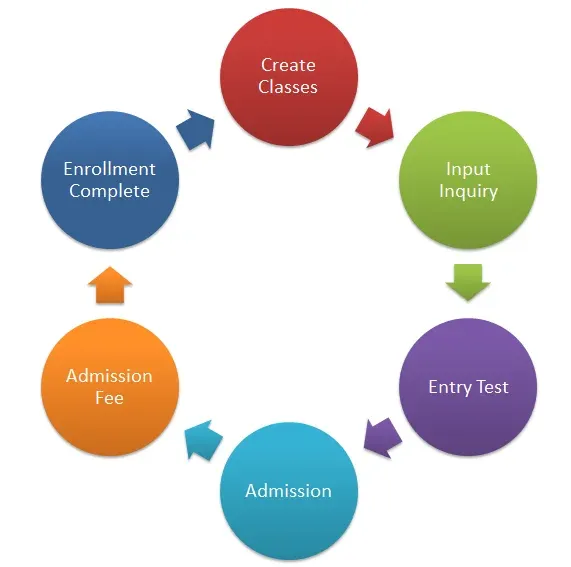
A student enrollment management system streamlines the entire enrollment process, from the first application to a confirmed seat. Instead of spreadsheets, email threads, and paper forms, it gives admissions teams one place to collect applications, track documents, review candidates, manage fees, and communicate with applicants.
Most systems integrate with a Student Information System (SIS), LMS, and finance tools so information moves between departments without repeated manual entry. This reduces errors and gives admissions teams a clearer view of applicant progress during peak enrollment periods.
A student enrollment management system reduces the manual work involved in moving applicants from initial application to confirmed enrollment. It gives admissions teams one place to manage applicant information, documents, communication, payments, and progress throughout the enrollment journey.
Students can submit applications, upload documents, provide required details, and track their application status online. This reduces paper-based processes and makes enrollment more accessible for applicants applying from different locations.
A student enrollment system creates a single record for each applicant instead of spreading information across spreadsheets, email threads, and separate departmental systems.
Admissions teams can quickly see application details, submitted documents, communication history, fee status, and other relevant information in one place.
Enrollment management systems can automate repetitive administrative steps such as identifying incomplete applications, requesting missing documents, sending deadline reminders, and updating applicants when their status changes.
This reduces manual follow-up during peak admission periods and helps prevent applications from stalling because a required step was missed.
Institutions can send application updates, deadline reminders, document requests, interview information, and enrollment confirmations to large numbers of applicants without contacting each person manually.
This helps admissions teams keep applicants informed throughout the process while maintaining more consistent communication.
Enrollment management systems can help institutions track application volume, applicant sources, completion rates, conversion trends, and other admissions metrics.
These insights help teams understand where applicants drop off and which channels or campaigns contribute most to completed enrollments.
Many enrollment systems also help institutions manage application fees, tuition deposits, scholarships, and financial-aid information as part of the enrollment workflow.
Bringing this information into the same system gives admissions and finance teams a clearer view of each applicant's progress toward confirmed enrollment.
Overall, the main advantages of an enrollment system are faster processing, fewer manual errors, better applicant communication, and a more organized admissions workflow.
The right student enrollment management system depends on how your institution actually handles admissions. A platform with more features is not automatically a better choice if it does not fit your workflows, budget, existing systems, or applicant volume.
Use the following factors to narrow your shortlist.
Start with the type and volume of enrollment your institution manages.
A small school may only need online applications, document tracking, applicant communication, and basic reporting. A large university may require complex workflows across departments, multiple programs, financial aid, admissions teams, and campuses.
Before comparing platforms, define which processes the system must support and which features are optional.
Smaller schools and coaching institutes may not need the same enrollment stack as a large university. Enrollment software for small schools should prioritize straightforward applicant management, communication, scheduling, reporting, and essential integrations without adding unnecessary implementation complexity.
The same applies to enrollment software for coaching institutes, where simple enquiry capture, scheduling, applicant communication, reporting, and essential integrations may matter more than complex enterprise features.
Student enrollment management systems may use subscription, tiered, module-based, or quote-based pricing.
When comparing costs, include:
A lower starting price can become more expensive if essential functionality requires additional modules or services.
The student enrollment management system should work with the tools your institution already relies on.
Confirm whether it integrates with your:
Strong integrations reduce duplicate data entry and make it easier for applicant information to move between admissions, academic, and administrative teams.
Support quality matters most when application volume is highest.
Ask how quickly the vendor responds to technical issues, what support channels are available, and whether implementation or training assistance is included.
A system that works well during normal periods but becomes difficult to support during admission rushes can create delays when applicants and staff need it most.
Enrollment systems handle sensitive applicant information, so security should be part of the selection process from the beginning.
Check for:
Ask vendors to explain how applicant data is stored, protected, accessed, and transferred between connected systems.
Choose two or three platforms that match your institution's actual enrollment workflow, then test them using real admissions scenarios.
The best enrollment management system is the one that fits your institution's size, budget, integrations, support requirements, and security needs rather than the one with the longest feature list.
Once you have selected a platform, use this guide on how to implement a student enrollment management system to plan data migration, rollout, staff training, and adoption.
Now let us compare the top student enrollment management systems in 2026, including their features, pros, cons, pricing, and best-fit use cases.

A no-code chatbot for education best for admissions enquiry automation and student communication.
BotPenguin is not a full student enrollment management system or Student Information System. Instead, it works as the conversational layer in front of your enrollment stack.
Schools, colleges, universities, and training institutions can use BotPenguin to capture and qualify admission enquiries, answer questions about fees, eligibility, courses, deadlines, and required documents, and support prospective students across WhatsApp, websites, and social channels.
The applicant information captured through these conversations can then move into the institution’s CRM or enrollment workflow, while the SEMS continues to manage formal applications, documents, records, fees, and final enrollment.
Admissions enquiry automation: Answers common questions about courses, eligibility, fees, deadlines, and application requirements.
Lead capture and qualification: Collects applicant contact details, course interest, eligibility information, and other enquiry data before staff follow up.
Multichannel student communication: Supports prospective students across WhatsApp, websites, Instagram, Facebook, and other supported channels.
24/7 applicant support: Handles routine admission queries outside office hours and during peak admission periods.
Multilingual conversations: Helps institutions support prospective students across different languages.
CRM and workflow integrations: Passes captured applicant information into connected CRMs, enrollment tools, and other institutional workflows.
Human handoff: Escalates complex, sensitive, or high-intent conversations to admissions staff.
Analytics and reporting: Helps teams track enquiry volume, conversation outcomes, lead information, and escalation patterns.
No-code setup for admissions and student-support workflows.
Free forever plan available for institutions testing chatbot use cases.
Supports enquiry capture across multiple communication channels.
Handles repetitive admission questions 24/7.
Supports multilingual applicant communication.
Connects with CRMs and other systems through integrations and APIs.
Allows human handoff when an enquiry needs admissions staff.
Useful alongside an existing SEMS rather than requiring the institution to replace its core records platform.
BotPenguin is not a complete SEMS or SIS.
It does not manage transcripts, grade books, academic records, or the institution’s formal student-record system.
Core enrollment tasks such as official application processing, document verification, student records, and academic administration still require a dedicated enrollment or student-information platform.
Some advanced automation, integrations, and higher usage limits require paid plans.
BotPenguin currently offers the following plans:
Baby Plan: Free forever with 1,000 messages and one chatbot.
Little Plan: $29/month with 3,000 messages, five chatbots, and five team members.
King Plan: $99/month with 12,000 messages, unlimited chatbots and AI agents, and 10 team members.
Emperor Plan: Custom enterprise pricing starting at $990/month.
A 7-day free trial is available for paid features.
4.4/5 on G2, based on 29 reviews.
To learn more about BotPenguin’s unique features and detailed pricing structure, please visit BotPenguin.
DVET Maharashtra: BotPenguin’s bilingual chatbot resolved 50,000+ student queries across admission and vocational-training enquiries. DVET reported a 52% increase in student satisfaction and a 35% increase in ITI admission conversion after deployment.
İstanbul Ticaret University: Its multilingual admissions chatbot handles an estimated 1,200–1,400 student enquiries per month, with approximately 60–70% of routine admissions queries resolved automatically.
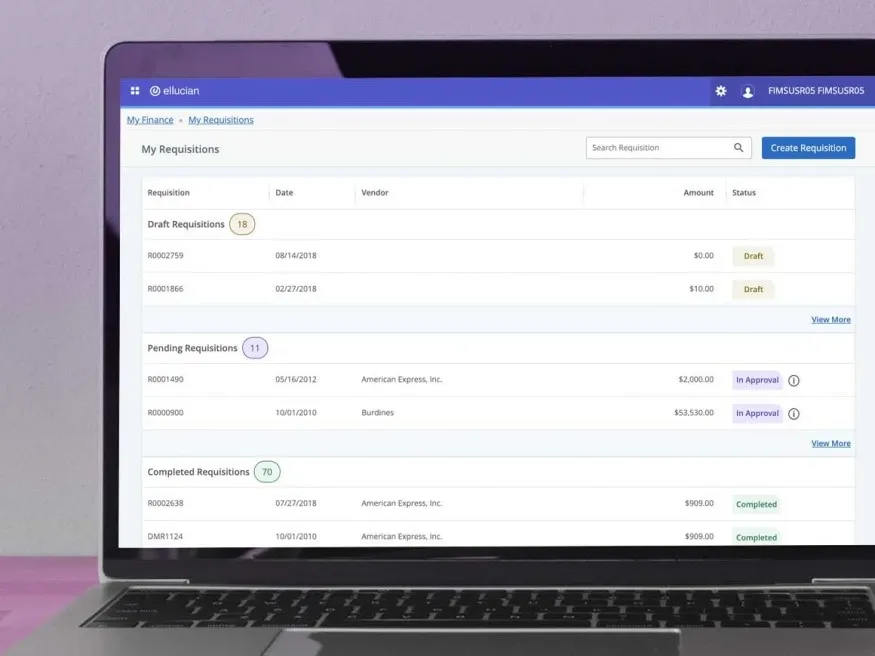
Ellucian Banner focuses more on higher education than K-12 learning. It’s a powerful Student Enrollment management system software suite that offers extensive tools for simplifying administration. These include student information management, financial aid, and enrolment features alongside LMS functionality like course creation, online assessments and learning analytics. The platform is also highly customisable, allowing educators to create branded multimedia courses.
Let us look at some of the main features that Ellucian Banner can offer as a Student Enrollment Management System:
Financial aid management
Enrolment and registration features
Course creation and management
Online and multimedia content and assessments
Mobile app support
Multimedia content delivery
Let's look at the pros of having Ellucian Banner as your Student Enrollment Management System :
Better suited to higher education institutions than many other options on this list
Extensive reporting and analytics options
Allows for customisation and branding
Let's look at some possible cons of having Ellucian Banner as your Student Enrollment Management System :
Not suited to K-12 learning environments
Degraded performance with large datasets
Can be difficult to navigate without significant training
Ellucian does not publish standard pricing for Ellucian Student publicly. Institutions need to contact Ellucian for a tailored quote.
3.6/5 on Capterra, based on 84 reviews.
Blackbaud Enrollment Management System makes it possible to have a connected admissions process. Its admissions portal includes tools for fast and easy applications. As well, it allows interested students to track the status of their applications. On the same page, they can make enrollment decisions once they have been accepted to the program or school.
Let us look at some of the main features that BlackBaud can offer as a Student Enrollment Management System:
Student information system (SIS) features
Has an admissions portal that saves time
Application tracking for prospective students
Enrollment milestones that keep applicants engaged
Time-saving scheduling tools for admission officers for tours, interviews, and assessments
Offers personalized admissions experience with notifications and emails
Mobile forms for accessible applications
Self-scheduling of visits and interviews by applicants
Let's look at the pros of having BlackBaud as your Student Enrollment Management System :
Extensive platform accommodating various educational needs
Offers higher education and employee training solutions
User-friendly interface for administrators, students and parents
Extensive fundraising and finance features
Let's look at some possible cons of having BlackBaud as your Student Enrollment Management System :
Few options for advanced reporting
Setup requires training and can be complex and time-consuming
Limited offline capabilities
Blackbaud does not publish standard Enrollment Management pricing. Institutions can request a customized quote directly from Blackbaud.
4.2/5 on G2, based on 59 reviews.
To learn more about them, please visit https://www.blackbaud.com/

SchoolAdmin is an admissions and student enrollment management system software that is designed to help educational institutions to thrive. It is a strategic system that integrates admissions, enrollment, and billing tools in one platform. With this, private K-12 schools can attract the right families.
Let us look at some of the main features that SchoolAdmin can offer as a Student Enrollment Management System:
Increases conversion with dynamic and responsive forms
Improves user experience with forms that can be embedded in the school website
Eases the admissions process by enabling administrators to score and review applications right on the platform
Painless enrollment by personalized and automated admissions
Adaptable solution with mobile-friendly enrollment applications
Quicker payments with reminders and fee schedules
Let's look at the pros of having SchoolAdmin as your Student Enrollment Management System :
Offers paperless admissions.
The software has dynamic and responsive forms that can help increase conversion.
Painless, personalized and automated enrollments
Schools can get paid rather quickly as well, because of automated reminders and custom fee schedules.
Let's look at some possible cons of having SchoolAdmin as your Student Enrollment Management System:
No Mobile app
Not as flexible as we sometimes need the features to be
Development of new features seems to take a long time
Finalsite Enrollment uses quote-based pricing across its Starter, Core, and Pro packages. Schools need to request a customized quote.
To learn more about them, please click here
4.7/5 on G2, based on 98 reviews.

FACTS is another well-rounded student enrollment management system platform that aims to enhance learner experiences while simplifying admin for educators and support teams. It offers tools for tuition management alongside effective communication features, allowing better alignment between students, teachers, and parents. The platform also supports blended learning, offering options for virtual learning environments and hybrid courses alongside instructor-led lessons.
Let us look at some of the main features that FACTS can offer as a Student Enrollment Management System:
Attendance and behavior tracking
Tuition management
Course content delivery
Assignment and test submissions
Student progress tracking
Advanced communication features
Let's look at the pros of having FACTS as your Student Enrollment Management System :
Strong focus on simplifying administrative tasks
Comprehensive communication tools
Good customer support
Let's look at some possible cons of having FACTS as your Student Enrollment Management System :
Few options for learning beyond K-12 education
Occasional sync issues
Reports of performance lagging with high-volume usage
FACTS does not provide a standard public price for institutional enrollment and student-management deployments. Contact FACTS for current pricing.
4.2/5 on Capterra, based on 57 reviews.
To learn more about them, please click here
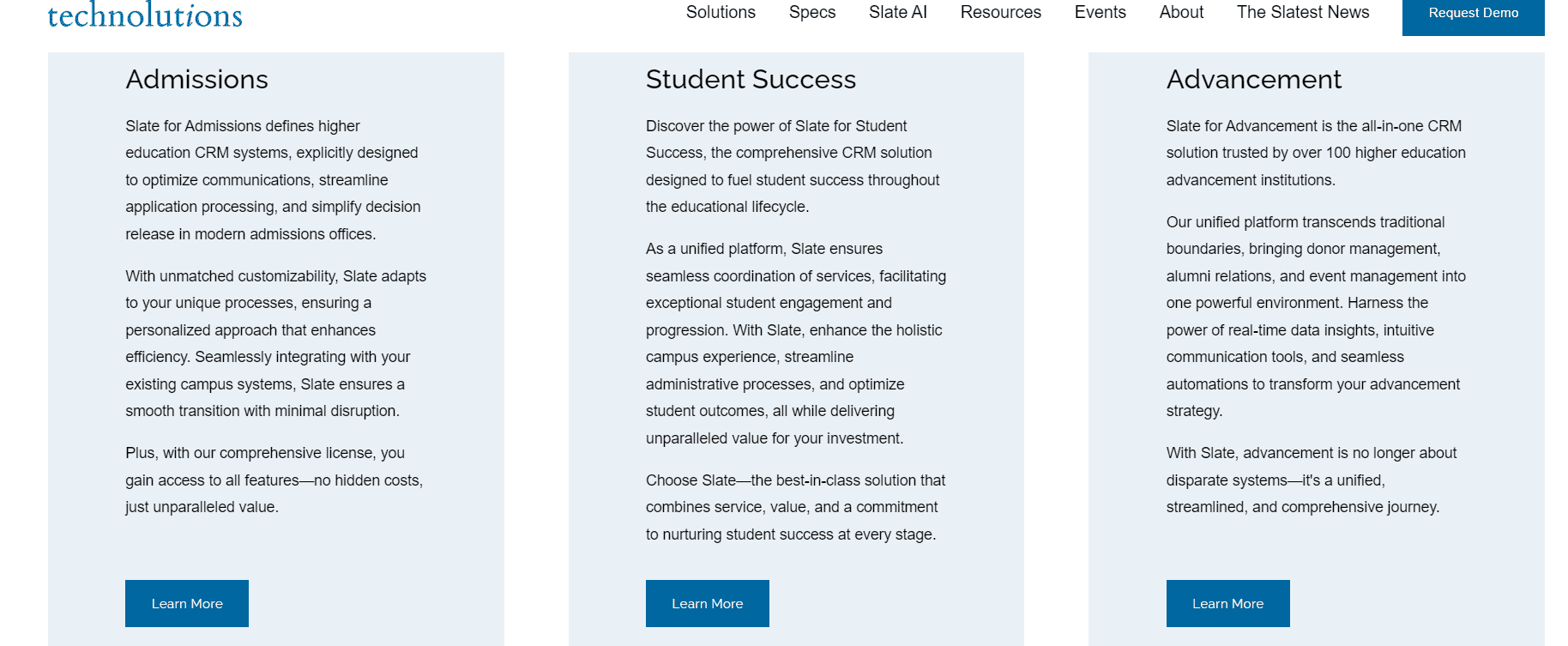
Slate is a system that is purpose-built for higher education institutions. It provides tertiary education organizations with the tools they need for modern admissions and Student Enrollment management system. To that end, it has communications, applications, data management, and automation modules.
Let us look at some of the main features that Slate can offer as a Student Enrollment Management System:
Integrated communication channels to attract more applicants and re-enrollments
Automated marketing communications to target specific prospects or groups
Multiple application frameworks for each unique group and purpose
Application integration with third-party site or platform
Custom application portal for students to check application status
Project and task management automation
Let's look at the pros of having Slate as your Student Enrollment Management System :
custom applicant status portal
higher education scheduling software for admins
Drip marketing.
Let's look at some possible cons of having Slate as your Student Enrollment Management System :
Unattractive admin interface
No Free Version
Limited integrations with other platforms
Slate admissions licenses start at $30,000 per year. Pricing increases based on annual application volume, and Technolutions states that most clients pay $50,000 per year.
4.4/5 on G2, based on 74 reviews.
To learn more about them, please click here

Infinite Campus is a versatile student enrollment management system designed for K-12 schools. It offers a comprehensive suite of tools to manage student data, streamline administrative tasks, and improve communication with families. Alongside tools for attendance management and grade book submissions, Infinite Campus’s LMS functionality includes online course management and delivery, assessment tools and advanced reporting.
Let us look at some of the main features and benefits that Infinite Campus can offer as a Student Enrollment Management System:
Online Registration: Simplifies the registration process for families and school staff.
Attendance Tracking: Provides accurate attendance records and reporting.
Parent Portals: Gives parents easy access to student information and school communications.
Grade books and transcript management: Generates comprehensive reports to track student progress and admissions trends.
Integration with Other Tools: Works seamlessly with other educational tools.
Admission Management System: Streamlines the application process, making it more efficient.
Course management
Online course delivery
Let's look at the pros of having Infinite Campus as your Student Enrollment Management System :
Long-standing solution
Strong analytics and reporting capabilities
Various assessment and assignment options
Let's look at some possible cons of having Infinite Campus as your Student Enrollment Management System :
K-12 focused without options for higher education or corporate training
Few customization features
Occasional technical issues
Infinite Campus does not publish standard SIS pricing. Schools and districts should contact the vendor for a quote.
4.2/5 on Capterra, based on 133 reviews.
To learn more about them, please click here
PowerSchool Enrollment is a robust student enrollment management system that caters to both K-12 and higher education institutions. It focuses on simplifying the enrollment process and improving data management.
On top of popular features of student management systems like a student information system, grade book management and behavior tracking, PowerSchool also incorporates tools for learning management. You can easily create and manage courses with multimedia elements and develop online assessments.
Let us look at some of the main features and benefits that PowerSchool can offer as a Student Enrollment Management System:
Online Applications: Simplifies the application process for students and staff.
Automated Workflows: Streamlines administrative tasks and reduces errors.
Detailed Reporting: Provides insights into enrollment trends and performance.
Integration with PowerSchool Products: Works seamlessly with other PowerSchool tools, such as student information systems and learning management systems.
Chatbot for Education: Assists with common questions, improving the applicant experience.
Attendance and behavior tracking
Course creation and management
Online assessments and quizzes
Assignment submissions
Let's look at the pros of having PowerSchool as your Student Enrollment Management System :
Meets various needs of educational institutions across PowerSchool solutions
Strong reporting and analytics
Extensive integration capabilities
Let's look at some possible cons of having PowerSchool as your Student Enrollment Management System :
Requires significant training to take full advantage of features
Reviews suggest occasional performance issues
Offers limited offline capabilities
PowerSchool Enrollment uses quote-based pricing. Institutions need to contact PowerSchool for current pricing based on their enrollment requirements.
4.1/5 on Capterra, based on 18 reviews.
To learn more about them, please click here
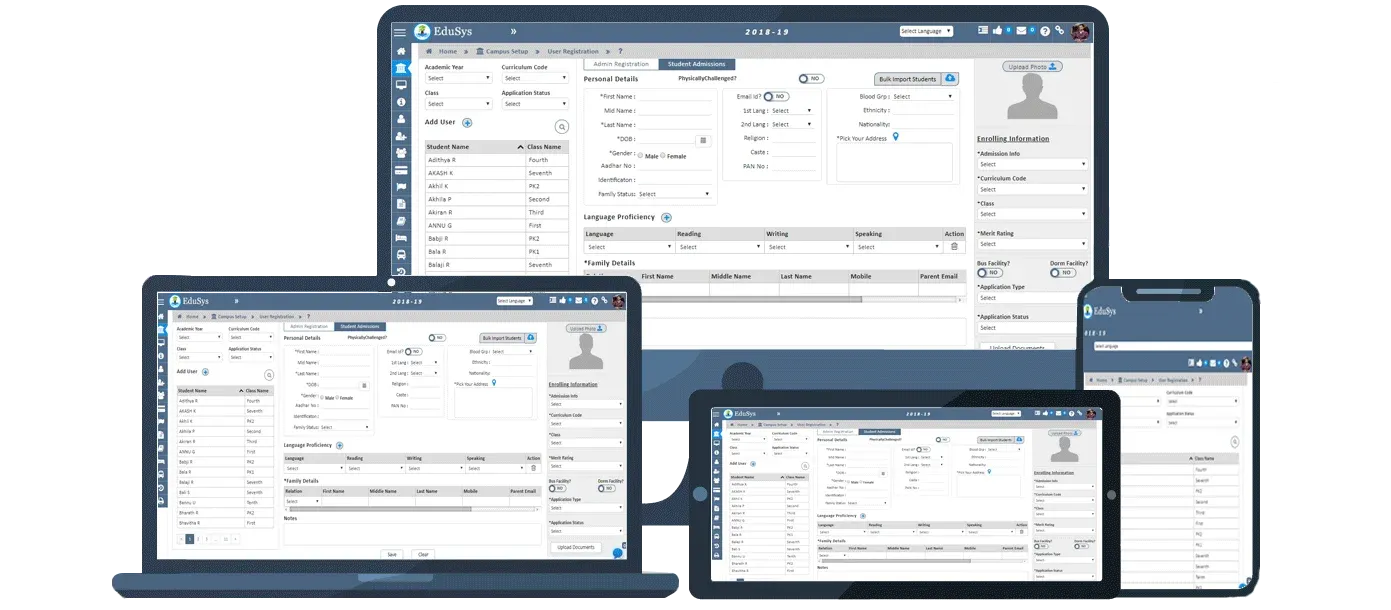
EduSys School ERP is a school management software exclusive to schools in the United States. It enables the fast-tracking of student registration as the enrollment process is easy. EduSys School ERP also features a document management solution. With this, administrators can store documents provided by parents and students to ensure that everyone is always on the same page.
Let us look at some of the main features that Edusys can offer as a Student Enrollment Management System:
Assignment Management
Student Information System: Manage student data, profiles, contacts, and documents and track the complete lifecycle.
Payroll - Salary and reimbursement processing, taxation and statutory compliance
Admissions - Automate inquiry, registration, application review and admissions process
Academics - Build curriculum and course catalog, assign classes, manage examinations and evaluations
Attendance - Record and monitor student and staff attendance through multiple methods
Communication Efficiency
Ease of Use
Let's look at the pros of having Edusys as your Student Enrollment Management System :
Fast-track student registration
Comprehensive features - All-in-one solution for key school management needs like admissions, fees, payroll, exams, transportation, hostel management and more
Efficient document management solution
Supports local language and customizable
Scalability - System scales to support schools of all sizes from a few hundred to thousands of students.
Cloud-based - Software-as-a-service model with high availability. No need for in-house servers or IT infrastructure
Let's look at some possible cons of having Edusys as your Student Enrollment Management System :
Steep learning curve - The extensive feature set can overwhelm new users. This may require investing in more training.
Occasional bugs - Some users have reported minor software bugs, though these seem to be addressed promptly.
Basic reporting - Out-of-the-box reports meet most needs, but advanced users may require custom reporting services.
Third-party add-ons - Integrating with other ed-tech systems may require paid customizations and add-ons.
Upfront setup time - Getting started with the system and migrating data can involve considerable time and effort.
EduSys School ERP pricing is available on request and varies according to institutional requirements.
4.6/5 on Techjockey, based on 14 reviews.
To learn more about them, please click here
Gradelink is praised for its user-friendly interface and good customer support. It provides essential student management features like tracking grades and attendance, and parent-teacher communication tools. Alongside these are LMS features like course management, assignment tools, and integration with Google Classroom. Its comprehensive reporting tools also make it an attractive option for various institutions.
Let us look at some of the main features that GradeLink can offer as a Student Enrollment Management System:
Advanced scheduling options
Educator training features
Parent-teacher communication tools
Course creation and management
Assignment and quiz features
Customisable reporting
Let's look at the pros of having Gradelink as your Student Enrollment Management System :
Advanced reporting and scheduling features
Resources for staff development
Extensive support materials
Let's look at some possible cons of having Gradelink as your Student Enrollment Management System :
Limited integrations beyond Google Classroom
Reviews suggest occasional performance issues
Basic customisation options compared to other platforms
Gradelink pricing varies by enrolled student count and optional add-ons. Capterra currently lists plans starting at $121 per month, while Gradelink provides an online calculator for institution-specific pricing.
4.7/5 on Capterra, based on 734 reviews.
To learn more about them, please click here
A SEMS manages records and workflow once a student is in your funnel. An admissions chatbot manages the conversation before that — enquiries arriving on WhatsApp and your website at all hours.
They’re complementary: the chatbot captures and qualifies the enquiry and answers instant questions; the SEMS handles the formal application, documents and enrolment.
For the conversational layer, see BotPenguin’s education chatbot for admissions & student support to understand how enquiry automation works across web, WhatsApp, and other student-facing channels.
Connected, the chatbot hands clean, qualified applicant data straight into your SEMS or CRM, so nothing is lost between “interested” and “applied.”
If your challenge starts earlier in the funnel, these marketing strategies to increase student enrollment cover ways to generate and nurture more prospective-student demand.
If your enrolment software is solid but you're still losing prospective students at the enquiry stage, adding an admissions chatbot is the highest-leverage fix. Start free with BotPenguin, or book a demo to see it mapped to your enrolment stack.
The best student enrollment management system is the one that fits your institution’s size, budget, enrollment workflow, and existing technology stack, not simply the platform with the longest feature list.
Compare the systems above based on integrations, implementation requirements, support, security, current pricing, and how well they match your real admissions process before making a decision.
A strong enrollment system can manage applications, documents, payments, and student records once an applicant enters the formal process. But many institutions lose prospective students earlier, at the enquiry stage.
Pairing your enrollment system with an admissions chatbot such as BotPenguin helps capture and qualify those enquiries 24/7, answer repetitive questions, and pass cleaner applicant information into your CRM or enrollment workflow.
Start free to add an admissions chatbot to your enrollment process, or book a demo to see how BotPenguin can fit alongside your existing enrollment stack.
A student enrollment management system (SEMS) is software that manages the enrollment journey in one platform, from application and document collection through review, fee payment, and final enrollment. It centralizes applicant data, automates admissions workflows, sends applicant communications, and usually integrates with a Student Information System, LMS, and finance tools.
For schools, colleges, and universities, it reduces manual data entry and errors, speeds up processing during peak admission periods, and gives admissions teams a single, reliable view of each prospective student from initial application through confirmed enrollment.
The main benefits are faster application processing, less manual data entry, and a centralized record for every applicant. Good enrollment systems automate document requests and reminders, send status updates and offers, and help teams manage fees or financial aid in one workflow.
They can also surface analytics on application volume, acquisition sources, completion rates, and conversion. Together, these capabilities reduce administrative workload during peak admission periods while giving applicants a clearer, more consistent experience from application through enrollment.
Start with fit rather than the length of the feature list. Consider your institution’s size and enrollment workflow, total budget including setup and training, and how well the platform integrates with your existing SIS, LMS, finance, CRM, and communication tools. Review security controls, regional compliance requirements, reporting capabilities, and vendor support during peak admission periods.
Shortlist two or three systems that match your actual requirements, then test them using realistic admissions scenarios before committing to a long-term implementation.
Pricing varies significantly because many enterprise enrollment and student-information platforms use custom quotes based on institution size, application volume, modules, and integrations. Published prices are uncommon and can change quickly. When budgeting, include implementation, data migration, training, integrations, support, and optional modules rather than comparing license fees alone.
Some platforms, such as Slate, publish annual pricing tiers, while others require a vendor quote. Communication-focused tools such as an admissions chatbot are typically priced separately from the institution’s core enrollment system.
No. BotPenguin is an AI chatbot platform, not a SEMS or Student Information System. It does not manage transcripts, grade books, academic records, or the institution’s formal enrollment database. Its role is earlier in the admissions journey: capturing and qualifying enquiries across WhatsApp, websites, and social channels, answering common questions, sending reminders, and passing applicant information into a CRM or enrollment workflow.
Think of BotPenguin as the conversational front door to the enrollment stack, while the SEMS manages the formal application and student-record process.
Yes. An admissions chatbot can pass captured enquiry information into connected CRMs, enrollment tools, and other institutional workflows through native integrations or APIs. For example, a chatbot can collect contact information, course interest, eligibility answers, and application intent before passing that information to the admissions team or enrollment platform.
The chatbot handles first contact and qualification, while the SEMS manages applications, documents, fees, and records. Institutions should confirm the exact integration path, supported fields, security requirements, and data-flow rules for their specific technology stack.
Subscribe to Our Newsletter
Get the latest business insights straight into your inbox.
Checkout our related blogs you will love.
Updated at Oct 29, 2026
11 min to read
Updated at Oct 9, 2026
12 min to read
Updated at Sep 22, 2026
12 min to read
Updated at Oct 30, 2026
10 min to read
Updated at Oct 28, 2026
15 min to read
Updated at Oct 28, 2026
10 min to read
Table of Contents



