LeadSquared Chatbot Integration That Captures and Qualifies Every Inbound Lead Automatically
LeadSquared
How BotPenguin Connects to LeadSquared
AI Agent to LeadSquared
Automation to LeadSquared
What BotPenguin Adds to LeadSquared
What LeadSquared is built for
The Gap
What BotPenguin Adds
Everything the LeadSquared Chatbot Integration Handles for You

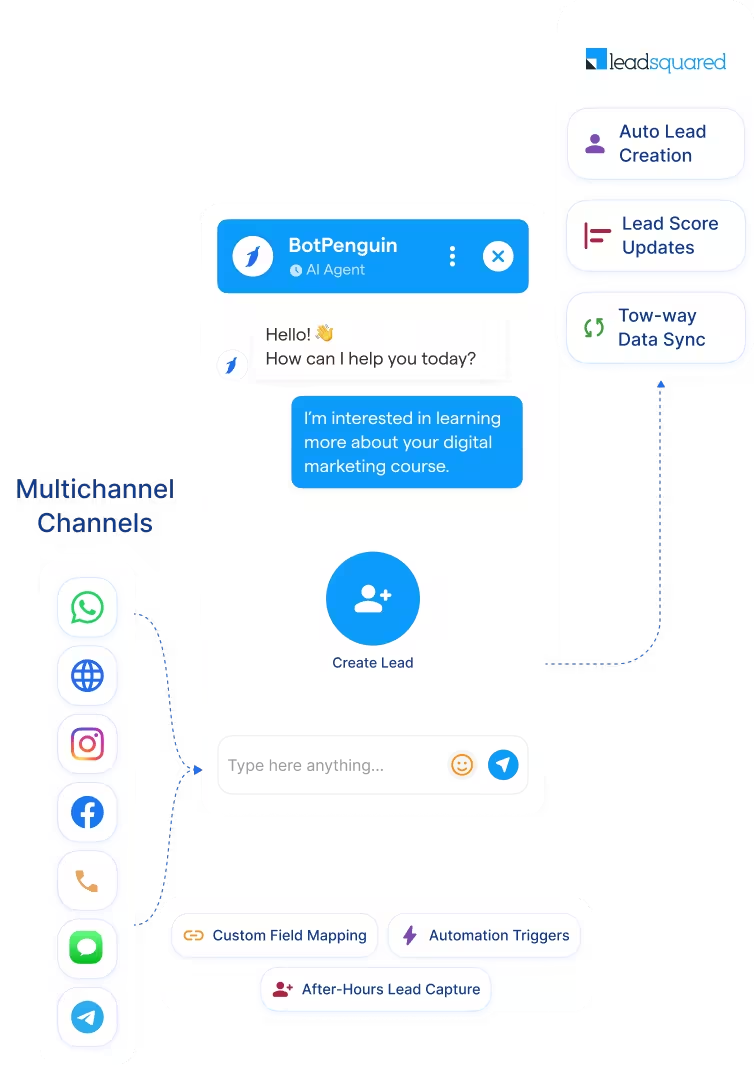
- Auto Lead Creation in LeadSquared: Every chatbot conversation that qualifies a lead automatically creates or updates the contact in LeadSquared. Duplicate prevention is built in so your pipeline stays accurate and your lead scoring reflects real data.
- Custom Field Mapping: Map any chatbot answer directly to any LeadSquared field. Name, email, phone, course interest, product type, budget, service area, or any custom field your pipeline uses. Configure it once and it maps automatically from every conversation.
- Lead Score Updates: Qualification signals captured in the chatbot conversation update lead scores in LeadSquared automatically. Your sales and admissions teams start with a prioritized pipeline, not a flat list of unscored contacts.
- Workflow Automation Triggers: Trigger LeadSquared workflow automations from chatbot events. Demo requested, admission inquiry submitted, policy question asked: the right LeadSquared sequence fires automatically based on what the lead said in conversation.
- Conversation Logging: The full chatbot transcript is saved against the LeadSquared contact so your reps have complete context before their first call or follow-up. No cold outreach, no repeated questions.
- Two-Way Data Sync: Pull existing LeadSquared contact data into the chatbot to personalize conversations with returning leads and avoid asking for information LeadSquared already holds.
- Education and Admissions Lead Capture: Capture prospective student inquiries on WhatsApp and your website chatbot. Course interest, intake date, and qualification level are captured in conversation and synced to LeadSquared automatically, ready for your admissions team to follow up with full context.
- Healthcare Patient Inquiry Capture: Qualify inbound patient inquiries on WhatsApp before they reach your team. Service type, appointment preference, and contact details are captured and synced to LeadSquared in real time so your team responds to pre-qualified inquiries, not cold messages.
- Financial Services Lead Qualification: Qualify insurance, lending, and investment inquiries conversationally on WhatsApp and Instagram. Product interest, coverage type, loan amount, and intent signals are captured and mapped to LeadSquared fields before your sales team makes contact.
- Real Estate Buyer Qualification: Qualify buyer and tenant inquiries on WhatsApp with budget, location, and property type captured in conversation. Leads arrive in LeadSquared pre-scored and pre-qualified for your agents to act on immediately.
- After-Hours Lead Capture: BotPenguin qualifies leads 24 hours a day, 7 days a week. Every conversation outside business hours creates a LeadSquared contact with full context waiting in the pipeline when your team starts the day. No lead sits uncontacted because no one was available.
- WhatsApp: The primary inbound channel for this integration. Leads captured on WhatsApp sync to LeadSquared in real time with the full conversation logged and fields pre-mapped. See WhatsApp Chatbots See WhatsApp Chatbots
- Website Chatbot: Visitor conversations create LeadSquared contacts instantly, with qualification data mapped to the right fields without any manual export. See Website Chatbots See Website Chatbots
- Instagram DMs: Inbound DM leads qualified by the chatbot and pushed into LeadSquared the moment they complete your flow. See Instagram Chatbots See Instagram Chatbots
- Facebook Messenger: Messenger conversations captured, qualified, and synced directly to LeadSquared contacts for immediate pipeline entry. See Facebook Chatbots See Facebook Chatbots
- Telegram: Telegram bot conversations sync to LeadSquared with full chat context and field mapping applied. See Telegram Chatbots See Telegram Chatbots
- SMS: Inbound SMS leads captured and pushed into LeadSquared in real time with the conversation logged against the contact.
- Microsoft Teams: Internal lead handoffs from Teams logged in LeadSquared to keep your pipeline current. See Teams Chatbot See Teams Chatbot
How BotPenguin Connects to LeadSquared
No developer needed. Three steps between you and a fully synced LeadSquared pipeline fed by an omnichannel chatbot.
- 1
Connect Your Accounts
Step 1 - 2
Map Your Fields
Step 2 - 3
Test and Go Live
Step 3
What Sales and Admissions Teams Achieve with BotPenguin and LeadSquared
100x
0
30%
LeadSquared Chatbot Integration Examples by Industry
Real ways high-volume B2C teams in education, healthcare, and financial services use BotPenguin to feed their LeadSquared pipeline automatically.
Education
Healthcare
Financial Services
Real Estate
eCommerce
Connect Your AI Agents, Chatbots & Voice Agents to 80+ Tools With Zero Switching Costs
Connect BotPenguin's conversational AI to your CRM, payment gateway, calendar and eCommerce platform in minutes. No-code, no disruption. Your existing tech stack stays exactly as it is.
Zero Lead Leakage Starts at the First Message. Not the First Form
Free to start. No credit card required.
Frequently Asked Questions About the LeadSquared Chatbot Integration
Is the LeadSquared chatbot integration free?
Do I need a developer to connect LeadSquared to BotPenguin?
Does the LeadSquared integration work with WhatsApp?
How does BotPenguin support LeadSquared's zero lead leakage promise?
Can BotPenguin update existing LeadSquared contacts, or only create new ones?
Which LeadSquared fields can BotPenguin populate automatically?
Can BotPenguin work as an AI agent with LeadSquared, not just a rule-based chatbot?