
How to Add a Chatbot to Your Website: A Complete Step-by-Step Guide
Updated at Oct 6, 2026
17 min to read
You might not have a lead problem but a slow-response problem.
Customers now expect appointment scheduling to happen immediately, not after callbacks or manual coordination. Delays between interest and booking can create friction before the conversation even reaches your team.
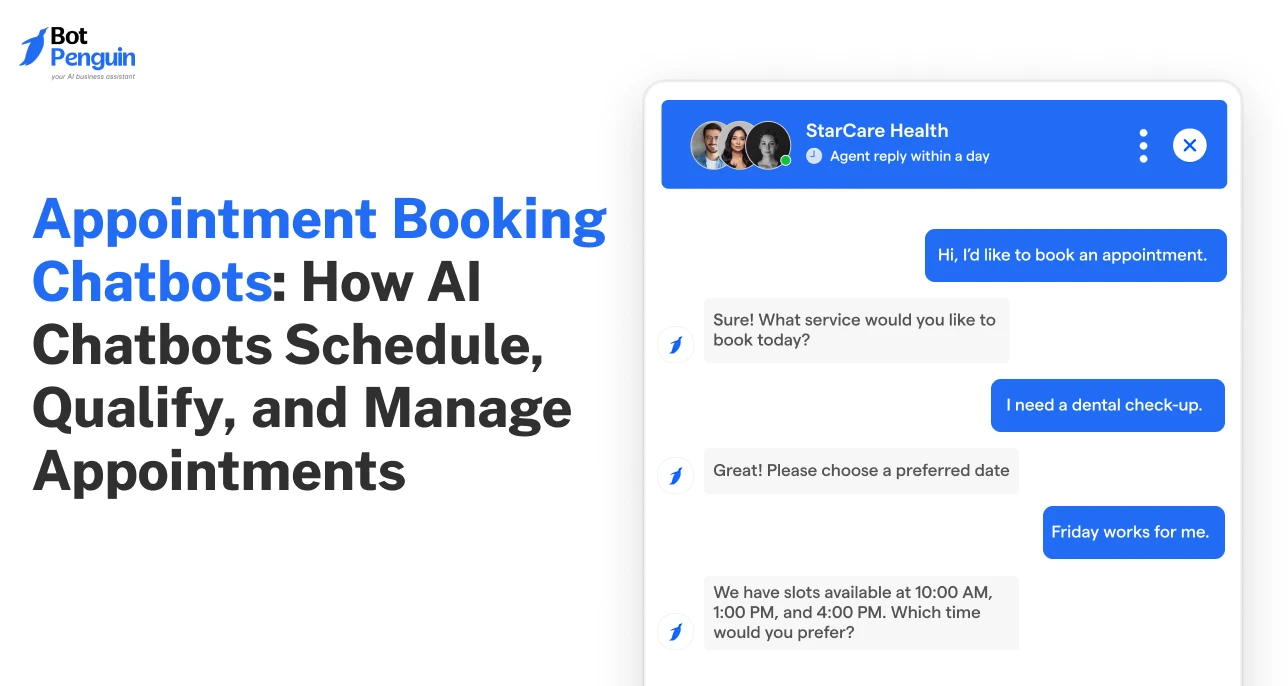
A chatbot for appointment booking can schedule meetings, qualify leads, send reminders, and automatically manage rescheduling.
The Diva Dubai case study shows how AI-powered automation can support faster responses and smoother booking interactions.
This guide explains how appointment booking chatbots work, where they fit, which features matter, and how businesses can evaluate them.
An appointment-booking chatbot is a conversational scheduling tool that manages appointments via chat. Users can book, reschedule, or cancel without switching between multiple tools.
The chatbot can also send reminders and collect qualification details. This makes scheduling more interactive than static forms or shared calendar links.
Sephora provides an early example of conversational booking in retail. Its Messenger assistant reported an 11% higher booking conversion rate than other channels.
These tools can all schedule appointments, but the customer experience differs significantly.
The key difference is interaction. Forms collect information, while chatbots can respond and guide users during scheduling.
The differences become clearer when AI enters the conversation.
Rule-based chatbots follow predefined paths. They work well when services, questions, and booking rules remain predictable.
AI-powered chatbots can interpret more flexible language and contextual requests. They can qualify leads, answer booking questions, and adjust responses during conversations.
BotPenguin lets teams build booking flows, sync calendars, send reminders, and route leads without code. This keeps common appointment tasks within one conversational workflow.
Choosing between rule-based and AI scheduling depends on conversation complexity. That choice becomes more practical once each booking step is mapped from intent to confirmation.
Appointment booking chatbots guide users from initial intent to confirmed appointments. They collect details, check availability, and manage booking changes through conversation.
The chatbot first identifies what the user wants to schedule. This could be a consultation, demo, service appointment, or meeting.
Next, it gathers the information required for booking. This may include service type, preferred time, name, phone number, or email.
The chatbot connects with the business calendar to check open slots. Real-time availability helps prevent overlapping appointments and double bookings.
Users can then choose from the available times directly in chat.
Some businesses need qualification before accepting a booking. The chatbot can ask relevant questions about needs, location, budget, or service requirements.
Qualified users can then continue to the appropriate appointment path.
Users can confirm, modify, or cancel appointments within the same conversation. The chatbot updates the connected calendar when booking details change.
This keeps both customers and teams aligned.
The chatbot can send reminders before the scheduled appointment. It can also share updates or follow-up messages after the appointment.
These six steps turn scheduling into a connected conversational workflow. The same workflow can support several business use cases beyond basic appointment booking.
With AI, booking chatbots can handle more than basic scheduling. They can qualify leads, collect payments, send reminders, and route appointments.
Weill Cornell Medicine saw a 47% increase in digitally booked appointments after using an AI chatbot.
Here’s a quick overview of the top use cases for an appointment scheduling chatbot:
These use cases show how booking automation supports different stages of the appointment journey. The examples below explain how each one works in practice.
The chatbot shows available slots and collects booking details in real time. Customers can confirm appointments without waiting for staff.
Hyatt Hotels reportedly increased direct bookings by 20% after adopting AI chatbot support.
Businesses can automate consultations, discovery calls, demos, and onboarding sessions. The chatbot handles scheduling without repeated staff coordination.
Customers can modify or cancel appointments directly through chat. Calendar availability updates when an existing booking changes.
This reduces routine booking requests handled by support teams.
The chatbot can ask qualification questions before confirming appointments. This helps teams prioritize relevant, higher-intent requests.
For example, a law firm might ask about case type, urgency, and budget. Attorneys then receive better context before consultations.
Automated reminders keep customers informed before scheduled appointments. They can also provide options to confirm, reschedule, or cancel.
This helps clinics, salons, and coaching businesses manage time-sensitive schedules.
Some businesses require deposits or full payment before confirming appointments. The chatbot can include payment within the booking flow.
Payment and customer data should follow appropriate security & trust controls.
The chatbot can route appointments by staff member, department, specialist, or location. Routing rules match each request with the right resource.
Together, these use cases make an appointment-booking chatbot more than just a scheduling tool. Their value becomes clearer when applied to specific industries and booking workflows.
AI chatbots support different booking journeys across service-based industries. The workflow changes based on appointment type, customer needs, and business rules.
Patients can book, reschedule, or cancel visits without calling the front desk. Healthcare chatbots can also send reminders and manage routine scheduling requests.
This reduces repetitive coordination while keeping appointment changes accessible to patients.
Clients can choose services, preferred staff, and available appointment times through chat. Automated reminders can then keep customers informed before their visit.
This reduces phone coordination for businesses managing multiple services and schedules.
Buyers and renters can schedule property visits without waiting for an agent. Chatbots can show available times and confirm tours during the conversation.
Our real estate AI chatbots guide provides broader context on property-focused chatbot workflows.
Educators and coaches can automate session bookings, discovery calls, and onboarding meetings. This reduces the need for repeated email coordination for one-to-one appointments.
Chatbots for education can also support scheduling alongside other student interactions.
Customers can schedule maintenance, repairs, or test drives without calling a dealership.
Current data shows 28% of automotive chatbot inquiries involve service appointment bookings.
The automotive chatbots guide covers how these conversations fit broader dealership operations.
Law firms, financial advisors, and consultants can qualify prospects before scheduling consultations. The chatbot can collect requirements before routing suitable prospects to available professionals.
This helps teams enter consultations with relevant context already captured.
Restaurants, hotels, and event businesses can automate reservations and registrations through chat. Customers can book tables, rooms, or event slots across supported channels.
The chatbot for restaurants provides additional context for reservation-focused workflows.
Across industries, the booking journey changes, but the required capabilities remain similar. Choosing the right features determines how reliably these workflows operate.
The right booking chatbot should simplify scheduling and fit existing business workflows. It should also connect with calendars, customer systems, and communication channels.
Look for these eight capabilities:
Calendar and Availability Integration: The chatbot should sync availability in real time. This helps show open slots and prevent double bookings.
Automated Confirmations and Reminders: Confirmations, reminders, and follow-ups keep customers informed throughout the booking journey.
CRM and Lead Management Integration: CRM connectivity helps capture customer details and retain conversation context. Teams can also track leads after booking.
Omnichannel Booking Support: Customers should be able to book across websites, WhatsApp, apps, and supported social channels.
AI Intent Detection and Natural Conversations: AI can interpret flexible requests and guide users toward suitable booking options.
Human Handoff for Complex Queries: The chatbot should transfer conversations to a human when customers need staff assistance or additional clarification.
Payment, Consent, and Data Security: Payment handling and consent collection should protect customer information throughout the booking process.
Analytics and Booking Reports: Reporting features help track booking trends, response times, conversions, and customer engagement.
The strongest feature set supports the complete scheduling journey, not just calendar access. Each capability should solve a clear operational need.
Once these requirements are defined, businesses can turn them into a working booking flow with the right implementation steps.
Building an appointment booking chatbot starts with understanding your scheduling process. You also need clear booking rules, customer journeys, and communication channels.
Most businesses can structure implementation around these seven steps:
Each connection should support a specific part of the booking journey. Calendar integration manages availability, while CRM integration keeps customer details organized.
Notification systems handle confirmations, reminders, and follow-ups after booking. Testing should also cover failed bookings and unexpected user responses.
A well-designed booking flow reduces manual coordination for both teams and customers. Once implemented correctly, its business value becomes easier to measure through everyday scheduling outcomes.
Appointment-booking chatbots can improve responsiveness while reducing routine scheduling tasks. Their value extends beyond simply placing appointments on a calendar.
Customers can book appointments outside regular business hours. Teams do not need to be available for every scheduling request.
Instant responses help businesses engage interested customers while intent is still high. Users can move from inquiry to booking without waiting for callbacks.
Conversational scheduling removes unnecessary steps from the booking journey. Customers receive guidance rather than having to navigate through disconnected forms or links.
Automated confirmations and reminders keep upcoming bookings visible. Customers can also reschedule or cancel before the appointment when needed.
Teams spend less time coordinating calendars and answering routine booking questions. This leaves more time for customer-facing or higher-value work.
Customer outcomes can also provide useful context when evaluating booking automation.
Relevant case studies and testimonials can support that evaluation with real customer experiences.
These benefits depend heavily on how the booking flow is configured. Poor setup can quickly create friction rather than remove it.
Even well-designed booking chatbots can create friction when workflows are poorly configured. Small setup mistakes can affect bookings, customer experience, and team coordination.
Here are seven common mistakes businesses should avoid.
Long conversations can frustrate users before they reach available slots. Ask only essential questions before booking and collect additional details later.
This keeps the scheduling journey focused and easier to complete.
Outdated availability can cause double bookings and scheduling conflicts. Connect calendars directly so open slots update whenever bookings change.
Real-time synchronization keeps customers and teams working from the same availability.
Customers may need to change plans after confirming appointments. Allow rescheduling and cancellations directly within the same conversation.
The connected calendar should update immediately after every change.
Customers can forget appointments without timely confirmations or reminders. Automate these messages around each confirmed booking.
Relevant follow-ups can also help customers prepare or manage schedule changes.
Valuable booking requests can stall when they reach the wrong person. Route priority appointments using intent, service, location, or qualification details.
This helps teams respond to important requests with the right context.
Different industries need different questions, rules, and scheduling journeys. Adapt booking flows around each business model and appointment type.
For example, clinics may require intake details before confirmation. Salons may prioritize service and staff selection.
Poor consent and data handling can reduce customer trust. Request clear consent and collect only information required for the booking.
Sensitive information should also be subject to appropriate storage and access controls.
Avoiding these mistakes makes scheduling clearer for customers and easier for teams. Performance metrics then reveal whether the booking flow delivers the intended results.
Tracking the right metrics shows where booking workflows perform well. It also reveals where customers encounter friction or need human support.
The following metrics provide a practical view of booking performance:
These metrics should be evaluated against each business's own baseline. Appointment type, industry, booking complexity, and customer behavior can change expected results.
For example, a rising abandonment rate may indicate unnecessary booking steps. A high handoff rate may reveal questions the chatbot cannot resolve effectively.
Reporting features can help teams monitor these patterns over time. Regular reviews make it easier to refine qualification, reminders, routing, and booking flows.
Performance data explains how appointment automation works today. Emerging AI capabilities will determine how these workflows develop further.
Appointment booking is becoming more conversational and connected across customer channels. Several AI capabilities are extending the range of scheduling workflows they can support.
Voice AI receptionists can handle spoken booking requests where voice support is available. They may help businesses manage calls alongside digital scheduling.
Predictive scheduling can use available customer and booking data to suggest suitable time slots. Its usefulness depends on data quality and system integration.
AI agents can also support broader workflows around scheduling. These may include qualification, reminders, follow-ups, and related customer conversations.
Booking experiences can become more personalized when systems use relevant customer context. Businesses can also connect scheduling across websites, WhatsApp, apps, and other supported channels.
A chatbot for appointment booking can therefore become part of a wider customer workflow, not just a scheduling interface. The right approach depends on business needs, integrations, and booking complexity.
It is a conversational scheduling tool that helps users book, reschedule, or cancel appointments. It can also collect customer details, confirm bookings, and support reminders without requiring constant staff involvement.
They understand booking intent, collect required details, check calendar availability, and confirm appointments. They can also support lead qualification, reminders, rescheduling, cancellations, and follow-up communication throughout the scheduling journey.
Yes. When connected with a compatible scheduling system, a chatbot can display available slots, collect booking details, confirm appointments, and update calendars automatically without requiring staff to manage each request manually.
Clinics, salons, real estate firms, educational institutions, automotive businesses, consultants, restaurants, and hospitality providers can use them. Their booking flows vary based on services, customer needs, and scheduling requirements.
They can help reduce no-shows through automated confirmations and timely reminders. Results depend on reminder timing, customer behavior, appointment type, and the business's ability to manage its overall booking workflow.
It should support calendar integration, automated reminders, CRM connectivity, qualification, human handoff, payment controls, data security, multi-channel booking, and analytics. The right feature set depends on the business workflow.
Yes, when the chatbot supports a compatible Google Calendar integration. It can check available time slots, display suitable options, confirm appointments, and update calendar availability when bookings change.
It depends on the scheduling process. AI chatbots provide conversational guidance, qualification, and flexible responses, while booking forms can remain effective for simpler workflows with predictable questions and straightforward appointment requirements.
Book Appointments With BotPenguin
Automate scheduling, reminders, rescheduling, and lead qualification so customers book faster while your team handles less manual coordination daily.
Start Booking AutomationCheckout our related blogs you will love.
Updated at Oct 6, 2026
17 min to read
Updated at Sep 28, 2026
15 min to read
Updated at Sep 28, 2026
19 min to read
Updated at Sep 25, 2026
9 min to read
Updated at Jun 24, 2026
10 min to read
Updated at Jun 16, 2026
10 min to read
Table of Contents