


WhatsApp Chatbot for Insurance: Use Cases, Benefits, and Automation Workflows
Updated at Sep 21, 2026
11 min to read
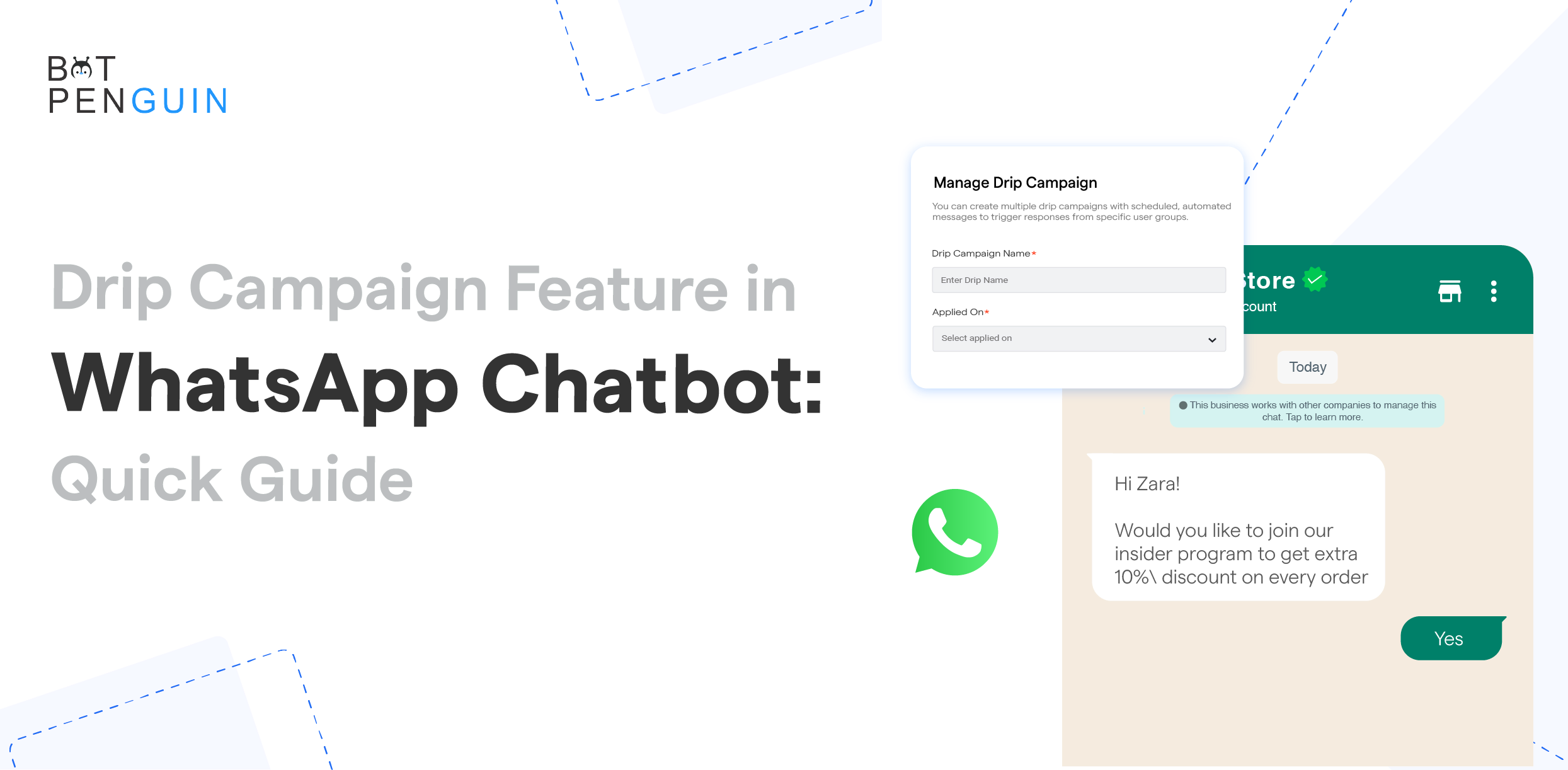
A WhatsApp drip campaign sends a series of messages, one after another. The timing depends on what the customer does or when you want to nudge them. It saves you from manually chasing every lead.
Say someone signs up. First, they get a welcome message. Two days later, they get some product info. After that, maybe an invite to a demo or answers to questions they might have.
This is not like sending the same message to everyone. Each message fits where the customer is in their journey.
But it’s not only about setting up a timer. You need to think in terms of consent, who you’re messaging, what you’re saying, and when you’re saying it. Most importantly, define a clear goal for the campaign.
This guide shows you how WhatsApp drip sequences work, how to set them up, and what numbers to watch.
A WhatsApp drip campaign is just a set of messages that go out over time. Each one is sent on a schedule or when the customer does something.
The broader strategy is known as drip marketing, which can also cover email, SMS, and other channels.
The sequence starts when someone takes an action. This can be filling out a form, buying something, or signing up for an event.
For example, if someone asks for a demo, they get a confirmation first. Next comes product info, then a reminder about the meeting. Step by step.
All these messages work together for one goal. Maybe you want to onboard a customer, recover an abandoned cart, or get someone to book an appointment. The same structure also supports drip campaigns in marketing automation across email, SMS, and other channels.
A drip campaign isn’t just one message. It’s a series of connected messages. People might even get different messages depending on what they do.
A WhatsApp drip sequence usually has four parts:
For example, once someone buys, they should leave the sales sequence. Nobody wants more promos after they’ve already bought. That creates an unpleasant customer experience.
Businesses must also get appropriate consent before sending proactive messages. Some business-initiated messages need approved templates under WhatsApp’s current messaging rules.
A WhatsApp drip sequence guides each person through a set of messages. What happens next depends on timing, what the customer does, and your rules.
There are usually five steps in the process.
Every sequence needs a clear entry point. A contact might enter after submitting a form, scanning a QR code, or completing a purchase.
Only add people who said yes to getting your WhatsApp messages.
A trigger tells your system when to send the first message. It links what the customer does to the right sequence.
Common triggers include:
Messages go out with planned gaps in between. The next one might show up in a few hours, a few days, or whenever you set it.
Timing should make sense for the customer. For example, booking confirmations should come fast. Product follow-ups may wait a bit.
The sequence doesn’t have to be set in stone. If someone replies, clicks, books, or buys, you can change what messages come next.
For example, if someone books a demo, stop sending them reminders to book. Move them to a pre-demo sequence instead.
Every drip sequence needs a clear stop point. Otherwise, people might keep getting messages after they’ve already done what you wanted.
Exit conditions can include:
Both WhatsApp broadcasts and drip campaigns let you reach lots of people. But they’re good for different things.
According to Salesforce, 83% of marketers are seeing growing demand for two-way conversations with brands.
A broadcast sends one message to your list. A drip campaign sends a bunch of messages, one after another, as the customer moves along.
For example, you might send a broadcast to tell people about an upcoming webinar.
A drip campaign keeps going after someone signs up. It can send a confirmation, prep materials, reminders, and a follow-up after the event.
Which one should you use? Go for a broadcast if you just need to send one update. Use a drip sequence if you want to guide someone with a series of messages.
Both formats must follow applicable WhatsApp messaging and consent requirements.
Good WhatsApp drip marketing has four main parts. Each one decides who gets messages, what they get, and when.
Segmentation: Divide contacts using relevant characteristics, actions, or customer stages. Useful segments may include new leads, trial users, recent buyers, or inactive customers. Segmentation stops you from sending the same content to everyone. For example, don’t send reminders to someone who just bought the product.
Content: Each message should have one job. Maybe it confirms something, answers a question, or nudges the customer to the next step. Make sure your messages make sense together. Don’t repeat the same offer over and over, or you’ll annoy people. WhatsApp lets you use text, images, videos, and documents. Just use them when they actually help.
Automation: Automation handles when people enter the campaign, when messages go out, and when to stop. You don’t have to send every follow-up by hand. Set rules so the system reacts to what customers do. A WhatsApp chatbot CRM integration can supply the customer data used by these automation rules. If someone replies, buys, books, or opts out, the sequence should pause or stop. And don’t worry, humans can still jump in when needed. People should always be able to get help if the bot gets confused.
Personalization: Personalization means using what you know about the customer. Use their name, what they picked, their appointment time, or what they did last. Don’t just put their name on every message; make it actually relevant.
All these parts should work toward the same goal. Before you launch, walk through the whole thing like you’re the customer. Every step should give something new or help move things along.
A WhatsApp drip campaign can help with all sorts of customer journeys. The messages, timing, and when you stop should fit each goal.
Most new leads don’t decide after just one message. A sequence lets you share info and answer their questions over time.
Stop the sequence when the lead converts, opts out, or asks for a real person.
After someone signs up, they might need a little help getting started. A sequence can send setup tips, how-tos, and reminders.
Make sure your messages match where the customer is in the onboarding process. Don’t just repeat the same instructions for everyone.
If someone leaves products in their cart, send a follow-up. The first message can remind them they forgot to check out.
Later messages can answer delivery or payment questions, or give more product info. Stop the sequence once they buy.
You can send confirmations, prep tips, and reminders before appointments or events. Customers should also receive clear options to confirm, reschedule, cancel, or request assistance. An appointment booking chatbot can handle these actions before the sequence continues.
A post-purchase sequence can share order updates and usage guidance. It may also contain care instructions or feedback requests.
Each message must match the order’s current stage. Promotional follow-ups should not interrupt important service updates.
If a customer goes quiet, you can start a sequence based on when they last bought something.
Messages may share relevant updates. They may ask about current needs or provide a reason to return. Contacts who remain inactive should not receive endless follow-ups.
Education providers and event coordinators can send registration confirmations and session reminders. They may also share post-session material.
What you send next depends on what people do. Someone who shows up gets different messages than someone who skips.
The best use case isn’t always the most popular. Go for the one with a clear trigger, a goal you can measure, and a good follow-up plan.
A good sequence starts with a clear customer journey. Don’t just add messages for the sake of it. Make sure you have clear triggers, timing, and exit rules.
Choose one measurable outcome for the sequence. It could be:
Don’t try to do everything in one campaign. Keep it focused.
Pick who should get these messages and why. Use things like where they are in the journey, what they like, what they’ve done, or what they’ve bought.
Confirm that every contact has provided appropriate consent for WhatsApp communication.
Tie the sequence to something the customer does or a clear condition.
Possible triggers include:
Make sure your trigger matches your goal.
Plan out every message before you set up the automation. Decide what each one should say and what you want people to do next.
Think about what happens if someone replies, buys, books, or opts out. Map out those paths too.
Pick delays based on how urgent things are. Confirmations should go out fast. Educational follow-ups may wait a bit.
Don’t send a bunch of messages all at once. Test the timing yourself to see how it feels.
Keep each message simple and focused. Say what you need to say, give the right context, and offer one clear next step.
The media should support the message rather than distract from it. Include images, videos, or documents only when they add useful information.
Decide when someone should leave the sequence. Common reasons: they buy, book, opt out, or finish onboarding.
Make sure people can reach a real person if they have a tricky question.
Test every path using sample contacts. Check the order, timing, links, personalization, triggers, and when things stop.
Also test what happens after replies, conversions, and opt-out requests.
After you launch, review the campaign’s performance. See where people reply, convert, drop off, or leave the sequence.
Change one big thing at a time. If you change everything at once, you won’t know what worked.
Metrics show where people engage, stop replying, convert, or leave. Make sure each number ties back to your goal.
A lead-nurturing campaign may focus on demo bookings and qualified replies. An onboarding sequence may focus on setup completion or feature activation.
Check how each message does, not just the whole campaign. If lots of people drop off after one message, examine that step. The timing, the copy, or the offer may be the problem.
Compare results for different groups. New leads, current customers, and inactive people might all react differently.
Change one major variable at a time. This makes it easier to understand what affected the performance.
Even the best automation can underperform if you ignore what customers actually need. Watch out for these common mistakes before you launch.
Do not treat possession of a phone number as permission. Record how and when each contact agreed to receive WhatsApp messages.
People at different stages need different info. Split up new leads, active customers, recent buyers, and inactive customers before you send out sequences.
Don’t send messages too close together. Set the timing based on how urgent it is and what customers expect.
Let people leave or switch sequences after they buy, book, reply, or opt out. If you don’t, you’ll end up sending messages that are no longer relevant.
Don’t make every message a sales pitch. Mix in tips, confirmations, reminders, and answers that actually help.
Don’t trap people in endless bot loops. Make it easy for them to reach a real person if they need more help.
Just because lots of people read your messages doesn’t necessarily indicate campaign success. Look for real results like bookings, purchases, replies, or completed onboarding.
A WhatsApp drip campaign works best when every message fits the customer journey. You need the right triggers, good timing, helpful content, and clear ways to stop.
Start with consent and make sure your messages matter. Then watch the numbers to see where people engage, convert, or drop off.
BotPenguin helps you build WhatsApp chatbots for marketing and drip campaigns. Use them for lead nurturing, onboarding, reminders, and follow-ups.
Start with one campaign. Test every path, see how people respond, and refine the campaign using real data.
Choose a WhatsApp automation solution that supports message sequences. Define the campaign goal, entry trigger, audience segment, message order, timing, and exit conditions. Get customer consent, prepare required templates, and test every path before adding contacts to the drip campaign.
Yes. A WhatsApp drip sequence can include supported media. It may have images, videos, and documents. Use media only when it helps explain the message or customer’s next step. Confirm current file formats and size limits before building the sequence.
Yes. Businesses must get appropriate opt-in permission and honor all opt-out requests. Business-initiated conversations require approved message templates. Outside the 24-hour customer-service window, businesses can only send approved templates. Applicable privacy, marketing, and industry laws must also be followed carefully.
Yes, you can customize message timing when the connected automation solution supports scheduled delays and action-based triggers. Timing can reflect registration, purchases, appointments, inactivity, or customer responses. Test each delay carefully and stop the sequence when the contact converts or opts out.
Businesses with multi-step customer journeys can use WhatsApp drip campaigns for a variety of purposes. They may perform lead nurturing, onboarding, reminders, post-purchase communication, and re-engagement. They must consider customer consent, message relevance, local laws, and WhatsApp policies while creating the campaigns.
3X Your Business
Growth on WhatsApp
See how our chatbot automates replies, qualifies leads & books appointments on autopilot.
Watch Demo NowCheckout our related blogs you will love.
Updated at Sep 21, 2026
11 min to read

Updated at Sep 15, 2026
20 min to read

Updated at Sep 11, 2026
15 min to read
Updated at Sep 5, 2026
14 min to read
Updated at Sep 3, 2026
8 min to read
.webp)
Updated at Oct 26, 2026
12 min to read
Table of Contents



