


Facebook Ads Automation in 2026: Rules, Advantage+ and What Happens After the Click
Updated at Oct 21, 2026
23 min to read

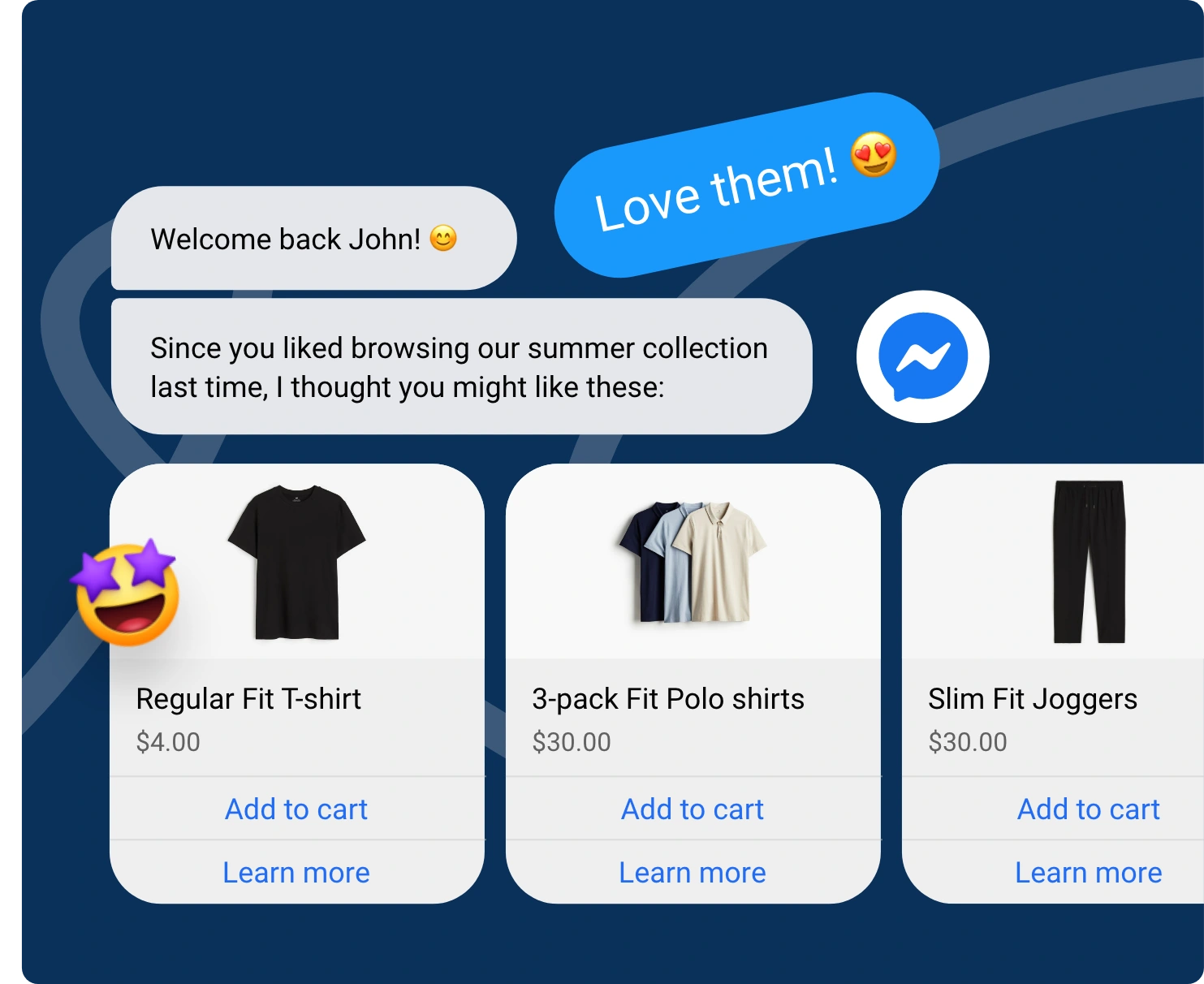
A Facebook chatbot for ecommerce can prevent a sale from disappearing because of one unanswered question. It helps online stores answer product questions, recommend products, capture shopper details, and hand complex requests to your team without making customers wait for an available agent.
Shoppers often ask urgent questions about stock, size, compatibility, shipping, and delivery. After ordering, they want help with tracking, returns, exchanges, and delays.
A Facebook Messenger ecommerce bot can answer routine questions and direct complex requests to your team inside Messenger. Used as a Facebook chatbot for business, it gives customers faster answers while directing disputes, complaints, and complex cases to a human agent.
Fast answers often decide whether a shopper completes a purchase or leaves. Facebook creates this pressure because product discovery, buying questions, and support requests can happen in the same conversation at any hour.
A Facebook chatbot for ecommerce helps online stores manage these common challenges.
Shoppers may ask about stock, sizing, delivery times, payment options, or existing orders late at night. Delaying the answer until the next working day can cost the store a ready buyer.
A chatbot can provide approved information immediately or collect the shopper’s details for an agent.
Order tracking, returns, exchanges, product availability, and delivery delays create a large share of ecommerce messages.
Answering each request manually takes time and creates inconsistent responses when several agents handle the same issue.
Sales events, product launches, seasonal demand, and promotional campaigns can increase customer messages within hours.
The number of available support agents usually does not increase at the same speed. This creates longer queues and slower responses during the periods when buying intent is highest.
Shoppers often prefer to continue in the channel where they found the product. They may not want to search the website, open an email, or call support.
A chatbot can keep the conversation inside Messenger while directing the shopper to the correct product, policy, or order page.
The chatbot can answer standard questions, collect order details, and share approved store information.
Refund disputes, damaged products, unusual complaints, and payment issues should move to a human agent. The agent should receive the conversation history so the customer does not need to explain the issue again.
The chatbot's value depends on where it supports the ecommerce customer journey. It should solve specific buying and service problems rather than respond to every message in the same way.
A chatbot creates value when it solves a clear customer need. In ecommerce, this means helping shoppers find suitable products, access purchase links, and resolve common support questions faster.
Product questions often decide whether a shopper buys or leaves. A Facebook chatbot for ecommerce can answer questions about product features, available sizes, colors, variants, stock, materials, ingredients, compatibility, and delivery eligibility.
The response should do more than repeat a standard FAQ. It should use the shopper’s question to guide the next step.
A customer asking whether a laptop sleeve fits a specific model can receive a compatibility answer and a direct product link. Someone asking whether a skincare product contains a particular ingredient can receive the ingredient details and suitable alternatives.
The chatbot can also ask a follow-up question when the original request is unclear. It may ask for the device model, preferred size, location, or intended use before recommending a product.
Accurate answers depend on up-to-date product information in the chatbot's knowledge base. Review product details regularly to avoid sharing outdated information.
Some shoppers know exactly what they need. Others need help narrowing down several similar options.
A Facebook Messenger ecommerce bot can guide product discovery by asking a few short questions.
It may ask:
What product are you looking for?
What size do you need?
What is your budget range?
Which feature matters most to you?
How do you plan to use the product?
The answers can direct the shopper to a specific item, category, collection, comparison page, or purchase link.
A customer searching for running shoes may be asked about size, running surface, budget, and preferred support level. The chatbot can then show relevant options instead of sending the customer to a broad footwear page.
This use case is different from answering routine questions. The chatbot actively helps the shopper compare choices and reach a product that matches the stated need.
Stores should keep recommendation rules clear. The chatbot should explain why a product was suggested and allow the shopper to change preferences without restarting the conversation.
Customers frequently contact ecommerce stores about shipping policies, delivery times, returns, and existing orders.
A Facebook chatbot for ecommerce can answer shipping and return policy questions using your store's knowledge base. It can explain delivery areas, estimated timelines, return eligibility, and available support options.
For order-specific questions, the chatbot can:
The support team can then verify the order and provide an accurate update.
For automatic order updates and tracking messages, BotPenguin connects to Shopify on WhatsApp and your website. Explore the WhatsApp chatbot for Shopify for these capabilities.
According to Baymard Institute, the average ecommerce cart abandonment rate is 70.22%. This makes abandoned-cart recovery important for online stores.
BotPenguin supports abandoned-cart recovery through its Shopify integration on WhatsApp, not Facebook Messenger.
Businesses can use Shopify abandoned cart automation to follow up with shoppers who leave without purchasing.
On Facebook, businesses can use broadcasts to:
Re-engage shoppers who have opted in.
Share promotions and product information.
Announce new arrivals and store offers.
Direct interested shoppers to product pages.
Facebook broadcasts are available on the Little plan and above. They do not access abandoned-cart data and must follow Meta's messaging and consent rules.
Customer support continues after checkout. Shoppers may need help with returns, exchanges, refund status, damaged products, delivery problems, product use, or repeat purchases.
A chatbot can collect the order number, identify the request, explain the relevant policy, and direct the customer to the correct form or support path.
For returns, it can share the return window, eligibility rules, required product condition, and next steps. For exchanges, it can collect the preferred size or variant before transferring the request.
It can also help customers find product instructions, care information, warranty details, replacement parts, or reorder links.
Human support should take over when the issue involves payment disputes, complex refunds, repeated delivery failures, damaged high-value products, or unusual complaints.
The agent should receive the order information collected during the conversation and the available chat context. This reduces repeated questions and helps the agent investigate the case.
The chatbot supports the service team by handling standard requests. It should not replace human judgment when a case requires investigation, approval, negotiation, or empathy.
A useful ecommerce chatbot should help shoppers explore products, answer buying questions, and connect with your team when they need additional assistance.
Shopper: Is the classic black jacket available in medium?
Chatbot: The product information lists medium as available. Would you prefer regular fit or relaxed fit?
Shopper: Regular fit. Can it be delivered to Delhi?
Chatbot: We deliver to Delhi. You can check delivery options and timelines on the product page.
Shopper: Great. Where can I buy it?
Chatbot: You can view the regular fit black jacket and complete your purchase here: View Black Jacket.
Shopper: Can I speak with someone about the return policy?
Chatbot: Certainly. I'll connect you with our team for further assistance.
This example shows how a Facebook chatbot for ecommerce can guide product discovery, share relevant information, and direct shoppers to purchase links.
When questions require additional verification or human judgment, the chatbot can hand the conversation to a support agent.
You can see more chatbot examples to understand similar conversations across product discovery, lead qualification, booking, and customer support.
A useful ecommerce chatbot should be built around real customer questions and accurate store data. Start with a focused use case, test it carefully, and expand the chatbot as customer needs become clearer.
Review Facebook messages, support tickets, live chat records, product reviews, and return requests.
List common questions about products, stock, sizing, compatibility, shipping, returns, payments, and order status.
Prioritize questions that affect buying decisions or create frequent support requests.
Connect the correct business Facebook Page to your chatbot platform.
Confirm that the chatbot can receive Messenger conversations, respond through the correct Page, and transfer conversations to the required team.
Review Page permissions before publishing.
Add accurate product details, shipping rules, delivery areas, return policies, exchange conditions, payment information, and support answers.
Organize the information by customer intent so the chatbot can distinguish between product questions, order-related support questions, and post-purchase issues.
Connect the chatbot to the knowledge base and available product information needed to answer customer questions.
Add product details, catalog information, shipping policies, and return guidelines. Connect a CRM for lead management if you use BotPenguin's King plan.
Configure live chat handover so complex customer requests reach your team with the relevant conversation context.
Define which conversations should move to an agent.
Payment disputes, complex refunds, damaged products, repeated delivery failures, unusual complaints, and account security issues should not remain inside a fixed chatbot flow.
Include the customer information and order details collected during the conversation when transferring the request to an agent.
Test product questions, recommendations, delivery policy questions, returns, lead capture, and human handover.
Check how the chatbot handles missing information, unclear questions, unavailable products, and requests that require an agent.
Confirm that the chatbot does not promise automatic order tracking, cart recovery, or payment processing inside Messenger.
Review conversation records after launch.
Identify unanswered questions, weak responses, repeated agent transfers, abandoned chatbot paths, and outdated policies.
Update the chatbot whenever products, shipping rules, return terms, or customer behavior changes.
Use the full build guide for detailed instructions on creating and publishing your Messenger chatbot.
Ecommerce businesses can use a Facebook chatbot to answer product questions, recommend suitable items, collect shopper details, explain store policies, and handle routine post-purchase inquiries. Complex requests can be transferred to human agents for further assistance.
On Messenger, BotPenguin collects the customer's order details and hands the conversation to your team. Automatic order tracking runs on WhatsApp and websites through the Shopify integration, not directly through Facebook Messenger.
BotPenguin runs abandoned-cart recovery on WhatsApp through its Shopify integration. On Facebook, businesses can re-engage opted-in contacts through broadcasts, available on the Little plan and above, without accessing abandoned-cart data.
Basic FAQs and product information can be managed through the chatbot's knowledge base. Businesses can use available integrations for additional workflows, such as CRM lead management on the King plan. Shopify cart recovery and automatic order tracking are not supported through Messenger.
No. It handles routine product and policy questions, collects order-related information, and assists with return inquiries. Human agents remain necessary for payment disputes, complex refunds, damaged products, and cases requiring investigation or approval.
It can be useful for a small store that receives repeated questions about stock, sizing, shipping, returns, and order status. Start with one high-volume conversation and expand only when needed.
Yes. It can ask about size, budget, intended use, preferred features, or product type before suggesting relevant products, collections, or purchase links based on the information available in the store catalog.
A Facebook chatbot for ecommerce works best when it supports specific customer needs throughout the shopping journey.
It can recommend relevant products, answer buying questions, explain store policies, and help customers find the information they need before purchasing.
Accurate product information, clear conversation flows, and updated knowledge bases help businesses provide consistent answers.
Human handover remains important. Complex refunds, payment disputes, damaged products, and unusual complaints should reach the appropriate support agent with the conversation context.
Review chatbot conversations regularly to identify missing answers, outdated information, and opportunities to improve customer support.
Build your ecommerce chatbot for free and start with the customer conversations that create the most support work or purchase hesitation.
Build an Ecommerce Chatbot that Supports Shoppers from Product Discovery Through Order Tracking
Answer product questions, recover carts, and share order updates automatically through Facebook Messenger
Build Your Chatbot FreeCheckout our related blogs you will love.
Updated at Oct 21, 2026
23 min to read
Updated at Oct 13, 2026
11 min to read
Updated at Oct 10, 2026
19 min to read
Updated at Oct 9, 2026
8 min to read
Updated at Oct 7, 2026
12 min to read

Updated at Oct 1, 2026
7 min to read
Table of Contents


