AI Chatbot → Zapier
Capture leads, forms, bookings, and support requests through chatbot conversations. Send mapped event data to Zapier triggers.
See AI ChatbotsAdd a no-code AI chatbot to your Zapier stack. Leads from WhatsApp, website chat, or Instagram can automatically trigger your workflows.
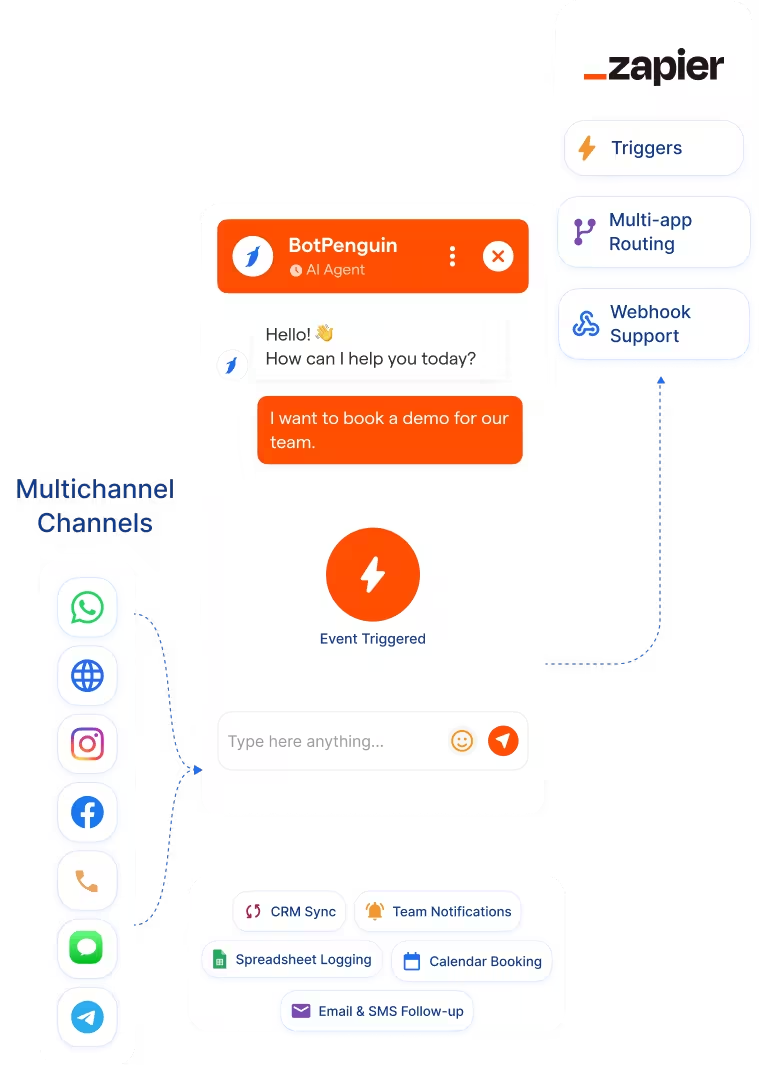
This Zapier chatbot integration connects BotPenguin conversations with your Zapier workflows. It helps teams trigger actions from WhatsApp, website chat, Instagram, and other chatbot channels. Zapier connects thousands of apps through automated workflows called Zaps. It moves data between tools, triggers actions, and runs follow-up workflows.
The BotPenguin Zapier integration adds the conversational trigger layer. Your chatbot captures intent first, then Zapier moves the data where it needs to go. A lead, booking, support issue, or product inquiry can start the right Zap. Your existing workflows can run from real chatbot conversations.
Capture leads, forms, bookings, and support requests through chatbot conversations. Send mapped event data to Zapier triggers.
See AI ChatbotsLet an AI agent qualify the lead in a natural conversation. Then send structured details such as name, intent, budget, and source to Zapier.
See AI AgentsTrigger follow-up workflows from BotPenguin events. Lead captured, meeting booked, issue raised, or campaign response received can start the right Zap.
View IntegrationsZapier is built to move data between apps after a trigger event fires. It connects tools, runs workflows, and reduces manual app-to-app work. It is not a CRM or helpdesk by itself. It is the automation layer between the tools your business already uses.
Zapier needs a trigger before it can act. Many customer conversations begin outside workflow tools. A WhatsApp lead, Instagram DM, or website chatbot qualification may not start a workflow on its own. The conversation needs a structured trigger.
BotPenguin becomes the conversational front end for Zapier. It captures leads, bookings, inquiries, and support issues across customer channels. Each chatbot or AI agent event can become a Zapier trigger. Your workflows can then update CRMs, sheets, calendars, email tools, and support apps.

No developer needed. Three steps connect BotPenguin chatbot events with your Zapier automation workflows.
Log in to BotPenguin and open your bot settings. Connect BotPenguin to Zapier and select the trigger events you need.
Step 1Choose which chatbot answers map to Zapier fields. Map name, email, phone, intent, source, budget, and custom answers.
Step 2Send a test lead through your chatbot. Confirm the Zap fires with the correct values. Then switch the workflow on.
Step 3Up to 35 %
of abandoned carts recovered via WhatsApp AI chatbot automation, with every lead conversation routed through Zapier and actioned within minutes.
30%
reduction in appointment no-shows after deploying AI-powered WhatsApp reminders, with every patient inquiry routed through Zapier automatically.
40%+
more qualified leads routed through Zapier per month after deploying BotPenguin AI chatbots to qualify buyers on WhatsApp and trigger workflows automatically.
Capture abandoned-cart and product inquiries through WhatsApp, then trigger CRM, email, and team notification workflows.
Qualify trial signups through website chatbot, then trigger CRM creation and onboarding workflows.
Qualify buyers on WhatsApp, then trigger CRM updates, agent alerts, and calendar workflows.
Capture patient inquiries through chatbot and trigger scheduling, email, and internal notification workflows.
Qualify admissions inquiries through WhatsApp, then trigger CRM, email, and Google Sheets workflows.
Capture prospect interest through chatbot, then trigger CRM, advisor notification, and compliance logging workflows.
Use BotPenguin as the chatbot layer for client campaigns, then route leads to each client’s existing tools through Zapier.
Capture booking inquiries through WhatsApp, then trigger CRM updates, confirmations, and internal notification workflows through Zapier.
Connect BotPenguin's conversational AI to your CRM, payment gateway, calendar and eCommerce platform in minutes. No-code, no disruption. Your existing tech stack stays exactly as it is.
Free to start. No credit card required. Live under 10 minutes.
Is the Zapier chatbot integration free?
The Zapier integration is included on paid BotPenguin plans. You can also start with a free BotPenguin plan and test the chatbot before upgrading. View BotPenguin pricing
Do I need to code to connect BotPenguin to Zapier?
No. The integration is no-code. Connect BotPenguin to Zapier, select trigger events, map fields, send a test lead, and go live.
Which Zapier plan do I need?
You need a Zapier plan that supports the apps and workflows you want to run. Exact Zapier plan requirements depend on your chosen apps, tasks, and workflow setup.
Can BotPenguin fire Zapier triggers from WhatsApp?
Yes. WhatsApp chatbot events can trigger Zapier workflows with structured lead or support data. Website, Instagram, Facebook, Telegram, SMS, and Teams events can also be integrated with Zapier workflows.
What chatbot data gets sent to Zapier?
Only the data you map. Name, email, phone, intent, source, budget, product interest, and custom qualifying answers can map to Zapier fields.
Can Zapier also trigger BotPenguin chatbot flows?
BotPenguin can support Zapier-connected workflow actions where your setup allows it. Exact bidirectional behavior depends on your BotPenguin and Zapier configuration.
How is this different from Zapier's own chatbot builder?
Zapier Chatbots helps teams build AI chatbot experiences inside Zapier. BotPenguin adds omnichannel AI chatbot and AI agent coverage across WhatsApp, Instagram, Facebook, Telegram, SMS, website chat, and Teams.