AI Chatbot → Zendesk
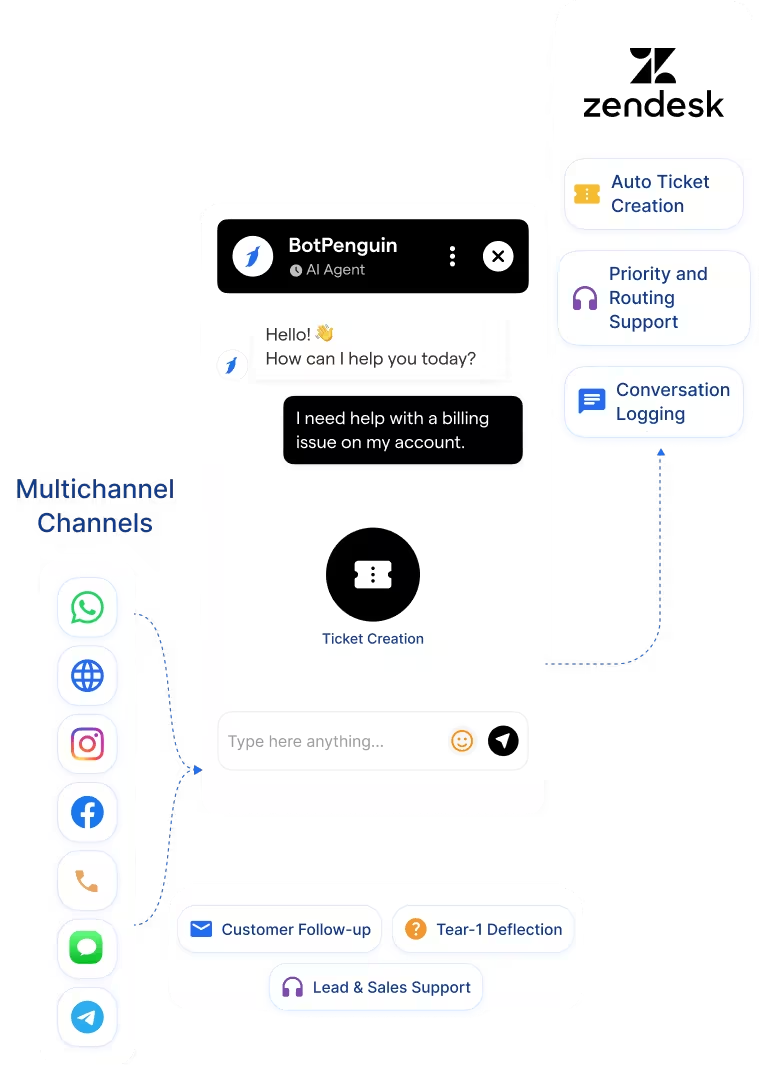
Capture support and sales conversations across WhatsApp, website, Instagram, Facebook, and more. Send mapped conversation data into Zendesk tickets.
See AI ChatbotsAdd a no-code AI chatbot and AI agent to Zendesk. Capture support conversations across WhatsApp, Instagram, Facebook, website chat, and more.
This Zendesk chatbot integration connects BotPenguin support conversations with your Zendesk ticket workflow. It helps teams capture inquiries from WhatsApp, website chat, Instagram, Facebook, and more. Zendesk helps teams manage tickets, agents, workflows, SLAs, messaging, and customer support operations. Zendesk also offers its own AI agents and automation tools.
The BotPenguin Zendesk integration adds an external omnichannel chatbot layer. It captures customer conversations before routing the right context into Zendesk. Your team gets cleaner tickets and faster handoffs. Every qualified inquiry can reach Zendesk with the conversation history already attached.
Capture support and sales conversations across WhatsApp, website, Instagram, Facebook, and more. Send mapped conversation data into Zendesk tickets.
See AI ChatbotsLet an AI agent handle Tier-1 support or lead qualification in natural conversation. Then route unresolved cases into Zendesk with context.
See AI AgentsTrigger Zendesk routing and follow-up actions from chatbot events. Issue type, urgency, or a human request can initiate the appropriate workflow.
View IntegrationsZendesk is built to manage customer service at scale. It helps teams handle tickets, SLAs, agent workflows, support queues, and customer conversations. Its native AI tools support automation inside the Zendesk ecosystem. That makes Zendesk strong once the support operation is already structured.
Many customer conversations begin before they become tickets. They may start through WhatsApp, Instagram, Facebook, Telegram, SMS, or your website. Those conversations still need to be qualified and routed. Without a front-end chatbot layer, agents may receive incomplete support context.
BotPenguin becomes the omnichannel chatbot layer before Zendesk. It captures, qualifies, and structures customer conversations before handoff. Every chatbot-qualified inquiry can reach Zendesk with mapped fields. Agents get issue type, urgency, contact details, and chat history before replying.

No developer needed. Three steps connect your BotPenguin chatbot to Zendesk with mapped support data.
Log in to BotPenguin and open your bot settings. Connect your Zendesk account and allow the required permissions.
Step 1Choose which chatbot answers map to Zendesk fields. Map name, email, phone, issue type, priority, product, and source.
Step 2Send a test support inquiry through your chatbot. Confirm it appears correctly in Zendesk. Then switch the workflow on.
Step 3Up to 35 %
of abandoned carts recovered via WhatsApp AI chatbot automation, with every lead conversation logged in Zendesk and actioned within minutes.
30%
reduction in appointment no-shows after deploying AI-powered WhatsApp reminders, with every patient inquiry synced to Zendesk automatically.
40%+
more qualified leads logged in Zendesk per month after deploying BotPenguin AI chatbots to qualify buyers on WhatsApp, and sync leads automatically.
Capture order, return, and refund inquiries via WhatsApp and route them to Zendesk with the issue details attached.
Route product support and pre-sales inquiries from the website chatbot to Zendesk, with account context mapped.
Capture patient support requests through chatbot and route them with inquiry type and urgency attached.
Route compliance and account inquiries from chatbot into Zendesk with priority and category assigned.
Log student and parent support inquiries from WhatsApp and website chat into Zendesk.
Capture booking change and refund inquiries through chatbot and create categorized Zendesk tickets.
Log property and contract inquiries from WhatsApp into Zendesk with full conversation context.
Capture billing, connectivity, and service inquiries through WhatsApp, then route categorized tickets into Zendesk with context.
Connect BotPenguin's conversational AI to your CRM, payment gateway, calendar and eCommerce platform in minutes. No-code, no disruption. Your existing tech stack stays exactly as it is.
Free to start. No credit card required. Live in under 10 minutes.
Is the Zendesk chatbot integration free?
The Zendesk integration is included on paid BotPenguin plans. You can also start with a free BotPenguin plan and test the chatbot before upgrading. View BotPenguin pricing
Do I need to code to connect Zendesk to BotPenguin?
No. The integration is no-code. Connect your Zendesk account, map chatbot answers to ticket fields, send a test inquiry, and go live.
Does the Zendesk integration work with WhatsApp?
Yes. Support inquiries captured on WhatsApp can sync to Zendesk with conversation context. The same setup can support website, Instagram, Facebook, Telegram, SMS, and Teams channels.
How is this different from Zendesk AI or Zendesk bots?
Zendesk AI works inside the Zendesk customer service ecosystem. BotPenguin adds an external omnichannel chatbot and AI agent layer that captures conversations across BotPenguin-supported channels and routes context to Zendesk.
Can BotPenguin update existing Zendesk tickets?
Yes. BotPenguin can support new ticket creation and existing ticket updates based on your mapped setup. Exact update behavior depends on your integration configuration.
What chatbot conversation data gets sent to Zendesk?
Only the data you map. Issue type, contact details, priority, product, source, and qualifying answers can map to Zendesk fields.
Can BotPenguin's AI agent resolve Tier-1 issues before creating a Zendesk ticket?
Yes. BotPenguin AI agents can handle Tier-1 support before routing unresolved or escalated issues into Zendesk.