CRM & Lead Management Integration
NoCRM+BotPenguin

noCRM Chatbot Integration That Qualifies Every Inbound Lead Automatically

noCRM keeps your salespeople selling. BotPenguin makes sure inbound conversations get qualified across WhatsApp, your website, and Instagram before reaching your sales pipeline.

About This Integration

noCRM

Helpdesk & Support

noCRM is the action-driven sales management tool built for people who actually sell. It removes much of the admin overhead associated with traditional CRM software. It gives salespeople a focused pipeline built around leads, next actions, follow-ups, and deals getting closed. noCRM can already capture leads through forms, email, imports, business cards, browser tools, and connected sales channels. It also supports duplicate detection, custom fields, integrations, and sales workflow automation.

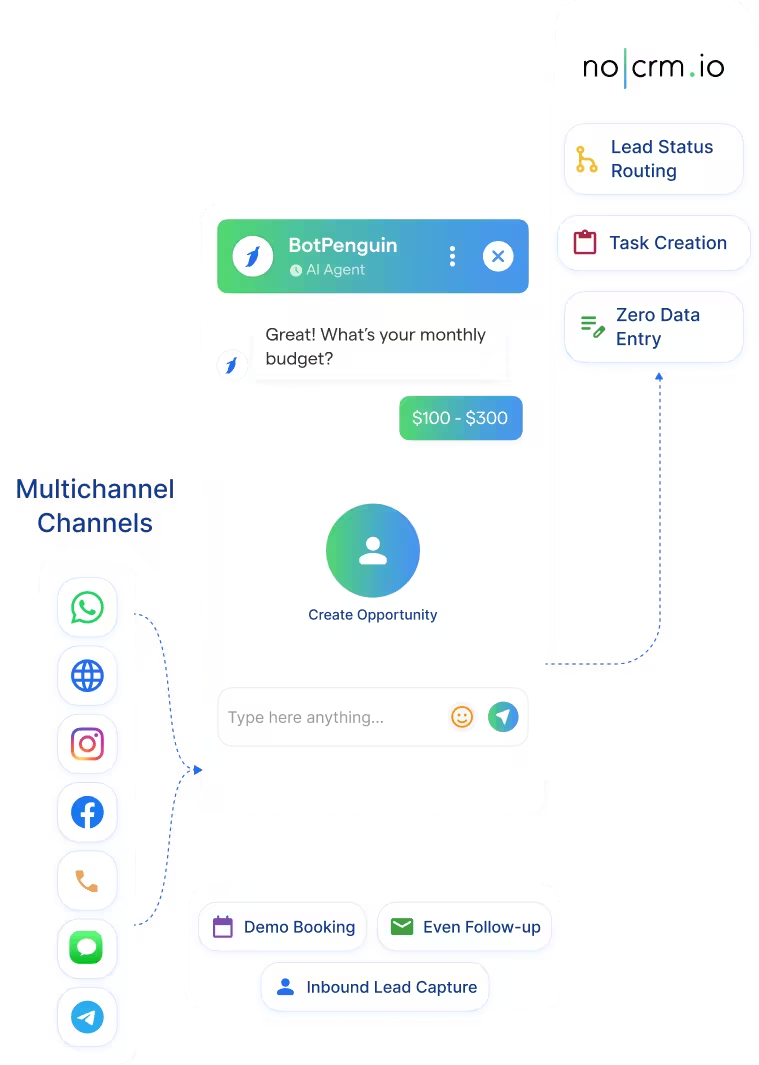
The BotPenguin noCRM chatbot integration adds conversational qualification before a salesperson needs to act. When someone messages you on WhatsApp, starts a website conversation, or reaches out through Instagram, BotPenguin can respond immediately. The chatbot asks the required questions, captures lead information, and sends mapped responses into noCRM. Your salespeople open noCRM with more context already available instead of starting every inquiry from scratch.

How BotPenguin Connects to Acuity Scheduling

AI Chatbot to noCRM

AI Chatbot to noCRM

Every lead that reaches out on WhatsApp, Instagram, or your website gets an instant response. The chatbot captures their details and sends mapped information into your noCRM lead workflow automatically.

See WhatsApp Chatbots
AI Agent to noCRM

AI Agent to noCRM

For leads that need more than a quick response, the AI Agent handles a natural back-and-forth conversation. It can ask qualifying questions, capture intent, and pass structured lead information into connected sales workflows.

See AI Agents
Automation to noCRM

Automation to noCRM

When a conversation produces a qualified lead, BotPenguin can send the captured data into noCRM. noCRM's own workflow automation can then support actions such as lead assignment, tagging, notifications, and follow-up processes, as configured.

View Integrations

What BotPenguin Adds to NoCRM

NoCRM keeps salespeople selling. BotPenguin qualifies conversations before they reach sales.

What noCRM Is Built For

noCRM is built around one idea: salespeople should spend their time selling, not filling in unnecessary CRM fields. It gives sales teams a clean pipeline, follow-up reminders, next-step visibility, and tools for moving active leads toward a sale. It can also capture leads through forms, email, imports, WhatsApp-related workflows, and other connected sources.

The Gap

Capturing a lead and qualifying a live conversation are different jobs. A prospect messaging on WhatsApp, Instagram, or your website may need questions answered before becoming sales-ready. Salespeople cannot manually qualify every conversation at every hour.

What BotPenguin Adds

BotPenguin becomes the always-on conversational layer before noCRM. It responds to inbound conversations, collects the required details, and qualifies prospects across supported channels. Mapped lead information can then move into noCRM, where your team handles follow-up and closing. Your salespeople spend less time gathering basic information and more time acting on qualified conversations.

See the noCRM Integration in Action

Follow the complete process for connecting noCRM to BotPenguin, adding your API details, and sending your first test lead.
80+
Native integrations available on BotPenguin
3
Core noCRM connection details: API Token, noCRM Domain, and Lead Title
0
Lines of code needed for the native connection
<10 min
Target time from connection to your first test lead

Everything the noCRM Chatbot Integration Handles for You

Everything the noCRM Chatbot Integration Handles for You
  • Automated Lead Capture: Turn qualified chatbot conversations into lead information that can move directly into noCRM.
  • Custom Field Mapping: Map chatbot responses to the corresponding noCRM parameters during integration setup. Capture information such as contact details, budget, requirements, product interest, source, and other qualification answers.
  • Conversational Qualification: Collect the information your sales team needs before a salesperson begins follow-up. This turns BotPenguin into a lead management chatbot layer before noCRM.
  • Duplicate Management: noCRM includes duplicate detection based on information such as email, phone number, and other key fields. This helps teams identify repeated prospects after lead information enters the sales system.
  • Workflow Automation: noCRM can automate lead distribution, follow-up emails, tags, notifications, and other sales actions based on configured triggers.
  • Reduced Data Entry: Chatbot responses are mapped before reaching noCRM, reducing the amount of information salespeople need to enter manually.
  • Inbound Lead Capture: Qualify inbound leads on WhatsApp, Instagram, or your website before they reach your sales team. Budget, timeline, requirements, and intent can be collected during the conversation.
  • Demo Booking: Let prospects request demos through chatbot conversations and capture their details before the sales team follows up.
  • Event Follow-Up: Capture post-event inquiries through a chatbot and move source, interest, and contact information into your lead workflow.
  • Re-Engagement: Use connected CRM data and BotPenguin workflows to support personalized follow-up conversations with leads that stopped responding.
  • Freelancer Pipeline: Solo salespeople and freelancers can capture inbound leads around the clock without relying entirely on manual forms or callbacks.
  • WhatsApp: Qualify inbound conversations and collect lead information before moving it into noCRM. See WhatsApp Chatbots
  • Website Chatbot: Capture visitor questions, requirements, and contact details through website conversations. See Website Chatbots
  • Instagram DMs: Qualify inbound Instagram conversations and collect structured lead information. See Instagram Chatbots
  • Facebook Messenger: Turn Messenger inquiries into structured sales information for CRM follow-up. See Facebook Chatbots
  • Telegram: Capture lead details through automated Telegram conversations. See Telegram Chatbots
  • SMS: Use automated SMS conversations to collect lead and qualification information.
  • Microsoft Teams: Support internal referrals, requests, and sales handoffs through connected conversational workflows. See Teams Chatbot

Live in Under 10 Minutes

No developer needed. Connect noCRM, add the required authorization details, and send a test lead.

  1. 1

    Connect Your Accounts

    Step 1
  2. 2

    Add Your noCRM Details

    Step 2
  3. 3

    Connect, Test, and Go Live

    Step 3

What Sales Teams Can Gain With BotPenguin and noCRM

CRM Admin Time

1–2 Hours

spent updating CRM records each day. Automated conversational capture reduces the amount of basic information reps need to transfer manually.

Lead Growth

5x

monthly lead growth recorded by Bhandary Builders after deploying BotPenguin for website lead capture. The result demonstrates what always-on conversational lead capture can add before CRM follow-up begins.

Missed Leads

70%

fewer unattended property leads after introducing automated website conversations. That matters when every captured conversation can feed the sales pipeline instead of waiting for manual follow-up.

Connect Your AI Agents, Chatbots & Voice Agents to 80+ Tools With Zero Switching Costs

Connect BotPenguin's conversational AI to your CRM, payment gateway, calendar and eCommerce platform in minutes. No-code, no disruption. Your existing tech stack stays exactly as it is.

ChatGPT integration logoPabbly integration logoZoho CRM integration logoHubSpot integration logoTeamgate CRM integration logoZendesk integration logoWebHoper integration logoInsightly CRM integration logoNo CRM integration logoZapier integration logo
  • ChatGPT integration logo
  • Pabbly integration logo
  • Zoho CRM integration logo
  • HubSpot integration logo
  • Teamgate CRM integration logo
  • Zendesk integration logo
  • WebHoper integration logo
  • Insightly CRM integration logo
  • No CRM integration logo
  • Zapier integration logo
  • Copper CRM integration logo

Every Inbound Lead Qualified and Ready in noCRM Before Your Salesperson Follows Up

Free to start. No credit card required.

Frequently Asked Questions About the noCRM Chatbot Integration



