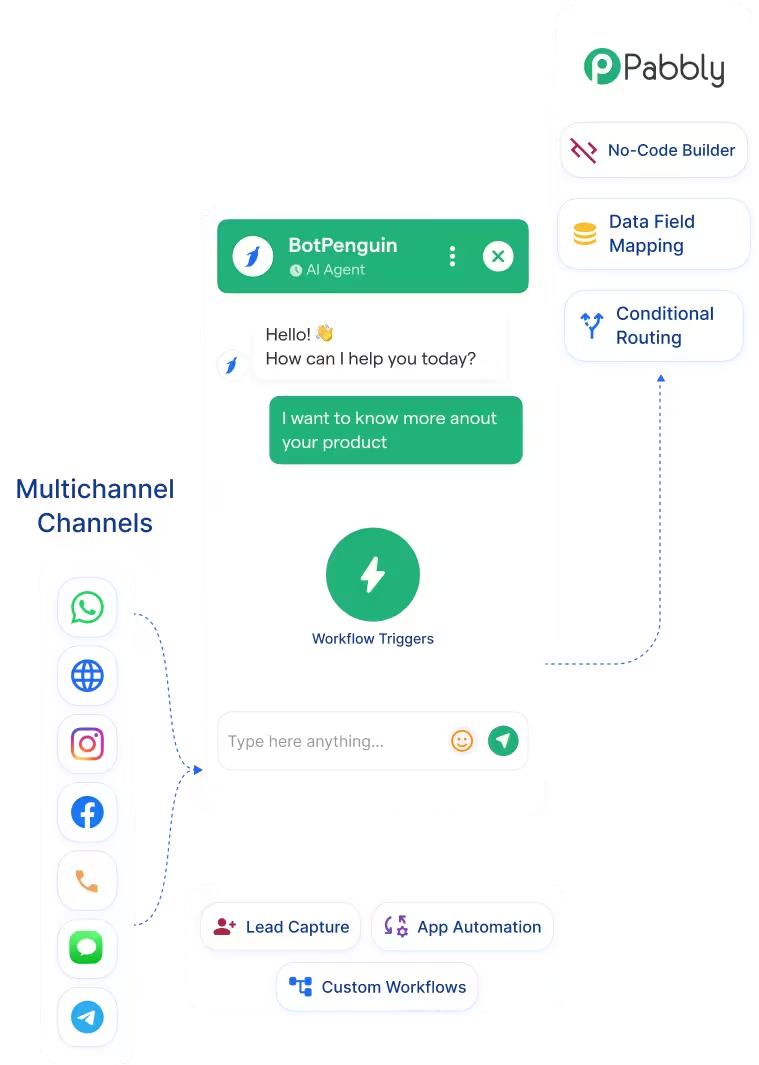
Pabbly Connect Chatbot Integration That Routes BotPenguin Data Across Your Stack
Pabbly Connect
How BotPenguin Connects to Pabbly Connect
Pabbly Connect → BotPenguin Workflow
Native Route → Direct Integration
What BotPenguin Adds to Your Pabbly Connect Stack
Pabbly Connect handles workflow automation, while BotPenguin adds the conversational intake layer before each trigger.
What Pabbly Connect is Built For
The Gap
What BotPenguin Adds
Everything the Pabbly Connect Integration Handles for You

- BotPenguin as Pabbly Connect Trigger: Use chatbot events to trigger Pabbly Connect workflows. Lead qualified, appointment booked, or form completed can start the flow.
- Multi-App Routing: Route BotPenguin conversation data to multiple apps in one Pabbly Connect workflow. Send data to your CRM, helpdesk, spreadsheet, and email tool.
- No-Code Workflow Builder: Build the BotPenguin to Pabbly Connect workflow on a visual canvas. No API work is required.
- Data Field Mapping: Map BotPenguin conversation answers to destination app fields through Pabbly Connect. Name, email, phone, intent, and custom fields can move into the right tool.
- Conditional Routing: Use Pabbly Connect filters to route chatbot outcomes differently. Send hot leads to your CRM and support queries to your helpdesk.
- Chatbot Workflow Automation: Turn BotPenguin chatbot events into automated workflow steps across your wider business stack.
- CRM Without a Native BotPenguin Integration: Use Pabbly Connect to route BotPenguin lead data to CRMs not yet in BotPenguin's native list.
- Multi-Tool Lead Routing: Qualify a lead in BotPenguin, then route it to your CRM, Google Sheets, and email tool.
- Helpdesk Ticket Creation: Create support tickets from BotPenguin chatbot conversations when a direct helpdesk integration is unavailable.
- E-commerce Order Data: Send BotPenguin order-related chatbot data to your commerce stack through Pabbly Connect.
- Custom Notification Workflows: Trigger Slack, email, or SMS notifications from BotPenguin chatbot events through Pabbly Connect.
- WhatsApp: BotPenguin captures WhatsApp lead data and triggers Pabbly Connect workflows. See WhatsApp Chatbots
- Website Chatbot: Events from the website chatbot trigger Pabbly Connect workflows upon form completion or lead qualification See Website Chatbots
- Instagram DMs: Instagram chatbot conversations can route lead data to destination apps. See Instagram Chatbots
- Facebook Messenger: Messenger bot conversations can automatically trigger Pabbly Connect workflows. See Facebook Chatbots
- Telegram: Telegram bot events can move data into your workflow stack through Pabbly Connect. See Telegram Chatbots
- SMS: SMS chatbot conversations can trigger data routing workflows.
- Microsoft Teams: Teams bot events can trigger internal routing workflows. See Teams Chatbot
Three Steps to Connect BotPenguin with Pabbly Connect in Under 10 Minutes
No developer needed. No API documentation to read. Three steps connect your BotPenguin chatbot to apps through Pabbly Connect.
- 1
Authenticate Both Accounts
Step 1 - 2
Map Your Fields
Step 2 - 3
Test and Go Live
Step 3
What Teams Achieve with BotPenguin and Pabbly Connect
Up to 35%
30%
40%+
Pabbly Connect Chatbot Integration Examples by Industry
E-commerce
SaaS
Healthcare
Real Estate
Insurance
Agencies
Connect Your AI Agents, Chatbots & Voice Agents to 80+ Tools With Zero Switching Costs
Connect BotPenguin's conversational AI to your CRM, payment gateway, calendar and eCommerce platform in minutes. No-code, no disruption. Your existing tech stack stays exactly as it is.
Connect BotPenguin to Your Full Stack Through Pabbly Connect
Free to start. No credit card required. Live under 10 minutes.
Frequently Asked Questions About the Pabbly Connect Chatbot Integration
Do I need Pabbly Connect to connect BotPenguin to my CRM?
Is the Pabbly Connect integration free?
How does BotPenguin connect to Pabbly Connect?
Can Pabbly Connect trigger a BotPenguin workflow?
Which BotPenguin chatbot events can trigger a Pabbly Connect workflow?
Can I use BotPenguin without Pabbly Connect if my tools have native integrations?
Does the Pabbly Connect integration work with WhatsApp?
Can I use AI agents with Pabbly Connect workflows?