



Typing speed can be improved only with dedicated and continuous practice to develop muscle memory.
Live Typing Test For Customer Support
Challenge your typing skills with the specially designed typing speed test for maximum efficiency.
Test your average typing speeds
Let’s get your tying practice started!
60Second
00Words/Min
00Chars/Min
0%Accuracy
00Wrong Words
00Correct Words
Easy
Start Typing!
Improve your typing speed with online typing test
You should remain relaxed and focused on your typing speed for the best results.
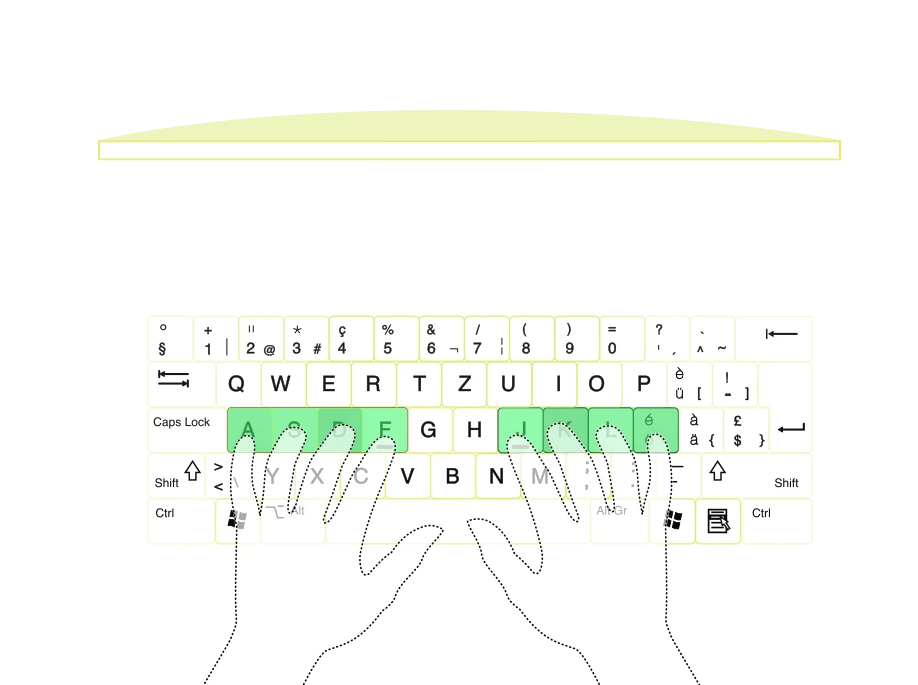
Ensure you learn about proper finger placement and ergonomic layouts.
Lastly, participate in multiple typing games and tests to steadily increase your typing accuracy and typing speed.
You can bookmark this free typing test and practice every day.
Understand WPM and CPM, the typing speed metrics

Words per minute (WPM) measures the number of words typed in a minute.
Characters per minute (CPM) counts the number of characters typed in a minute.
WPM is measured to attain an overall picture of typing speed, while CPM provides a detailed count of characters typed.
The average typing speed for the general population is around 40 WPM, whereas professional typists can exceed 75 WPM.
Different professions have varying benchmarks for typing speed. For example, data entry jobs require 60-70 WPM, while transcriptionists aim for 70-80 WPM.
Learn the best typing techniques for Online Typing Test
QWERTY is the most widely used layout, designed to prevent typewriter jams by spacing out commonly used letter pairs ensuring typing efficiency.
Dvorak was created to increase typing speed and reduce finger movement by placing the most frequently used letters on the home row.
Colemak is a modern alternative to QWERTY that maintains some familiar key placements while optimizing for efficiency and ease of learning.
Ergonomic keyboards are designed to reduce strain and improve comfort by splitting the keyboard, angling keys, and incorporating wrist supports promoting a more natural hand and wrist position.
To improve your typing speed and accuracy, ensure you learn about proper finger placement and ergonomic layouts with our fast typing test that suits your typing style.
Frequently Asked Questions
How do I improve my typing speed?

Improving your typing speed is a continuous effort. Begin by familiarizing yourself with the keyboard layout. Ensure you position your fingers correctly, with each finger responsible for its region on the keyboard. Practice regularly using various typing exercises. Gradually increase your typing speed while maintaining accuracy. Lastly, remain patient and consistent as progress may come slowly. Use our free typing test to gauge your improvements.
What Is the Best 10-Finger Typing Layout?
The best 10-finger typing layout depends on your preference and familiarity. The widely used QWERTY layout allows you to type 30-32 common English words using only the home row keys. However, alternative layouts like Colemak and Dvorak are designed for faster typing and improved efficiency. With Colemak, you can type 436 words, and with Dvorak, 282 words can be typed using only the home row keys. Test out these layouts with our Live Chat Typing test.
Is Typing Speed Still Important?
Yes, typing speed remains a critical skill in the modern digital realm. Decent typing speed is tied to productivity in various roles: in jobs where typing forms a significant part of the tasks — such as data entry or transcription — speed requirements may range from 60 to 90 WPM. Even in less typing-focused roles, an average of 40 to 60 WPM is desirable. It's also worth noting that just as speed is crucial, so is accuracy. Therefore, you should aim to improve your typing speed in this online typing test.
Is Typing Fast a Skill or a Talent?
Typing fast is more of a skill than a talent. It's something acquired and improved through consistent practice and proper training. Like many other skills, learning to type fast requires patience, discipline, and a well-planned typing method. Start by learning correct finger positioning, then gradually increase your speed while maintaining accuracy. Practice and test it with our Fast Typing Test.
How Are the Words From the Test Chosen?
Typing Speed test uses common words to reflect everyday language use. They also ensure a variety of lengths and types, from short to long, and includes alphanumeric combinations. Further, tests often incorporate full complete sentences to assess punctuation and capitalization skills. This thorough word selection provides a comprehensive measure of typing skills proficiency which you can improve through online typing test.
How many WPMs is a good typing score?
A good typing speed generally falls around 40 words per minute (WPM), considered the average speed. However, a 'good' score can also be subjective and dependent on a person's job requirements or personal goals.
What our Customers Say
Delivering value, earning trust. Hear good words about BotPenguin on these platforms.

G2
"Their ability to execute in a timely manner. If you want to start an AI Chatbot business then this is the place. - They have a great work environment, and know how important it is to be efficient."
Gustav Louv

4.4-Star Rating

Capterra
"We are using BotPenguin for our Facebook bots, responding to Facebook messages automatically. Currently handling millions of messages on a monthly basis and really great product."
Twana D.
4.8-Star Rating

Trustpilot
"Its Whatsapp Automation with API is really practical for sales & marketing objective. If it comes with analytics about campaign result it will be awesome."
BD Michae
4.8-Star Rating

Good Firms
"Their timely communication is the reason for the great project management. Our descriptions are precisely translated into needs by BotPenguin, and they possess the necessary skill set to execute features in a timely manner."
Yashi Amola
5-Star Rating

Crozdesk
"The team at BotPenguin contributed knowledge not just about using Generative AI but also about how these technologies may be customized to meet our needs in the asset and wealth management industry. It was amazing how well they could convert difficult technical ideas into workable, approachable solutions. Furthermore, the team at BotPenguin has shown a remarkable capacity for creative problem-solving, as demonstrated by their approach to challenging project specifications."
Phil Johnson
5-Star Rating