Mobile Customer Support Integration
Helpshift+BotPenguin

BotPenguin Extends Your Helpshift Support to Every Channel, Without the SDK

About This Integration

Helpshift

Helpdesk & Support

How BotPenguin Connects to Helpshift

AI Chatbot to Helpshift

AI Chatbot to Helpshift

See AI Chatbots
AI Agent to Helpshift

AI Agent to Helpshift

See AI Agents
Automation to Helpshift

Automation to Helpshift

See Automations

Helpshift AI Runs Inside Your App. BotPenguin Covers Everything Outside It

Helpshift Native AI (In-App)

  • Inside mobile app via SDK
  • SDK integration, developer resource required
  • In-app and limited external
  • Smart Intents, Answer Bot, custom bot builder inside Helpshift platform
  • Issue-based billing from $150/mo; costs scale with volume
  • No robust free option

BotPenguin + Helpshift

  • WhatsApp, Instagram, Facebook, Telegram, SMS, website, Teams
  • Fully no-code, live in under 10 minutes
  • All external channels plus website
  • AI chatbot plus AI agent with tool calling on all paid plans
  • Flat plans plus free tier, predictable monthly cost
  • Free plan available to start
80+
Native integrations on BotPenguin
6
External channels BotPenguin adds to your Helpshift stack: WhatsApp, Instagram, Facebook, Telegram, SMS, and website
0
Lines of code needed to connect BotPenguin to Helpshift
Under 10 min
From signup to your first external channel conversation in Helpshift

Everything the Helpshift Chatbot Integration Handles for You

Everything the Helpshift Chatbot Integration Handles for You
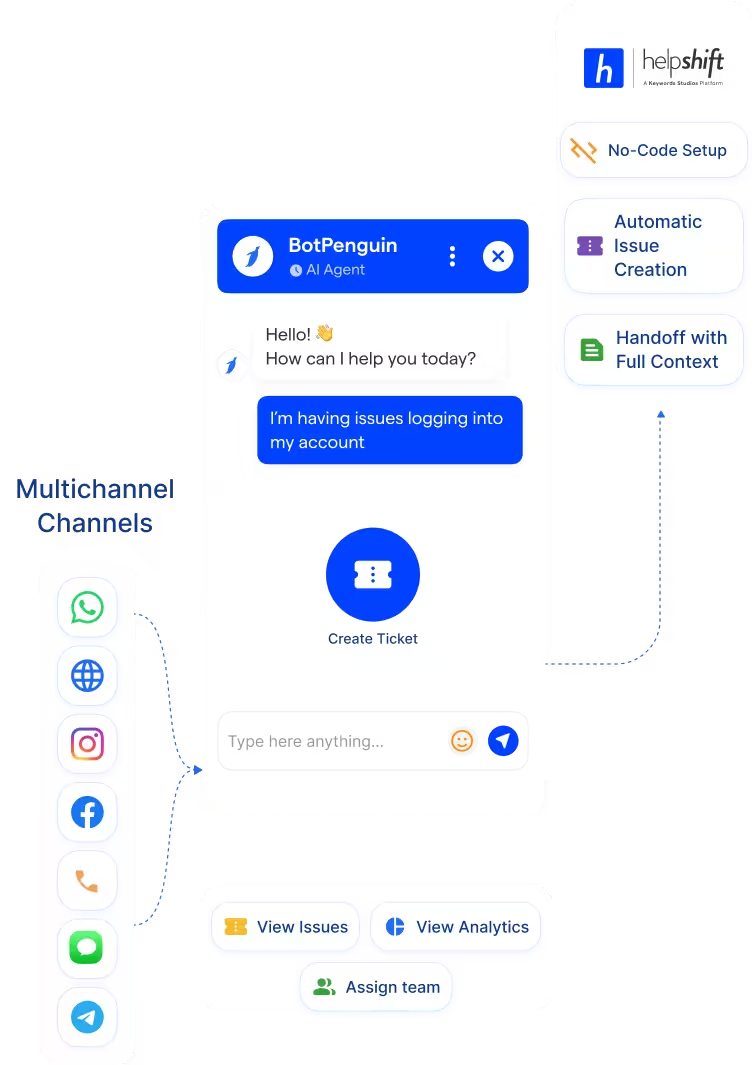
  • External Channel Routing: Conversations from WhatsApp, Instagram, Facebook, Telegram, and your website are routed to Helpshift as issues with the full transcript attached. Your agents pick up every external conversation with complete context already there.
  • No-Code Setup: Connect BotPenguin to Helpshift using your API key and domain. No SDK integration. No developer resource needed. Most teams are live in under ten minutes.
  • Pre-Qualification Before the Issue: The chatbot collects issue type, platform, user details, and urgency before anything reaches Helpshift. Your agents know exactly what they are dealing with before they open the issue.
  • Automatic Issue Creation: Qualifying conversations create Helpshift issues automatically with the correct category, priority, and team assignment already set. No manual triage needed from your support leads.
  • Question Deflection: Common questions get resolved by the chatbot before a Helpshift issue is ever created. Your support queue fills with cases that genuinely need a human, not repetitive questions your FAQ already covers.
  • Handoff With Full Context: When a conversation needs a human, it transfers to Helpshift with the complete conversation history attached. Your agents never ask a user to repeat themselves.
  • Gaming Support Outside the App: Your Helpshift SDK handles in-app support. BotPenguin covers the players who message you on WhatsApp or your website before they find the in-app channel. Common questions get resolved automatically. Complex cases reach Helpshift as categorized issues with full context.
  • SaaS External Support: Resolve product questions and bug reports on your website chatbot automatically. Route complex cases to Helpshift as labeled issues with product area, issue type, and user details pre-captured. Your support team gets context without asking for it.
  • WhatsApp Support at Scale: Add WhatsApp as a support channel without SDK work or issue-based billing surprises. BotPenguin qualifies every WhatsApp conversation and routes only the cases that need a human to Helpshift as a pre-filled issue.
  • Ticket Deflection: Resolve FAQ-level questions automatically on every external channel before they create a Helpshift issue. Only cases that genuinely need your team land in the queue.
  • After-Hours Coverage: BotPenguin keeps responding when your Helpshift team is offline. Straightforward questions get resolved instantly. Complex cases become prioritized Helpshift issues waiting with full context when your agents log in.
  • WhatsApp: Support conversations captured, qualified, and routed to Helpshift as issues with the full chat transcript attached. See WhatsApp Chatbots See WhatsApp Chatbots
  • Website Chatbot: Common questions resolved instantly from your website. Cases that need an agent create a Helpshift issue the moment the conversation ends. See Website Chatbots See Website Chatbots
  • Instagram DMs: Inbound DM support queries captured and routed to Helpshift automatically when a human is needed. See Instagram Chatbots See Instagram Chatbots
  • Facebook Messenger: Messenger conversations handled by the chatbot and routed to Helpshift with full context on escalation. See Facebook Chatbots See Facebook Chatbots
  • Telegram: Telegram conversations that need human handling create Helpshift issues automatically with the full transcript. See Telegram Chatbots See Telegram Chatbots
  • SMS: SMS support messages captured, resolved where possible, and escalated to Helpshift as issues when a human is required.
  • Microsoft Teams: Internal support requests from Teams create Helpshift issues automatically without manual intervention. See Teams Chatbot See Teams Chatbot

Three Steps to Connect BotPenguin with Helpshift in Under 10 Minutes

No SDK integration needed. No developer required. Three steps between you and a no-code chatbot routing external conversations into Helpshift.

  1. 1

    Connect Your Accounts

    Step 1
  2. 2

    Map Your Fields

    Step 2
  3. 3

    Test and Go Live

    Step 3

What Support Teams Achieve with BotPenguin and Helpshift

External Channel Coverage

3x

Issue Deflection

60%

Agent Efficiency

40%

How Support Teams Use BotPenguin With Helpshift

Real ways gaming, SaaS, and mobile-first businesses extend Helpshift with BotPenguin across every external channel.

eCommerce

SaaS

Healthcare

Real Estate

Education

Travel

Insurance

Connect Your AI Agents, Chatbots & Voice Agents to 80+ Tools With Zero Switching Costs

Connect BotPenguin's conversational AI to your CRM, payment gateway, calendar and eCommerce platform in minutes. No-code, no disruption. Your existing tech stack stays exactly as it is.

ChatGPT integration logoPabbly integration logoZoho CRM integration logoHubSpot integration logoTeamgate CRM integration logoZendesk integration logoWebHoper integration logoInsightly CRM integration logoNo CRM integration logoZapier integration logo
  • ChatGPT integration logo
  • Pabbly integration logo
  • Zoho CRM integration logo
  • HubSpot integration logo
  • Teamgate CRM integration logo
  • Zendesk integration logo
  • WebHoper integration logo
  • Insightly CRM integration logo
  • No CRM integration logo
  • Zapier integration logo
  • Copper CRM integration logo

Your App Has Helpshift. Every Other Channel Has BotPenguin

Free to start. No credit card required.