Copper CRM Chatbot Integration That Turns Every Conversation Into a CRM Contact
Copper CRM
How BotPenguin Connects to Copper CRM
AI Agent → Copper CRM
Automation → Copper CRM
What BotPenguin Adds to Copper CRM
Understand what Copper CRM is designed to do, where gaps can exist, and how BotPenguin helps create a more connected, automated customer journey.
What Copper CRM is Built For
The Gap
What BotPenguin Adds
Everything the Copper CRM Chatbot Integration Handles for You

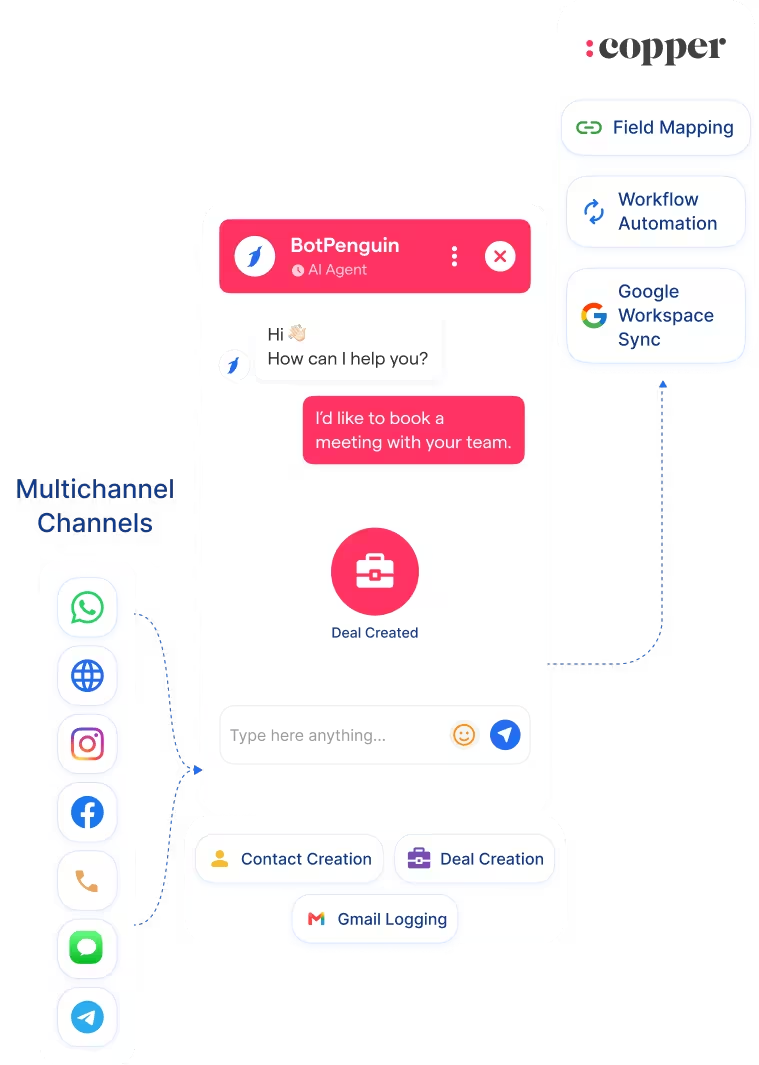
- Auto Contact and Deal Creation: New Copper CRM contacts, leads, and deals created from every AI chatbot or agent interaction. Duplicate prevention built in.
- Custom Field Mapping: Map chatbot or agent answers to any Copper CRM field across contacts, leads, and opportunities your Google Workspace sales process uses.
- Conversation Logging: Full chat transcripts saved against the Copper CRM contact record. Your team gets complete context inside Gmail before the first follow-up.
- Copper CRM Workflow Automation: Chatbot or agent outcomes trigger Copper CRM workflow automation and follow-up sequences without manual input.
- Google Workspace Sync: New Copper CRM records sync with Gmail, Google Calendar, and Google Drive automatically, keeping your entire Google Workspace pipeline current.
- Two-Way Data Sync: Pull existing Copper CRM contact and deal data into your chatbot to personalise conversations for returning leads.
- Lead Qualification: AI chatbot or agent qualifies inbound leads and routes them into the right Copper CRM pipeline stage with key details pre-filled before your team makes contact in Gmail.
- Deal Creation: When a lead shows buying intent via chatbot, BotPenguin creates a Copper CRM deal and syncs it to your Google Workspace pipeline instantly.
- Copper CRM WhatsApp Lead Capture: Capture and qualify inbound leads via WhatsApp and push them into Copper CRM as contacts or leads in real time.
- Google Workspace Activity Logging: Every chatbot or agent conversation logs as a Copper CRM activity, visible inside Gmail without switching tools.
- Re-engagement: Use existing Copper CRM contact data to trigger personalised chatbot follow-ups on WhatsApp or Instagram for cold or inactive leads.
- WhatsApp: Leads qualify and sync to Copper CRM instantly via the Copper CRM WhatsApp integration, full conversation logged. See WhatsApp Chatbots
- Website Chatbot: Visitor enquiries create Copper CRM contacts and deals the moment a chat ends. See Website Chatbots
- Instagram DMs: DM leads qualify and push to Copper CRM the moment they complete your flow. See Instagram Chatbots
- Facebook Messenger: Conversations log directly to Copper CRM contact records. See Facebook Chatbots
- Telegram: Bot conversations sync to Copper CRM as activity notes in real time. See Telegram Chatbots
- SMS: Lead captures map to Copper CRM fields and sync as contacts in real time.
- Microsoft Teams: Internal handoffs and escalations log to Copper CRM from Teams, visible inside Gmail. See Teams Chatbot
Three Steps to Sync BotPenguin with Copper CRM in Under 10 Minutes
No developer or Copper CRM API keys needed. Three steps to a fully synced Google Workspace pipeline.
- 1
Authenticate Both Accounts
Step 1 - 2
Map Your Fields
Step 2 - 3
Test and Go Live
Step 3
What Businesses Achieve with BotPenguin and Copper CRM
Up to 35%
30%
40%+
Copper CRM Chatbot Integration Examples by Industry
E-commerce
Insurance
Consultancy
Healthcare
Connect Your AI Agents, Chatbots & Voice Agents to 80+ Tools With Zero Switching Costs
Connect BotPenguin's conversational AI to your CRM, payment gateway, calendar and eCommerce platform in minutes. No-code, no disruption. Your existing tech stack stays exactly as it is.

Connect Copper CRM to BotPenguin and Wake Up to a Full Google Workspace Pipeline.
Free to start. No credit card required.
Frequently Asked Questions About the Copper CRM Chatbot Integration
Is the Copper CRM chatbot integration free?
Do I need technical skills to connect Copper CRM to BotPenguin?
Does the Copper CRM integration work with WhatsApp?
Does the Copper CRM integration work with Google Workspace?
Does BotPenguin update existing Copper CRM records or only create new ones?
What data does BotPenguin send to Copper CRM?
Which channels does the Copper CRM integration support?
Does the Copper CRM integration support LinkedIn?


