



What Is Zendesk and How Does It Work? A 2026 Guide
Updated at Oct 24, 2026
12 min to read
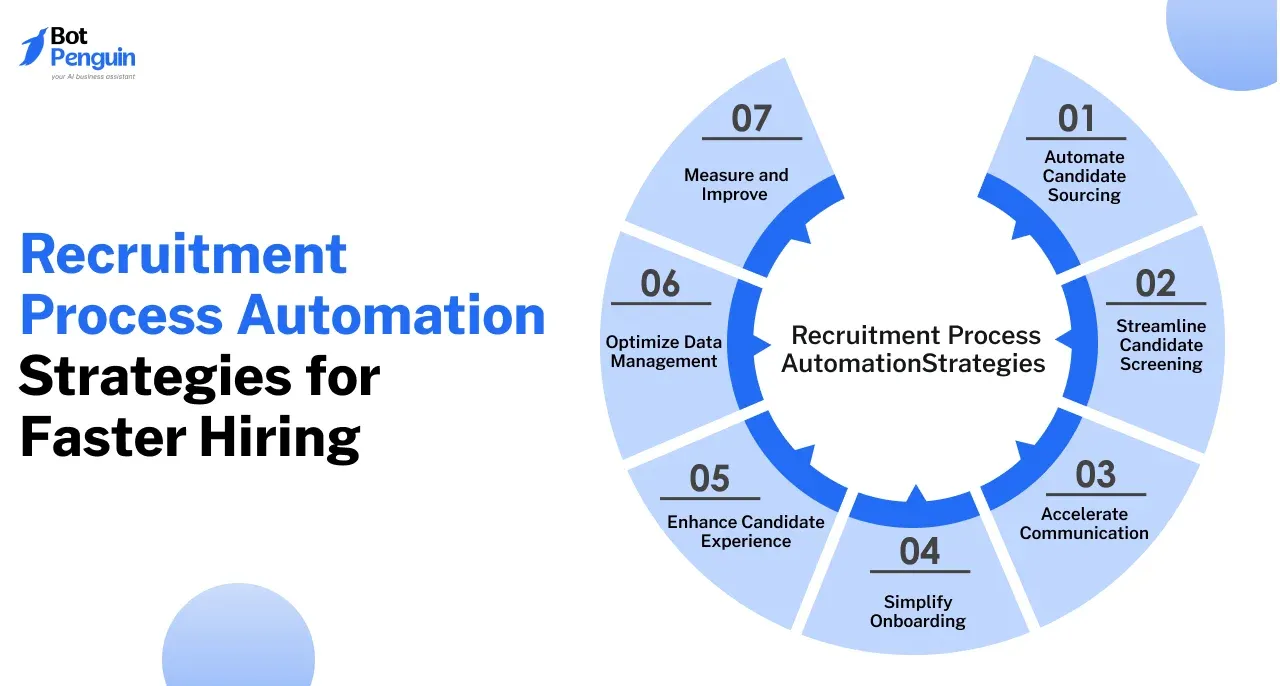
Recruitment process automation uses software, workflows, and AI tools to reduce repetitive work across hiring. Teams can automate candidate sourcing, screening, interview scheduling, communication, data management, and reporting while keeping recruiters in charge of interviews, judgment, compliance, and final hiring decisions.
Hiring teams spend significant time on repetitive tasks such as sourcing, screening, scheduling, and candidate communication.
Recruitment process automation connects these steps through structured workflows, reducing manual effort while keeping recruiters involved where judgment matters.
In 2026, iCIMS and Aptitude Research found that half of organizations said improving efficiency was their primary goal for adopting AI.
Unlike broader recruitment automation, this approach focuses on improving how hiring stages work together. The following strategies show how teams can streamline workflows, improve candidate communication, and move qualified applicants through hiring faster.
Recruitment process automation can reduce repetitive work across sourcing, screening, communication, scheduling, and other hiring stages. The following seven strategies show where structured automation can make hiring workflows faster and easier to manage.
Candidate sourcing is often one of the most time-consuming stages of hiring. Recruiters must identify relevant talent across multiple sources while keeping search criteria aligned with each open role.
Automation can simplify this process by helping teams discover candidates, manage searches, and distribute job openings more efficiently.
Tools such as LinkedIn Recruiter and hireEZ use AI-assisted search to help recruiters find candidates based on skills, experience, location, job titles, and other defined criteria.
LinkedIn Recruiter, for example, can turn natural-language prompts into structured candidate searches, while hireEZ can source across the open web and existing ATS data. Recruiters still decide which candidates to engage or move forward.
Manually posting the same vacancy across multiple job boards creates unnecessary administrative work. Platforms such as Broadbean and SmartRecruiters let teams distribute job openings across multiple channels from one system.
They can also track job-board performance, helping recruiters understand which sources generate stronger applicant pipelines. This makes job distribution a practical part of recruitment workflow automation without requiring teams to manage every posting separately.
Reviewing resumes and applications can become time-consuming, especially for high-volume roles. Recruitment process automation can reduce manual screening work by structuring candidate data and applying consistent, role-specific criteria.
Platforms such as Zoho Recruit and Workday can extract or evaluate candidate information such as skills, experience, education, and qualifications.
This allows recruiters to filter applications more efficiently against predefined job requirements. Resume parsing can speed up the process, but recruiters should still review candidate context before deciding whether to move them forward.
Assessment platforms such as Testlify and Harver can evaluate candidates using role-specific skills tests, cognitive assessments, situational judgment exercises, and other structured criteria.
These tools can help teams compare candidates more consistently, but automated scores should support rather than replace recruiter judgment.
Regular reviews of assessment criteria and outcomes also help identify unintended bias and keep screening decisions relevant to the role.
Timely communication keeps candidates informed and reduces unnecessary follow-ups for recruiters. Automation can handle routine updates, reminders, and scheduling while leaving sensitive or complex conversations to the hiring team.
Platforms such as Workable and Greenhouse support automated candidate communication through email and text messaging. Workable also offers candidate self-scheduling, while Greenhouse supports automated notifications and reminders.
These workflows can confirm interviews, share hiring updates, and keep candidates informed as they move through different stages. This makes communication a practical part of recruitment workflow automation without requiring recruiters to send every update manually.
A recruitment chatbot can answer common candidate questions, collect applicant information, and guide users through early hiring steps.
For example, Paradox’s Olivia supports candidate screening, interview scheduling, and common hiring questions. BotPenguin can similarly handle routine candidate conversations across supported messaging channels and hand chats to a recruiter when human involvement is needed.
Automating these repetitive interactions gives candidates faster responses while allowing recruiters to focus on interviews, evaluation, and relationship-building.
Once a candidate accepts an offer, automated workflows can carry relevant hiring information into onboarding systems and reduce repetitive administrative work.
This creates a smoother handoff between recruitment and the employee’s first days.
Platforms such as BambooHR can automate new-hire packets, onboarding checklists, reminders, and electronic signatures. Candidate information from the ATS can also flow into employee records, reducing repeated data entry.
New hires can complete documents such as tax forms and direct-deposit information before their first day. HR teams should still review workflows to ensure required documents, access controls, and compliance procedures match applicable regulations.
Onboarding platforms such as Enboarder can coordinate tasks, communications, learning, and stakeholder actions across HR, IT, managers, and new employees.
Workflows can also adapt by role, location, and onboarding stage, helping teams deliver relevant information and reminders at the right time.
When connected with hiring systems, this extends recruitment workflow automation beyond offer acceptance and creates a more organized transition from candidate to employee.
Suggested Reading:
How to Create Effective HR Workflow with Examples
A smooth hiring process helps candidates stay informed and reduces uncertainty between application, interview, and final decision stages. Recruitment process automation can support that experience through clearer updates, easier scheduling, and more consistent communication.
Candidate portals give applicants one place to track progress and manage hiring tasks. For example, MyGreenhouse lets candidates view real-time status updates, self-schedule interviews, and complete pre-hire tasks.
This reduces the need for repeated follow-ups while giving candidates more visibility into the hiring process. Recruiters can also automate updates without managing every interaction manually.
Automated notifications can confirm applications, share interview reminders, and communicate next steps throughout the hiring journey. Greenhouse, for example, supports automated email and text notifications as well as candidate self-scheduling.
Recruitment chatbots can complement these workflows by answering common questions, sharing interview information, and handing conversations to recruiters when needed.
Together, these touchpoints make recruitment workflow automation more transparent for candidates while reducing repetitive communication work for hiring teams.
High-volume hiring creates large amounts of candidate data across applications, interviews, assessments, and communication.
Recruitment process automation helps teams centralize this information and keep candidate records updated as applicants move through the hiring process.
Applicant tracking systems such as Manatal and Workday give recruiters a central place to manage candidate profiles, applications, and pipeline stages.
Centralized records make it easier for hiring teams to track candidate progress, share feedback, and identify pending actions. Automated workflows can also reduce duplicate data entry by updating records as candidates move between recruitment stages.
Recruitment platforms can also turn hiring data into actionable reports. For example, Lever provides recruiting analytics for funnel performance, outreach, interviews, and hires, while Workday offers reports for candidate stages, source effectiveness, and candidate drop-off.
Teams can use these insights to identify slow stages, compare sourcing channels, and understand where candidates leave the process.
This helps organizations refine recruitment workflow automation based on actual hiring performance, not assumptions.
Suggested Reading:
Transforming the Recruitment Process With NLP
Review automation continuously rather than treating it as a one-time setup. Tracking hiring performance helps teams identify bottlenecks and adjust workflows when results fall short.
Define the right Key Performance Indicators (KPIs) before evaluating recruitment process automation.
Useful metrics include:
Platforms such as JazzHR provide reports for time-to-hire, pipeline stages, and source quality. Breezy HR also tracks how candidates move through hiring pipelines and how long they spend at each stage.
For example, consistently long screening or interview stages may indicate approval delays, scheduling problems, or unnecessary steps in the workflow.
Once teams identify a bottleneck, they can review the workflow causing it instead of adding more automation by default.
If candidates frequently leave during screening, recruiters might examine application length, assessment requirements, communication gaps, or waiting times. If interview stages move slowly, teams may need to adjust scheduling rules or internal approvals.
Regularly reviewing these metrics helps teams refine automated workflows based on actual hiring performance. It also helps ensure automation continues to support recruiters rather than add unnecessary complexity.
Recruitment process automation works best when it handles repetitive coordination rather than replacing human judgment. Tasks such as scheduling, reminders, data entry, and routine candidate communication suit automation well.
Recruiters should remain closely involved when decisions require context, judgment, or direct candidate interaction.
Interviews, final candidate evaluations, compensation discussions, and hiring decisions should not depend solely on automated recommendations.
AI tools can help organize information or surface relevant candidates, but recruiters should review the context behind those recommendations. Teams exploring more advanced AI agents for recruiting should apply the same principle.
Automated screening, assessments, and candidate scoring require regular review for accuracy, relevance, and unintended bias.
Teams should also define how candidate data is collected, accessed, retained, and shared across connected systems.
Clear human oversight helps ensure recruitment workflow automation supports consistent hiring processes without handing sensitive decisions entirely to software.
Recruitment process automation can reduce repetitive work across sourcing, screening, communication, scheduling, onboarding, and reporting.
The strongest workflows automate coordination while keeping recruiters responsible for judgment, candidate relationships, and final hiring decisions.
Teams should start with clear bottlenecks, track the right KPIs, and refine workflows based on actual hiring performance. This keeps recruitment workflow automation useful instead of adding unnecessary complexity.
BotPenguin can support candidate communication by answering routine questions, collecting information, and handing conversations to recruiters when needed. Used alongside ATS, scheduling, and assessment tools, it can help create a more responsive and organized hiring experience.
Recruitment process automation uses software, workflows, and AI tools to reduce repetitive hiring work across sourcing, screening, scheduling, communication, onboarding, and reporting. It helps recruiters manage tasks faster while keeping human judgment involved in interviews, evaluations, and final hiring decisions.
Automation improves hiring efficiency by reducing manual work across screening, scheduling, communication, data entry, and reporting. Recruiters spend less time on repetitive coordination and more time evaluating candidates, conducting interviews, resolving exceptions, and making informed hiring decisions with relevant context.
Teams can automate candidate sourcing, job distribution, resume parsing, interview scheduling, reminders, status updates, onboarding tasks, data entry, and reporting. Recruiters can also automate screening and assessment workflows, but they should review results before deciding whether to advance candidates or make hiring decisions.
Common recruitment process automation tools include Greenhouse, Workable, Zoho Recruit, BambooHR, and BotPenguin. Each supports different parts of hiring, from applicant tracking and scheduling to onboarding and candidate communication, so the right choice depends on your recruitment workflow and requirements.
Yes. Recruitment process automation can improve candidate experience by providing faster updates, easier scheduling, and more consistent communication throughout hiring. However, poorly designed workflows can create frustration, so teams should monitor candidate feedback, response times, and handoff points for issues.
Yes. Automated hiring can raise concerns around bias, transparency, privacy, and overreliance on algorithmic recommendations. Teams should review screening criteria, monitor outcomes, limit unnecessary data collection, secure candidate information, and keep humans involved in sensitive evaluation and final hiring decisions.
Automate Recruitment Processes
Handle routine candidate questions, collect details, and support faster recruitment workflows without replacing human recruiters entirely with BotPenguin.
Start Hiring SmarterCheckout our related blogs you will love.
Updated at Oct 24, 2026
12 min to read
Updated at Oct 23, 2026
10 min to read
Updated at Oct 16, 2026
8 min to read
Updated at Oct 15, 2026
7 min to read

Updated at Oct 13, 2026
17 min to read

Updated at Oct 12, 2026
15 min to read
Table of Contents

