Communications API Integration
Twilio logo+BotPenguin

Twilio Integration for Voice Calls and SMS With BotPenguin

About This Integration

Twilio

Helpdesk & Support

Three Ways BotPenguin Works With Twilio

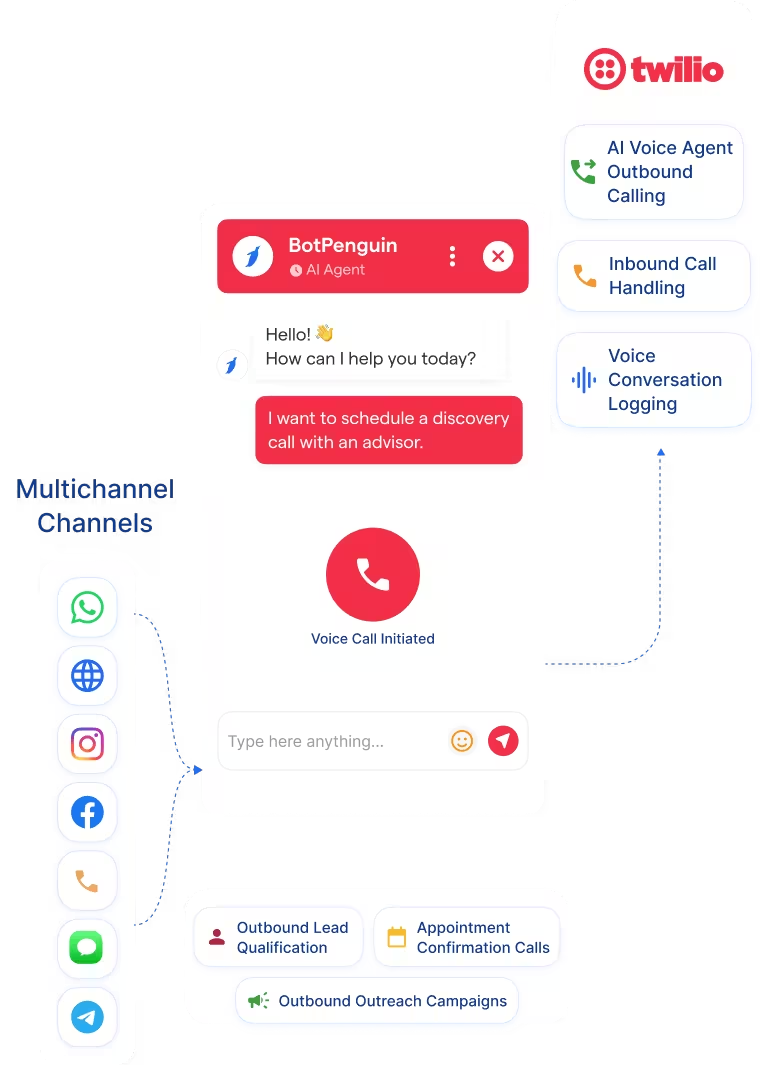
Voice Calling Through Twilio

Voice Calling Through Twilio

Explore AI Voice Agents →
SMS Through Twilio

SMS Through Twilio

View BotPenguin Integrations →
Communication Workflow

Communication Workflow

What BotPenguin Adds to Twilio

Twilio provides the communications infrastructure. BotPenguin adds the customer workflow.

What Twilio Is Built For

The Gap

What BotPenguin Adds

See the Twilio Integration in Action

See where to find your Twilio credentials, connect them with BotPenguin, configure your TwiML App, and test your first communication workflow.

80+
Native integrations available across BotPenguin
2
Confirmed Twilio capabilities in BotPenguin: SMS and Calls
6
Twilio credentials and configuration values used during connection
< 10 min
Target time to complete the standard integration setup

What the Twilio and BotPenguin Integration Handles for You

What the Twilio and BotPenguin Integration Handles for You
  • Voice Calling: Place customer calls through your connected Twilio phone number from BotPenguin once the integration is configured.
  • SMS Communication: Use Twilio to send SMS communications to contacts from your BotPenguin environment.
  • TwiML App Connection: Connect BotPenguin with a Twilio TwiML App using the application URL supplied during setup. BotPenguin's documentation instructs users to set the TwiML App Request URL to the BotPenguin App URL and use POST as the request method.
  • Existing Twilio Account Support: Use an existing Twilio account, phone number, and API credentials instead of provisioning a separate communications platform.
  • Customer-Initiated Contact Protection: BotPenguin's documentation states that users can call or SMS only customers who have shared their phone number.
  • Platform-Level Integration: Twilio is documented as a platform-level BotPenguin integration, meaning it can work across BotPenguin chatbots once connected.
  • Outbound Lead Follow-Up: Call prospects directly when a higher-touch conversation is more appropriate than continuing through chat.
  • Customer Support Calls: Move a customer conversation from messaging into a phone call when the issue needs direct assistance.
  • Appointment Follow-Up: Contact customers by phone or SMS regarding upcoming appointments, booking questions, or scheduling changes.
  • Sales Outreach: Use the contact details captured through BotPenguin to continue qualified sales conversations through voice.
  • SMS Updates: Send text-based updates or follow-up messages using the Twilio connection where SMS is the preferred channel.
  • Voice Calls: Use your connected Twilio phone number to call customers from BotPenguin. Twilio Programmable Voice supports making and receiving calls through Twilio's global voice infrastructure. Explore AI Voice Agents →
  • SMS: Use the Twilio integration to send SMS communications to contacts who have provided their phone number.
  • WhatsApp: BotPenguin supports WhatsApp chatbot workflows separately as part of its omnichannel communication platform. See WhatsApp Chatbots →
  • Website Chatbot: Capture website visitors and move qualified conversations into the appropriate follow-up workflow. See Website Chatbots →
  • Instagram: Automate inbound Instagram conversations through BotPenguin's Instagram chatbot. See Instagram Chatbots →
  • Facebook Messenger: Handle customer conversations and lead capture through Facebook Messenger. See Facebook Chatbots →
  • Telegram: Run automated Telegram conversations and collect customer information. See Telegram Chatbots →
  • Microsoft Teams: Use BotPenguin conversational workflows inside Microsoft Teams for supported internal and business use cases. See Microsoft Teams Chatbots →

Connect Twilio to BotPenguin in Under 10 Minutes

Add your Twilio account details, configure the TwiML App, and test the connection before using it with live contacts.

  1. 1

    Add Your Twilio Account Details

    Step 1
  2. 2

    Configure Your TwiML App

    Step 2
  3. 3

    Connect and Test

    Step 3

What Businesses Achieve With BotPenguin

Response Time

70%+

Qualified Leads

3X

Customer Satisfaction

52%

Twilio Integration Examples by Industry

Ways businesses can combine BotPenguin conversational workflows with Twilio-powered voice and SMS communication.

Ecommerce

SaaS

Healthcare

Real Estate

Education

Travel

Insurance

Agencies

Connect Your AI Agents, Chatbots & Voice Agents to 80+ Tools With Zero Switching Costs

Connect BotPenguin's conversational AI to your CRM, payment gateway, calendar and eCommerce platform in minutes. No-code, no disruption. Your existing tech stack stays exactly as it is.

ChatGPT integration logoPabbly integration logoZoho CRM integration logoHubSpot integration logoTeamgate CRM integration logoZendesk integration logoWebHoper integration logoInsightly CRM integration logoNo CRM integration logoZapier integration logo
  • ChatGPT integration logo
  • Pabbly integration logo
  • Zoho CRM integration logo
  • HubSpot integration logo
  • Teamgate CRM integration logo
  • Zendesk integration logo
  • WebHoper integration logo
  • Insightly CRM integration logo
  • No CRM integration logo
  • Zapier integration logo
  • Copper CRM integration logo

Add Twilio Voice and SMS to Your BotPenguin Workflow

Connect your Twilio account and continue customer conversations through calls and SMS without building a separate communications workflow.