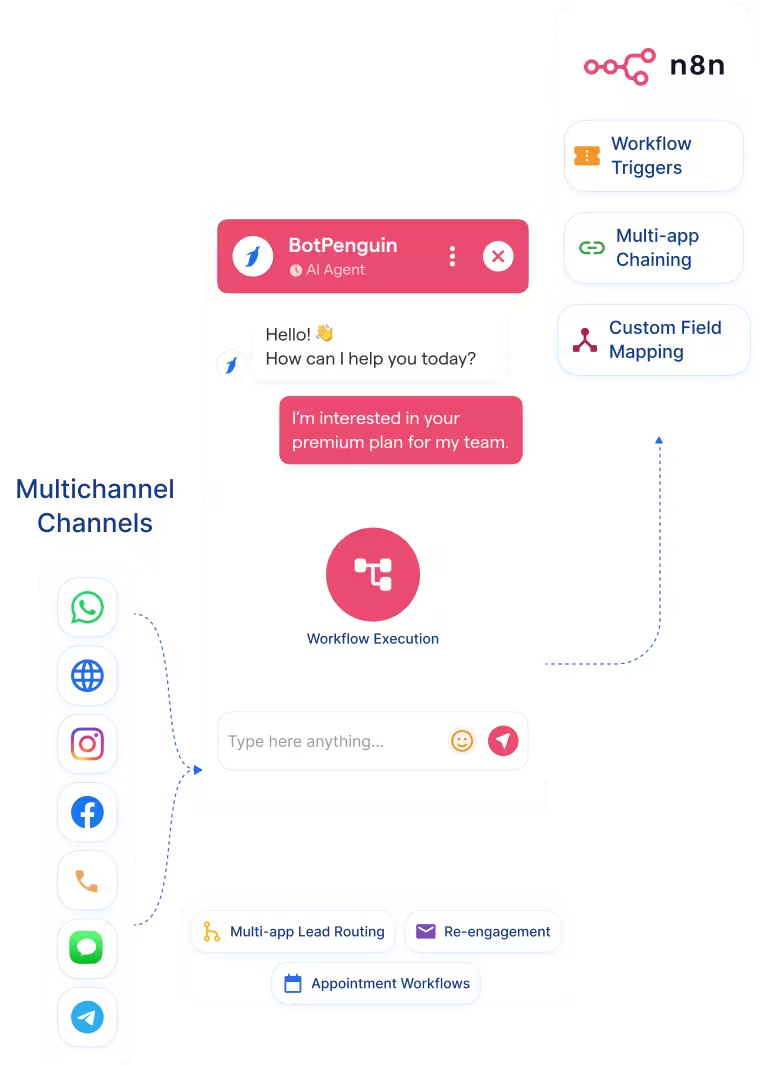
AI Chatbot → n8n
Capture conversation data across WhatsApp, website, Instagram, and more. Trigger the right n8n workflow with mapped answers.
See AI ChatbotsEvery BotPenguin chatbot conversation on WhatsApp, website chat, or Instagram can trigger an n8n workflow with mapped data and context attached.
This n8n BotPenguin integration connects BotPenguin conversations with n8n workflow automation. It helps teams trigger workflows from WhatsApp, website chat, Instagram, and other customer channels. n8n helps technical teams build workflow automations across apps, services, APIs, and AI systems. It works best once a clean trigger and structured input are available.
BotPenguin closes the conversation trigger gap. It captures chatbot responses, customer details, event context, and qualification data before routing them to the appropriate n8n workflow. This setup helps teams connect BotPenguin to n8n without having to build every chatbot trigger from scratch.
Capture conversation data across WhatsApp, website, Instagram, and more. Trigger the right n8n workflow with mapped answers.
See AI ChatbotsLet an AI agent qualify the conversation first. Then route automation-ready context into the correct n8n workflow.
See AI AgentsTrigger n8n workflow automation from chatbot events. Lead captured, meeting booked, support escalated, or product interest captured can start the workflow.
View Integrationsn8n is built for workflow automation across connected apps and services. Teams use it to move data, trigger actions, and build custom automation logic. It works well once a workflow trigger starts. Then n8n can route data across the tools connected to that workflow.
Many automation triggers begin inside customer conversations. A user may ask a product question, request a demo, upload details, or need support. Those messages can remain outside n8n unless properly configured. Someone may still need to copy details or trigger the workflow manually.
BotPenguin becomes the conversational trigger layer for n8n. It captures structured data before the workflow starts. Every qualified chatbot event can trigger the right n8n workflow. Your automation receives mapped answers instead of scattered chat messages.

No developer needed from the BotPenguin side. Three steps connect chatbot conversations with n8n workflow automation.
Log in to BotPenguin and open your bot settings. Connect your n8n workflow trigger where your setup supports it.
Step 1Choose which chatbot events trigger which n8n workflow. Map names, emails, phone numbers, answers, source data, and conversation context.
Step 2Send a test conversation through your chatbot. Confirm that the correct n8n workflow runs with the correct data, then enable it.
Step 33x
faster response times, while qualified leads can trigger CRM, spreadsheet, and team notification workflows through n8n.
35%
average cart recovery rate, while abandoned cart conversations can trigger follow-up and sales workflows through n8n.
5x
monthly lead growth, with qualified buyer conversations ready to trigger routing, alerts, and follow-up workflows through n8n.
Trigger workflows for abandoned-cart inquiries, lead logging, and WhatsApp follow-up.
Route patient inquiries across scheduling, CRM, and team notification workflows.
Send qualified buyer leads to agents, trackers, and follow-up tools automatically.
Log admissions inquiries across CRM, sheets, and counselor notification workflows.
Trigger booking, confirmation, and amendment workflows from chatbot conversations.
Push trial signups into CRM, Slack, spreadsheets, and onboarding workflows.
Trigger policy inquiry workflows and route cases to the right team.
Route client leads into CRM, reporting, and team notification workflows through n8n.
Connect BotPenguin's conversational AI to your CRM, payment gateway, calendar and eCommerce platform in minutes. No-code, no disruption. Your existing tech stack stays exactly as it is.
Free to start. No credit card required. Live in under 10 minutes.
Is the n8n BotPenguin integration free?
The n8n integration is included on paid BotPenguin plans. You can also start with a free BotPenguin plan and test the chatbot before upgrading. View BotPenguin pricing
Do I need to code to connect BotPenguin to n8n?
No. The integration is no-code from the BotPenguin side. You can connect n8n, map chatbot answers to workflow inputs, send a test conversation, and go live.
Does this support WhatsApp chatbot workflows?
Yes. BotPenguin WhatsApp conversations can trigger n8n workflows where your setup supports it.
How many apps can I reach through n8n from BotPenguin?
n8n connects to hundreds of apps and services. For the complete catalog and broader platform context, see the full list of n8n integrations.
What chatbot data gets sent to n8n?
Only the data you map. Name, email, phone, selected answers, event type, source, and conversation context can route into n8n.
Can BotPenguin AI agents work with n8n?
Yes. BotPenguin AI agents can qualify conversations before triggering the right n8n workflow with structured context.
How is this different from a generic n8n webhook?
A generic webhook passes an event. BotPenguin passes a qualified chatbot conversation with mapped answers, source context, and automation-ready data.