File Storage and Document Management Integration
Google Drive+BotPenguin

Google Drive Chatbot Integration That Saves Files and Powers AI Agents

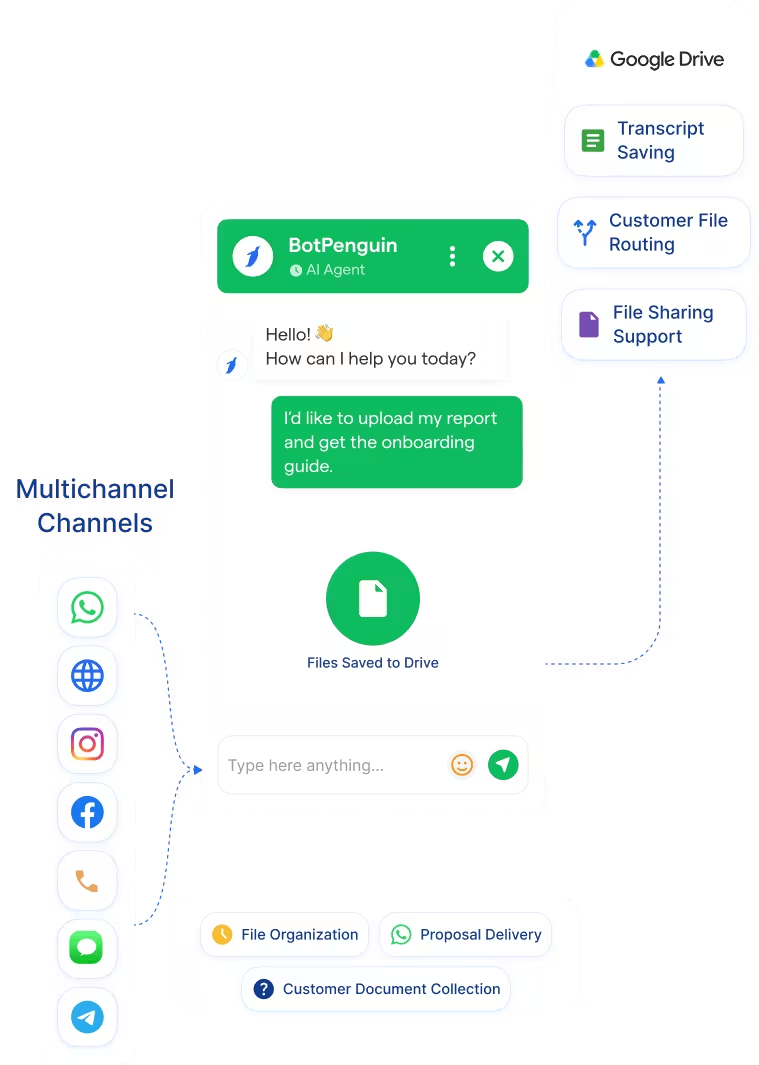
Auto-save chatbot transcripts, customer-shared files, and conversation records to Google Drive. Then use Drive documents to support AI agent answers across customer channels.

About This Integration

Google Drive

Helpdesk & Support

Google Drive helps teams store, organize, share, and collaborate on files. It works as a central document layer for proposals, contracts, PDFs, guides, SOPs, and internal resources. The BotPenguin Google Drive integration connects chatbot conversations with your Drive workspace. It helps save chatbot transcripts, customer-shared files, and captured documents into organized Drive folders.

This google drive chatbot integration also supports AI agent knowledge workflows. You can use selected Google Drive content to help AI agents answer questions from approved business documents. Your team gets cleaner file storage and better knowledge access. Customer conversations, uploaded files, and useful documents stay connected to your chatbot workflow.

How BotPenguin Connects to Google Drive

Chatbot Files → Google Drive

Chatbot Files → Google Drive

Save chatbot transcripts, customer-shared documents, images, PDFs, and lead files to selected Google Drive folders.

See AI Chatbots
Google Drive → AI Agent Knowledge

Google Drive → AI Agent Knowledge

Use Drive documents as a knowledge source for BotPenguin AI agents where your setup supports it.

See AI Agents
Automation → Google Drive

Automation → Google Drive

Trigger Google Drive automation from chatbot events. New lead captured, file uploaded, onboarding started, or document requested can start the right workflow.

View Integrations

What BotPenguin Adds to Google Drive

What Google Drive is Built For

Google Drive is built for cloud file storage and collaboration. Teams use it to store, share, organize, and manage documents in a single workspace. It works well once files are already saved in the right place. Shared folders also help teams collaborate on documents and assets.

The Gap

Chatbot conversations create useful files and records. Customers may upload documents, share images, ask for proposals, or complete important support flows. Those files and transcripts can stay inside chat histories. Someone may still need to download, rename, and upload them manually.

What BotPenguin Adds

BotPenguin becomes the conversational file-routing layer for Google Drive. It connects chatbot activity with Drive folders and document workflows. You can save chatbot transcripts and customer-shared files into Google Drive. You can also use Drive documents to support AI agent answers where configured.

80+
Native integrations available on BotPenguin
Files + Knowledge
Google Drive content BotPenguin can help store, route, or use
0
Lines of code needed to connect Google Drive to BotPenguin
<10 min
From signup to your first Google Drive chatbot workflow

Everything the Google Drive Integration Handles for You

Everything the Google Drive Integration Handles for You
  • Transcript Saving: Save chatbot conversation transcripts to selected Google Drive folders where your setup supports it.
  • Customer File Routing: Route uploaded PDFs, images, documents, and files from chatbot conversations into Drive folders.
  • Drive Knowledge Source: Use selected Drive documents as a knowledge source for BotPenguin AI agents.
  • Folder Organization: Route different chatbot outputs to different folders based on flow, channel, customer type, or inquiry type.
  • File Sharing Support: Trigger document sharing workflows from chatbot events where your setup supports it.
  • Google Drive Automation: Use chatbot events to support file storage, document routing, and knowledge workflows.
  • Transcript Archiving: Save chatbot conversation records to Drive for review, training, and operational visibility.
  • Customer Document Collection: Let customers submit files via chatbot flows and route them to the appropriate Drive folder.
  • AI Agent from SOPs: Use Drive SOPs, guides, and knowledge documents to support AI agent responses.
  • Proposal Delivery: Trigger proposal or onboarding document workflows after chatbot qualification.
  • Client File Organization: Store files, transcripts, and lead documents by customer, case, or campaign.
  • WhatsApp: Google Drive WhatsApp integration can save WhatsApp chatbot files and transcripts to Drive. WhatsApp integration
  • Website Chatbot: Website chatbot uploads and transcripts can be routed to Google Drive. See Website Chatbots See Website Chatbots
  • Instagram DMs: Instagram chatbot conversations can support routing of files and transcripts. See Instagram Chatbots See Instagram Chatbots
  • Facebook Messenger: Messenger conversations can route files or transcripts into Drive workflows. See Facebook Chatbots See Facebook Chatbots
  • Telegram: Telegram bot conversations can support Drive file-routing workflows. See Telegram Chatbots See Telegram Chatbots
  • SMS: SMS chatbot events can support transcript and record storage workflows.
  • Microsoft Teams: Internal Teams workflows can route files or notes into Drive. See Teams Chatbot See Teams Chatbot

Three Steps to Connect BotPenguin with Google Drive in Under 10 Minutes

No developer needed. Three steps connect your BotPenguin chatbot to Google Drive with mapped storage and knowledge workflows.

  1. 1

    Authenticate Both Accounts

    Step 1
  2. 2

    Configure Drive Workflows

    Step 2
  3. 3

    Test and Go Live

    Step 3

What Teams Achieve with BotPenguin and Google Drive

Professional Services

70%

of billable hours reclaimed in a professional services use case, while client files and transcripts stay organized for easier access.

SaaS

3x

faster response time, while approved product guides and onboarding documents can support more informed AI agent answers.

Real Estate

70%

fewer unattended leads, while buyer documents, property files, and conversation records stay organized for agent follow-up.

Connect Your AI Chatbot, WhatsApp Bot and Automation Workflows to 80+ Tools With Zero Switching Costs

Connect BotPenguin's conversational AI to your CRM, payment gateway, calendar and eCommerce platform in minutes. No-code, no disruption. Your existing tech stack stays exactly as it is.

ChatGPT integration logoPabbly integration logoZoho CRM integration logoHubSpot integration logoTeamgate CRM integration logoZendesk integration logoWebHoper integration logoInsightly CRM integration logoNo CRM integration logoZapier integration logo
  • ChatGPT integration logo
  • Pabbly integration logo
  • Zoho CRM integration logo
  • HubSpot integration logo
  • Teamgate CRM integration logo
  • Zendesk integration logo
  • WebHoper integration logo
  • Insightly CRM integration logo
  • No CRM integration logo
  • Zapier integration logo
  • Copper CRM integration logo

Connect Google Drive to Your Chatbot Today

Free to start. No credit card required. Live under 10 minutes.

Frequently Asked Questions About the Google Drive Chatbot Integration