Calendly Chatbot Integration That Turns Chats Into Confirmed Meetings
Calendly
How BotPenguin Connects to Calendly
AI Agent → Calendly
Automation → Calendly
What BotPenguin Adds to Calendly
Understand what Calendly is designed to do, where gaps can exist, and how BotPenguin helps create a more connected, automated customer journey.
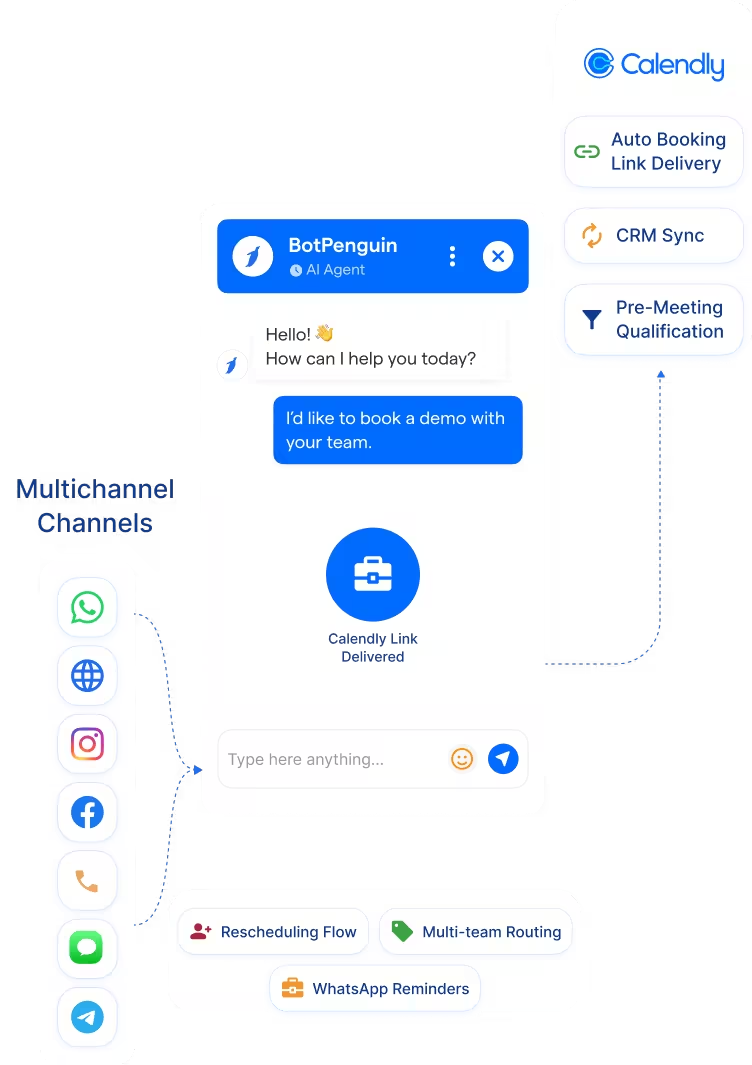
What Calendly is Built For
The Gap
What BotPenguin Adds
Everything the Calendly Chatbot Integration Handles for You

- Auto Booking Link Delivery: Chatbot delivers the right Calendly booking link based on prospect qualification, meeting type, team member, or service area.
- Meeting Type Routing: Route prospects to the correct Calendly event type based on chatbot answers, discovery call, demo, support, or consultation.
- Pre-Meeting Qualification: Qualify the prospect fully before delivering the Calendly link, so every meeting is with a qualified lead.
- WhatsApp Reminder Sequences: BotPenguin’s Calendly WhatsApp integration triggers WhatsApp reminders before Calendly meetings to reduce no-shows.
- Cancellation and Rescheduling Flows: Trigger chatbot rescheduling flows from Calendly cancellation events.
- CRM Sync: Log Calendly bookings and chatbot qualification data to your connected CRM automatically.
- Demo Booking: Website chatbot qualifies a trial user and immediately delivers the product demo Calendly link, without sales rep involvement.
- After-Hours Meeting Capture: WhatsApp chatbot captures meeting requests at any hour and delivers the Calendly booking link instantly.
- No-Show Reduction: Send WhatsApp reminders 24 hours and 1 hour before a Calendly meeting, reducing no-show rates automatically.
- Multi-Team Routing: Route prospects to the right team member's Calendly page based on chatbot qualification, by region, product, or deal size.
- Post-Event Booking: Trigger a Calendly booking flow via WhatsApp chatbot after a webinar or event to capture interest while it is still fresh.
- WhatsApp: Meeting requests qualify and sync to Calendly instantly via the Calendly WhatsApp integration, full conversation logged. See WhatsApp Chatbots See WhatsApp Chatbots
- Website Chatbot: Visitor enquiries trigger Calendly booking links the moment a chat ends. See Website Chatbots See Website Chatbots
- Instagram DMs: DM leads qualify and push to Calendly the moment they complete your flow. See Instagram Chatbots See Instagram Chatbots
- Facebook Messenger: Conversations log directly to Calendly booking records. See Facebook Chatbots See Facebook Chatbots
- Telegram: Bot conversations sync to Calendly as booking activity in real time. See Telegram Chatbots See Telegram Chatbots
- SMS: Meeting captures map to Calendly fields and sync as bookings in real time.
- Microsoft Teams: Internal handoffs and escalations log to Calendly from Teams, visible inside your team's workflow. See Teams Chatbot See Teams Chatbot
Three Steps to Sync BotPenguin with Calendly in Under 10 Minutes
No developer or Calendly API keys needed. Three steps to a fully synced booking flow.
- 1
Authenticate Both Accounts
Step 1 - 2
Map Your Fields
Step 2 - 3
Test and Go Live
Step 3
What Businesses Achieve with BotPenguin and Calendly
Up to 35%
3.2x
Up to 40%
Calendly Chatbot Integration Examples by Industry
Consultancy
SaaS
Real Estate
Healthcare
Education
E-commerce
Connect Your AI Agents, Chatbots & Voice Agents to 80+ Tools With Zero Switching Costs
Connect BotPenguin's conversational AI to your CRM, payment gateway, calendar and eCommerce platform in minutes. No-code, no disruption. Your existing tech stack stays exactly as it is.
Connect Calendly to BotPenguin and Never Chase a Booking Link Again
Free to start. No credit card required.
Frequently Asked Questions About the Calendly Chatbot Integration
Is the Calendly chatbot integration free?
Do I need to code to connect Calendly to BotPenguin?
Does the Calendly integration work with WhatsApp?
Can BotPenguin route prospects to different Calendly event types based on qualification?
Can BotPenguin send WhatsApp reminders for Calendly meetings?
How is this different from Google Calendar integration?
Can clients reschedule or cancel a Calendly meeting through the chatbot?
Does the Calendly integration support multiple team members or calendars?



