Scheduling & Calendar Automation
Google Calendar+BotPenguin

Google Calendar Chatbot Integration That Turns Chats Into Booked Meetings

Let your BotPenguin AI chatbot or agent capture meeting requests on WhatsApp, your website, or Instagram and create Google Calendar bookings automatically. No manual scheduling, no missed booking intent.

About This Integration

Google Calendar

Helpdesk & Support

Google Calendar is a scheduling platform for meetings, events, reminders, attendees, and shared team calendars. It helps businesses manage appointment booking and availability across teams, locations, and devices. But when meeting requests come through WhatsApp, Instagram, or website chat, creating calendar events can still become manual.

The BotPenguin Google Calendar chatbot integration removes that step. Your AI chatbot or agent captures booking intent, collects contact details, confirms preferred time slots, and creates Google Calendar events where configured. With BotPenguin’s Google Calendar WhatsApp integration, leads can move from chat to booked meeting without manual scheduling. Available on all paid plans; test it free during your trial.

How BotPenguin Connects to Google Calendar

AI Chatbot → Google Calendar

AI Chatbot → Google Calendar

Capture meeting requests on WhatsApp, website chat, Instagram, and more. BotPenguin collects contact details, preferred time, booking purpose, and creates Google Calendar events where configured.

See AI Chatbots
AI Agent → Google Calendar

AI Agent → Google Calendar

Your AI agent handles booking enquiries in natural conversation, qualifies intent, confirms meeting details, and prepares the Google Calendar booking before the chat ends.

See AI Agents
Automation → Google Calendar

Automation → Google Calendar

Trigger Google Calendar automation from chatbot or agent events. Meeting requested, slot selected, appointment booked, reminder sent, or booking details updated through real-time workflows.

See Automations

What BotPenguin Adds to Google Calendar

Understand what Google Calendar is designed to do, where gaps can exist, and how BotPenguin helps create a more connected, automated customer journey.
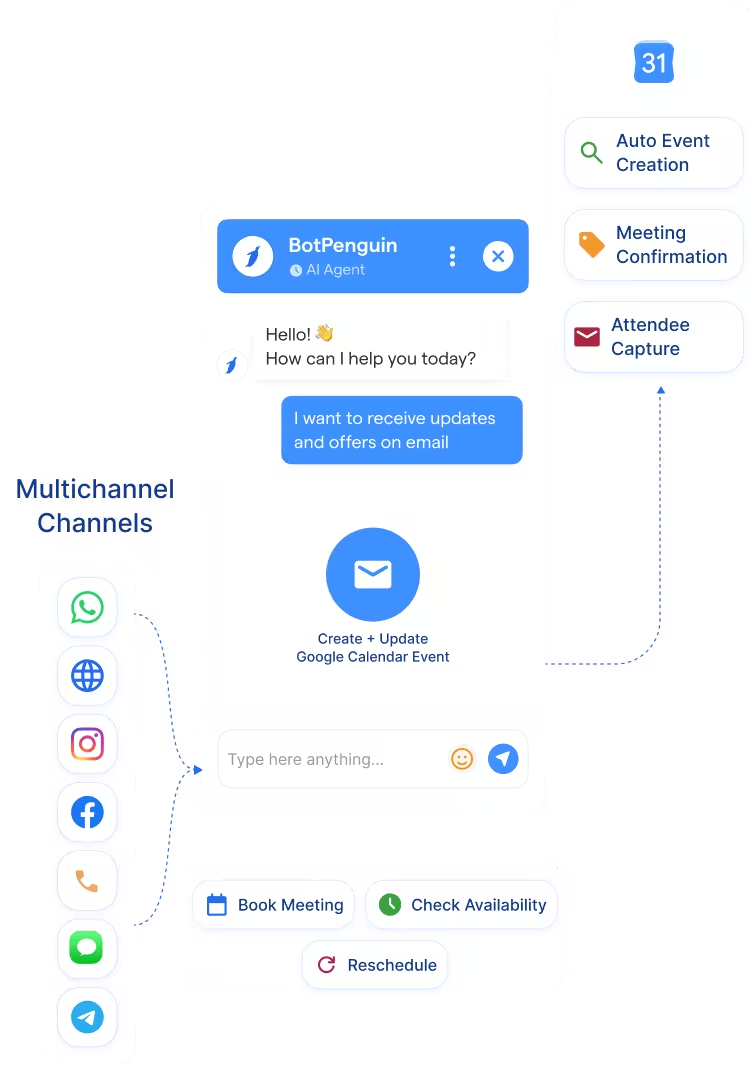
What Google Calendar is Built For

Google Calendar is built to manage schedules once a meeting or appointment is ready to book. It handles calendar events, attendees, reminders, recurring meetings, video call links, and shared team calendars across devices.

The Gap

Google Calendar manages the booking well, but the booking request often starts somewhere else. Prospects may ask to meet on WhatsApp, Instagram, or website chat. Without a conversational layer, someone still has to capture details, confirm intent, check slots, and create the event.

What BotPenguin Adds

BotPenguin adds that conversational booking layer. Your AI chatbot or agent captures meeting intent, collects contact details, confirms booking information, and creates a Google Calendar event where configured. Leads move from interested to booked without manual back-and-forth.

80+
Native Integrations Available on BotPenguin
6
Google Calendar Data BotPenguin Can Sync: events, attendees, booking details, reminders, meeting links, and event descriptions
0
Lines of Code Needed to Connect Google Calendar to BotPenguin
<10 min
From Signup to Your First Test Calendar Event in Google Calendar

Everything the Google Calendar Chatbot Integration Handles for You

Everything the Google Calendar Chatbot Integration Handles for You
  • Auto Event Creation: Create Google Calendar events from chatbot or AI agent booking requests, with meeting details attached.
  • Booking Detail Mapping: Map chatbot answers to event title, date, time, attendee details, meeting purpose, and event description.
  • Attendee Capture: Collect name, email, phone number, and booking intent before adding attendees to the calendar event.
  • Meeting Confirmation: Send booking confirmation details after the Google Calendar event is created, where configured.
  • Google Calendar Automation: Trigger booking workflows from chatbot events like meeting requested, slot selected, or appointment confirmed.
  • Calendar Data Lookup: Use Google Calendar availability or booking data to support scheduling conversations, where configured.
  • Meeting Booking: Turn chatbot-qualified enquiries into Google Calendar events with contact details and meeting purpose attached.
  • Appointment Scheduling: Let users book appointments from WhatsApp, website chat, or Instagram without manual back-and-forth.
  • Google Calendar Booking Bot: Capture booking intent, preferred time, attendee details, and meeting notes through chatbot conversations.
  • After-Hours Scheduling: Capture meeting requests 24/7 and create Google Calendar bookings when your team is offline.
  • Booking Reminders: Trigger reminder workflows after an appointment is booked, where configured.
  • Reschedule Requests: Collect rescheduling details through chatbot and update the booking flow, where configured.
  • WhatsApp: Capture meeting requests through BotPenguin’s Google Calendar WhatsApp integration and create calendar bookings. See WhatsApp Chatbots
  • Website Chatbot: Let website visitors request meetings and book appointments through chatbot conversations. See Website Chatbots
  • Instagram DMs: Capture Instagram booking enquiries and move users toward confirmed Google Calendar events. See Instagram Chatbots
  • Facebook Messenger: Turn Messenger conversations into appointment requests with contact details attached. See Facebook Chatbots
  • Telegram: Collect booking intent, preferred time, and attendee details from Telegram conversations. See Telegram Chatbots
  • SMS: Capture short appointment requests and route them into the Google Calendar booking flow.
  • Microsoft Teams: Send internal booking handoffs or appointment updates to Teams, where configured. See Teams Chatbot

Three Steps to Sync BotPenguin with Google Calendar in Under 10 Minutes

No developer needed. Three steps connect BotPenguin to Google Calendar and prepare your first booking flow.

  1. 1

    Authenticate Both Accounts

    Step 1
  2. 2

    Map Your Fields

    Step 2
  3. 3

    Test and Go Live

    Step 3

What Businesses Achieve with BotPenguin and Google Calendar

Speed-to-Lead

21x

more likely to qualify a lead when businesses respond within 5 minutes instead of waiting 30 minutes. BotPenguin helps capture and route booking intent instantly.

No-Show Reduction

21%

lower no-show likelihood among patients with active digital scheduling access at the time of booking. Chat-led reminders can support stronger appointment attendance.

Online Booking Efficiency

1.8% vs 5.9%

no-show rate for online-scheduled appointments compared with offline-scheduled appointments in a private practice study. Google Calendar automation helps reduce manual booking friction.

Connect Your AI Chatbot, WhatsApp Bot and Automation Workflows to 80+ Tools With Zero Switching Costs

Connect BotPenguin's conversational AI to your CRM, payment gateway, calendar and eCommerce platform in minutes. No-code, no disruption. Your existing tech stack stays exactly as it is.

ChatGPT integration logoPabbly integration logoZoho CRM integration logoHubSpot integration logoTeamgate CRM integration logoZendesk integration logoWebHoper integration logoInsightly CRM integration logoNo CRM integration logoZapier integration logo
  • ChatGPT integration logo
  • Pabbly integration logo
  • Zoho CRM integration logo
  • HubSpot integration logo
  • Teamgate CRM integration logo
  • Zendesk integration logo
  • WebHoper integration logo
  • Insightly CRM integration logo
  • No CRM integration logo
  • Zapier integration logo
  • Copper CRM integration logo

Stop Scheduling Meetings Manually. Let BotPenguin Book Them Into Google Calendar

Free to start. No credit card required.

Frequently Asked Questions About Google Calendar Chatbot Integration



