


WhatsApp Chatbot for Ecommerce: Use Cases, Examples, and Setup
Updated at Oct 7, 2026
12 min to read
Every ecommerce brand is running the same broken playbook.
Spend on ads, watch nearly 70% of shoppers abandon their carts (Statista, 2025), send follow-up emails nobody opens, and repeat. CAC climbs. Revenue leaks.
The problem is not your product. It is the channel.
That is why mobile-first buyers are shifting where they engage with brands. It’s also why a WhatsApp ecommerce strategy is how growth-focused D2C businesses are closing the gap.
This guide breaks down exactly how to use WhatsApp to recover lost ecommerce revenue, automate the full customer journey, and build a retention channel that actually converts.
From API setup and Shopify integrations to WhatsApp automation workflows and performance benchmarks, everything you need to implement it is here.
The traffic is there. The ad spend is there. The problem is what happens after the click.
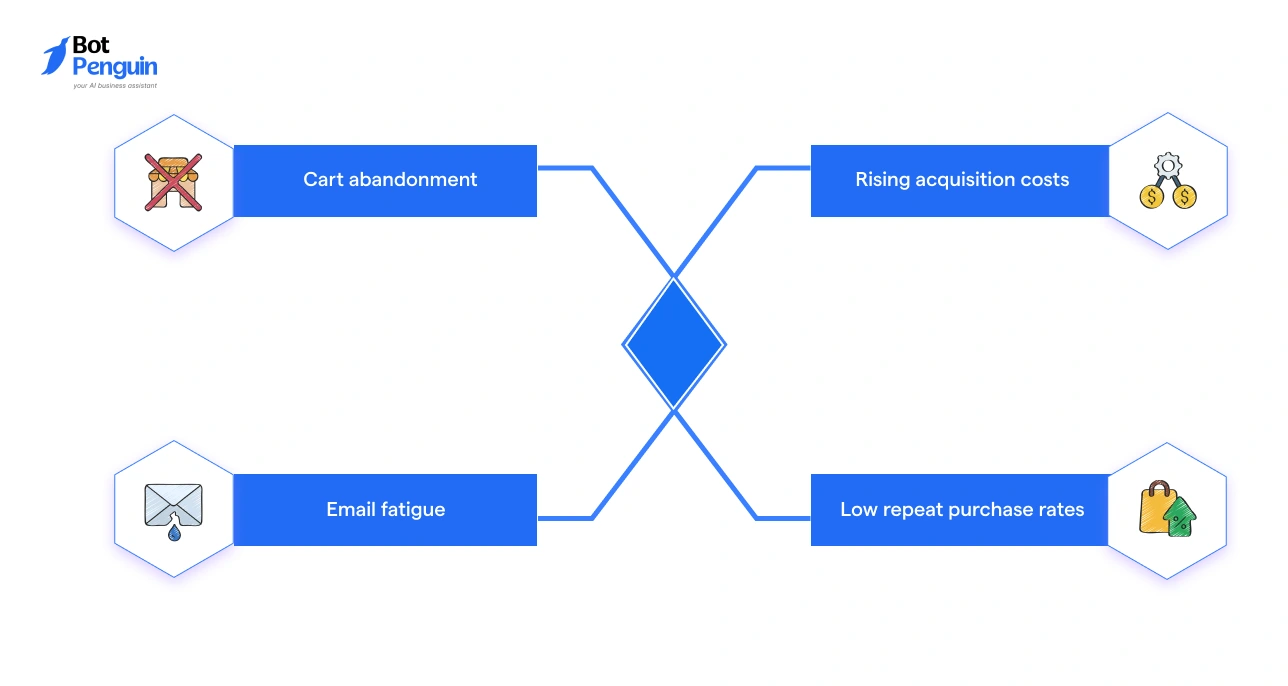
Most ecommerce brands rely on the same set of channels: email, SMS, and paid ads. But each one is showing cracks.
Here is why revenue is slipping:
The problem is not the product or the offer. These channels were built for reach, not for real-time, personal engagement that turns browsers into buyers.
Sources: Mailchimp Email Marketing Benchmarks (2024), Klaviyo SMS Benchmark Report (2024), WhatsApp Business Platform Data via Meta (2024). Figures represent industry averages and may vary by sector and campaign type.
WhatsApp does not replace email or SMS. It fills the gap in conversion that they leave open.
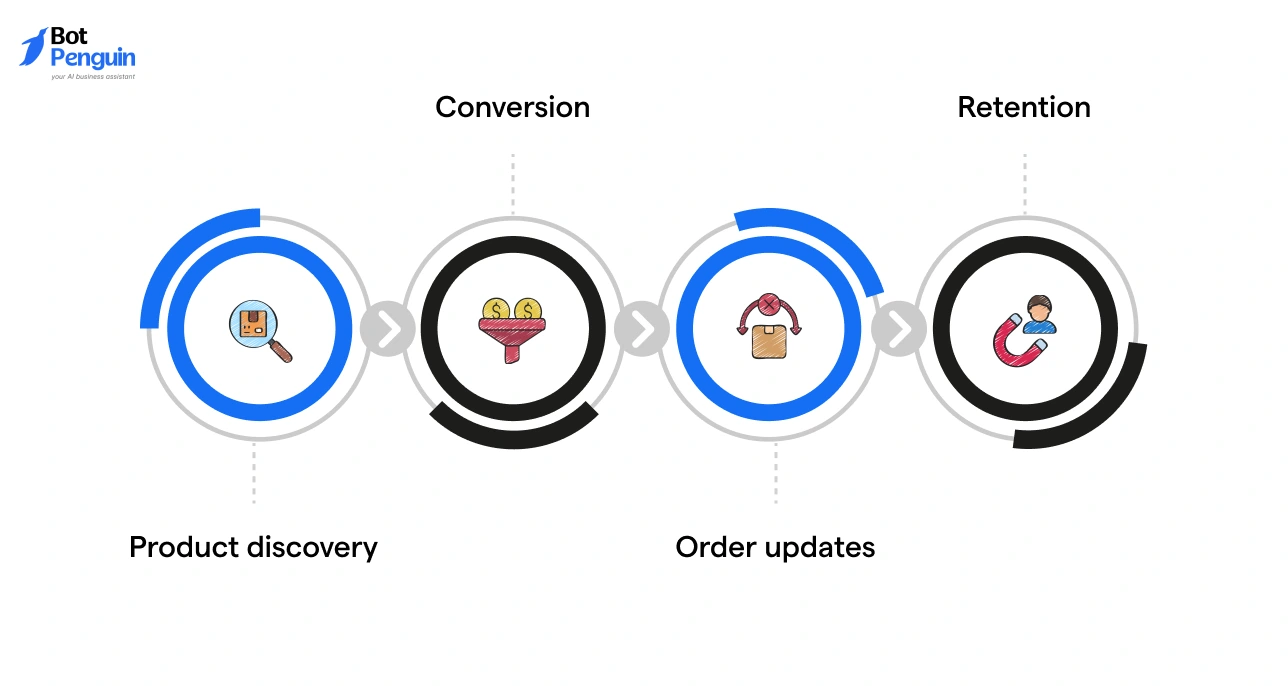
WhatsApp ecommerce is the use of WhatsApp as an active commerce channel, not just for support, but for selling, converting, and retaining customers across the entire buyer journey.
The core shift is from broadcast to conversation. Instead of pushing messages at customers and hoping they click, brands engage in two-way communication that feels personal and immediate.
Here is what it actually enables:
It is not a replacement for your store. It is the conversational layer that connects your customer to it, at every stage.
WhatsApp offers two distinct products for ecommerce business automation. They share the same interface but serve very different operational needs.
Choosing the wrong one early means hitting a ceiling exactly when your store starts to scale.
The decision comes down to two things: order volume and automation depth.
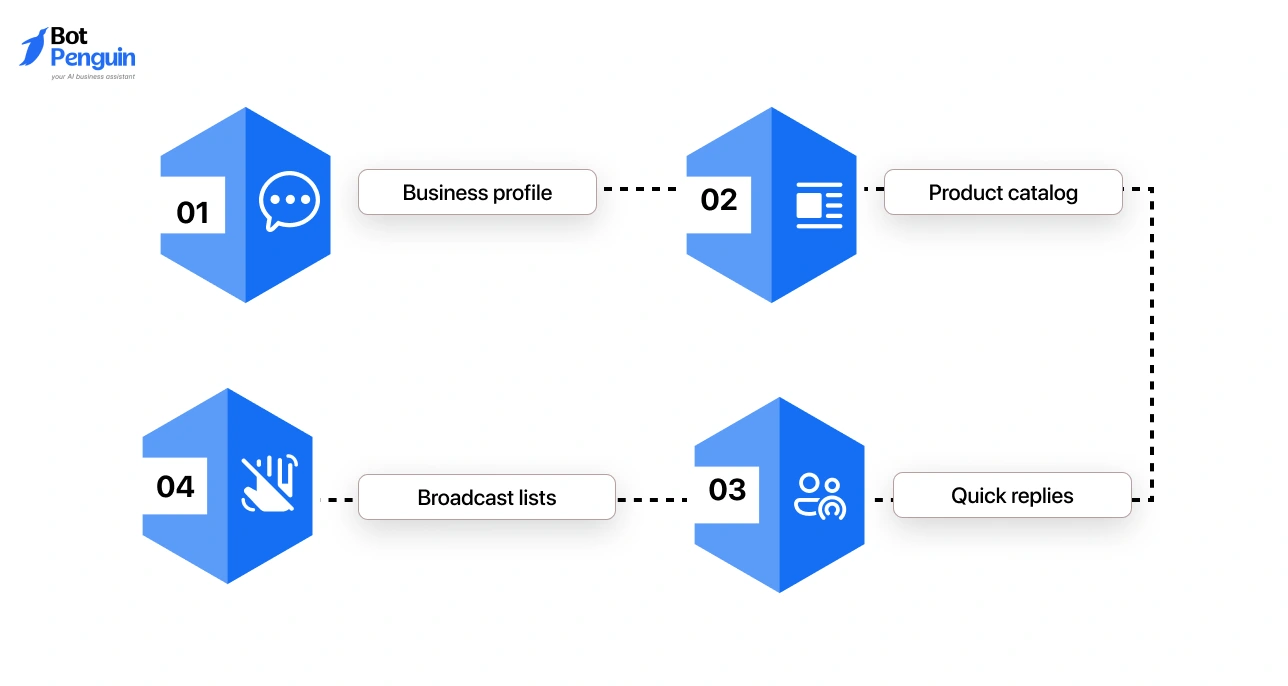
The Business App is free, easy to set up, and built for small businesses managing low message volumes manually. It covers the basics well:
The ceiling hits fast. There is no automation. No Shopify integration. No multi-agent inbox.
Every conversation is handled manually, from a single device. For a store processing hundreds of orders a day, that is not a support tool; it is a bottleneck.
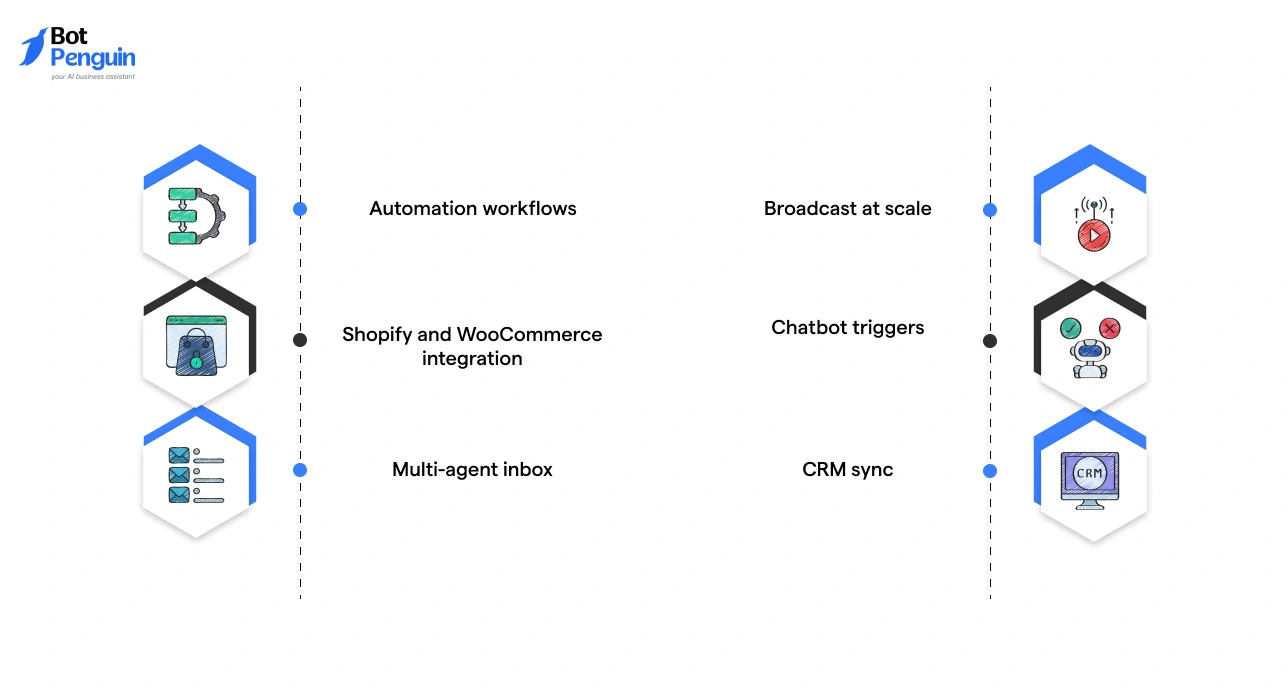
The WhatsApp Business API is not an app. It is an infrastructure layer that connects WhatsApp to your existing ecommerce stack.
It is accessed either directly via Meta's Cloud API or through an authorized Business Solution Provider (BSP) or Technical Solution Provider (TSP). This is where the operational capability shifts entirely.
What it unlocks:
This is an infrastructure decision, not a feature upgrade. It changes what your store can operationally do, not just how it communicates.
Which one does your store need? Use this to decide:
If you are running campaigns, managing post-purchase communication, or integrating WhatsApp into a broader retention strategy, the API is not optional. It is the starting point.
Most brands think of WhatsApp as a support channel. That is the smallest use of it.
Across the customer journey, from the first touchpoint to the tenth purchase, WhatsApp has a specific, high-impact role to play at every stage. Here is how it maps.
The pre-purchase stage is where intent exists, but commitment does not. WhatsApp closes that gap through conversation.
A shopper sees a Facebook or Instagram ad for a product. Instead of landing on a website and navigating alone, they click directly into a WhatsApp conversation. A chatbot qualifies their intent, answers questions, and shares the product catalog, all before they have visited the store.
The drop-off between the ad click and the purchase page is removed entirely.
For stores with a wider catalog, a WhatsApp chatbot can guide shoppers through a short discovery flow, asking about preferences, budget, or use case, and surface the most relevant products.
This is consultative selling at scale, without a human agent involved.
For a broader perspective, explore BotPenguin's ecommerce solutions.
For SKUs that require more consideration (electronics, furniture, premium skincare), customers need reassurance before they convert. A click-to-WhatsApp button on the product page lets them ask questions directly.
A trained agent or AI-powered bot responds in real time. The result is a guided buying experience that a static product page cannot replicate.
This is where the most recoverable revenue lives.
As quoted earlier, over 70% of shoppers abandon their carts before completing a purchase (Baymard Institute, 2024).
WhatsApp cart abandonment automation sends a personalized message, with the product image, name, and a direct checkout link, within minutes of the drop-off.
A follow-up with a time-limited offer closes the loop for shoppers who need a nudge.
Recovery rates on WhatsApp consistently outperform email for this use case.
Cash-on-delivery orders carry a high refusal rate at the door, a direct hit to logistics costs.
A WhatsApp message sent immediately after order placement, asking the customer to confirm their intent, significantly reduces failed deliveries. It is a simple automation with a measurable operational impact.
For stores where checkout happens outside the platform or where a customer needs to complete a paused transaction, WhatsApp delivers payment links directly into the conversation.
One tap. No inbox hunting. No friction.
The post-purchase window is the most underused stage in the WhatsApp ecommerce customer journey and the highest-engagement one.
Order confirmed. Shipped. Out for delivery. Delivered. Each of these moments is an opportunity to build trust, and with WhatsApp order tracking automation, they happen without manual effort.
Customers get real-time updates in the same chat thread, without needing to check an email or log into a portal.
Customers can initiate a return directly through WhatsApp.
A simple chatbot flow captures the order number, reason, and preferred resolution, reducing support ticket volume and resolving issues faster.
For consumable or repeat-purchase products, a timed WhatsApp message sent when the product is likely running low drives reorders without paid acquisition.
Pair it with a loyalty offer, and the lifetime value impact compounds over time.
A post-delivery message asking for a review, sent in a channel the customer actually checks, generates significantly higher response rates than a buried post-purchase email.
Connecting WhatsApp to your ecommerce store is not a single-step process. The right approach depends on your platform, order volume, automation needs, and how deeply you want WhatsApp embedded into your customer journey.
There are three ways to do it, and each serves a different stage of growth.
WhatsApp apps and plugins are available directly on Shopify, WooCommerce, and BigCommerce marketplaces.
Meta-authorized partners that provide WhatsApp Business API access with a managed platform layer on top.
Both handle template approvals, Meta verification, and compliance. Both integrate natively with Shopify, WooCommerce, and Magento, triggering automations from store events like abandoned checkout, order placed, and fulfillment updated.
Connect directly to Meta's Cloud API and build a fully custom WhatsApp layer on top of your ecommerce stack.
Whether you are evaluating native apps, BSP and TSP-powered platforms, or a direct API build, the criteria you use to assess them should remain consistent.
The integration path changes. The questions you ask should not.
Evaluate on these criteria:
The right platform grows with your store. A tool that works at 300 orders a month should not become a bottleneck at 3,000.
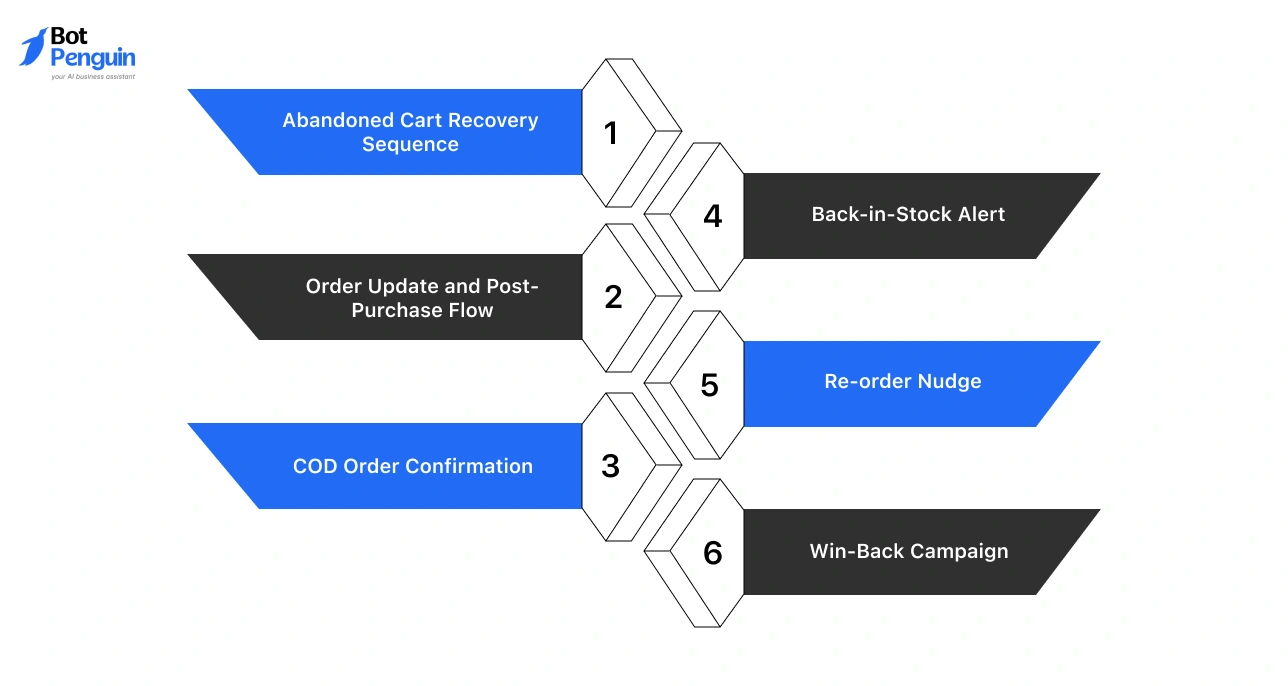
Use cases tell you what WhatsApp can do. Automation workflows tell you how to actually build it.
The five workflows below cover the highest-impact moments in the customer journey. Each one has a clear trigger, a defined message sequence, and a measurable outcome.
Start with these before building anything more complex.
The abandoned cart workflow is the single highest-ROI automation any ecommerce store can deploy on WhatsApp. Set this up first.
The order update flow is the most undervalued automation in WhatsApp ecommerce, and the cheapest to run. Utility conversations on the WhatsApp API are priced lower than marketing conversations, making this the highest-engagement, lowest-cost touchpoint in the entire customer lifecycle.
Setting up workflows is step one. Knowing whether they are working is what separates stores that scale WhatsApp into a revenue channel from those that treat it as a broadcast tool.
Track KPIs by automation type, not as a single blended metric. Each workflow has a different purpose and a different benchmark to measure against.
Use the first 30 days to establish baseline delivery and open rates. By day 60, optimize message timing and sequence logic based on click and conversion data.
By day 90, you should have enough attribution data to calculate WhatsApp's direct contribution to revenue and make the case for scaling investment in the channel.
Benchmark figures represent industry averages for ecommerce use cases. Actual performance will vary based on audience quality, message relevance, and automation timing.
The most significant near-term development in WhatsApp commerce is WhatsApp Flows.
What is WhatsApp Flows? Meta's in-chat interface builder that allows brands to create structured, interactive experiences inside a WhatsApp conversation, without redirecting the customer to a browser, a landing page, or an app.
What it changes for ecommerce:
Where it stands today: Flows are already being used for appointment booking, lead qualification, and order management. Full in-chat commerce checkout is the natural and imminent next step.
What this means for your channel strategy:
WhatsApp is no longer just a channel that supports the path to purchase. It is becoming the path itself.
Stores that build WhatsApp infrastructure now, with Flows-compatible platforms and API-level integrations, will not need to retrofit when in-chat commerce becomes the standard expectation.
The window to build ahead of that curve is still open. Not for long.
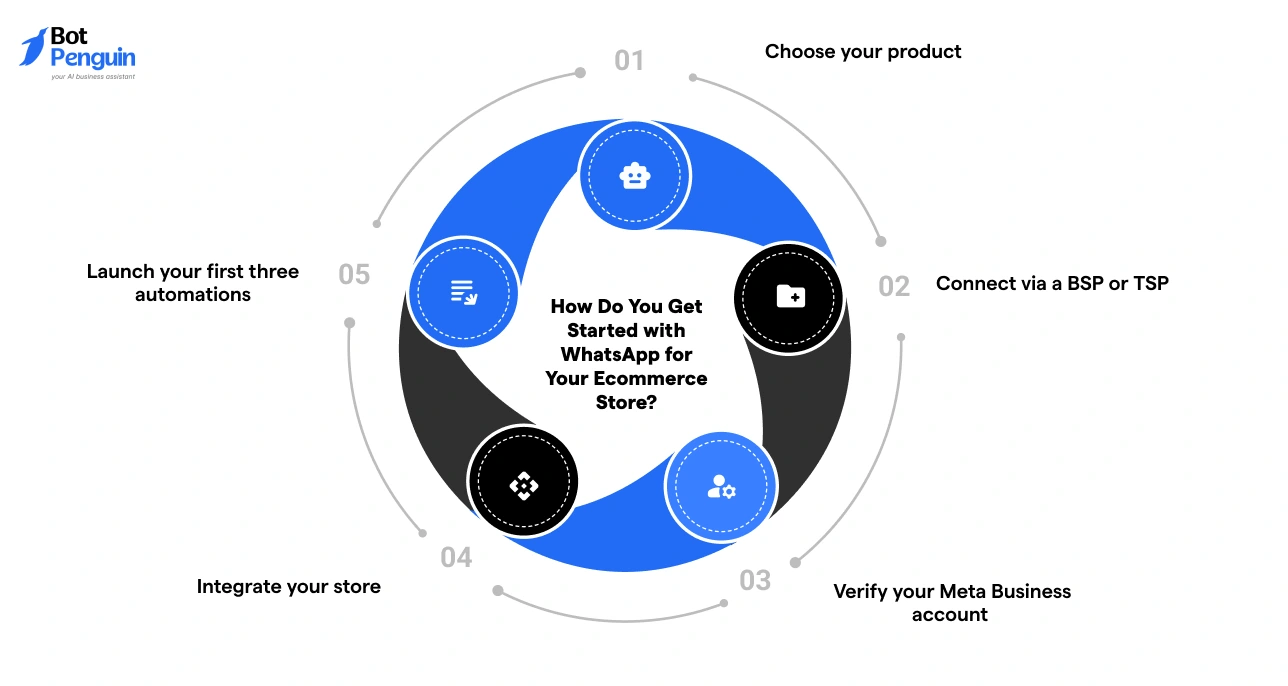
Getting started with WhatsApp for ecommerce does not require a complex setup. Follow this sequence.
For ecommerce businesses looking for a straightforward starting point, BotPenguin offers WhatsApp Business API access as a Meta-authorized TSP.
It is a no-code AI agent and chatbot platform that provides WhatsApp automation setup, native integrations with Shopify, WooCommerce, and Magento, and pre-built ecommerce workflow templates to get your online store up and running quickly on WhatsApp.
The infrastructure is ready. The use cases are proven. The only thing left is to start.
WhatsApp for ecommerce enables businesses to sell, support, and retain customers through two-way conversations, covering product discovery, cart recovery, order updates, and post-purchase engagement inside a single chat.
The WhatsApp Business API lets ecommerce businesses automate order updates, recover abandoned carts, run broadcast campaigns, and manage customer conversations at scale, integrated directly with platforms like Shopify and WooCommerce.
The Business App suits small stores managing low message volumes manually. The WhatsApp Business API is built for ecommerce businesses that need automation, multi-agent support, and integrations with ecommerce platforms at scale.
Connect via a Meta-authorized BSP or TSP, verify your Meta Business account, integrate your ecommerce platform, and launch your first automations. Platforms like BotPenguin simplify this with no-code setup and native ecommerce integrations.
Yes. An automated WhatsApp cart recovery sequence, triggered within 30 to 60 minutes of abandonment, consistently outperforms email for recovering lost purchases for ecommerce businesses.
Ecommerce businesses can send order confirmations, shipping notifications, out-for-delivery alerts, delivery confirmations, and return or refund updates, all automated through the WhatsApp Business API.
Regular ecommerce messaging is one-way. WhatsApp conversational commerce enables two-way interactions where customers browse, ask questions, and complete purchases entirely inside the chat, without visiting a website.
Small ecommerce businesses can start with the free WhatsApp Business App. As order volume grows, upgrading to the WhatsApp Business API via a BSP or TSP becomes the logical next step.
Sell More on WhatsApp
Automate cart recovery, order updates, and customer re-engagement on WhatsApp, without writing a single line of code.
Start Automating NowCheckout our related blogs you will love.
Updated at Oct 7, 2026
12 min to read
Updated at Sep 30, 2026
11 min to read
Updated at May 29, 2026
11 min to read
Updated at May 27, 2026
9 min to read
Updated at May 20, 2026
8 min to read
Updated at May 20, 2026
9 min to read
Table of Contents

