


WhatsApp Chatbot for Insurance: Use Cases, Benefits, and Automation Workflows
Updated at Sep 21, 2026
11 min to read
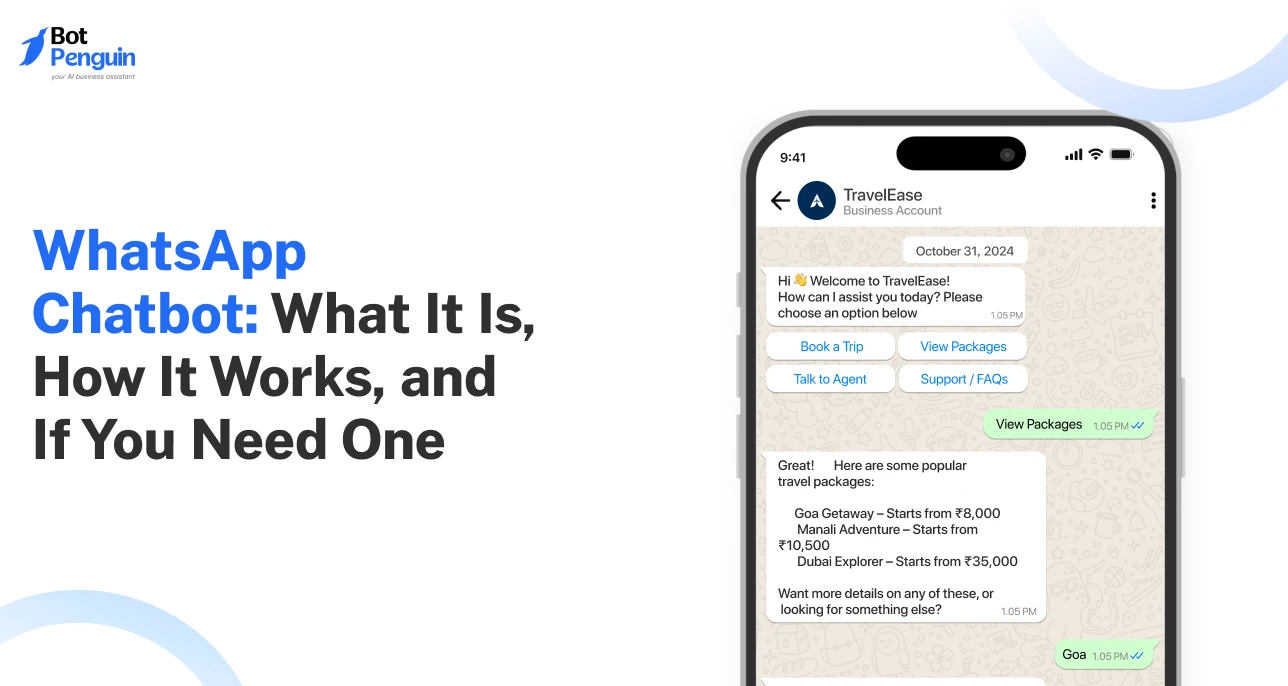
A WhatsApp chatbot is software connected to a business’s WhatsApp account that handles conversations automatically. It can answer questions, capture leads, share updates, trigger workflows, and hand conversations to humans when automation is no longer the right fit.
I've seen quite a few businesses go from being a “noun” to “verb”. But WhatsApp may be the most striking example.
Unsurprisingly, brands worldwide rushed to capitalize on that fame and secure their spot.
But I'll be honest, being on WhatsApp is the easy part. Knowing how to use it well? That’s where most businesses stall!
Among the popular tools to engage customers are WhatsApp chatbots. They answer questions, collect leads, and handle requests, any time of day.
This guide is for anyone starting fresh, whether you're new to chatbots or just making sense of the jargon. You'll learn what a WhatsApp chatbot actually is, how it works, and whether your business genuinely needs one.
A WhatsApp chatbot is just software connected to your WhatsApp Business setup, ready to chat, answer, and sell, even during off hours.
The core infrastructure is the WhatsApp Business Platform, which lets businesses send and receive messages programmatically while still supporting human handoff when needed.
WhatsApp paid messaging alone surpassed a $2 billion annual run rate in Q4 2025. (Source: Meta, 2026)
Before chatbots showed up, most support teams were fighting the same issues. This is why WhatsApp chatbots have become essential today.
Slow Replies Adversely Affected the Business: A customer would ask a question via email or a web form, and by the time someone replied, they'd already messaged a competitor.
The Same Questions Kept Support Busy: Support teams spent entire shifts typing out answers to routine queries, leaving little time for the issues that actually needed a human.
Too Many Tasks for Visitors: Asking someone to leave WhatsApp for a web form or an email thread was often where the conversation, and the sale got hindered.
24x7 support Meant Round-the-clock Hiring: Being available in off-hours usually meant paying someone to sit and wait for it.
Thus, WhatsApp chatbots matter because they turn WhatsApp from a simple messaging channel into a place where businesses can answer, assist, and convert customers in the moments that matter.
For businesses ready to put this into practice, platforms like BotPenguin make it easier to build WhatsApp chatbots without coding, connect business tools, and manage customer interactions from one place.
When I began understanding WhatsApp as a business communication channel, I often got confused between the two terms: WhatsApp automation & WhatsApp chatbots.
These words sound almost interchangeable, but they solve different problems. Here’s what I’ve learned about them over time:
At the Heart of It: WhatsApp automation moves messages; a chatbot moves conversations.
So the real question isn't chatbot or automation; it's knowing which job you're hiring for.
Now that the distinction is clear, let's get into the different kinds of WhatsApp chatbots you'll actually run into, since not all of them work the same way.
Businesses use different types of WhatsApp chatbots, depending on their needs and volume.
Of course, most real-world bots borrow a bit from each category, but the core types can be divided into three buckets: rule-based, AI-powered, and agentic.
Rule-based bots follow predefined flows, buttons, and conditions.
They are predictable, easy to control, and ideal when the customer journey has clear next steps rather than open-ended questions.
Example: A gym bot that books a class slot, sends a reminder, and asks for a rating in the same fixed sequence every time
AI-powered bots understand natural language instead of waiting for the “right” keyword.
They can interpret varied questions, use approved business knowledge, and respond with more context than a fixed flow allows.
Example: A shopper types “something quiet, budget's tight”, and the bot reads the intent to suggest fitting listings.
Agentic bots go a step further. They do not just answer; they can decide what action comes next, use connected tools, and complete multi-step tasks within defined guardrails.
Example: A bot checks a courier's live status, confirms a delay, and issues a partial refund on its own, no ticket raised.
For a deeper look at this model, see how WhatsApp AI agents work.
The Business App and chatbot automation solve different parts of the same problem.
One keeps everyday messaging manageable. The other becomes useful when conversations start behaving more like business workflows.
The WhatsApp Business App is strongest when conversations are still manageable by hand.
Businesses can create a detailed profile, showcase products through catalogs, use quick replies, and handle calls or chats directly.
WhatsApp also allows up to 50 saved quick replies, useful for recurring questions.
Chatbot automation becomes useful when message volume grows, or conversations start involving more than simple replies.
Through the WhatsApp Business Platform, tools like BotPenguin help businesses automate conversations, connect workflows, and manage higher message volumes.
That makes tasks like lead qualification, order updates, reminders, and routing far easier to manage consistently.
The app and chatbot do not need to replace each other.
In India, eligible small businesses can use the Business App and Business Platform on the same number, keeping calls, Status, and direct chats in the app while automation handles repeatable workflows behind the scenes.
A move beyond the app usually starts with operational friction, not a fixed message threshold.
Repeated questions, missed leads, delayed responses, multiple agents, or requests needing CRM and order data are stronger signals.
At that point, API-based automation gives teams more control over volume and workflow complexity.
The Bottom Line: The app and chatbot are not rivals. One handles conversations well; the other becomes valuable when those conversations start turning into repeatable business processes.
From where you're sitting, a WhatsApp chat feels almost instant: type, send, reply, done.
But behind that one message, a chatbot is quietly running it through a full chain of systems and decisions before a reply ever reaches you.
1. Customer Starts the Conversation: A user sends text, media, or an interactive response inside WhatsApp.
2. WhatsApp Routes the Message: The WhatsApp Business Platform passes the incoming message to the connected chatbot through a webhook (basically an automatic alert that tells the bot, “New message arrived”).
3. The Bot Decides What It Means: Rule-based bots match predefined paths. AI-powered bots interpret intent, context, and varied phrasing before choosing the next step.
4. Connected Systems Add Context: When needed, the bot can check a CRM, order system, booking tool, or knowledge source before responding.
5. The Reply Returns to WhatsApp: The response appears in the same chat. If automation reaches its limit, the conversation can move to a human agent.
So, what feels like one quick reply is really a coordinated flow between WhatsApp, the chatbot, connected systems, and humans when needed.
Here's a quick map before we get into specifics: what triggers each use case, and what it typically helps improve.
Now, let’s understand each of these use cases in brief. You can also compare these use cases with BotPenguin’s chatbot features.
A chatbot handles routine questions instantly, things like order status, pricing, or store hours.
What most setups miss: the sharper bots read tone too, triggering a human handoff the moment frustration shows, before a complaint is even typed.
Rather than a static form asking for budget and timeline, a chatbot collects that same information mid-conversation, naturally.
By the time a lead reaches sales, it's already scored and sorted, not a list of half-filled forms waiting to be chased.
Indian retailers using Business Messaging and Click-to-WhatsApp campaigns generated 62% more leads on average. (Source: Meta & RAI, 2026)
A chatbot can suggest products based on what a customer asks for, much like a store assistant would.
The less obvious part: When connected to browsing or cart data, it remembers what someone browsed earlier and nudges them back if they stall mid-purchase, recovering carts that would've gone cold.
Booking a slot through chat is the easy part; most bots do that.
Fewer sync both ways: With a live calendar integration, if a customer wants to reschedule, the bot can check availability and update the calendar itself.
Sending shipping and delivery updates keeps customers informed without them asking.
What's often overlooked: proactive updates don't just inform; they prevent support tickets, since a customer who already knows their order shipped rarely messages to check.
Follow-up messages keep a business on a customer's radar after purchase.
The sharper version doesn't feel like marketing at all, a quiet check-in timed to when a product would realistically run out, rather than a blanket promotional blast.
The real value comes from knowing which conversations to automate and which ones are better left to a human.
For more examples in practice, check out these BotPenguin case studies.
One thing that I always tell teams building chatbots is that a bot's job isn’t to handle everything; it’s to know exactly when to step back.
Good handoffs happen before a customer gets frustrated, not after. Here are scenarios to look out for:
Complex or Unusual Requests: When a query doesn't match any known pattern or intent, forcing a bot to guess is worse than routing it to a human immediately.
Payment, Refund, and Account Issues: Anything involving money or sensitive account data needs judgment and accountability a bot shouldn't carry alone, even if it technically could process the request.
Dissatisfied Customers: The moment tone shifts to frustration or repeated complaints, the priority changes from resolving a query to de-escalating a person, something better left to a human.
When the Chatbot Lacks Enough Context: If a customer references something the bot has no record of: a past call, an in-store visit, or a prior agent conversation. Guessing an answer does more damage than admitting the gap and looping in a person.
Thus, the best WhatsApp chatbot experience is not fully automated; it is one where the right conversation reaches a human at the right moment.
A lot of this sounds useful in theory, but it begs one question: does your business even need a WhatsApp chatbot?
Here's a quick gut-check across common scenarios:
The deciding factor is rarely business size; it's repetition. If the same questions or actions keep showing up, a chatbot automation becomes much easier to justify. If not, it's a solution looking for a problem.
WhatsApp automation comes with boundaries. Ignore them, and even a well-built chatbot can run into message restrictions or account-level enforcement.
Here are the rules teams should know before getting started:
Having someone's number isn’t permission to message them. WhatsApp requires opt-in consent before any business-initiated contact.
Tell users what they're signing up for, whether that's order updates, offers, or reminders.
If someone opts out, that request must be honored, even if it happens outside WhatsApp.
Once a customer messages you, a 24-hour window opens for free-form replies.
Once it closes, you can't just send another regular message; an approved template is required instead.
Templates are WhatsApp's controlled route for business-initiated messages, especially ones sent outside that 24-hour window.
Each template needs approval and must stick to its intended purpose.
Meta can approve, reject, pause, or disable one later, so this isn't a write-once, forget-it task.
Adding AI doesn't shift responsibility onto the model. Businesses still own disclosures, consent, data security, and any third-party providers touching WhatsApp Business data.
Current WhatsApp terms generally prohibit Business Solution Data from training or improving AI models, except limited fine-tuning for a model used exclusively by that business.
The total cost rarely comes from one place; it's spread across four layers, and skipping one usually means a surprise bill later.
Here’s what you really need to consider when making a WhatsApp chatbot investment:
Most businesses budget for the chatbot software and forget the other three.
This is a significant mistake, because more often than not, the actual monthly cost looks nothing like the sales quote.
For BotPenguin, WhatsApp-only automation plans start at $15/month, with Meta messaging charges billed separately and no markup added by BotPenguin.
From what I've gathered building chatbots on WhatsApp, the smartest place to begin is with one task that is recurring, frequent, and easy to measure.
Here's the shortest path from idea to a live chatbot:
1. Choose Your First Use Case: Pick one repetitive, high-volume task, like FAQs or booking confirmations, rather than trying to automate everything on day one.
2. Connect your WhatsApp Business Account: Link your number to the WhatsApp Business API or a chatbot platform, so messages can actually flow through the bot.
3. Build and Test the Conversation: Map out the flow, write the responses, and run it through real scenarios before a single customer sees it.
4. Launch, Measure, and Improve: Go live, then track what's working and what's confusing customers, using that data to refine the bot over time.
One well-built flow that actually works beats five half-tested ones that don't.
Ready for the full process? See how to build a WhatsApp chatbot step by step.
In 2026, Meta pushed them closer to becoming working parts of a business, with native AI, connected actions, and clearer human controls.
Here are the top 2026 trends you need to know:
Meta launched Business AI inside the WhatsApp Business app in India, letting eligible businesses answer questions, recommend products, capture leads, and book appointments without extra tools.
Its Business Agent, used by more than one million businesses across WhatsApp and Messenger, takes this further.
Meta's Business Agent Platform connects with hundreds of systems, including Shopify, Zendesk, and Shopee, letting an agent act through those systems rather than just explain what to do.
Key Takeaway: The trajectory is shifting from answer → recommend → act, making WhatsApp conversations capable of completing actual business tasks.
More autonomy hasn't removed humans from the loop.
Businesses can still decide when an employee should step into a Business Agent conversation, and the platform ships with built-in controls and guardrails.
WhatsApp’s 2026 terms also restrict how AI providers can use Business Solution Data.
The direction is clear: AI is taking on more of the work, but businesses still decide where that autonomy stops.
WhatsApp chatbots can remove a lot of friction, but poor setup creates a different kind of friction. Most problems come from a few predictable weak spots:
This usually happens when the knowledge source is incomplete, outdated, or too broad. A confident wrong answer is worse than no answer at all.
How to Fix It: Keep business data current, tighten the knowledge base, and route low-confidence responses to a human.
Customers notice when every message sounds templated or forces them through rigid choices.
How to Fix It: Use shorter responses, natural language, and AI only where it genuinely improves understanding rather than decorating a fixed flow.
A chatbot that keeps pushing after it has lost context turns automation into frustration.
How to Fix It: Define clear escalation triggers around sentiment, repeated failures, payment issues, and unusual requests.
A bot is only as useful as the systems feeding it. Old prices, stock, policies, or schedules quickly create bad experiences.
How to Fix It: Connect reliable data sources and assign ownership for regular updates.
Trying to automate every journey at launch creates unnecessary failure points.
How to Fix It: Start with one repetitive, measurable workflow, then expand only after it works reliably.
If you want to start small and expand carefully, BotPenguin lets you build focused WhatsApp workflows first, then add automation as your use cases grow. You can also check BotPenguin customer reviews before deciding.
A WhatsApp chatbot isn't a magic fix. It's a tool that works well when the problem is real: repetitive questions, missed leads, slow replies.
If that sounds like your business, start small. Pick one use case. Build it properly. Test it before customers see it.
If your conversations are mostly unique, high-touch, or low in volume, a chatbot might not earn its keep yet. That's fine too.
WhatsApp chatbots were never meant to automate everything. They exist to free up time for the conversations that actually need a human. Know your use case, and the rest gets a lot easier.
A WhatsApp chatbot is software connected to a business account that automatically handles messages, answers questions, captures leads, and can route conversations to human agents when needed.
It receives customer messages through the WhatsApp Business Platform, interprets the request using rules or AI, then sends a response or triggers an action through connected systems.
The WhatsApp Business App supports manual messaging and basic tools, while chatbot automation handles higher volumes, repeatable workflows, integrations, and conversations that would otherwise require constant staff attention.
Yes, but businesses generally need customer opt-in and approved message templates for proactive outreach outside the 24-hour customer service window, subject to WhatsApp’s current messaging rules.
Costs usually include Meta messaging charges, chatbot software, AI usage, integrations, and human support. The final amount depends on message volume, features, and workflow complexity.
A chatbot makes sense when your team handles repetitive questions, misses messages, manages growing volume, or spends too much time on tasks that follow predictable patterns.
Yes, businesses can use chatbots through the WhatsApp Business Platform, provided they follow Meta’s messaging, consent, template, data-use, and commerce rules for eligible business accounts.
Turn WhatsApp Into a Business Channel
Answer customer questions, capture leads, share updates, and guide buyers directly on WhatsApp with chatbots built for business.
Start NowCheckout our related blogs you will love.
Updated at Sep 21, 2026
11 min to read

Updated at Sep 15, 2026
20 min to read
Updated at Sep 11, 2026
15 min to read
Updated at Sep 9, 2026
8 min to read
Updated at Sep 3, 2026
8 min to read
Table of Contents