



How to Automate Customer Service With a WhatsApp Chatbot
Updated at Sep 15, 2026
20 min to read
What is a WhatsApp chatbot for insurance?
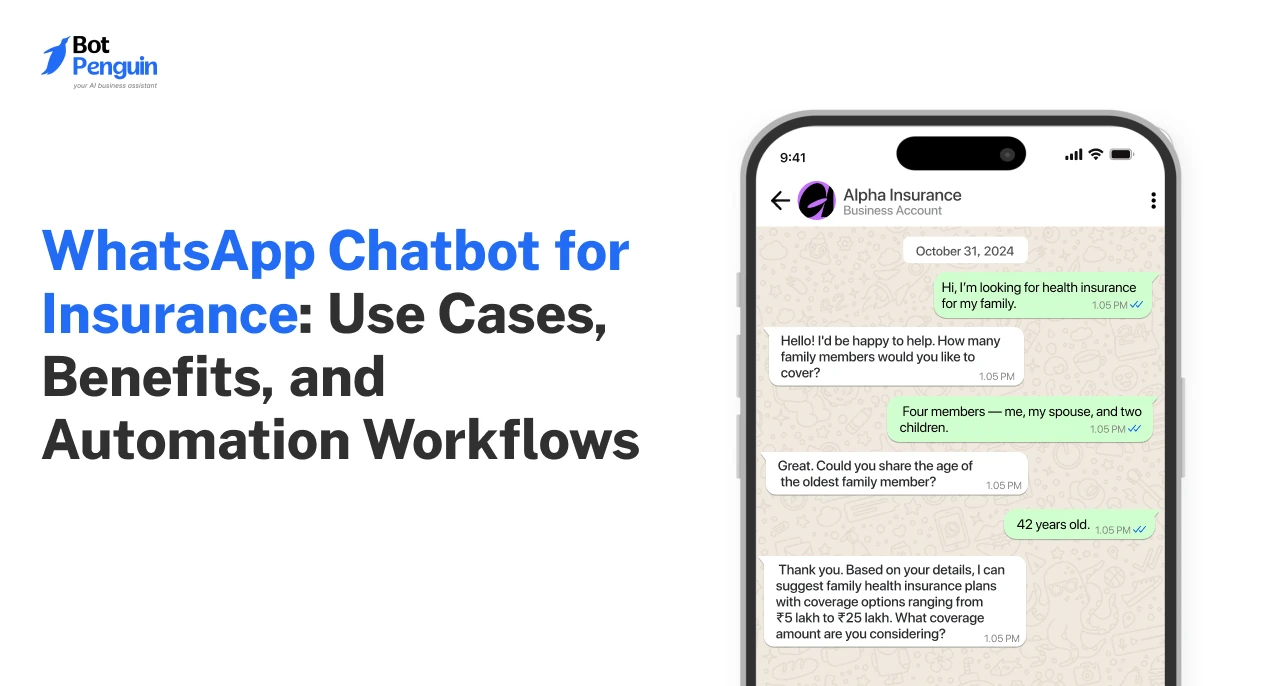
A WhatsApp chatbot for insurance is an automated assistant that helps insurers handle policy questions, quotes, renewals, claims updates, document requests, and customer support through WhatsApp. It can collect information, trigger reminders, route complex cases to agents, and keep routine insurance communication available beyond business hours.
Insurance teams handle a steady flow of customer conversations every day. These include policy inquiries, renewals, claims updates, payment questions, and support requests.
Managing each interaction manually can slow responses and increase agent workload.
WhatsApp gives insurers a familiar channel for handling these conversations. Customers can ask questions, share details, and receive updates without switching channels. A WhatsApp chatbot for insurance automates these routine exchanges.
It can answer common questions, collect lead details, send renewal reminders, and share claims updates. It can also gather documents, route inquiries, and schedule agent conversations. In simple terms, the chatbot manages repeatable customer interactions through WhatsApp using predefined or AI-assisted flows.
However, automation has clear limits. Complex claims, coverage decisions, personalized advice, and sensitive cases still need human agents. The chatbot handles predictable communication, while agents focus on work that requires judgment.
For broader context, read our pillar guide on what a WhatsApp chatbot is, which explains how WhatsApp-based automation handles business conversations.
This guide covers key use cases, business benefits, insurance workflows, and implementation steps for an effective WhatsApp insurance chatbot.
Insurance communication often depends on timely answers and clear follow-ups. Customers may need help before buying, renewing, or filing a claim. WhatsApp gives insurers one familiar channel for handling these conversations.
Unlike scattered calls and emails, messaging keeps conversations easier to follow. Customers can return to previous messages without having to repeat their entire situation.
Response delays can affect several stages of the insurance journey. A new lead may be waiting for basic policy information. An existing customer may need renewal details or a claims update.
WhatsApp helps insurance teams respond without relying only on phone availability. Routine inquiries can receive immediate automated responses before an agent joins.
This matters across common interactions such as:
Lead inquiries and qualification questions
Policy information requests
Renewal dates and payment reminders
Claims-status requests
Appointment and callback requests
Faster responses also reduce the number of customer follow-ups. Agents spend less time answering the same status questions.
Insurance conversations often continue across several days or weeks. Customers may first ask a question, then return with documents or follow-up details.
WhatsApp keeps that communication within the same conversation thread. Customers can review previous messages and continue without having to start again.
This reduces dependence on repeated calls and long email chains. It also gives customers easier access to updates they may need later.
For insurers, this creates a clearer communication trail. Teams can manage routine interactions without making customers repeat information unnecessarily.
An AI chatbot for insurance can handle predictable conversations before agent involvement becomes necessary. It can answer repeat questions using approved information and predefined workflows.
It can also collect customer details before routing the inquiry. This gives agents more context when they enter the conversation.
Common support tasks include:
Answering routine policy and process questions
Collecting contact and inquiry details
Identifying the reason for contact
Routing customers to the appropriate team
Escalating cases that require human judgment
Human agents should still handle complex claims and personalized insurance advice. Automation works best when its limits are clearly defined.
The differences become clearer when comparing how each approach handles routine customer interactions.
These advantages become more useful when tied to specific insurance workflows. The next step is understanding where WhatsApp automation creates the most practical value.
Insurance teams can automate routine interactions across the customer journey. Human agents can then focus on conversations requiring advice, judgment, or case-specific decisions.
A WhatsApp chatbot for insurance works best when its role is clearly defined. The table below shows where automation fits and where agents should take over.
These use cases show how automation supports different insurance workflows without removing human involvement.
A chatbot can handle the repetitive information-gathering stage before an agent joins.
It may collect:
Name and contact details
Type of insurance required
Basic coverage requirements
Existing customer status
Preferred callback or consultation time
This gives agents useful context before continuing the conversation.
The chatbot should stop at information collection and basic qualification. Underwriting, pricing decisions, and coverage recommendations still require the appropriate insurance process or agent.
Customers often need factual information before speaking with an advisor.
The chatbot can share approved details such as:
Available policy categories
Standard plan features
Required documents
General eligibility information
Common policy procedures
This is particularly useful for questions with consistent answers.
Personal circumstances require a different approach. When customers ask which plan suits them, the conversation should move to an agent.
Renewals usually involve predictable communication before an expiry date.
Automation can support this process through:
Upcoming renewal alerts
Premium payment reminders
Scheduled follow-ups
Document reminders
Responses to routine renewal questions
Customers can reply directly when they need assistance.
Requests involving coverage changes, pricing questions, or policy modifications should be routed to an agent.
Claims communication can involve several updates before resolution. Customers may need instructions, document requests, or progress information.
Claims communication is one part of broader insurance automation, which can also support renewals, servicing, and other recurring workflows.
A chatbot can help with:
Collecting initial claim details
Requesting required documents
Sending missing-document reminders
Sharing approved status updates
Explaining standard claims procedures
This reduces the number of repeated status inquiries for support teams.
However, automation should not make claims decisions. Disputes, exceptions, sensitive situations, and case-specific judgments need human handling.
Many support conversations involve straightforward process questions.
A chatbot can handle common requests involving:
Policy documents
Payment procedures
Renewal steps
Claims submission instructions
Contact information
Standard policy processes
This keeps agents from repeatedly answering the same questions.
Questions outside approved information should trigger human handoff. That keeps routine support automated without forcing customers through unsuitable chatbot responses.
Some conversations naturally need direct agent involvement.
The chatbot can prepare that handoff by:
Booking calls or consultations
Identifying the reason for contact
Routing by insurance type
Sending claims inquiries to claims teams
Sending sales inquiries to advisors
Passing collected context to the assigned agent
That context matters during handoff. Customers should not need to repeat information already provided.
These use cases apply differently depending on business size and structure. Large insurers, agencies, and brokers may automate similar tasks, but their routing and operational needs often differ.
A whatsapp chatbot for insurance companies can support far more than basic customer replies. Larger insurers often manage thousands of conversations across claims, renewals, policy servicing, and sales.
Agencies and brokers face similar communication needs at a smaller scale. However, their priorities usually focus more on lead handling and client follow-ups.
A broader AI chatbot for insurance can also support these workflows across claims, renewals, lead handling, and customer service.
Large insurance companies often handle high volumes of conversations across several departments. Insurance WhatsApp automation can help organize these interactions before human teams step in.
Common uses include:
Routing claims inquiries to claims teams
Sending renewal and premium reminders
Sharing approved claims-status updates
Collecting basic customer information
Directing policy questions to relevant teams
Passing conversations to human agents when required
Routing becomes especially important for larger insurers. A single WhatsApp number may serve customers across products, regions, or departments.
The chatbot can first identify the customer's need. It can then direct the conversation to the correct service team.
Connections with CRM and policy systems can also support continuity. Customer details and conversation context can remain available during follow-up.
These integrations should only use approved data and verified workflows. Sensitive insurance information still requires appropriate controls.
Insurance AI chatbots can support agencies and brokers with smaller teams. A WhatsApp bot for insurance agents is particularly useful when lead capture, quote inquiries, renewals, and consultation scheduling happen through messaging.
Common agency workflows include:
Capturing new leads
Collecting qualification details
Handling quote inquiries
Sending renewal reminders
Scheduling consultations
Answering routine customer questions
For example, an agency may use WhatsApp to qualify new motor insurance inquiries. The chatbot can collect basic details before an advisor responds.
Agencies may also depend more heavily on appointment scheduling. This helps brokers manage consultations without repeated calls or manual coordination.
Their routing structures are generally simpler. A conversation may only need to move between sales, servicing, and claims support.
Larger insurers often require more complex routing and system connections. Agencies usually benefit most from focused automation around repetitive customer interactions.
Automation should support insurance teams, not replace professional judgment.
Human agents remain essential when conversations involve:
Complex or disputed claims
Coverage interpretation
Personalized insurance recommendations
High-value sales discussions
Policy exceptions
Complaints or sensitive customer situations
Customers may also need reassurance during stressful claims or disputes. These conversations often require empathy and case-specific judgment.
Clear escalation rules help prevent automation from handling unsuitable situations. The chatbot should recognize its limits and transfer the conversation with context.
The core automation goals are similar, but operational requirements often differ.
These differences determine how the chatbot should be configured. Once the business structure is clear, the next step is to plan the appropriate implementation process.
Successful implementation starts with a clear scope and reliable escalation rules. Insurance teams should automate repeatable communication before expanding into more complex workflows.
WhatsApp can support insurance communication when businesses use appropriate access controls, customer consent, secure integrations, approved messaging workflows, and clear human-escalation rules. Insurers remain responsible for ensuring their implementation meets the privacy, security, consent, and regulatory requirements that apply to the customer data they handle.
Start by setting up WhatsApp Business for API-based messaging.
Meta's Cloud API currently requires a Meta business portfolio, WhatsApp Business Account, and business phone number. Businesses must verify phone ownership before registration. Two-step verification is also required when registering the number.
The setup process typically includes:
Creating or connecting a Meta business portfolio
Setting up the WhatsApp Business Account
Adding and verifying the business phone number
Configuring the required API permissions
Completing applicable business verification steps
Requirements can vary by account setup and messaging needs. Meta's current documentation should always be checked before launch.
Do not automate every customer conversation at once. Start with frequent tasks that follow predictable steps.
Good starting points include:
Policy and process questions
New lead inquiries
Renewal reminders
Claims status requests
Appointment or callback requests
These workflows usually have clear inputs and expected outcomes. That makes them easier to test and improve.
Once these flows perform reliably, insurers can gradually expand automation. Complex decisions should remain outside the initial scope.
Useful automation depends on access to the right customer information.
Connect the chatbot to relevant CRM or policy management systems where appropriate. These connections can help maintain customer context across conversations.
Review available chatbot integrations for systems involved in customer communication.
Typical connections may support:
Customer contact information
Lead records
Policy details
Claims status information
Previous conversation context
Only necessary data should be available to each workflow. Access and data handling should follow the insurer's security requirements.
Every automated flow needs a clear point where an agent takes over.
Set escalation triggers for situations such as:
Complex or disputed claims
Coverage interpretation
Policy exceptions
Sensitive complaints
Failed chatbot responses
Requests for personalized advice
The handoff should pass useful conversation context to the agent. Customers should not need to repeat information already provided.
Before launch, test routing, consent flows, message logic, and escalation paths. Teams should also monitor conversations after launch and correct recurring failures.
A well-planned WhatsApp chatbot for insurance should reduce repetitive work without removing necessary human judgment. That balance is what turns automation into practical value for insurers and customers.
A WhatsApp chatbot for insurance can help insurers manage routine conversations across the customer journey. It can capture leads, support quote inquiries, send renewal reminders, and share claims updates.
It can also answer common policy questions and route customers to the right team. This reduces repetitive communication without removing access to human support.
The key is knowing where automation should stop. Complex claims, coverage interpretation, personalized advice, and sensitive cases still require experienced agents.
For insurance companies, agencies, and brokers, the right setup combines automation with clear handoff rules. That keeps service efficient while preserving human judgment where it matters.
BotPenguin is a no-code AI chatbot builder for creating AI chatbots, AI agents, and voice agents, including WhatsApp-based customer communication workflows.
BotPenguin is GDPR, HIPAA, and CCPA compliant, ISO certified, SOC 2 attested, and VAPT-assessed by a CERT-In empanelled auditor. BotPenguin is a Meta Business Partner.
If you are ready to put these workflows into practice, BotPenguin can help you start building WhatsApp automation for your insurance business.
Yes. A WhatsApp chatbot for insurance can capture leads, send renewal reminders, share claims updates, and answer routine support questions. It can also route customers to human agents when conversations require advice, judgment, or case-specific assistance.
Yes, businesses typically need the WhatsApp Business API for scalable automation. It supports higher conversation volumes, multi-agent access, approved messaging workflows, and business integrations. Exact setup requirements can vary, so teams should verify Meta’s current documentation before launch.
Yes. A chatbot can collect initial claim details, request documents, send missing-document reminders, share approved status updates, and explain standard procedures. Complex claims, disputes, exceptions, or decisions should still be escalated to qualified human agents.
Yes, depending on the chatbot and CRM setup. Integrations can help sync customer details, lead information, policy records, and conversation context. Insurance teams should verify that supported CRM or policy-system connections are supported before relying on them for live customer workflows.
No. Chatbots can handle repetitive communication, but agents remain essential for complex claims, coverage interpretation, personalized recommendations, high-value sales, and sensitive customer situations. Automation should reduce routine workload while preserving human judgment where it matters most.
3X Your Business
Growth on WhatsApp
See how our chatbot automates replies, qualifies leads & books appointments on autopilot.
Watch Demo NowCheckout our related blogs you will love.
Updated at Sep 15, 2026
20 min to read

Updated at Sep 11, 2026
15 min to read
Updated at Sep 9, 2026
8 min to read
Updated at Sep 5, 2026
14 min to read
Updated at Sep 3, 2026
8 min to read

Updated at Oct 21, 2026
12 min to read
Table of Contents



