



10 Best Dental Chatbots & AI Receptionists in 2026
Updated at Sep 28, 2026
11 min to read
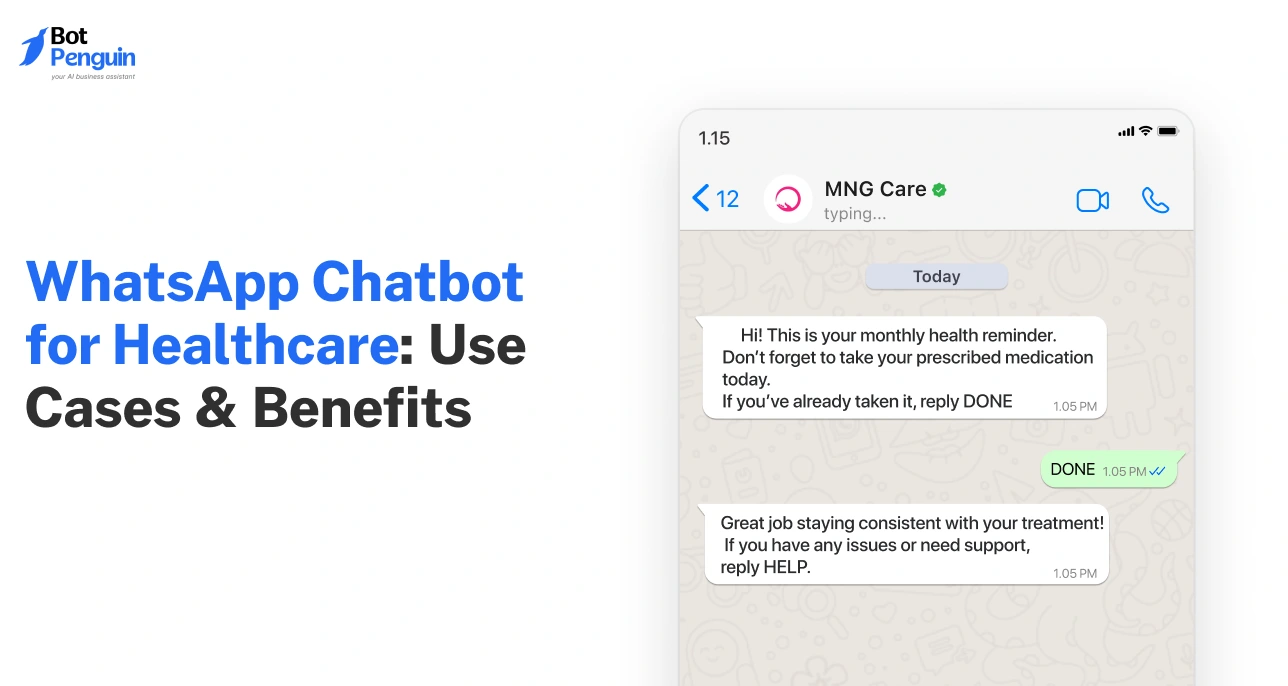
A WhatsApp chatbot for healthcare is an automated assistant that helps patients book appointments, get reminders, ask routine questions, receive updates, and complete follow-ups directly on WhatsApp. It connects with healthcare workflows while supporting consent, secure data handling, human escalation, and integrations with scheduling or patient-management systems.
WhatsApp is probably the most convenient channel for patients today.
From quick family updates to sharing reports with doctors, it has quietly become a default communication channel in everyday healthcare moments.
However, most healthcare providers aren’t built for that level of speed or convenience.
Front desks are still overwhelmed, and patients are left dealing with long wait times.
That’s where a WhatsApp chatbot for healthcare fits in. It helps providers respond instantly, automate routine interactions, and support patients without adding more pressure on staff.
In this guide, we’ll break down how a WhatsApp chatbot in healthcare works, where it helps, and why it’s quickly becoming essential.
A WhatsApp chatbot for healthcare is a virtual assistant that interacts with patients on WhatsApp.
Purpose: It helps answer questions, book appointments, send reminders, and guide patients, without needing manual effort every time.

The flow below shows how a typical healthcare chatbot interaction works:
This keeps patient communication fast, structured, and always available.
Imagine a patient trying to book an appointment late at night. A chatbot responds instantly, while manual support makes them wait until the next day.
Here’s how both approaches differ in real-world healthcare scenarios:
Although WhatsApp’s automation is powerful, it’s important to remember that a WhatsApp chatbot doesn’t replace human support.
The goal is to handle repetitive interactions efficiently, so human staff can focus on complex and sensitive patient needs.
Many healthcare providers today rely on platforms like BotPenguin to build these workflows, combining automation with human support to deliver faster, more consistent patient experiences.
Rule-based chatbots follow predefined paths and work well for structured tasks like FAQs or appointment booking. Think: fixed options, predictable responses, and limited flexibility.
AI-powered WhatsApp chatbots, on the other hand, understand intent, handle complex queries, and deliver more natural, flexible conversations.
They can adapt responses, manage variations in patient input, and support more dynamic healthcare workflows.
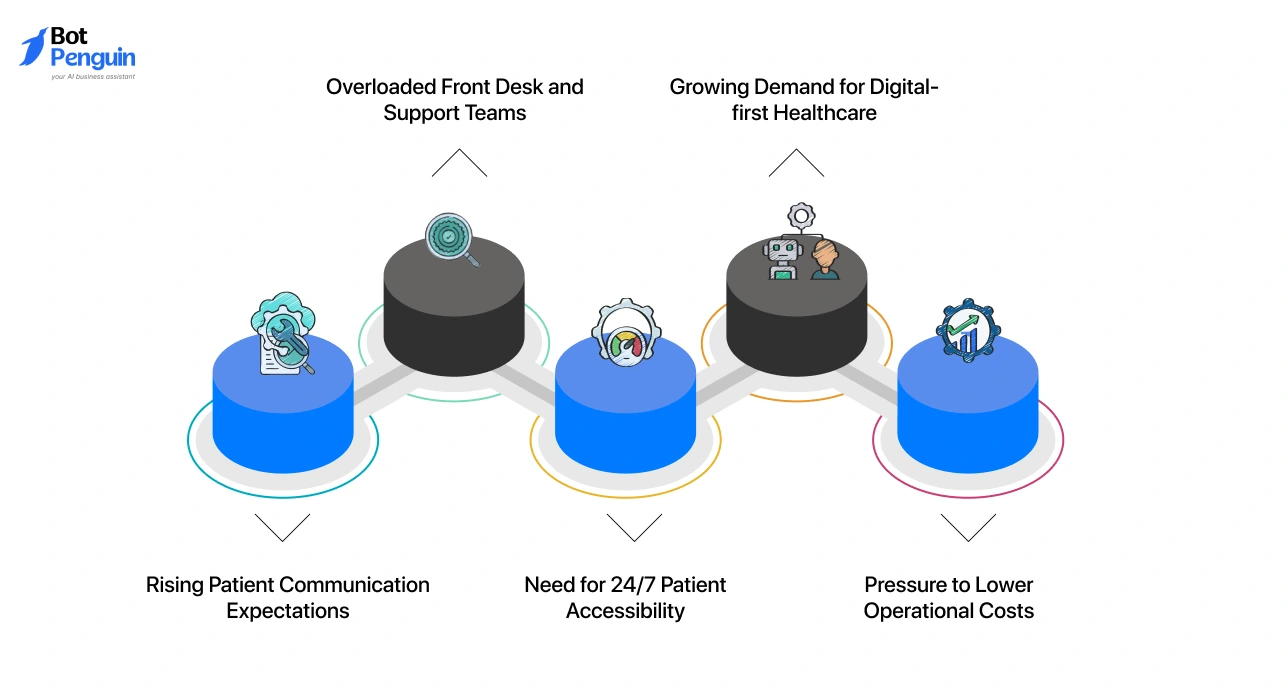
With so many communication channels available, one would wonder: Why WhatsApp?
The answer is simple. It’s already where patients are. No new apps, no learning curve, no friction. For healthcare providers, meeting patients on WhatsApp becomes necessary to keep up with how people expect care to work today.
At its core, this shift is about removing friction from patient communication. WhatsApp chatbots help providers stay responsive and deliver the kind of experience patients now expect by default.

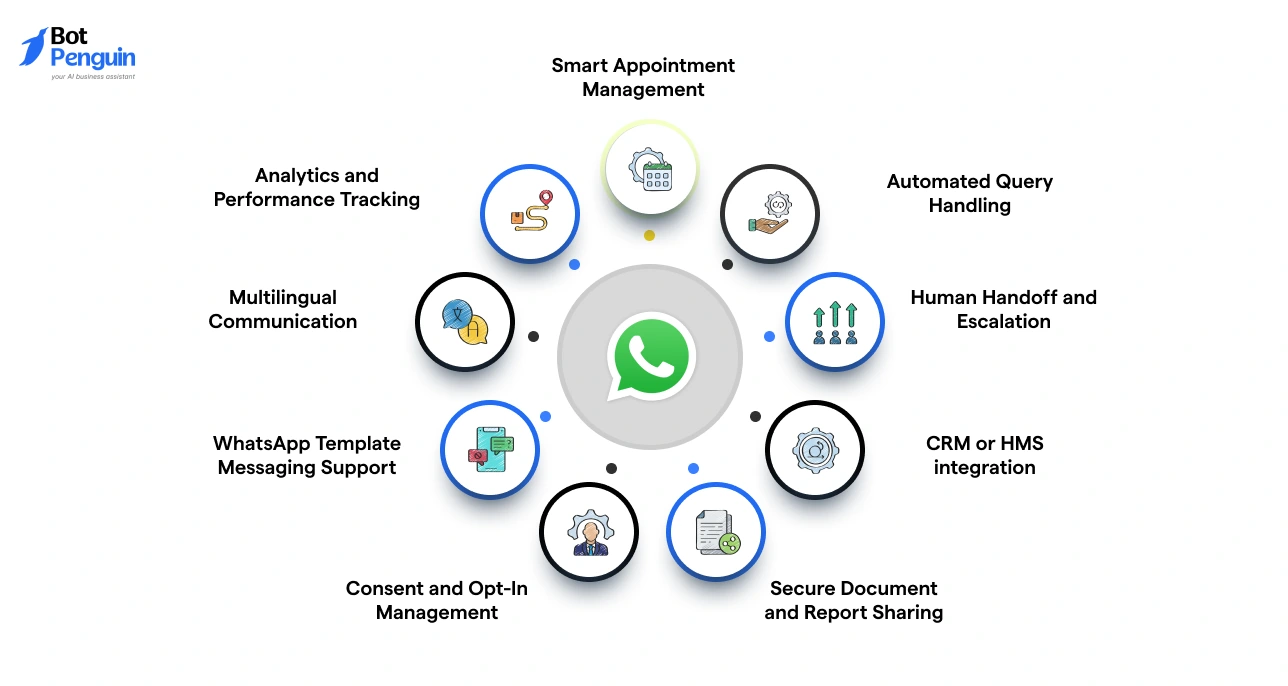
Having explored the why behind WhatsApp chatbot adoption, it's now time to see how WhatsApp chatbots map onto every critical touchpoint of the patient journey:
These use cases show how WhatsApp chatbots are changing the game for healthcare providers looking to deliver more connected and less friction-heavy patient experiences.
To understand how WhatsApp is being used more broadly in healthcare communication, you can explore our WhatsApp in healthcare guide.
Healthcare providers are already using WhatsApp chatbots across different settings to streamline patient communication and routine workflows.
The examples below show how these chatbots are applied in real-world scenarios, based on the type of healthcare service and operational need.
Prominent Examples from Real-World Settings:
Organizations like Sabine Hospitals and Cipla have used WhatsApp chatbots to automate patient engagement workflows at scale.
Cipla, using BotPenguin’s WhatsApp-integrated chatbot, ran 10,000+ drip campaigns and reduced missed doses by 40% in its Patient Support Program.
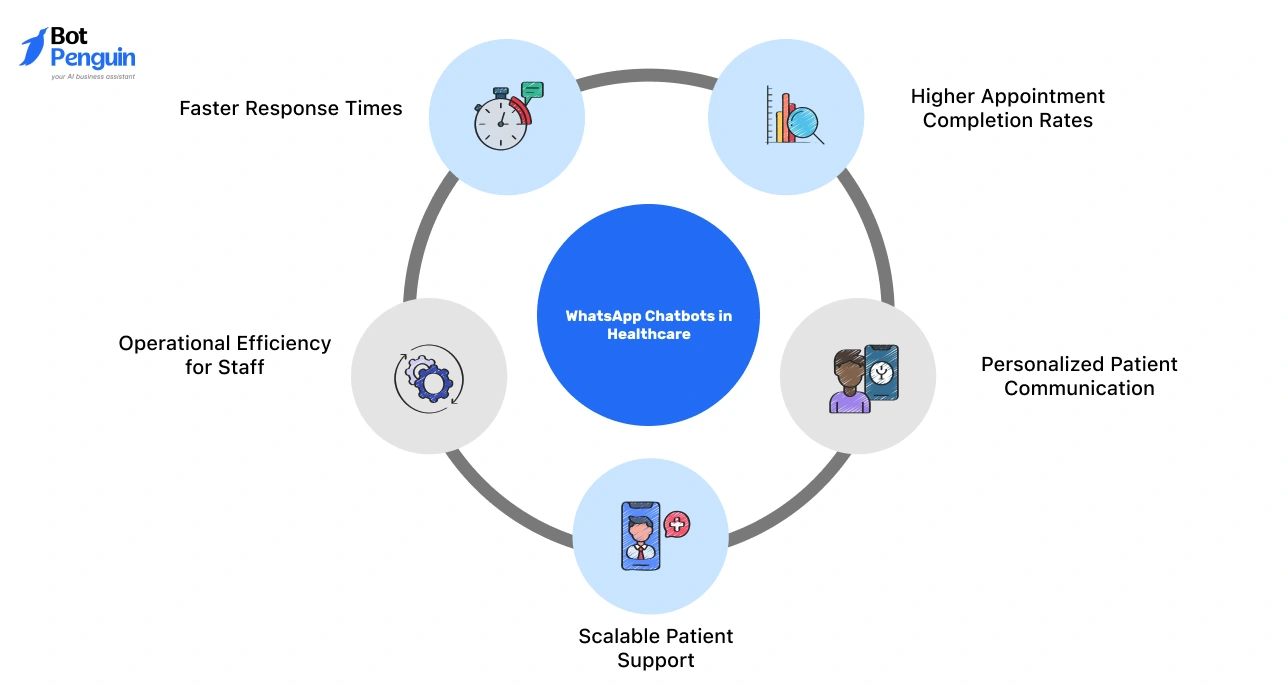
As healthcare leaders, you’re constantly balancing patient expectations with operational efficiency.
WhatsApp chatbots help bridge this gap by automating routine interactions while keeping communication fast and accessible.
WhatsApp chatbots make healthcare operations more responsive, consistent, and scalable.
By handling routine interactions efficiently, they allow teams to focus on delivering better care where it truly matters.
Getting started with a WhatsApp chatbot means setting up access through the WhatsApp Business API, connecting your existing systems, and then building flows around real patient needs.
Here’s a clear breakdown of what that means in practice:
Choosing the right WhatsApp chatbot for healthcare goes beyond comparing features. The platform should fit your patient workflows, compliance requirements, existing systems, expected conversation volume, and support needs.
Start by checking whether it can handle the workflows your healthcare team actually needs.
Here’s what to look for:
The right set of features ensures your WhatsApp chatbot supports real healthcare workflows while keeping communication compliant and patient-friendly.
Features alone do not determine whether a healthcare chatbot will work reliably at scale. Before choosing a platform, evaluate these operational factors as well:
These checks help healthcare providers evaluate not only what the chatbot can do today, but whether the underlying platform can support patient communication reliably as usage grows.
In healthcare, automation must always be balanced with safety. WhatsApp chatbots should improve communication while protecting patient data, privacy, and care quality.
In most regions, this also means aligning with healthcare and data protection regulations, not just technical setup.
WhatsApp chatbots work best for routine tasks like appointment booking, reminders, FAQs, and report notifications.
For example, sending a reminder for a scheduled check-up is safe, but diagnosing symptoms should not be fully automated.
Healthcare data requires careful handling. Chatbots should only access and share information that is necessary for the task, using secure and access-controlled methods.
For example, sharing a lab report link is acceptable if it is protected, rather than sending sensitive details in plain text.
Depending on the region, providers must align with regulations such as HIPAA (US), GDPR (EU), or Digital Personal Data Protection Act (India). This includes secure data transmission, audit logs, and controlled access to patient information.
Patients should clearly opt in before receiving messages. This includes appointment reminders, follow-ups, or health-related updates.
Under frameworks like GDPR and DPDP, consent must be explicit, informed, and easy to withdraw. WhatsApp template messaging policies also require pre-approved communication formats for outbound messages, reinforcing compliant usage.
Chatbots should recognize their limits. Complex queries, emotional concerns, or critical situations must be handed over to human staff.
For example, if a patient reports severe symptoms, the chatbot should immediately route the conversation to a medical professional.
Ultimately, a WhatsApp chatbot should support care, not replace clinical judgment. When used responsibly, it improves access and efficiency while keeping patient safety at the center of every interaction.
Healthcare providers looking to extend these workflows across channels can explore BotPenguin AI solutions for healthcare, which support HIPAA- and GDPR-aligned workflows, secure data handling, and controlled patient communication across WhatsApp.
Even the best WhatsApp healthcare chatbot can fail if it’s not designed thoughtfully, causing poor patient experience or even safety risks.
Understanding what not to do is just as important as getting the setup right.
Automating complex or sensitive conversations, like symptoms or medical advice, can put patient safety at risk.
It’s critical to keep automation limited to non-clinical tasks and route critical or health-related queries to professionals.
When patients get stuck with a bot and have no way to reach a human, frustration builds quickly.
By enabling clear and quick escalation paths to human staff, providers can deliver better experience and trust.
Disconnected systems lead to errors, delays, and incomplete patient journeys.
If you are deploying a chatbot, ensure it is tightly integrated with CRM, HMS, and scheduling tools for seamless workflows.
Sending messages without clear consent can break trust and create compliance risks. This included unsolicited health updates.
Thus, always set up proper opt-ins and define clear boundaries on what the chatbot can and cannot handle.
Focusing only on response volume or speed doesn’t reflect real impact. What matters is task completion outcomes.
To meet this, track meaningful outcomes like completed bookings, reduced no-shows, and patient satisfaction.
Avoiding these mistakes ensures your chatbot supports care, not disrupts it. When automation is applied thoughtfully, it improves efficiency while still keeping patient trust and safety.
At this stage, it’s not just about implementing a WhatsApp chatbot, but also understanding how well it performs.
To evaluate its real impact on patient experience and operations, you need to track the right metrics.
These benchmarks help you move beyond automation and measure real impact on patient experience and operational efficiency.
BotPenguin enables healthcare providers to build AI WhatsApp chatbots that go beyond basic replies and support real patient workflows. Built on the official WhatsApp Business API, it ensures reliable and secure communication at scale.
Its no-code setup makes it easy to launch chatbot flows for appointments, reminders, and follow-ups without complex development. With integrations across CRM, scheduling systems, and other tools, it fits seamlessly into existing operations.
From AI-driven conversations to smooth human handoff and performance tracking, BotPenguin helps streamline patient interactions while keeping care efficient and consistent.
Patient communication is changing fast. And WhatsApp is already where your patients are.
A WhatsApp chatbot for healthcare helps you meet them there, without adding pressure on your team. It handles routine queries, reduces delays, and keeps interactions consistent. At the same time, it ensures your staff can focus on care that truly needs human attention.
The key is to use it thoughtfully. Start with simple workflows. Keep patient safety in mind. Measure what matters.
When done right, a WhatsApp chatbot doesn’t just automate conversations. It makes your entire patient experience smoother, faster, and more reliable.
A WhatsApp chatbot for healthcare is an automated assistant that interacts with patients to handle bookings, reminders, queries, and follow-ups without manual intervention.
Healthcare providers use WhatsApp chatbots for appointment booking, reminders, report sharing, FAQs, and patient follow-ups, helping streamline communication and reduce manual workload.
Yes, when built correctly, WhatsApp chatbots can follow secure, HIPAA-aligned workflows, ensuring patient data is handled safely with proper consent and controlled access.
No, chatbots handle routine tasks only. Complex, sensitive, or clinical queries should always be escalated to human professionals to ensure patient safety and proper care.
They improve response times, reduce no-shows, automate repetitive tasks, and enhance patient engagement, while allowing healthcare staff to focus on critical care activities.
Providers track metrics like appointment completion rate, response time, no-show reduction, self-service rate, and patient satisfaction to evaluate chatbot effectiveness and impact.
Build Healthcare WhatsApp Chatbots
Automate appointment queries, FAQs, and patient support with BotPenguin’s no-code WhatsApp chatbot.
Build WhatsApp ChatbotCheckout our related blogs you will love.
Updated at Sep 28, 2026
11 min to read
Updated at Sep 25, 2026
12 min to read
Updated at Sep 24, 2026
14 min to read
Updated at Sep 24, 2026
11 min to read
Updated at Sep 18, 2026
8 min to read
Updated at Sep 18, 2026
8 min to read
Table of Contents



