Decision Tree Integration
Zingtree+BotPenguin

Zingtree Chatbot Integration That Adds AI Chatbots to Decision Trees

Connect BotPenguin AI chatbots with Zingtree-style decision flows. Guide customers across WhatsApp, website chat, Instagram, and more.

About This Integration

Zingtree

Helpdesk & Support

Zingtree helps support teams build interactive decision trees, scripts, and guided workflows. These flows can guide agents or customers through troubleshooting, intake, and resolution steps.

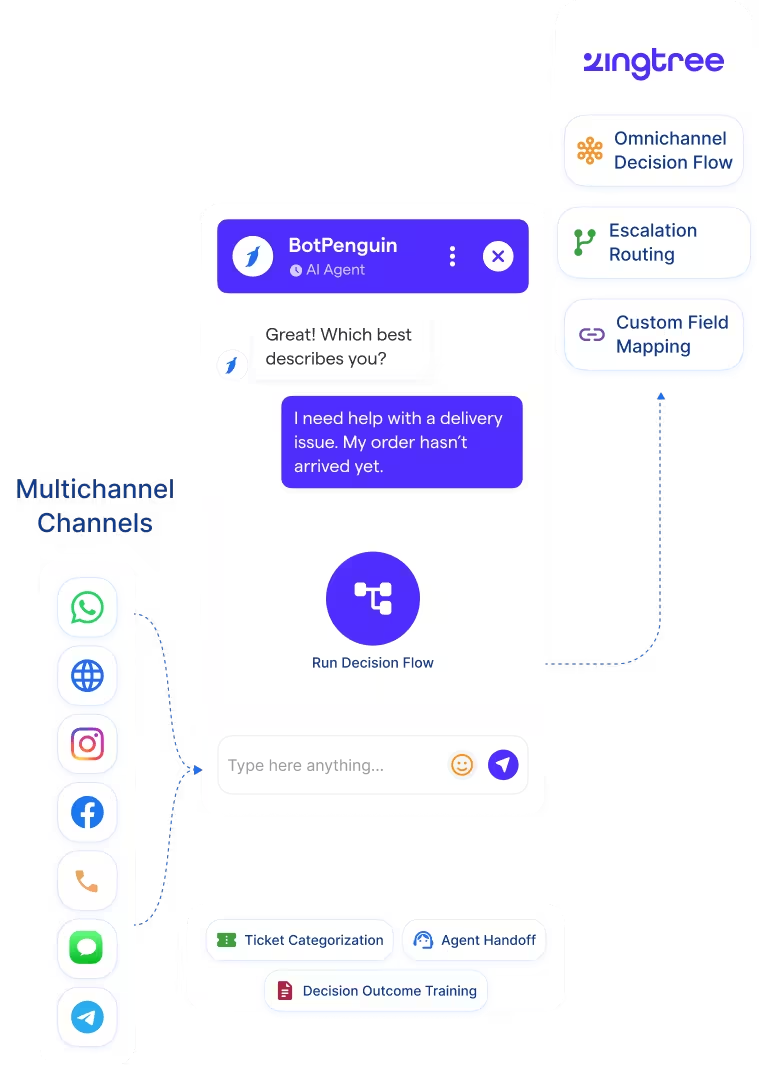
The BotPenguin Zingtree integration extends that logic into chatbot conversations. Customers can move through guided support paths without starting from a website-only flow. Your team gets clearer triage and better routing context. Each chatbot conversation can follow structured logic before escalation or handoff.

How BotPenguin Connects to Zingtree

AI Agent → Zingtree

AI Agent → Zingtree

Let an AI agent handle natural-language triage while following structured decision logic. Then escalate with the full path and outcome captured.

See AI Agents
Automation → Zingtree

Automation → Zingtree

Trigger follow-up workflows from decision outcomes. Once an issue is identified, customer tier is matched, or escalation is needed, the right action can be taken.

View Integrations

What BotPenguin Adds to Zingtree

What Zingtree is Built For

Zingtree is built for structured decision trees and guided workflows. It helps teams create step-by-step support, troubleshooting, and scripting paths. These flows help agents and customers reach the right outcome. They are useful when support logic needs consistency and control.

The Gap

Zingtree is not built as a full omnichannel chatbot platform. Customer conversations may still begin on WhatsApp, Instagram, Facebook, Telegram, SMS, or website chat. Without a conversational layer, structured decision logic may stay disconnected. Customers can end up in freeform support instead of guided triage.

What BotPenguin Adds

BotPenguin brings guided decision-flow logic into chatbot conversations. It helps customers move through structured paths across supported channels. Every chatbot-guided outcome can carry useful context into the next workflow. Support teams get the decision path, issue type, and escalation reason.

80+
Native integrations available on BotPenguin
Decision Paths
Zingtree-style outcomes BotPenguin can help route or log
0
Lines of code needed to connect Zingtree to BotPenguin
<10 min
From signup to your first guided chatbot flow

Everything the Zingtree Chatbot Integration Handles for You

Everything the Zingtree Chatbot Integration Handles for You
  • Omnichannel Decision Flows: Run Zingtree-style decision flows through BotPenguin chatbots across supported channels.
  • Outcome Logging: Capture triage answers, issue categories, escalation reasons, and decision outcomes.
  • Escalation Routing: Route customers to the right human agent with the full decision path attached.
  • Custom Field Mapping: Map decision outcomes to CRM, helpdesk, or workflow fields where your setup supports it.
  • Workflow Triggers: Trigger downstream actions from decision outcomes, such as ticket creation or agent notification.
  • Chatbot for Zingtree: Use BotPenguin as the conversational front end for guided decision-tree support.
  • IT Support Triage: Guide employees through structured troubleshooting before routing unresolved issues.
  • Customer Support Deflection: Run guided Tier-1 support flows through website chat or WhatsApp.
  • Onboarding Qualification: Guide new customers through structured questions and route them based on their needs.
  • Compliance Scripting: Keep sensitive conversations aligned with approved decision paths and scripts.
  • Healthcare Triage: Guide patients through intake questions before booking appointments or escalating.
  • WhatsApp: WhatsApp chatbot flows can guide users through structured support paths. WhatsApp chatbot
  • Website Chatbot: Website chatbot flows can mirror decision-tree-style triage. See Website Chatbots See Website Chatbots
  • Instagram DMs: Instagram chatbot conversations can run structured support flows. See Instagram Chatbots See Instagram Chatbots
  • Facebook Messenger: Messenger conversations can guide customers through decision paths. See Facebook Chatbots See Facebook Chatbots
  • Telegram: Telegram bot conversations can support structured chatbot triage. See Telegram Chatbots See Telegram Chatbots
  • SMS: SMS conversations can support short guided decision flows.
  • Microsoft Teams: Internal decision flows can support employee triage and agent handoffs. See Teams Chatbot See Teams Chatbot

Three Steps to Sync BotPenguin with Zingtree in Under 10 Minutes

No developer needed. Three steps connect BotPenguin chatbot flows with Zingtree-style decision logic.

  1. 1

    Authenticate Both Accounts

    Step 1
  2. 2

    Map Your Flow Logic

    Step 2
  3. 3

    Test and Go Live

    Step 3

What Teams Achieve with BotPenguin and Zingtree

E-commerce

Up to 35 %

of abandoned carts recovered via WhatsApp AI chatbot automation, with every lead conversation guided through Zingtree-style workflows and actioned within minutes.

Healthcare

30%

reduction in appointment no-shows after deploying AI-powered WhatsApp reminders, with every patient inquiry guided through Zingtree-style flows automatically.

Real Estate

40%+

more qualified leads captured per month after deploying BotPenguin AI chatbots to qualify buyers on WhatsApp through Zingtree-style decision flows.

Connect Your AI Chatbot, WhatsApp Bot and Automation Workflows to 80+ Tools With Zero Switching Costs

Connect BotPenguin's conversational AI to your CRM, payment gateway, calendar and eCommerce platform in minutes. No-code, no disruption. Your existing tech stack stays exactly as it is.

ChatGPT integration logoPabbly integration logoZoho CRM integration logoHubSpot integration logoTeamgate CRM integration logoZendesk integration logoWebHoper integration logoInsightly CRM integration logoNo CRM integration logoZapier integration logo
  • ChatGPT integration logo
  • Pabbly integration logo
  • Zoho CRM integration logo
  • HubSpot integration logo
  • Teamgate CRM integration logo
  • Zendesk integration logo
  • WebHoper integration logo
  • Insightly CRM integration logo
  • No CRM integration logo
  • Zapier integration logo
  • Copper CRM integration logo

Start Running Zingtree-Style Flows Through Your Chatbot

Free to start. No credit card required. Live under 10 minutes.

Frequently Asked Questions About the Zingtree Chatbot Integration