Shared Inbox and Ticketing Integration
SupportBee+BotPenguin

SupportBee Chatbot Integration That Resolves Queries Before Tickets

Most support tickets should not reach your inbox. BotPenguin answers common questions first, then routes complex cases to SupportBee with context.

About This Integration

SupportBee

Helpdesk & Support

This SupportBee chatbot integration connects BotPenguin support conversations with your SupportBee shared inbox. It helps teams answer common questions across WhatsApp, website chat, Instagram, and more.

SupportBee helps teams manage customer emails as tickets. Teams can assign, track, comment, label, and resolve support requests from a shared inbox.

The BotPenguin SupportBee integration adds the proactive support layer. Common queries can be answered before they become tickets. When a case needs a human, BotPenguin can route it into SupportBee with captured context. Your agents start with the details they need.

How BotPenguin Connects to SupportBee

AI Chatbot → SupportBee

AI Chatbot → SupportBee

Answer common customer questions across WhatsApp, website chat, Instagram, and more. Route unresolved cases into SupportBee with conversation context.

See AI Chatbots
AI Agent → SupportBee

AI Agent → SupportBee

Let an AI agent handle multi-step support conversations before escalation. Complex cases can move to SupportBee with issue details captured.

See AI Agents
Automation → SupportBee

Automation → SupportBee

Trigger SupportBee routing from chatbot events. A human request, an urgent issue detected, or an unresolved query can start the right ticket flow.

View Integrations

What BotPenguin Adds to SupportBee

What SupportBee is Built For

SupportBee is built for collaborative email support. It gives small teams a shared inbox where customer emails become trackable tickets. Teams can assign tickets, add comments, use labels, and manage status. This keeps support work visible without heavy helpdesk complexity.

The Gap

SupportBee manages tickets after they reach the inbox. But many support questions begin on WhatsApp, website chat, Instagram, or Facebook. Simple queries can still become tickets. Agents may spend time answering questions a chatbot could resolve first.

What BotPenguin Adds

BotPenguin becomes the proactive capture-and-resolution layer before SupportBee. It answers repeated questions across customer messaging channels. Only cases that need a human move into SupportBee. Those cases can arrive with issue type, customer details, and chat context attached.

80+
Native integrations available on BotPenguin
Tickets + Context
SupportBee routing BotPenguin can support from chatbot conversations
0
Lines of code needed to connect SupportBee to BotPenguin
<10 min
From signup to your first routed support conversation in SupportBee

Everything the SupportBee Chatbot Integration Handles for You

Everything the SupportBee Chatbot Integration Handles for You
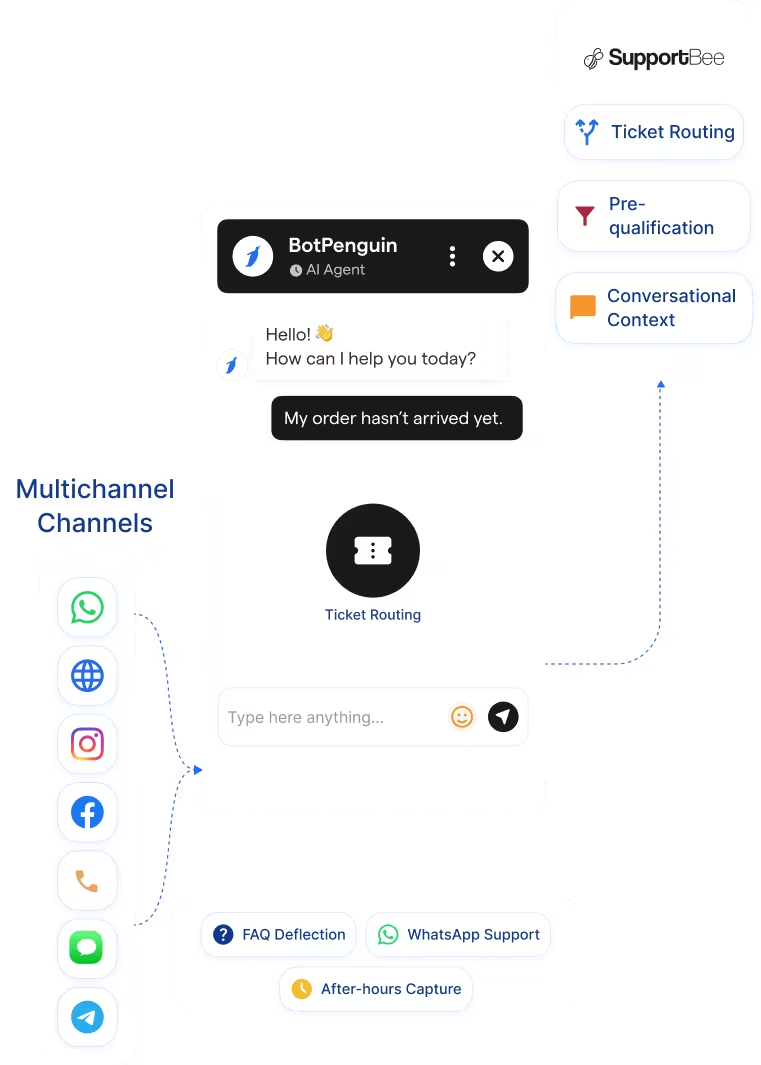
  • Automatic Ticket Routing: Route unresolved chatbot conversations to SupportBee, capturing customer context.
  • Pre-Qualification: Collect name, email, issue type, and urgency before routing to SupportBee.
  • Auto-Resolution: Answer common questions without creating a ticket for every support interaction.
  • Multi-Channel Capture: Capture support queries from WhatsApp, website chat, Instagram, Facebook, Telegram, and SMS.
  • Conversation Context: Send chatbot conversation details with escalated cases so agents understand the issue.
  • Shared Inbox Chatbot: Use BotPenguin as the front-end chatbot before SupportBee handles the ticket.
  • Ticket Deflection: Resolve FAQs before they become SupportBee tickets.
  • E-commerce Support: Handle orders, returns, and product questions via WhatsApp before escalation.
  • SaaS Support: Pre-qualify bug reports and feature requests before routing them to SupportBee.
  • After-Hours Capture: Collect support queries across channels while your team is offline.
  • Small Team Support Scaling: Let BotPenguin answer repeat questions before agents handle complex cases.
  • WhatsApp: WhatsApp Chatbots support can answer common questions before SupportBee routing. WhatsApp Chatbots
  • Website Chatbot: Website chatbot queries can be resolved or routed to SupportBee. See Website Chatbots See Website Chatbots
  • Instagram DMs: Instagram chatbot conversations can handle support queries before escalation. See Instagram Chatbots See Instagram Chatbots
  • Facebook Messenger: Messenger conversations can support customer questions and ticket routing. See Facebook Chatbots See Facebook Chatbots
  • Telegram: Telegram bot conversations can route unresolved issues to SupportBee. See Telegram Chatbots See Telegram Chatbots
  • SMS: Support queries can be captured and routed when human assistance is needed.
  • Microsoft Teams: Internal support handoffs can be routed into your support workflow. See Teams Chatbot See Teams Chatbot

Three Steps to Connect BotPenguin with SupportBee in Under 10 Minutes

No developer needed. Three steps connect BotPenguin support conversations with your SupportBee ticket workflow.

  1. 1

    Authenticate Both Accounts

    Step 1
  2. 2

    Map Routing Rules

    Step 2
  3. 3

    Test and Go Live

    Step 3

What Teams Achieve with BotPenguin and SupportBee

E-commerce

Up to 35%

of abandoned carts recovered via WhatsApp AI chatbot automation, with every lead conversation logged in Apptivo CRM and actioned within minutes.

Healthcare

30%

reduction in appointment no-shows after deploying AI-powered WhatsApp reminders, with every patient inquiry synced to Apptivo CRM automatically.

Real Estate

40%+

more qualified leads logged in Apptivo CRM per month after deploying BotPenguin AI chatbots to qualify buyers on WhatsApp, and sync leads automatically.

Connect Your AI Chatbot, WhatsApp Bot and Automation Workflows to 80+ Tools With Zero Switching Costs

Connect BotPenguin's conversational AI to your CRM, payment gateway, calendar and eCommerce platform in minutes. No-code, no disruption. Your existing tech stack stays exactly as it is.

ChatGPT integration logoPabbly integration logoZoho CRM integration logoHubSpot integration logoTeamgate CRM integration logoZendesk integration logoWebHoper integration logoInsightly CRM integration logoNo CRM integration logoZapier integration logo
  • ChatGPT integration logo
  • Pabbly integration logo
  • Zoho CRM integration logo
  • HubSpot integration logo
  • Teamgate CRM integration logo
  • Zendesk integration logo
  • WebHoper integration logo
  • Insightly CRM integration logo
  • No CRM integration logo
  • Zapier integration logo
  • Copper CRM integration logo

Start Resolving Support Queries Before They Reach SupportBee

Free to start. No credit card required. Live under 10 minutes.

Frequently Asked Questions About the SupportBee Chatbot Integration