Razorpay Chatbot Integration for Payments Inside Conversations
Razorpay
Razorpay is a payment gateway used by businesses to collect secure online payments through payment links, checkout flows, subscriptions, and supported payment methods. It helps process transactions once a customer is ready to pay.
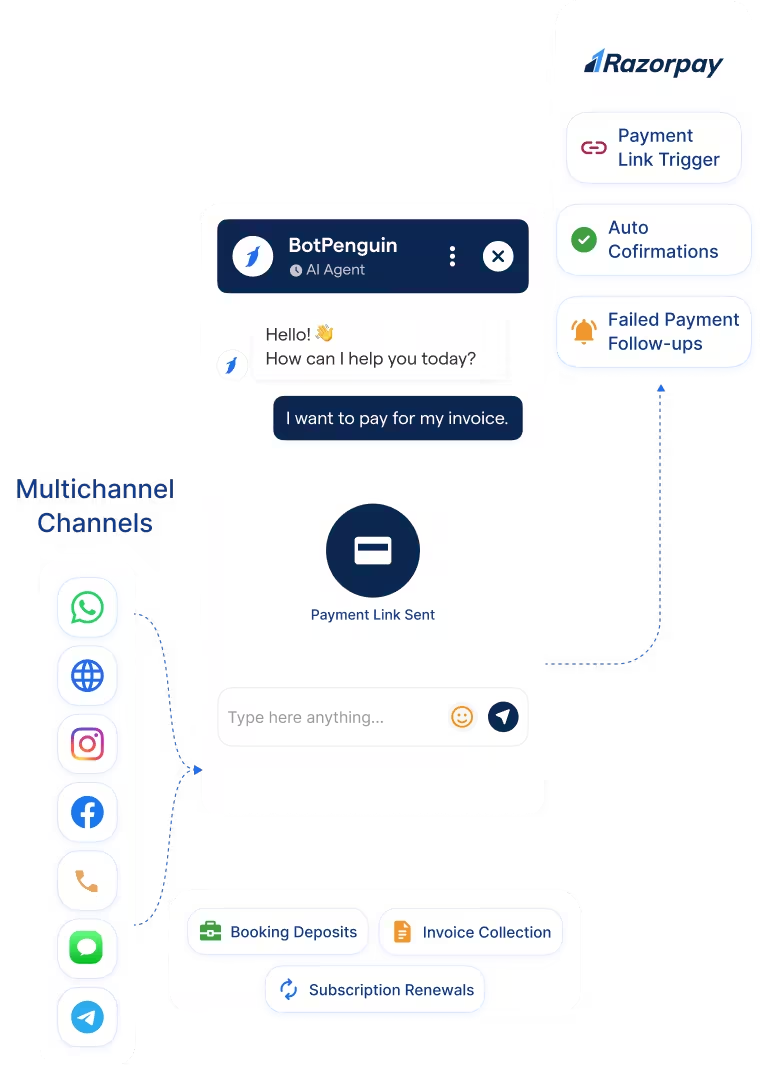
The BotPenguin Razorpay chatbot integration brings payments into WhatsApp and website chatbot conversations. Your chatbot can answer payment questions, capture payment intent, guide customers toward Razorpay flows, and continue based on the payment outcome. AI agents can support customer conversations, but Razorpay payment triggering currently runs through chatbot flows. Available on King and WA King plans.
White-label partners can also connect their Razorpay account through the Agency Panel to collect plan and add-on payments directly from clients. Learn more about BotPenguin for white-label partners.
How BotPenguin Connects to Razorpay
Payment Status → Chatflow
Follow-Ups → WhatsApp
What BotPenguin Adds to Razorpay
Understand what Razorpay is designed to do, where gaps can exist, and how BotPenguin helps create a more connected, automated customer journey.
What Razorpay is Built For
The Gap
What BotPenguin Adds
Everything the Razorpay Chatbot Integration Handles for You

- Payment Component in Chatflows: Add a Razorpay payment step to a WhatsApp or website chatbot flow with your payment message and amount.
- Automatic Status Updates: Razorpay notifies BotPenguin through a webhook, so payment status updates without manual checks.
- Paid and Failed Paths: Route successful payments to confirmation steps and failed payments to retry or support flows.
- Conversation Context: Keep customer details and payment context together in the same conversation record your team can review.
- Payment Follow-Ups: Send relevant follow-ups when customers need to retry or complete a payment.
- Cart Recovery Payments: Prompt abandoned-cart shoppers to complete payment through a WhatsApp follow-up linked to the right Razorpay flow.
- Service Booking Deposits: Capture booking intent through WhatsApp or website chatbot conversations and guide customers toward a Razorpay deposit flow after the slot is confirmed.
- Subscription Renewals: Send renewal payment reminders through WhatsApp or website chatbots and guide customers toward a new Razorpay payment request when due.
- Invoice Collection: Send Razorpay payment requests through WhatsApp or website chatbot follow-ups for pending invoices, reducing manual collection calls.
- Chatbot Payments: Help customers move from enquiry to payment through WhatsApp or website chatbots by answering questions and sharing the appropriate Razorpay flow.
- WhatsApp: Use Razorpay WhatsApp payments to send payment reminders, checkout links, or payment prompts after chatbot conversations. See WhatsApp Chatbots See WhatsApp Chatbots
- Website Chatbot: Help website visitors ask payment questions and move toward the right Razorpay checkout or payment request flow. See Website Chatbots See Website Chatbots
Three Steps to Connect BotPenguin with Razorpay
No developer needed. Connect Razorpay, configure the webhook, and add the Payment component to your chatbot flow.
- 1
Connect Razorpay
Step 1 - 2
Add the Webhook
Step 2 - 3
Add the Payment Component
Step 3
What Businesses Can Achieve with BotPenguin and Razorpay
70%
20 to 30%
Up to 13%
Razorpay Chatbot Integration Examples by Industry
E-commerce
Travel
SaaS
Insurance
Real Estate
Healthcare
Connect Your AI Agents, Chatbots & Voice Agents to 100+ Tools
Connect your CRM, calendar, ecommerce store, and supported payment tools. Availability varies by channel and plan.

Bring Razorpay Payments Into Your Customer Conversations
Start with a free trial. No credit card required.
Frequently Asked Questions About the Razorpay Chatbot Integration
Is the Razorpay chatbot integration free?
Do I need to code to connect Razorpay to BotPenguin?
Which channels support Razorpay payments?
What happens if a Razorpay payment fails?
Why is the Razorpay webhook required?
Can BotPenguin’s AI agent or voice agent take Razorpay payments?
How is this different from Razorpay’s own payment page?


