AI Chatbot → Pipedrive
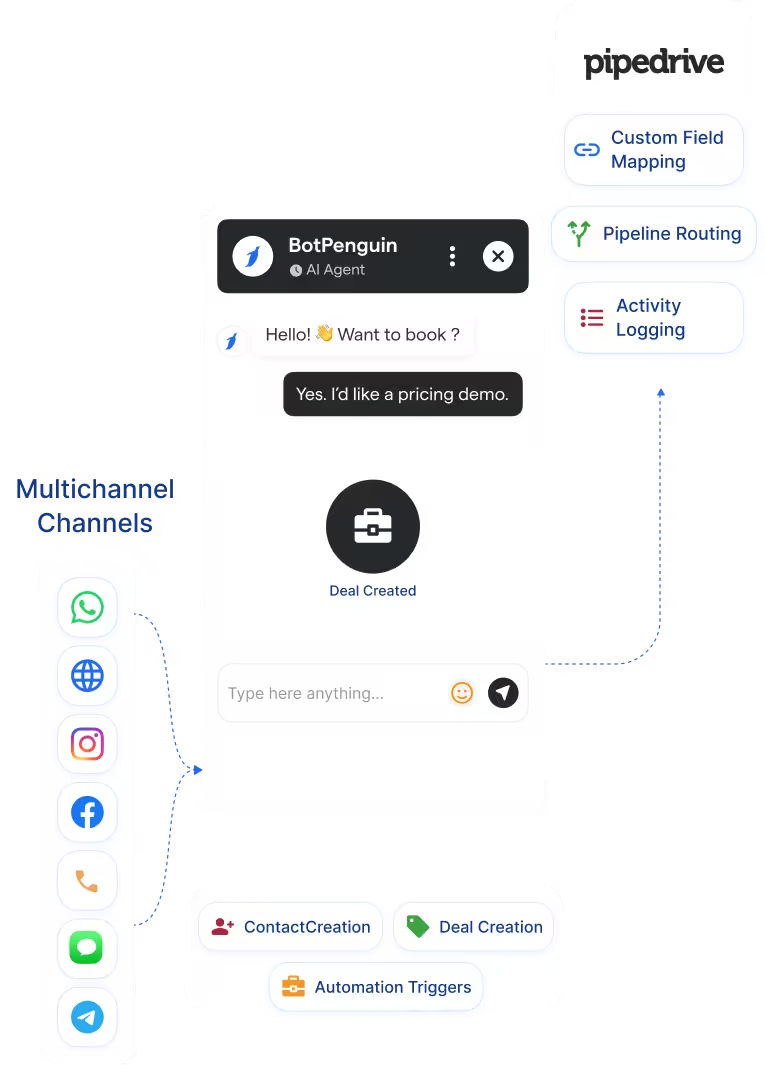
Capture leads across WhatsApp, website, Instagram, and more. Auto-create or update Pipedrive persons and deals with answers mapped to fields.
See AI ChatbotsEvery lead your chatbot captures on WhatsApp, your website, or Instagram lands in Pipedrive. Qualified, mapped, and ready for your sales team.
This Pipedrive chatbot integration connects BotPenguin lead conversations with your Pipedrive sales pipeline. Every qualified lead can move from WhatsApp, website chat, Instagram, and other channels into Pipedrive. Pipedrive keeps your sales pipeline organized. But it can only work with leads that reach it. If inquiries stay inside chat channels, reps work with an incomplete pipeline.
The BotPenguin Pipedrive integration closes that gap. Build a chatbot for Pipedrive with no code, or use AI agents to qualify leads before sync. Each lead can be created or updated in Pipedrive with the right sales context. Your team gets cleaner records, better handoffs, and faster follow-up.
Capture leads across WhatsApp, website, Instagram, and more. Auto-create or update Pipedrive persons and deals with answers mapped to fields.
See AI ChatbotsLet an AI agent qualify the lead in a natural conversation. Then send the captured sales context to Pipedrive for follow-up.
See AI AgentsTrigger sales follow-ups, activities, and routing rules from chatbot events. The right follow-up can begin when the deal moves forward.
View IntegrationsPipedrive LeadBooster helps sales teams capture website leads inside Pipedrive. BotPenguin extends lead capture across WhatsApp, Instagram, Facebook, Telegram, SMS, website chat, and Microsoft Teams.
Pipedrive LeadBooster
BotPenguin + Pipedrive
A step-by-step walkthrough showing how to connect Pipedrive to BotPenguin and send your first live lead in under 10 minutes.
No developer needed. Three steps connect your BotPenguin chatbot to Pipedrive with mapped sales data.
Log in to BotPenguin and open your bot settings. Connect Pipedrive using your Pipedrive domain and API token.
Step 1Choose which chatbot answers map to which Pipedrive fields. Map name, email, phone, source, budget, and custom sales fields.
Step 2Send a test lead through your chatbot. Confirm that the person and deal appear correctly in Pipedrive. Then switch it on for live traffic.
Step 3Up to 35%
of abandoned carts recovered via WhatsApp AI chatbot automation, with every lead conversation logged in Apptivo CRM and actioned within minutes.
30%
reduction in appointment no-shows after deploying AI-powered WhatsApp reminders, with every patient inquiry synced to Apptivo CRM automatically.
40%+
more qualified leads logged in Apptivo CRM per month after deploying BotPenguin AI chatbots to qualify buyers on WhatsApp, and sync leads automatically.
Capture abandoned-cart leads via WhatsApp and auto-create Pipedrive deals for follow-up.
Qualify buyers via WhatsApp, then send budget, location, and timeline into Pipedrive.
Push trial signups and product inquiries from any channel into Pipedrive with qualification data.
Route admissions inquiries into Pipedrive with course interest and intake date mapped.
Sync new patient inquiries to Pipedrive, including appointment details and chat history.
Log booking inquiries from Instagram and Facebook into Pipedrive for contextual follow-up.
Capture policy inquiries via WhatsApp and create Pipedrive deals, logging the coverage type.
Capture consultation inquiries and create Pipedrive deals with service needs, budget, and timeline mapped.
Connect BotPenguin's conversational AI to your CRM, payment gateway, calendar and eCommerce platform in minutes. No-code, no disruption. Your existing tech stack stays exactly as it is.
Free to start. No credit card required. Live in under 10 minutes.
Is the Pipedrive chatbot integration free?
The Pipedrive integration is included on paid BotPenguin plans. You can also start with a free BotPenguin plan and test the chatbot before upgrading.
Do I need to code to connect Pipedrive to BotPenguin?
No. The integration is no-code. Connect your Pipedrive account, map chatbot answers to Pipedrive fields, send a test lead, and go live.
Does the Pipedrive integration work with WhatsApp?
Yes. Leads captured on WhatsApp can sync to Pipedrive as persons and deals. The same setup can also support website, Instagram, Facebook, Telegram, SMS, and Teams channels.
What gets created in Pipedrive: a person, a deal, or both?
The integration can create or update Pipedrive person and deal records based on your mapped setup. Returning leads can be matched using available identifiers, such as email or phone number.
What chatbot data gets sent to Pipedrive?
Only the data you map. Name, email, phone, budget, timeline, source, product interest, and other qualifying answers can be mapped to Pipedrive fields.
Can BotPenguin's AI agent work with Pipedrive?
Yes. BotPenguin AI agents can qualify leads before the data moves into Pipedrive. Use this when your sales team needs deeper qualification before follow-up.
How is this different from Pipedrive LeadBooster?
Pipedrive LeadBooster is primarily designed to capture website leads in Pipedrive. BotPenguin helps capture and qualify leads across WhatsApp, Instagram, Facebook, Telegram, SMS, website chat, and Teams, then syncs them back to Pipedrive.



