AI Chatbot → Notion
Capture enquiries, support requests, bookings, feedback, form answers, and customer context from any BotPenguin channel. BotPenguin can create or update Notion pages and database entries where configured.
See AI ChatbotsLet your BotPenguin chatbot or AI agent capture requests, bookings, feedback, support details, and customer context, then send them into Notion databases or pages for cleaner team workflows.
Notion is an all-in-one workspace for notes, pages, databases, and project tracking. Teams use it to organize customer records, internal workflows, and project information in one place.
The BotPenguin Notion chatbot integration captures conversations from WhatsApp, website chat, or Instagram DMs and sends structured details into Notion pages or databases. This supports Notion database integration, Notion workflow automation, and Notion WhatsApp integration. Available on all paid plans; test it free during your trial.
Capture enquiries, support requests, bookings, feedback, form answers, and customer context from any BotPenguin channel. BotPenguin can create or update Notion pages and database entries where configured.
See AI ChatbotsYour AI agent qualifies the conversation, collects missing details, and prepares structured information before sending it to Notion. This helps teams work with cleaner records instead of raw chat transcripts.
See AI AgentsTrigger Notion workflow automation from chatbot or AI agent events. New enquiry, support request, feedback entry, internal task, or content request can move into the right Notion database or page automatically.
See AutomationsUnderstand what Notion is designed to do, where gaps can exist, and how BotPenguin helps create a more connected, automated customer journey.
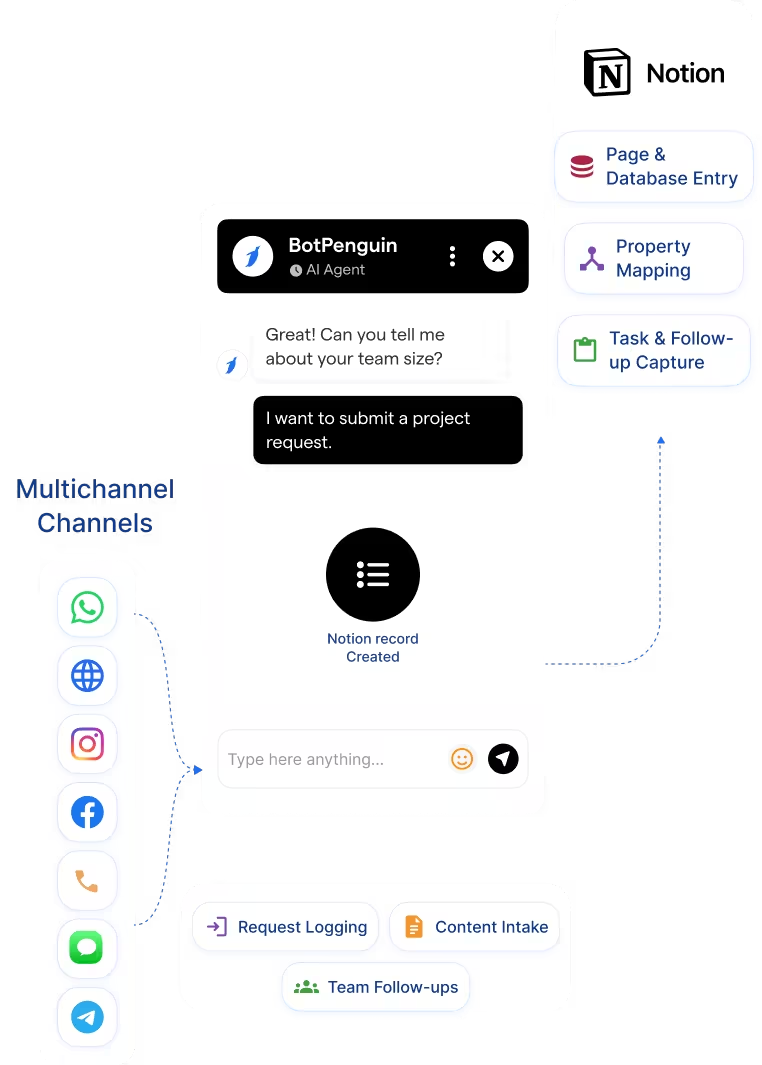
Notion is built to organize work inside pages, databases, docs, trackers, and knowledge bases. Teams use it to manage projects, notes, tasks, and structured workspace records.
Customer conversations often happen outside Notion, across WhatsApp, website chat, Instagram, and other channels. Unless those details are captured and sent into Notion, teams still copy updates manually.
BotPenguin adds the external conversation capture layer. Your chatbot or AI agent collects customer details, qualifies the request, and sends structured information into the right Notion page or database where configured.

No developer needed. Three simple steps connect BotPenguin to Notion and prepare your first workspace record.
Log in to BotPenguin, open your bot settings, and connect your Notion workspace. Choose the page or database where chatbot records should be created.
Step 1Choose which chatbot answers should move into Notion properties, such as name, request type, source channel, status, notes, or owner. Decide which chatbot events should create a new Notion record where configured.
Step 2Send a test conversation through your chatbot and confirm the correct Notion page or database entry is created. Once confirmed, switch it on for live conversations.
Step 30
manual copy-paste steps needed for configured chatbot submissions. BotPenguin can send captured requests directly into the right Notion page or database entry.
100%
of required chatbot fields can be captured before a Notion record is created, where configured. Teams get cleaner entries with name, request type, source channel, notes, and next action.
7+
BotPenguin channels can send captured conversation details into Notion where configured. Teams can track WhatsApp, website chat, Instagram DMs, Facebook Messenger, Telegram, SMS, and internal follow-ups from one workspace.
Log chatbot-captured customer feedback, product requests, and support enquiries into a Notion tracker.
Capture booking enquiries, destination preferences, and itinerary requests into a shared Notion planning board.
Route feature requests, bug reports, and product feedback from chatbot conversations into a Notion product database.
Log policy enquiries, renewal questions, and claims-related requests into a Notion follow-up tracker.
Send buyer details, budget, location preference, and timeline into a Notion property enquiry database.
Capture patient enquiries through chatbot flows and send them into a Notion intake tracker for staff review.
Log admissions enquiries, course interest, and counselling requests into a Notion applicant tracker.
Log consultation inquiries, project requirements, and meeting notes into a shared Notion workspace.
Connect BotPenguin's conversational AI to your CRM, payment gateway, calendar and eCommerce platform in minutes. No-code, no disruption. Your existing tech stack stays exactly as it is.
Free to start. No credit card required.
Is the Notion chatbot integration free?
The Notion chatbot integration is available on paid BotPenguin plans. You can test it during the free trial without a credit card. View BotPenguin pricing to compare plans.
Do I need to code to connect Notion to BotPenguin?
No coding required. Connect your Notion workspace, choose the page or database, map chatbot answers to Notion properties, send a test conversation, and go live.
Does the Notion integration work with WhatsApp?
Yes. BotPenguin can capture WhatsApp conversations and send structured details into Notion pages or databases where configured. This makes it useful as a Notion WhatsApp integration for enquiries, requests, and follow-ups.
Can BotPenguin update existing Notion entries?
BotPenguin can create Notion pages or database entries, and update existing records where supported by your setup. Confirm update depth with product before publishing.
What chatbot data gets sent to Notion?
Only the details you choose to map. This can include name, request type, source channel, status, notes, owner, and key conversation context where configured.
Can BotPenguin’s AI agent work with Notion?
Yes. A BotPenguin AI agent can qualify a conversation, collect missing details, and send structured information into Notion. This helps teams avoid raw transcript dumps.
How is this different from Notion AI?
Notion AI works inside your Notion workspace. BotPenguin captures external customer conversations from channels like WhatsApp, website chat, and Instagram, then sends useful data into Notion.
How is this different from manually copying chats into Notion?
Manual copying takes time and creates messy records. BotPenguin supports Notion database integration by sending selected chatbot answers into structured Notion properties automatically where configured.



