Customer Engagement Integration
MoEngage+BotPenguin

MoEngage Chatbot Integration That Powers Smarter Campaigns

Every chatbot conversation on WhatsApp, website chat, or Instagram can feed customer intent into MoEngage profiles, segments, and campaign workflows.

About This Integration

MoEngage

Helpdesk & Support

This MoEngage chatbot integration connects BotPenguin conversations with your customer engagement workflows. It helps teams capture customer intent from WhatsApp, website chat, Instagram, and other channels. MoEngage helps marketing and lifecycle teams build segments, personalize campaigns, and engage customers across channels. It works best when customer profiles include current behavioral signals.

The BotPenguin MoEngage integration closes that data gap. It can route chatbot-captured answers, events, preferences, and customer context into MoEngage profiles. This MoEngage CRM integration supports customer-profile enrichment, not pipeline CRM management. Your team gets better segments, cleaner campaign triggers, and more useful lifecycle data.

How BotPenguin Connects to MoEngage

AI Chatbot → MoEngage

AI Chatbot → MoEngage

Capture customer data and chatbot events across WhatsApp, website, Instagram, and more. Route mapped answers into MoEngage profiles where configured.

See AI Chatbots
AI Agent → MoEngage

AI Agent → MoEngage

Let an AI agent capture richer customer intent in natural conversation. Then route useful signals into MoEngage attributes where your setup supports it.

See AI Agents
Automation → MoEngage

Automation → MoEngage

Trigger MoEngage automation from chatbot events. Product interest, cart abandonment, a support issue, or a change in lifecycle stage can trigger the appropriate campaign workflow.

View Integrations

What BotPenguin Adds to MoEngage

What MoEngage is Built For

MoEngage is built for customer engagement, segmentation, personalization, and campaign orchestration. Teams use it to engage users across multiple lifecycle stages. It works best when customer profiles contain accurate behavioral data. Better signals lead to better segments and campaign timing.

The Gap

Many customer signals start inside conversations. A customer may ask about a product, confirm intent, abandon a flow, or request support through chat. Those signals can stay outside MoEngage unless they are captured and mapped. That leaves segments less complete than they should be.

What BotPenguin Adds

BotPenguin becomes the conversational data layer for MoEngage. It captures customer intent before campaign automation starts. Every mapped chatbot event can enrich MoEngage profiles and segments. Your campaigns can respond to actual conversation behavior, not guesswork.

80+
Native integrations available on BotPenguin
Profiles + Events
MoEngage data BotPenguin can help sync or route
0
Lines of code needed to connect MoEngage to BotPenguin
<10 min
From signup to your first chatbot-powered MoEngage workflow

Everything the MoEngage Automation Integration Handles for You

Everything the MoEngage Automation Integration Handles for You
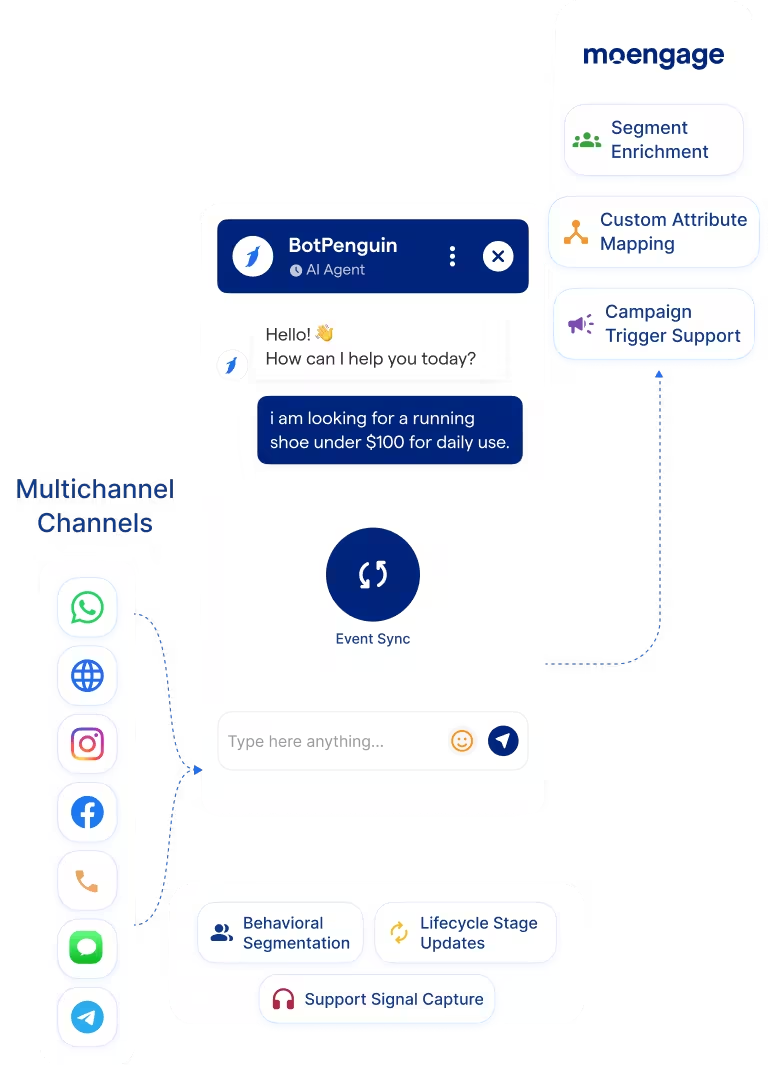
  • Event and Attribute Sync: Route chatbot events and mapped answers into MoEngage profiles where configured.
  • Custom Attribute Mapping: Map chatbot responses to MoEngage attributes like interest, lifecycle stage, or source.
  • Conversation Context: Add useful chatbot context so campaign teams understand the behavior behind each signal.
  • Campaign Trigger Support: Trigger MoEngage campaign workflows from chatbot events where your setup supports it.
  • Segment Enrichment: Use chatbot-captured data to support more accurate MoEngage customer segments.
  • MoEngage Automation: Use chatbot events to support re-engagement, lifecycle, and retention workflows.
  • Behavioral Segmentation: Feed chatbot intent signals into MoEngage segments.
  • Campaign-to-Chat Handoff: Continue a campaign journey through WhatsApp or website chat where configured.
  • E-commerce Re-Engagement: Use chatbot cart or product-interest signals to support win-back campaigns.
  • Lifecycle Stage Updates: Update lifecycle attributes based on chatbot qualification outcomes.
  • Support Signal Capture: Feed support-related chat signals into MoEngage so campaigns avoid poor timing.
  • WhatsApp: MoEngage WhatsApp integration can route WhatsApp chatbot signals into MoEngage workflows. WhatsApp integration
  • Website Chatbot: Conversations with the website chatbot can update MoEngage profiles or events. See Website Chatbots See Website Chatbots
  • Instagram DMs: Instagram chatbot conversations can send customer intent signals into MoEngage. See Instagram Chatbots See Instagram Chatbots
  • Facebook Messenger: Messenger conversations can support MoEngage customer engagement workflows. See Facebook Chatbots See Facebook Chatbots
  • Telegram: Telegram bot conversations can support MoEngage event workflows where configured. See Telegram Chatbots See Telegram Chatbots
  • SMS: SMS conversations can map customer responses into MoEngage attributes where configured.
  • Microsoft Teams: Internal team workflows can support MoEngage follow-up visibility. See Teams Chatbot See Teams Chatbot

Three Steps to Connect BotPenguin with MoEngage in Under 10 Minutes

No developer needed from the BotPenguin side. Three steps connect chatbot conversations with MoEngage customer engagement workflows.

  1. 1

    Connect MoEngage

    Step 1
  2. 2

    Map Attributes and Events

    Step 2
  3. 3

    Test and Go Live

    Step 3

What Teams Achieve with BotPenguin and MoEngage

E-commerce

35%

More useful win-back segments when chatbot cart-abandonment signals and product interests feed MoEngage campaign workflows.

SaaS

3x

Cleaner lifecycle campaigns when chatbot qualification answers update customer profiles and onboarding segments.

Travel

3x

Better re-engagement timing when campaign workflows can respond to chatbot-captured booking intent and customer preferences.

Connect Your AI Chatbot, WhatsApp Bot and Automation Workflows to 80+ Tools With Zero Switching Costs

Connect BotPenguin's conversational AI to your CRM, payment gateway, calendar and eCommerce platform in minutes. No-code, no disruption. Your existing tech stack stays exactly as it is.

ChatGPT integration logoPabbly integration logoZoho CRM integration logoHubSpot integration logoTeamgate CRM integration logoZendesk integration logoWebHoper integration logoInsightly CRM integration logoNo CRM integration logoZapier integration logo
  • ChatGPT integration logo
  • Pabbly integration logo
  • Zoho CRM integration logo
  • HubSpot integration logo
  • Teamgate CRM integration logo
  • Zendesk integration logo
  • WebHoper integration logo
  • Insightly CRM integration logo
  • No CRM integration logo
  • Zapier integration logo
  • Copper CRM integration logo

Start Powering MoEngage Campaigns with Your Chatbot Today

Free to start. No credit card required. Live in under 10 minutes.

Frequently Asked Questions About the MoEngage Chatbot Integration