MessageBird Chatbot Integration for WhatsApp and SMS Automation
MessageBird
How BotPenguin Connects to MessageBird
AI Agent → MessageBird
Automation → MessageBird
What BotPenguin Adds to MessageBird
Understand what MessageBird is designed to do, where gaps can exist, and how BotPenguin helps create a more connected, automated customer journey.
What MessageBird is Built For
The Gap
What BotPenguin Adds
Everything the MessageBird Chatbot Integration Handles for You

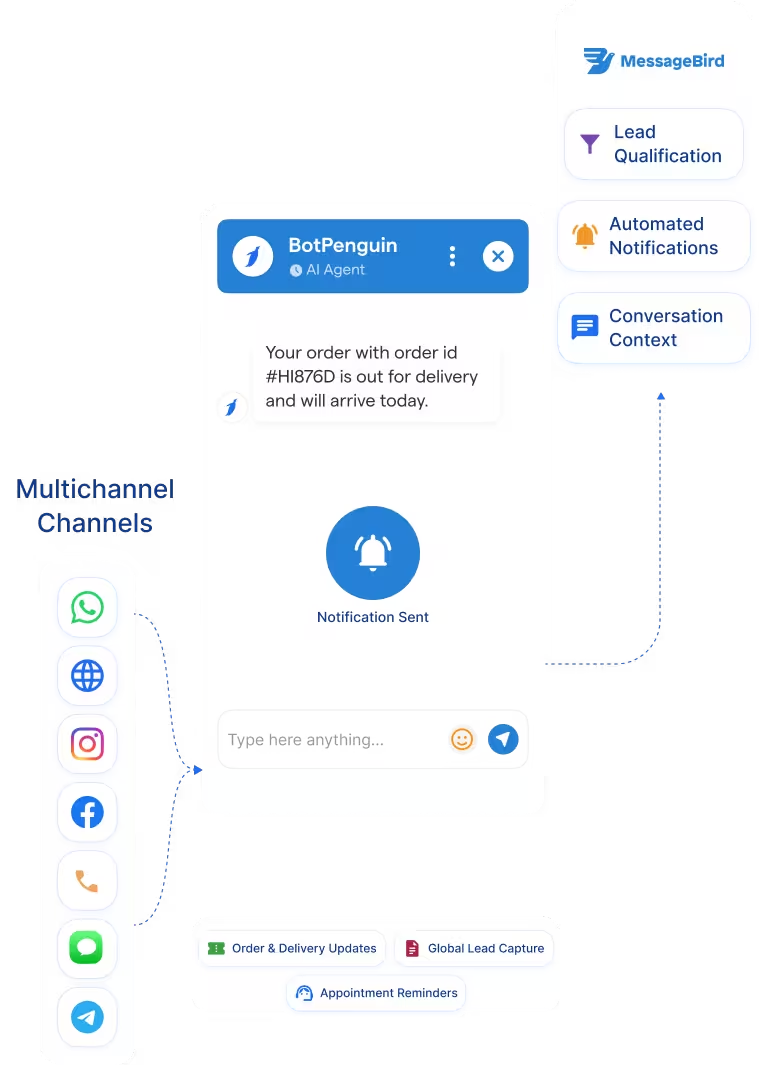
- Multi-Channel Messaging: Trigger MessageBird-powered WhatsApp and SMS workflows from chatbot or AI agent conversations.
- Lead Qualification: Qualify leads before they reach sales or support, with intent, contact details, and channel source captured.
- Automated Notifications: Send reminders, updates, alerts, or follow-up messages through MessageBird workflows based on chatbot events.
- MessageBird SMS Chatbot: Use SMS conversations for lead capture, reminders, status updates, and follow-ups where configured.
- Conversation Context: Keep chatbot answers, message summaries, and handoff details available for reporting and follow-up.
- Delivery Status Context: Use available MessageBird delivery or reply status to guide the next chatbot action, where configured.
- Order and Delivery Updates: Send automated MessageBird notifications when chatbot conversations confirm order status, delivery changes, or customer requests.
- Appointment Reminders: Reduce missed appointments with reminder messages sent through MessageBird-powered SMS or WhatsApp workflows.
- MessageBird WhatsApp Integration: Capture WhatsApp enquiries through BotPenguin and trigger MessageBird-powered replies, alerts, or follow-ups.
- Global Lead Capture: Qualify enquiries from customers across regions using one chatbot and MessageBird’s messaging infrastructure.
- WhatsApp: Capture WhatsApp enquiries through BotPenguin’s MessageBird WhatsApp integration and trigger replies, alerts, or follow-ups. See WhatsApp Chatbots See WhatsApp Chatbots
- Website Chatbot: Visitor conversations can trigger MessageBird-powered follow-up messages after the chatbot flow is completed. See Website Chatbots See Website Chatbots
- Instagram DMs: Instagram enquiries can be qualified by the chatbot before triggering a MessageBird notification or follow-up. See Instagram Chatbots See Instagram Chatbots
- Facebook Messenger: Messenger conversations can work alongside MessageBird-powered messaging workflows for customer follow-up. See Facebook Chatbots See Facebook Chatbots
- Telegram: Telegram bot conversations can trigger MessageBird-based follow-ups where configured. See Telegram Chatbots See Telegram Chatbots
- SMS: Use MessageBird SMS chatbot workflows to send reminders, alerts, and follow-ups to qualified leads.
- Microsoft Teams: Internal alerts can notify your team when a MessageBird follow-up or customer handoff is needed. See Teams Chatbot
Three Steps to Connect BotPenguin with MessageBird in Under 10 Minutes
No developer needed. Three simple steps connect BotPenguin to MessageBird and prepare your first messaging workflow.
- 1
Authenticate Both Accounts
Step 1 - 2
Choose Message Triggers
Step 2 - 3
Test and Go Live
Step 3
What Businesses Achieve with BotPenguin and MessageBird
90 to 98%
21 to 35%
51%
MessageBird Chatbot Integration Examples by Industry
E-commerce
Travel
Insurance
Real Estate
Healthcare
Connect Your AI Agents, Chatbots & Voice Agents to 80+ Tools With Zero Switching Costs
Connect BotPenguin's conversational AI to your CRM, payment gateway, calendar and eCommerce platform in minutes. No-code, no disruption. Your existing tech stack stays exactly as it is.
Turn MessageBird Messages Into Automated Customer Conversations
Free to start. No credit card required.
Frequently Asked Questions About the MessageBird Chatbot Integration
Is the MessageBird chatbot integration free?
Do I need to code to connect MessageBird to BotPenguin?
Which channels does the MessageBird integration support?
Does MessageBird messaging cost extra on top of BotPenguin?
Can I trigger a MessageBird message from a chatbot event?
Can BotPenguin’s AI agent work with MessageBird?
How is this different from using the MessageBird API directly?
What is a MessageBird SMS chatbot?



