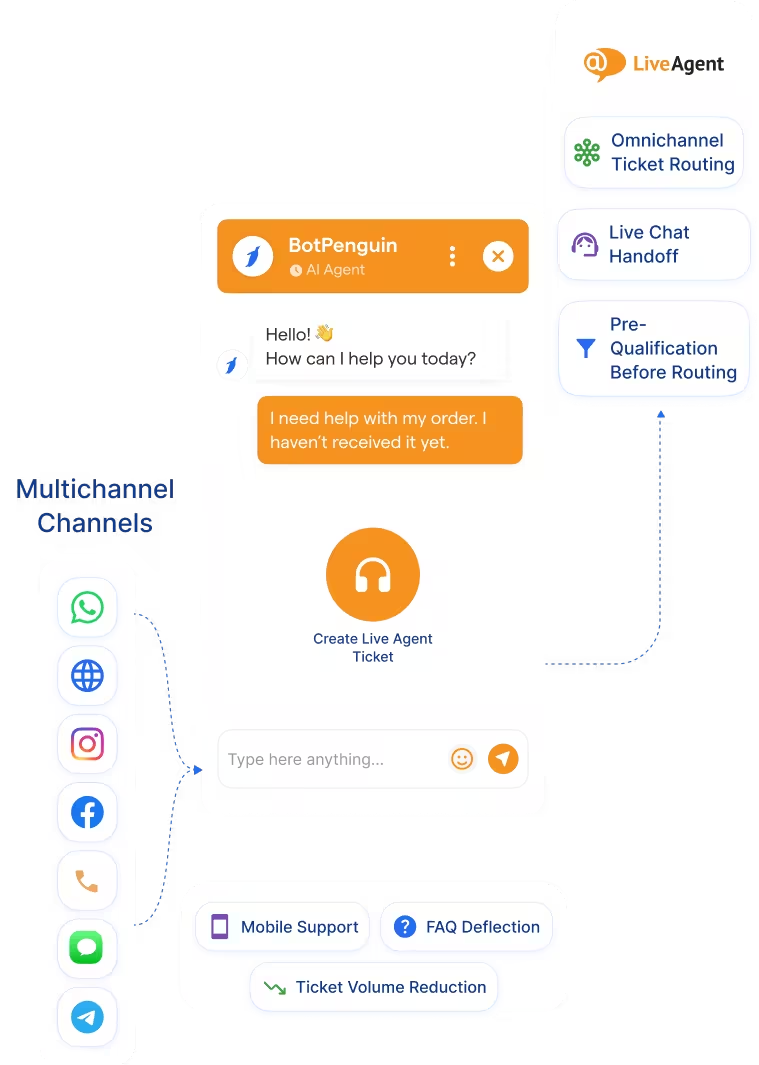
BotPenguin Adds AI-Powered Chatbot Automation Across Every Channel LiveAgent Doesn't Cover
LiveAgent
How BotPenguin Connects to LiveAgent
AI Agent to LiveAgent
Automation to LiveAgent
WHY BOTPENGUIN VS LIVEAGENT'S NATIVE CHATBOT
LiveAgent Native Chatbot
- Email, live chat, phone, Facebook, Instagram, WhatsApp, Telegram, Viber (via LiveAgent inbox)
- Included in LiveAgent per-agent plans ($15/agent/month)
- Rule-based chatbot within LiveAgent dashboard
- Built inside LiveAgent; requires LiveAgent configuration
- Limited
- Routes to LiveAgent inbox
BotPenguin + LiveAgent
- AI chatbot on WhatsApp, Instagram, website, Facebook, Telegram, SMS + LiveAgent inbox routing
- Flat BotPenguin plans + free tier; no per-agent charge for chatbot
- AI chatbot + AI agent with natural conversation and tool calling on all paid plans
- Fully no-code visual builder; live in under 10 minutes
- AI agent handles complex back-and-forth troubleshooting
- Resolves automatically OR routes to LiveAgent based on complexity
See the LiveAgent Integration in Action
Step-by-step: connect LiveAgent to BotPenguin and route your first WhatsApp support ticket to your helpdesk in under 10 minutes.
Everything the LiveAgent Chatbot Integration Handles for You

- Omnichannel Ticket Routing: Conversations from WhatsApp, Instagram, Facebook, SMS, and Telegram route to LiveAgent as tickets with full transcript attached. Your team picks up with complete context.
- AI Chatbot Resolution: Common support questions get answered automatically by the chatbot before they reach LiveAgent. FAQs, order status, password resets, returns—resolved without agent time.
- Pre-Qualification Before Routing: Chatbot collects customer name, issue type, priority, and context before routing to LiveAgent. Agents open tickets that are pre-prioritized and contextualized.
- Ticket Automation: LiveAgent tickets are created automatically with the correct department, priority, and assigned agent based on chatbot conversation data. No manual triage needed.
- Live Chat Handoff: When a chatbot reaches its limit, the conversation transfers to a LiveAgent live chat session with all previous context visible. The customer never repeats themselves.
- Two-Way Sync: Updates in LiveAgent can trigger chatbot follow-ups on the original channel to close customer conversations faster.
- FAQ Deflection: Answer the same support questions over and over automatically. Chatbot resolves 70%+ of incoming tickets without agent involvement.
- After-Hours Support: Customers on WhatsApp and website chat get instant answers 24/7, even outside business hours. Complex cases wait in the LiveAgent queue for morning.
- eCommerce Support at Scale: Handle returns, order status, and shipping questions automatically across all channels. Complex refund requests route to LiveAgent with order details pre-captured.
- Ticket Volume Reduction: Automated answers to common questions cut your support queue in half. Agents focus on customers with genuine issues.
- Mobile Support: Customers on WhatsApp and Instagram get support on the channels they prefer. LiveAgent agents follow up on complex cases without context switching.
- WhatsApp: Support questions answered automatically via AI chatbot. Complex cases escalate to LiveAgent with full transcript. See WhatsApp Chatbots See WhatsApp Chatbots
- Website Chatbot: Website visitors get instant chatbot answers to FAQs. Unresolved questions create LiveAgent tickets with visitor context pre-filled. See Website Chatbots See Website Chatbots
- Instagram DMs: Instagram support queries handled by chatbot or routed to LiveAgent as tickets with full context. See Instagram Chatbots See Instagram Chatbots
- Facebook Messenger: Messenger conversations answered by chatbot automatically or escalated to LiveAgent with conversation history. See Facebook Chatbots See Facebook Chatbots
- Telegram: Inbound Telegram support questions answered by chatbot or routed to LiveAgent as tickets automatically. See Telegram Chatbots See Telegram Chatbots
- SMS: SMS support requests answered automatically or created as LiveAgent tickets with full context.
- Microsoft Teams: Internal support requests from Teams create LiveAgent tickets with full context for team routing. See Teams Chatbot See Teams Chatbot
Three Steps to Sync BotPenguin with LiveAgent in Under 10 Minutes
No developer needed. Three steps between you and an AI chatbot feeding LiveAgent.
- 1
Connect Your Accounts
Step 1 - 2
Set Channel Routing Rules
Step 2 - 3
Test and Go Live
Step 3
What Support Teams Achieve with BotPenguin and LiveAgent
40%
30%
8x
How Support Teams Use BotPenguin With LiveAgent
Real ways businesses resolve simple questions automatically and route complex cases to LiveAgent.
eCommerce
Healthcare
SaaS
Real Estate
Education
Connect Your AI Agents, Chatbots & Voice Agents to 80+ Tools With Zero Switching Costs
Connect BotPenguin's conversational AI to your CRM, payment gateway, calendar and eCommerce platform in minutes. No-code, no disruption. Your existing tech stack stays exactly as it is.
Resolve Simple Questions Automatically. Let LiveAgent Handle the Rest.
Free to start. No credit card required.
Frequently Asked Questions About the LiveAgent Chatbot Integration
Is the LiveAgent chatbot integration free?
How is BotPenguin's chatbot different from LiveAgent's native chatbot?
Does BotPenguin work with WhatsApp?
Do I need to code to connect LiveAgent to BotPenguin?
Can BotPenguin resolve support questions automatically, or does it only route to LiveAgent?
Which channels does BotPenguin cover with LiveAgent?
Can BotPenguin work as an AI agent with LiveAgent, not just a rule-based chatbot?