Customer Support & Live Chat Integration
HelpCrunch+BotPenguin

BotPenguin Adds a No-Code AI Chatbot Layer to Your HelpCrunch Stack, Across Every Channel

HelpCrunch manages your support inbox. BotPenguin qualifies, deflects, and routes conversations from WhatsApp, Instagram, and every other channel before they ever reach your team. Together they handle more, with less manual work.

About This Integration

HelpCrunch

Helpdesk & Support

HelpCrunch is a customer communication platform built for SaaS and support teams. It brings live chat, AI agents, a knowledge base, email automation, and a shared inbox into one place so your team can manage every customer conversation without switching tools.

The BotPenguin integration adds a no-code AI chatbot layer that works across every channel your customers use and routes conversations into HelpCrunch automatically. Common questions get deflected before they reach your team. Leads get qualified before they hit your inbox. Complex cases arrive in HelpCrunch with the full conversation attached so your agents never start from scratch. Available on all paid plans. Test it free during your trial.

HOW BOTPENGUIN CONNECTS TO HELPCRUNCH

AI Chatbot to HelpCrunch

AI Chatbot to HelpCrunch

Your chatbot handles common questions on WhatsApp, Instagram, and your website before they reach your HelpCrunch inbox. When a case needs a human, it routes to HelpCrunch with the full conversation transcript attached. Your agents never start cold.

See AI Chatbots
AI Agent to HelpCrunch

AI Agent to HelpCrunch

For conversations that need more than a quick answer, the AI Agent holds a natural multi-step conversation, qualifies the customer, and escalates to HelpCrunch with complete context. No rep needed until it genuinely matters.

See AI Agents
Automation to HelpCrunch

Automation to HelpCrunch

When a lead qualifies, a support request comes in, or an issue needs escalating, BotPenguin triggers the right HelpCrunch workflow automatically. The right action fires without anyone on your team needing to do it manually.

See Automations

WHAT BOTPENGUIN ADDS TO HelpCrunch

HelpCrunch Runs Your Inbox. BotPenguin Handles What Comes Before It.

What HelpCrunch is Built For

HelpCrunch is built to manage customer conversations after they reach your team. It gives your agents a shared inbox, live chat, AI agents, a knowledge base, and email automation in one platform. For teams that need to handle high volumes of support, sales, and onboarding conversations, it keeps everything organised and in one place.

The Gap

Every conversation that reaches your HelpCrunch inbox still needs an agent to open it, read it, and respond. Common questions, basic qualifications, and repetitive requests take up the same agent time as complex cases. There is no layer that filters, deflects, and pre-qualifies before the conversation lands in the inbox.

What BotPenguin Adds

BotPenguin is that layer. It sits in front of HelpCrunch across every channel and handles the conversations that do not need a human. Common questions get answered automatically. Leads get qualified before they reach an agent. Complex cases arrive in HelpCrunch with the full context already captured. Your team spends time on the conversations that actually need them.

80+
Native integrations on BotPenguin
7
Channels BotPenguin covers with your HelpCrunch stack: WhatsApp, Instagram, Facebook, Telegram, SMS, website, and Teams
0
Lines of code needed to connect
Under 10 min
From signup to your first automated conversation routing into HelpCrunch

Everything the HelpCrunch Chatbot Integration Handles for You

Everything the HelpCrunch Chatbot Integration Handles for You
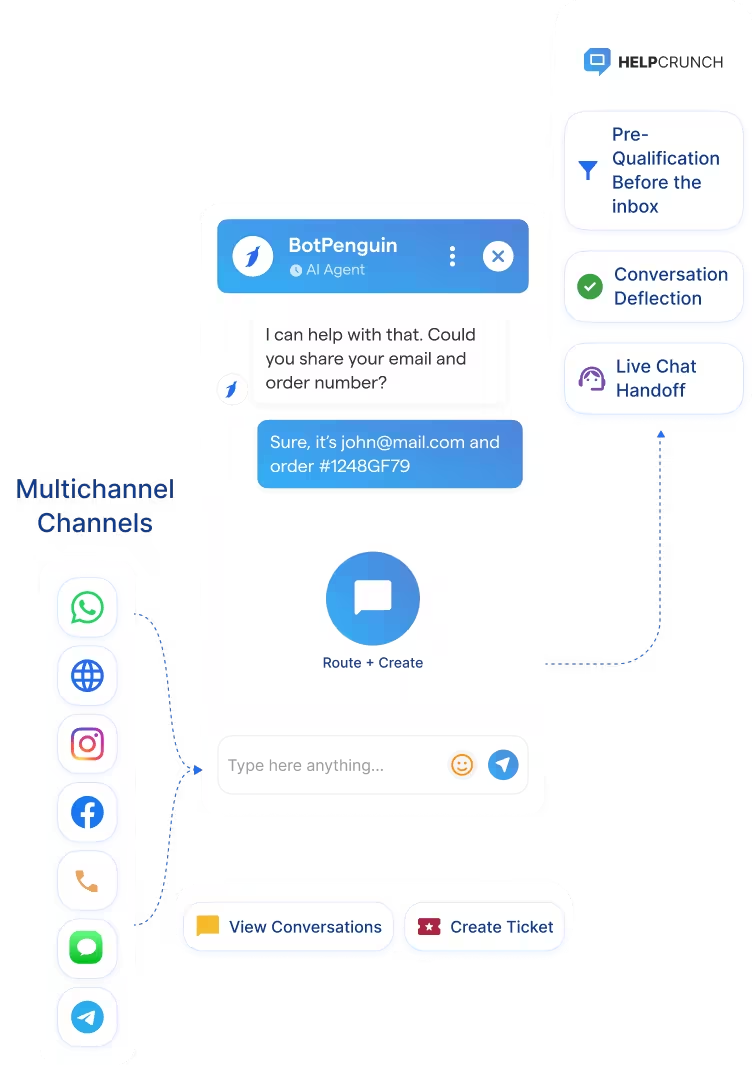
  • Omnichannel Routing: Conversations from WhatsApp, Instagram, Facebook, Telegram, and SMS route into HelpCrunch with the full transcript attached. Your team picks up every conversation with complete context already there.
  • Pre-Qualification Before the Inbox: The chatbot collects name, email, issue type, and intent before routing to HelpCrunch. Your agents have everything they need before they type a single word.
  • Automatic Ticket and Chat Creation: Qualifying conversations create HelpCrunch chats or tickets automatically with the correct team and priority already set. No manual triage needed.
  • Conversation Deflection: Common questions get answered automatically before they reach your team. Only cases that genuinely need a human land in your HelpCrunch inbox.
  • Live Chat Handoff: When a conversation needs a human, it transfers to a HelpCrunch live chat session with the full conversation history attached. Nothing gets repeated, nothing gets lost.
  • No-Code Setup: Connect HelpCrunch to BotPenguin in minutes. No developer required.
  • Support Deflection: Answer the questions your support team fields most often automatically before they reach HelpCrunch. Your agents focus on the cases that actually need them.
  • Lead Qualification: Qualify inbound leads on any channel before they reach your HelpCrunch inbox. Qualified prospects arrive with budget, intent, and contact details already captured.
  • SaaS Onboarding: Guide trial users through setup questions via chatbot. When a question needs a human, it routes straight to HelpCrunch with the full conversation context attached.
  • eCommerce Support: Handle returns, order status, and product questions automatically across WhatsApp and Instagram. Complex cases route to HelpCrunch with everything your agent needs to resolve them fast.
  • After-Hours Coverage: BotPenguin keeps responding to customers when your HelpCrunch team is offline. Urgent cases get flagged. Everything else gets resolved or logged for the morning.
  • WhatsApp: Conversations captured, qualified, and routed to HelpCrunch in real time with the full transcript logged. See WhatsApp Chatbots See WhatsApp Chatbots
  • Website Chatbot: Works alongside HelpCrunch's native live chat to handle deflection and qualification before conversations reach your agents. See Website Chatbots See Website Chatbots
  • Instagram DMs: Inbound DM support and sales queries captured and routed to HelpCrunch automatically. See Instagram Chatbots See Instagram Chatbots
  • Facebook Messenger: Messenger conversations routed to HelpCrunch with the full transcript attached. See Facebook Chatbots See Facebook Chatbots
  • Telegram: Telegram bot conversations escalated to HelpCrunch when a human is needed. See Telegram Chatbots See Telegram Chatbots
  • SMS: SMS support and sales leads captured and routed to HelpCrunch automatically.
  • Microsoft Teams: Internal support requests from Teams routed to HelpCrunch without manual intervention. See Teams Chatbot See Teams Chatbot

Live in Under 10 Minutes

No developer needed. Three steps between you and an AI chatbot routing conversations into HelpCrunch automatically.

  1. 1

    Connect Your Accounts

    Step 1
  2. 2

    Set Your Channels and Routing Rules

    Step 2
  3. 3

    Test and Go Live

    Step 3

What Support Teams Achieve with BotPenguin and HelpCrunch

Ticket Deflection

of common support questions resolved automatically by BotPenguin before reaching a HelpCrunch agent, reducing team workload without reducing coverage.

Agent Efficiency

more conversations handled with the same HelpCrunch team after BotPenguin took over deflection and pre-qualification across all channels.

Response Time

reduction in first response time after BotPenguin began qualifying and routing conversations before they reached the HelpCrunch inbox.

Connect Your AI Chatbot, WhatsApp Bot and Automation Workflows to 80+ Tools With Zero Switching Costs

Connect BotPenguin's conversational AI to your CRM, payment gateway, calendar and eCommerce platform in minutes. No-code, no disruption. Your existing tech stack stays exactly as it is.

ChatGPT integration logoPabbly integration logoZoho CRM integration logoHubSpot integration logoTeamgate CRM integration logoZendesk integration logoWebHoper integration logoInsightly CRM integration logoNo CRM integration logoZapier integration logo
  • ChatGPT integration logo
  • Pabbly integration logo
  • Zoho CRM integration logo
  • HubSpot integration logo
  • Teamgate CRM integration logo
  • Zendesk integration logo
  • WebHoper integration logo
  • Insightly CRM integration logo
  • No CRM integration logo
  • Zapier integration logo
  • Copper CRM integration logo

Less Volume in Your HelpCrunch Inbox. More Context for Every Case

Free to start. No credit card required.

Frequently Asked Questions About the HelpCrunch Chatbot Integration