Knowledge Base Integration Logo row: HelpDocs + BotPenguin
HelpDocs+BotPenguin

BotPenguin Connects Your HelpDocs Knowledge Base to Every Channel Your Customers Use

Your customers are not browsing your knowledge base. They are messaging you on WhatsApp, your website, and Instagram expecting an instant reply. BotPenguin answers them automatically using your existing HelpDocs articles, around the clock, across every channel.

About This Integration

HelpDocs

Helpdesk & Support

HelpDocs is where your support team puts the answers. It keeps your documentation organised, searchable, and up to date so customers can find solutions without raising a ticket. For teams that get the same questions over and over, it is the right tool for the job.

The problem is that most customers never open it. They message you on WhatsApp, drop into your website chat, or slide into Instagram DMs expecting a reply in seconds. They are not looking for an article. They want an answer.

BotPenguin closes that gap. Connect it to HelpDocs and your chatbot starts pulling answers from your existing articles the moment a customer reaches out, on any channel, at any hour. Questions your knowledge base covers get answered instantly. Questions it cannot cover get escalated to your team with the full conversation attached so nothing starts from scratch. Available on all paid plans. Test it free during your trial.

HOW BOTPENGUIN CONNECTS TO HELPDOCS

AI Chatbot to HelpDocs

AI Chatbot to HelpDocs

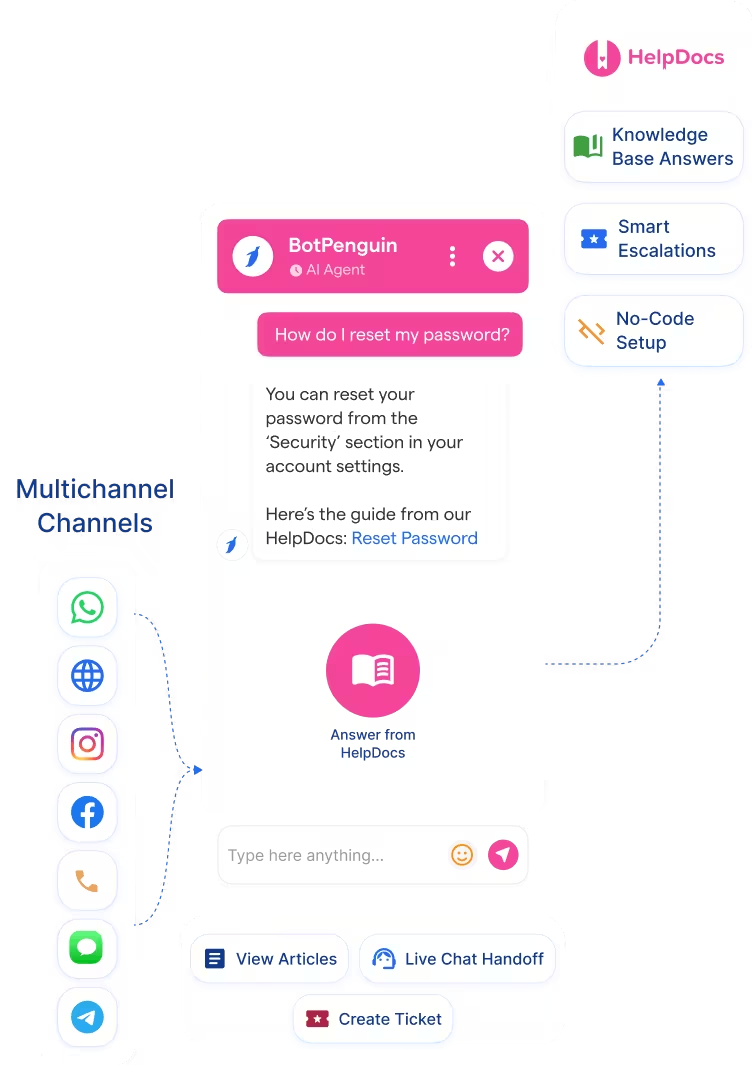
Your chatbot answers common customer questions directly from your HelpDocs articles, across WhatsApp, your website, Instagram, and more. When it cannot find an answer, it creates a ticket or routes to a human with the full conversation logged.

AI Chatbot
AI Agent to HelpDocs

AI Agent to HelpDocs

For conversations that need more than a quick answer, the AI Agent pulls from HelpDocs for known questions and handles bookings, status checks, and escalations in a single conversation. No rep needed until it matters.

AI Agent
Automation to HelpDocs

Automation to HelpDocs

When a question falls outside your HelpDocs content, BotPenguin logs a ticket, alerts your team, and routes the customer automatically. Every unanswered question becomes a task, not a missed conversation.

Automation

WHAT BOTPENGUIN ADDS TO HELPDOCS

What HelpDocs is Built for

HelpDocs is built to organize and publish your support documentation. It gives customers a clean, searchable place to find answers on their own. For teams fielding the same questions repeatedly, a well-maintained knowledge base cuts ticket volume and keeps the support team focused on complex issues.

The Gap

Most customers do not search the knowledge base when they need help. They message you directly and expect a reply within seconds. That expectation does not pause outside business hours. HelpDocs has no way to meet it because it has no chatbot and no way to push answers into the channels your customers actually use.

What BotPenguin Adds

BotPenguin is the delivery layer your HelpDocs knowledge base is missing. Connect the two and your chatbot answers questions from your existing articles across WhatsApp, your website, Instagram, and every other channel you run. Your content does not change. Your team does not grow. Your customers just stop waiting.

See the HelpDocs Integration in Action

A step-by-step walkthrough showing how to connect HelpDocs to BotPenguin and answer your first customer question automatically.

80+
Native integrations on BotPenguin
100%
HelpDocs knowledge base content BotPenguin can draw answers from automatically
0
Lines of code needed to connect
<10 min
From signup to your first automated answer

Everything the HelpDocs Chatbot Integration Handles for You

Everything the HelpDocs Chatbot Integration Handles for You
  • Knowledge Base Answers: Your chatbot pulls answers directly from your HelpDocs articles and responds to customer questions automatically. No manual scripting. No copying and pasting from documentation.
  • Instant Deflection: Questions your knowledge base already covers never reach your support team. The chatbot handles them the moment they come in, across every channel.
  • Smart Escalation: When a question goes beyond your HelpDocs content, the bot creates a support ticket or routes to a human agent with the full conversation context attached. Your team picks up exactly where the bot left off.
  • Multi-Channel Delivery: The same HelpDocs knowledge base powers answers across WhatsApp, your website, Instagram, Facebook, Telegram, and SMS. One knowledge base, every channel.
  • Conversation Logging: Every chatbot interaction is logged, so your team can see which questions the knowledge base is not covering and update your HelpDocs content accordingly.
  • No-Code Setup: Connect HelpDocs to BotPenguin in minutes using your HelpDocs API key. No developer required.
  • Support Deflection: Answer the questions your support team fields most often directly from your HelpDocs articles. Password resets, billing questions, feature explanations, handled automatically before a ticket is ever raised.
  • Onboarding Assistance: Guide new users through your product using your existing HelpDocs tutorials and setup guides, delivered conversationally through your website chatbot the moment they need help.
  • SaaS Help Desk: Resolve common product questions from WhatsApp or website chat before they become support tickets. Your documentation is already written. BotPenguin puts it to work.
  • eCommerce FAQs: Answer shipping, returns, and product questions from Instagram or Facebook Messenger using your HelpDocs help center content. No agent needed for questions you have already answered in writing.
  • After-Hours Support: Your knowledge base does not sleep. BotPenguin keeps it answering questions around the clock across every channel without your team needing to be online.
  • WhatsApp: Customer questions answered from your HelpDocs knowledge base in real time with the full chat logged. See WhatsApp Chatbots See WhatsApp Chatbots
  • Website: Visitor questions answered instantly from HelpDocs without a live agent needed. See Website Chatbots See Website Chatbots
  • Instagram DMs: Inbound DM questions handled from your HelpDocs content before they reach your support team. See Instagram Chatbots See Instagram Chatbots
  • Facebook Messenger: Messenger conversations answered from your knowledge base automatically with full context logged. See Facebook Chatbots See Facebook Chatbots
  • Telegram: Telegram bot conversations draw on HelpDocs articles for accurate, instant responses. See Telegram Chatbots See Telegram Chatbots
  • SMS: Short-form answers to customer questions delivered via SMS, sourced from your HelpDocs knowledge base.
  • Microsoft Teams: Internal queries routed to the right HelpDocs article via Teams, reducing internal support load. See Teams Chatbot See Teams Chatbot

Three Steps to Connect BotPenguin with HelpDocs in Under 10 Minutes

Three steps between you and a chatbot answering customer questions from your HelpDocs knowledge base.

  1. 1

    Connect Your Accounts

    Step 1
  2. 2

    Map Your Fields.

    Step 2
  3. 3

    Test and Go Live

    Step 3

What Businesses Achieve with BotPenguin and HelpDocs

Support Deflectio

60%

of common support questions answered automatically after connecting HelpDocs to BotPenguin, without adding support headcount.

Ticket Reduction

50%

reduction in inbound support tickets after deploying a knowledge base chatbot across WhatsApp and website channels.

Response Time

5x

faster response to customer questions after connecting HelpDocs to BotPenguin, with zero additional support headcount.

Connect Your AI Chatbot, WhatsApp Bot and Automation Workflows to 80+ Tools With Zero Switching Costs

Connect BotPenguin's conversational AI to your CRM, payment gateway, calendar and eCommerce platform in minutes. No-code, no disruption. Your existing tech stack stays exactly as it is.

ChatGPT integration logoPabbly integration logoZoho CRM integration logoHubSpot integration logoTeamgate CRM integration logoZendesk integration logoWebHoper integration logoInsightly CRM integration logoNo CRM integration logoZapier integration logo
  • ChatGPT integration logo
  • Pabbly integration logo
  • Zoho CRM integration logo
  • HubSpot integration logo
  • Teamgate CRM integration logo
  • Zendesk integration logo
  • WebHoper integration logo
  • Insightly CRM integration logo
  • No CRM integration logo
  • Zapier integration logo
  • Copper CRM integration logo

Every Customer Question, Answered Instantly From Your HelpDocs Knowledge Base

Free to start. No credit card required.

Frequently Asked Questions About the HelpDocs Chatbot Integration