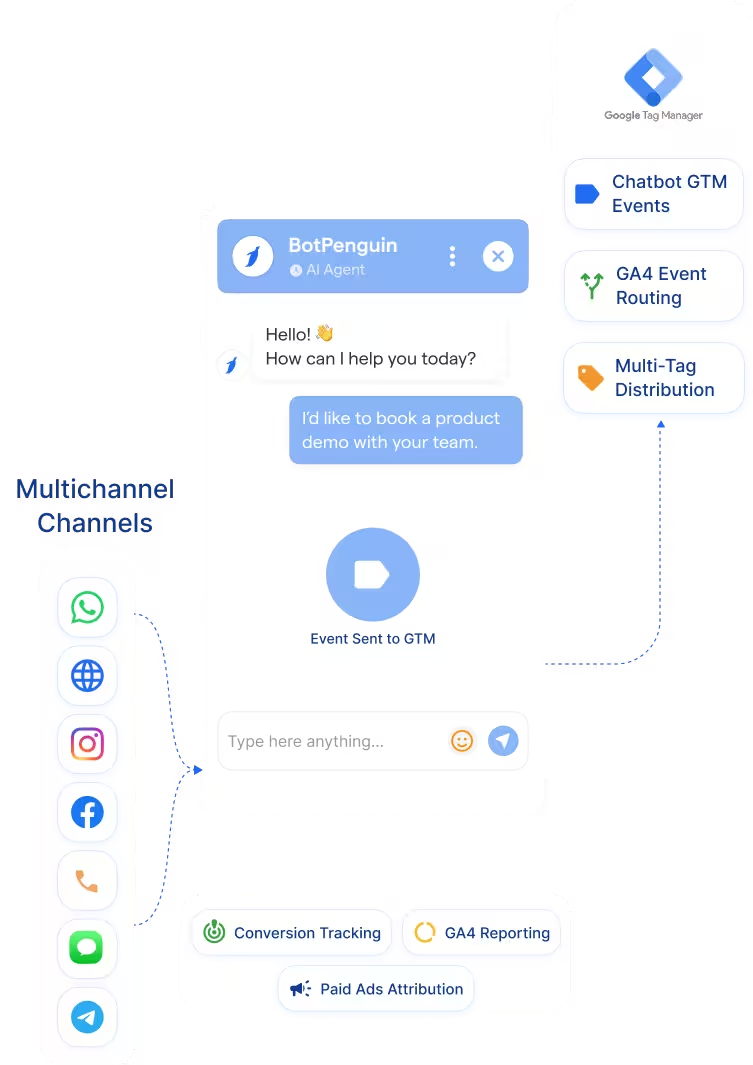
BotPenguin Widget → GTM Deployment
Deploy the BotPenguin chatbot widget via Google Tag Manager on sites that already use GTM. This reduces direct website code changes.
See AI ChatbotsDeploy your BotPenguin chatbot widget through Google Tag Manager. Then fire GTM tags from chatbot events such as lead capture, bookings, or flow completions.
Google Tag Manager helps marketing and analytics teams manage website tags from one container. It supports tracking scripts, advertising pixels, analytics tags, and custom scripts without requiring repeated edits to website code. The BotPenguin Google Tag Manager integration connects chatbot deployment and chatbot event tracking.
It helps teams deploy the BotPenguin chatbot widget through GTM where the site already uses a GTM container. Your marketing team gets faster deployment and cleaner tracking control. BotPenguin handles the chatbot experience, while GTM helps distribute tracking signals.
Deploy the BotPenguin chatbot widget via Google Tag Manager on sites that already use GTM. This reduces direct website code changes.
See AI ChatbotsFire GTM triggers from chatbot events such as lead captured, appointment booked, and conversation completed, where configured.
See AI AgentsSend chatbot event signals from GTM to tools such as Google Analytics, Meta Pixel, Google Ads, and other tags in your container.
View IntegrationsGoogle Tag Manager is designed to manage website tags from a single interface. It helps teams deploy analytics, advertising, remarketing, and custom tracking tags. This makes tag changes faster for marketing teams. It also reduces repeated developer dependency for tracking updates.
GTM is not a chatbot platform. It can deploy scripts and fire tags, but it does not create chatbot conversations on its own. Chatbot activity also needs clear event signals. Without configured triggers, lead captures, and bookings may stay outside your tracking stack.
BotPenguin adds the chatbot layer and event source. It creates customer conversations across website chat, WhatsApp, Instagram, and other channels. With GTM, BotPenguin can support widget deployment and chatbot event tracking. Your team can deploy faster and track chatbot outcomes more clearly.

No developer needed when GTM is already installed. Three steps connect BotPenguin chatbot deployment and events with your GTM setup.
Log in to Google Tag Manager and open your website container. Add the BotPenguin chatbot widget script through a GTM tag where supported.
Step 1Choose which chatbot actions should fire GTM triggers. Map lead captures, bookings, completed flows, support resolutions, or custom chatbot events.
Step 2Use GTM preview mode to test the chatbot widget and event firing. Confirm the tags fire correctly, then publish the GTM container.
Step 345%
increase in customer engagement, while chatbot events can feed GTM tracking for clearer campaign measurement.
29x
ROI achieved, while chatbot leads and booking events can trigger analytics and advertising tags through GTM.
3x
faster go-to-market, while GTM helps agencies deploy chatbot tracking across client websites without repeated code changes.
Deploy BotPenguin through GTM to track product inquiries, cart recoveries, or lead events.
Fire GA4 and ad platform events from demo booking or trial signup chatbot flows.
Deploy client chatbots via GTM and manage tracking without direct access to website code.
Track property viewing bookings and buyer qualification events from chatbot conversations.
Track admissions inquiry completions and counselor booking events from chatbot flows.
Track advisory call bookings and qualified inquiry events through GTM workflows.
Track appointment booking events from chatbot flows where compliant tracking is configured.
Track booking inquiries, itinerary requests, and completed reservation events through GTM workflows.
Connect BotPenguin's conversational AI to your CRM, payment gateway, calendar and eCommerce platform in minutes. No-code, no disruption. Your existing tech stack stays exactly as it is.
Free to start. No credit card required. Live in under 10 minutes.
Is the Google Tag Manager chatbot integration free?
The Google Tag Manager integration is included on paid BotPenguin plans. You can also start with a free BotPenguin plan and test the chatbot before upgrading. View BotPenguin pricing
Can I deploy my BotPenguin chatbot widget via Google Tag Manager?
Yes. You can deploy the BotPenguin chatbot widget through Google Tag Manager where your website already uses a GTM container and your setup supports the required tag.
Can chatbot events fire GTM triggers?
Yes. BotPenguin chatbot events can support GTM triggers such as lead captured, appointment booked, and conversation completed where event tracking is configured.
Can I fire Meta Pixel events from chatbot interactions via GTM?
Yes. Chatbot events can trigger Meta Pixel tags through GTM where your container and consent setup allow it.
Do I still need Google Analytics integration if I use GTM?
GTM distributes tags and triggers. Google Analytics reports performance. BotPenguin also supports Google Analytics for teams that want direct GA4 chatbot event tracking.
Can AI agent events be tracked through Google Tag Manager?
Yes. BotPenguin AI agents can generate trackable events such as qualified leads, completed bookings, escalations, or resolved inquiries.
Can I update my BotPenguin chatbot settings without touching GTM?
Yes. Chatbot content and flow changes happen inside BotPenguin. GTM is mainly used for widget deployment and event-trigger routing.