AI Chatbot → Google Contacts
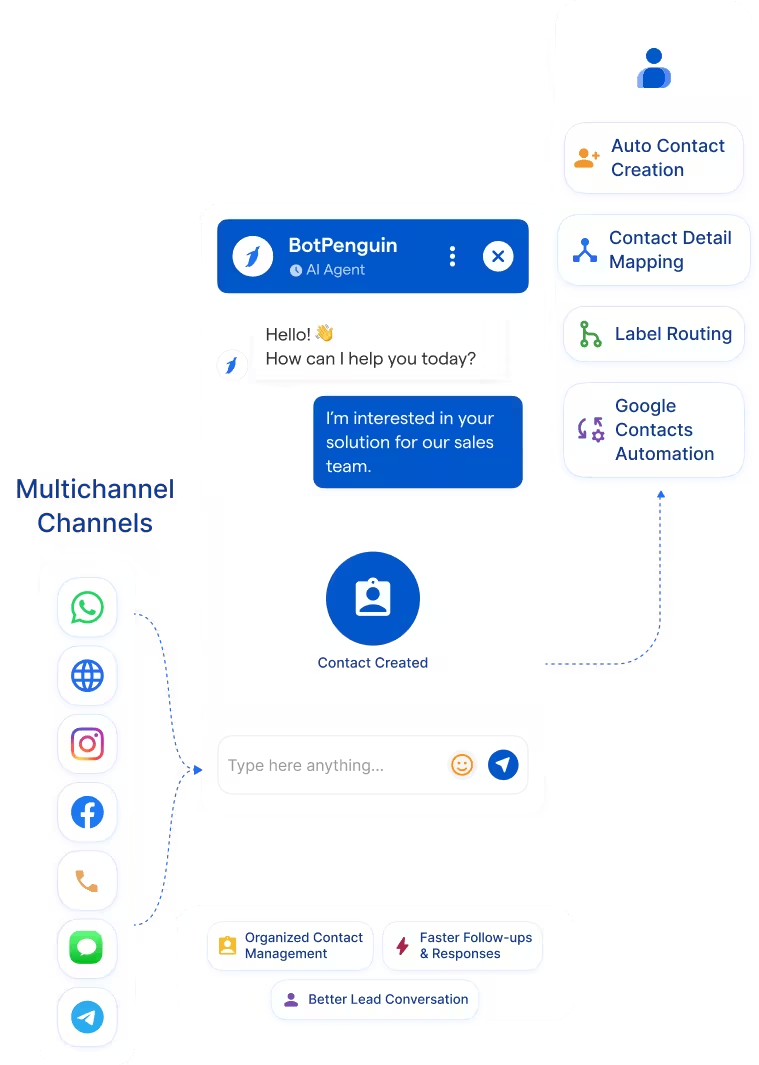
Capture leads on WhatsApp, website, Instagram, and more. Send name, email, phone, and lead details into Google Contacts.
See AI ChatbotsEvery lead captured on WhatsApp, website chat, or Instagram can become a Google Contacts record with a name, phone number, email address, and notes attached.
Google Contacts helps individuals and teams manage contact records inside Google Workspace. It supports names, phone numbers, email addresses, labels, and organized contact groups. The BotPenguin Google Contacts integration turns chatbot-captured leads into contact-ready records. It helps teams capture inquiries from WhatsApp, website chat, Instagram, and other channels.
This Google Contacts chatbot integration works well for teams using Google Contacts as a lightweight contact store. It helps keep new lead details available for Gmail, Calendar, and follow-up workflows. Your team gets cleaner contacts without manual copy-paste. Every qualified inquiry can become a usable contact record with attached conversation context.
Capture leads on WhatsApp, website, Instagram, and more. Send name, email, phone, and lead details into Google Contacts.
See AI ChatbotsLet an AI agent qualify the lead in natural conversation. Then route contact-ready details into Google Contacts for follow-up.
See AI AgentsTrigger Google Contacts automation from chatbot events. Lead captured, meeting requested, or follow-up needed can create the right contact workflow.
View IntegrationsGoogle Contacts is built to store and organize contact information. It helps teams keep names, phone numbers, email addresses, and labels accessible. It is useful for teams that work inside Google Workspace. Contacts can support simple follow-up without a full CRM setup.
New contacts often start inside customer conversations. A lead may message on WhatsApp, website chat, Instagram, or Facebook. Those details can stay buried in chat history. Someone still has to manually create or update the contact.
BotPenguin becomes the conversational capture layer for Google Contacts. It collects lead details before your team starts follow-up. Every chatbot-qualified inquiry can be converted into a structured Google Contacts record. Your team gets contact-ready information without scanning messages.

No developer needed. Three steps connect your BotPenguin chatbot to Google Contacts with mapped contact data.
Log in to BotPenguin and open your bot settings. Connect your Google Contacts account and allow the required permissions.
Step 1Choose which chatbot answers map to Google Contacts. Map name, email, phone, label, source, notes, and follow-up reason.
Step 2Send a test conversation through your chatbot. Confirm the contact appears correctly in Google Contacts. Then switch the workflow on.
Step 329x
Cleaner trial follow-up when website chatbot signups create Google Contacts with product interest and source details attached.
5x
Faster buyer callbacks when WhatsApp inquiries create Google Contacts, capturing budget, location, and property interest.
3x
Better lead organization when website and Instagram chatbot inquiries are labeled and stored in Google Contacts for account follow-up.
Capture trial signup and product inquiry leads through chatbot conversations.
Store new client inquiries with service interest and contact details attached.
Qualify buyers through WhatsApp and create contacts with budget and location details.
Capture patient inquiries with appointment type, urgency, and contact details attached.
Create contacts from admissions inquiries with course interest and intake details mapped.
Capture advisory prospects through WhatsApp and store contact details for follow-up.
Create contact records from website and Instagram chatbot inquiries for faster follow-up.
Capture booking inquiries and create contacts with the destination, travel dates, and follow-up details attached.
Connect BotPenguin's conversational AI to your CRM, payment gateway, calendar and eCommerce platform in minutes. No-code, no disruption. Your existing tech stack stays exactly as it is.
Free to start. No credit card required. Live in under 10 minutes.
Is the Google Contacts chatbot integration free?
The Google Contacts integration is included on paid BotPenguin plans. You can also start with a free BotPenguin plan and test the chatbot before upgrading. View BotPenguin pricing
Do I need to code to connect Google Contacts to BotPenguin?
No. The integration is no-code from the BotPenguin side. You can connect Google Contacts, map chatbot responses, test one contact, and go live.
Does the Google Contacts integration work with WhatsApp?
Yes. Leads captured on WhatsApp can be created as Google Contacts records with mapped details. The same setup can support website, Instagram, Facebook, Telegram, SMS, and Teams channels.
Is Google Contacts a CRM?
Google Contacts is a lightweight contact manager, not a full CRM. For pipeline management, BotPenguin also supports CRM integrations like HubSpot, Zoho CRM, and Pipedrive.
Can BotPenguin update existing Google Contacts?
BotPenguin can help create or update Google Contacts where your mapped setup supports it. Exact matching behavior depends on your integration configuration.
Can BotPenguin AI agents use Google Contacts?
Yes. BotPenguin AI agents can collect contact-ready details in natural conversation before routing them into Google Contacts.
What chatbot data gets sent to Google Contacts?
Only the data you map. Name, email, phone, labels, source, notes, and qualifying answers can be routed into Google Contacts.