Email Marketing Automation
GetResponse+BotPenguin

GetResponse Chatbot Integration That Captures Leads and Feeds Your Email Automation

Every lead your BotPenguin AI chatbot or agent captures on WhatsApp, your website, or Instagram gets added to GetResponse: tagged, segmented, and enrolled in the right email sequence. No manual import, no delay.

About This Integration

GetResponse

Helpdesk & Support

GetResponse is an email marketing and automation platform built for businesses that nurture leads through personalised email sequences, landing pages, and marketing funnels. It manages subscriber lists, GetResponse email automation journeys, and conversion funnels, working best once contacts are enrolled in the system.

The BotPenguin GetResponse chatbot integration adds the conversational capture layer. Every lead your AI chatbot or agent qualifies on WhatsApp, your website, or Instagram gets added to GetResponse as a tagged, segmented contact enrolled in the right email sequence. BotPenguin captures the intent; GetResponse nurtures it. Available on all paid plans; test it free during your trial.

How BotPenguin Connects to GetResponse

AI Chatbot → GetResponse

AI Chatbot → GetResponse

Every WhatsApp, website, or Instagram conversation that qualifies a lead adds a new GetResponse contact tagged, segmented, and enrolled in the right email sequence. Duplicates blocked.

See AI Chatbots
AI Agent → GetResponse

AI Agent → GetResponse

Your AI agent qualifies leads through natural conversation, captures purchase or signup intent, and pushes the completed GetResponse contact before the chat ends. No manual import needed.

See AI Agents
Automation → GetResponse

Automation → GetResponse

Chatbot or agent events trigger GetResponse email automation sequences, tags, and list enrollments via real-time webhooks. Lead captured, contact tagged, sequence started.

See Automations

What BotPenguin Adds to GetResponse

Understand what GetResponse is designed to do, where gaps can exist, and how BotPenguin helps create a more connected, automated customer journey.
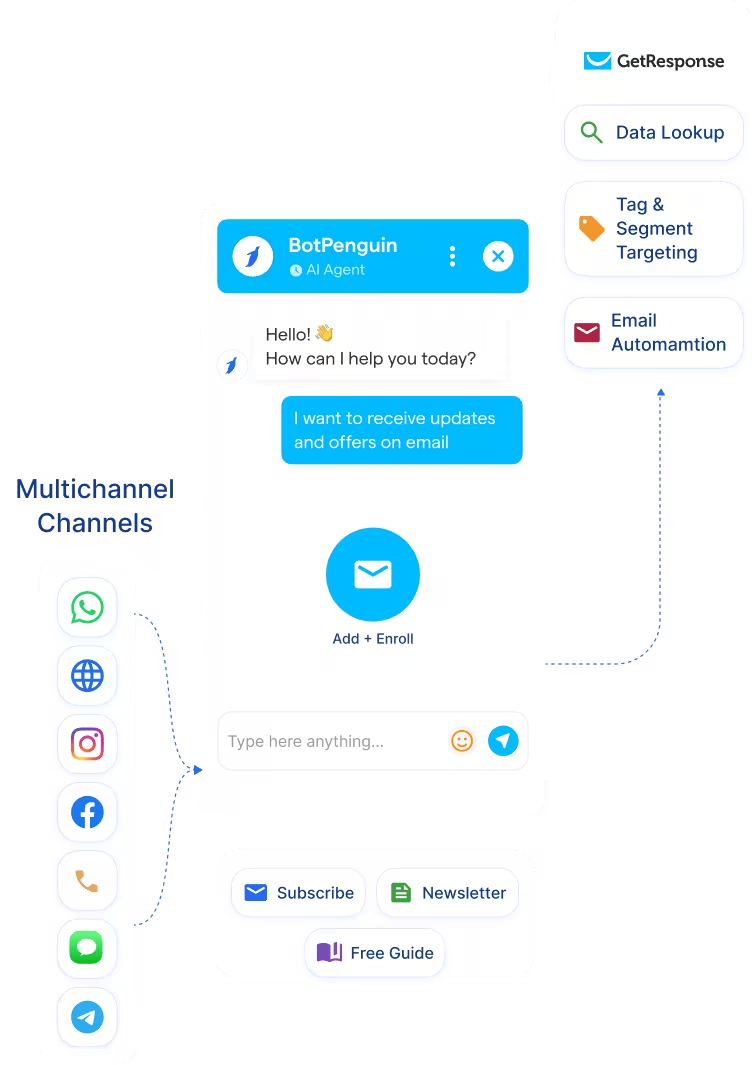
What GetResponse is Built For

GetResponse is built to nurture leads through personalized GetResponse email automation sequences, marketing funnels, and conversion tools. Once a contact is enrolled, its segmentation and automation journeys deliver the right message at the right time at scale.

The Gap

Getting leads into GetResponse from WhatsApp, Instagram, or website chat still requires a form submission or manual import. Those conversations stay outside GetResponse unless someone extracts the data, delaying enrollment and losing the moment of highest intent.

What BotPenguin Adds

BotPenguin captures that intent the moment it arrives. Every chatbot or agent conversation on WhatsApp, your website, or Instagram adds the contact to GetResponse with the right tags and segment, triggering the right email sequence before intent cools.

80+
Native Integrations Available on BotPenguin
6
GetResponse objects BotPenguin can create or update: contacts, tags, custom fields, lists, automation triggers, and segments
0
Lines of Code Needed to Connect GetResponse to BotPenguin
<10 min
From Signup to Your First Test Subscriber in GetResponse

Everything the GetResponse Chatbot Integration Handles for Y

Everything the GetResponse Chatbot Integration Handles for Y
  • Auto Contact and List Enrollment: New GetResponse contacts created from every AI chatbot or agent interaction, tagged and added to the right list. Duplicate prevention built in.
  • Tag and Segment Targeting: Map chatbot or agent answers to GetResponse tags, custom fields, and segment criteria like product interest, signup source, or purchase intent.
  • GetResponse Email Automation Enrollment: Chatbot or agent outcomes enroll new contacts into the right GetResponse email automation sequence or marketing funnel without manual input.
  • Custom Field Mapping: Map chatbot or agent answers to any standard or custom GetResponse field across contacts and lists.
  • Automation Triggers: Chatbot or agent events fire GetResponse automation workflows via real-time webhooks: lead captured, form submitted, purchase intent detected.
  • GetResponse Data Lookup: Use existing GetResponse contact and list data to personalize chatbot conversations for returning subscribers, where configured.
  • Lead Qualification: Capture and qualify WhatsApp leads via BotPenguin's GetResponse WhatsApp Integration and push them into GetResponse as tagged contacts enrolled in the right email sequence in real time.
  • Email List Building: Every chatbot or agent conversation that captures signup intent adds a segmented GetResponse contact to the right list without manual import.
  • Marketing Funnel Enrollment: When a lead qualifies via chatbot, BotPenguin enrolls them into the right GetResponse marketing funnel or automation journey without manual input.
  • Post-Event Follow-up: Trigger GetResponse email automation sequences from chatbot events.
  • Re-engagement: Use existing GetResponse contact and list data to trigger personalised chatbot follow-ups on WhatsApp or Instagram for cold or inactive subscribers.
  • WhatsApp: Leads qualify and sync to GetResponse as tagged contacts via BotPenguin's GetResponse WhatsApp integration. See WhatsApp Chatbots See WhatsApp Chatbots
  • Website Chatbot: Visitor enquiries create GetResponse contacts and add them to the right list the moment a chat ends. See Website Chatbots See Website Chatbots
  • Instagram DMs: DM leads qualify and push to GetResponse as segmented contacts in real time. See Instagram Chatbots See Instagram Chatbots
  • Facebook Messenger: Conversations push contacts into GetResponse with tags attached. See Facebook Chatbots See Facebook Chatbots
  • Telegram: Bot conversations create GetResponse contacts and trigger list enrollment in real time. See Telegram Chatbots See Telegram Chatbots
  • SMS: Lead captures push into GetResponse as tagged contacts in real time.
  • Microsoft Teams: Internal handoffs can notify your team when a high-intent GetResponse subscriber is captured. See Teams Chatbot See Teams Chatbot

Three Steps to Sync BotPenguin with GetResponse in Under 10 Minutes

No developer needed. Three steps to a fully automated GetResponse email automation pipeline.

  1. 1

    Authenticate Both Accounts

    Step 1
  2. 2

    Map Your Fields

    Step 2
  3. 3

    Test and Go Live

    Step 3

What Businesses Achieve with BotPenguin and GetResponse

Email Automation Revenue

320%

more revenue generated by automated emails versus non-automated campaigns, triggered the moment a lead qualifies via BotPenguin chatbot and lands in GetResponse.

Lead Capture to Sequence Enrollment

37%

of all email-generated sales driven by automated emails, despite accounting for just 2% of email volume, making every BotPenguin-captured lead a high-value GetResponse subscriber.

WhatsApp to Email Funnel

Up to 36x

return on email marketing spend when qualified leads enter the right automated sequence with intent data attached.

Connect Your AI Chatbot, WhatsApp Bot and Automation Workflows to 80+ Tools With Zero Switching Costs

Connect BotPenguin's conversational AI to your CRM, payment gateway, calendar and eCommerce platform in minutes. No-code, no disruption. Your existing tech stack stays exactly as it is.

ChatGPT integration logoPabbly integration logoZoho CRM integration logoHubSpot integration logoTeamgate CRM integration logoZendesk integration logoWebHoper integration logoInsightly CRM integration logoNo CRM integration logoZapier integration logo
  • ChatGPT integration logo
  • Pabbly integration logo
  • Zoho CRM integration logo
  • HubSpot integration logo
  • Teamgate CRM integration logo
  • Zendesk integration logo
  • WebHoper integration logo
  • Insightly CRM integration logo
  • No CRM integration logo
  • Zapier integration logo
  • Copper CRM integration logo

Stop Importing Leads Manually Into GetResponse. Let BotPenguin Do It From Every Channel

Free to start. No credit card required.

Frequently Asked Questions About GetResponse Chatbot Integration



