All-in-One CRM & Marketing Platform
EngageBay logo+BotPenguin

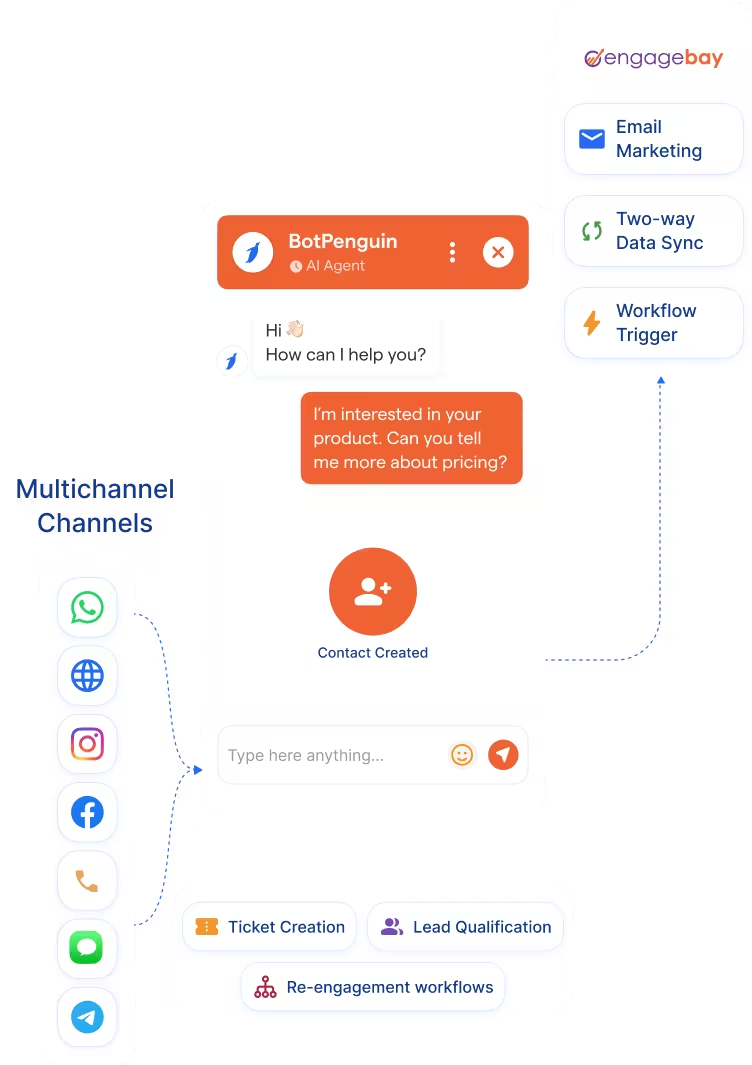
EngageBay Chatbot Integration That Brings AI to Every Channel You Sell On

About This Integration

EngageBay

Helpdesk & Support

How BotPenguin Connects to EngageBay

AI Chatbot → EngageBay

AI Chatbot → EngageBay

See AI Chatbots
AI Agent → EngageBay

AI Agent → EngageBay

See AI Agents
Automation → EngageBay

Automation → EngageBay

See Automations

BotPenguin Chatbot and AI Agent vs EngageBay Native Chatbot

EngageBay Native Chatbot

  • EngageBay website widget
  • Included in EngageBay plans
  • Configured inside EngageBay
  • Basic chatbot automation
  • Native EngageBay CRM sync
  • Within EngageBay suite
  • EngageBay free plan

BotPenguin + EngageBay

  • WhatsApp, Instagram, Facebook, Telegram, SMS, website, Microsoft Teams
  • Flat plans with free tier to start
  • No-code visual builder with AI agent and tool calling
  • AI agent with tool calling; qualifies leads in natural conversation
  • Creates or updates EngageBay CRM contacts and deals in real time
  • No-code, live in under 10 minutes
  • Free plan available to start
80+
80+
6
EngageBay Objects BotPenguin Can Create or Update: contacts, deals, notes, tickets, sequences, workflows, and custom fields
0
Lines of Code Needed to Connect EngageBay to BotPenguin
<10 min
From Signup to Your First Live Test Record

Everything the EngageBay Chatbot Integration Handles for You

Everything the EngageBay Chatbot Integration Handles for You
  • Auto Contact and Deal Creation: New EngageBay CRM contacts and deals created from every AI chatbot or agent interaction. Duplicate prevention built in.
  • Custom Field Mapping: Map chatbot or agent answers to any EngageBay CRM field across contacts, deals, and custom fields your sales process uses.
  • Conversation Logging: Full chat transcripts saved against the EngageBay contact record. Your team gets complete context before the first follow-up.
  • EngageBay Email Marketing Enrollment: Chatbot or agent outcomes enroll new contacts into EngageBay email marketing sequences and automation workflows without manual input.
  • Pipeline and Deal Updates: Update EngageBay CRM pipeline stages and deal statuses based on chatbot or agent qualification answers.
  • Two-Way Data Sync: Pull existing EngageBay CRM contact and deal data into your chatbot to personalise conversations for returning leads.
  • Lead Qualification: AI chatbot or agent qualifies leads and routes them into the right EngageBay CRM pipeline stage with key details pre-filled.
  • Email Marketing Enrollment: Chatbot-qualified leads enroll into the right EngageBay email marketing sequence without manual input.
  • WhatsApp Lead Capture: Capture leads via BotPenguin’s EngageBay WhatsApp integration and push them into EngageBay CRM as contacts or deals in real time.
  • Support Ticket Logging: Every chatbot or agent support conversation can create an EngageBay helpdesk ticket or contact note, where configured.
  • Re-engagement: Use existing EngageBay CRM data to trigger personalised chatbot follow-ups on WhatsApp or Instagram for cold leads.
  • WhatsApp: Leads qualify and sync to EngageBay CRM instantly via the EngageBay WhatsApp integration, full conversation logged. See WhatsApp Chatbots See WhatsApp Chatbots
  • Website Chatbot: Visitor enquiries create EngageBay contacts and deals the moment a chat ends. See Website Chatbots See Website Chatbots
  • Instagram DMs: DM leads qualify and push to EngageBay CRM in real time. See Instagram Chatbots See Instagram Chatbots
  • Facebook Messenger: Conversations log directly to EngageBay contact records. See Facebook Chatbots See Facebook Chatbots
  • Telegram: Bot conversations sync to EngageBay as contact notes in real time. See Telegram Chatbots See Telegram Chatbots
  • SMS: Lead captures map to EngageBay CRM fields and sync as contacts in real time.
  • Microsoft Teams: Internal handoffs and escalations log to EngageBay from Teams. See Teams Chatbot See Teams Chatbot

Three Steps to Sync BotPenguin with EngageBay in Under 10 Minutes

No developer or EngageBay API keys needed. Three steps to a fully synced EngageBay CRM pipeline.

  1. 1

    Authenticate Both Accounts

    Step 1
  2. 2

    Map Your Fields

    Step 2
  3. 3

    Test and Go Live

    Step 3

What Businesses Achieve with BotPenguin and EngageBay

E-commerce

Up to 35%

Healthcare

30%

Real Estate

40%+

EngageBay Chatbot Integration Examples by Industry

E-commerce

SaaS

Travel

Consultancy

Healthcare

Insurance

Education

Real Estate

Connect Your AI Agents, Chatbots & Voice Agents to 80+ Tools With Zero Switching Costs

Connect BotPenguin's conversational AI to your CRM, payment gateway, calendar and eCommerce platform in minutes. No-code, no disruption. Your existing tech stack stays exactly as it is.

ChatGPT integration logoPabbly integration logoZoho CRM integration logoHubSpot integration logoTeamgate CRM integration logoZendesk integration logoWebHoper integration logoInsightly CRM integration logoNo CRM integration logoZapier integration logo
  • ChatGPT integration logo
  • Pabbly integration logo
  • Zoho CRM integration logo
  • HubSpot integration logo
  • Teamgate CRM integration logo
  • Zendesk integration logo
  • WebHoper integration logo
  • Insightly CRM integration logo
  • No CRM integration logo
  • Zapier integration logo
  • Copper CRM integration logo

EngageBay Works Best When Every Channel Feeds It. BotPenguin Makes That Happen

Free to start. No credit card required.