AI Model Integration
DeepSeek+BotPenguin

Build a DeepSeek AI Chatbot and Agent on WhatsApp, Your Website, and Instagram Without Writing Code

DeepSeek delivers high-performance AI reasoning at competitive API costs. BotPenguin puts it to work across customer channels without custom channel integrations.

About This Integration

DeepSeek

Helpdesk & Support

DeepSeek is an AI company building large language models for reasoning, coding, problem-solving, and agent workflows. Its API includes DeepSeek V4 Pro for more demanding agent tasks and DeepSeek V4 Flash for faster, lower-cost workloads. Both support reasoning modes, tool calls, and long-context processing.

DeepSeek provides the underlying AI model, while BotPenguin adds the conversational deployment and automation layer. Businesses can use DeepSeek through BotPenguin across WhatsApp, website chat, Instagram, Facebook, Telegram, SMS, and other supported channels. BotPenguin manages conversation flows, knowledge training, lead capture, integrations, and human handoff.

How BotPenguin Connects to DeepSeek

AI Agent on DeepSeek

AI Agent on DeepSeek

Deploy an AI agent powered by DeepSeek across WhatsApp, your website, Instagram, Facebook, and other supported channels. The agent can handle multi-step conversations, qualify leads, and work with connected business tools. It can also escalate conversations to your team when human involvement is required.

See AI Agents
AI Chatbot on DeepSeek

AI Chatbot on DeepSeek

Run a no-code AI chatbot using DeepSeek as its language model. BotPenguin manages the conversation layer, channel connections, knowledge base, persona, and fallback logic. DeepSeek provides language understanding and response generation.

See Website Chatbots
AI Automation With DeepSeek

AI Automation With DeepSeek

Combine DeepSeek reasoning with BotPenguin integrations and automated workflows. Your AI agent can collect structured information and pass it into connected CRMs, calendars, helpdesks, spreadsheets, and automation tools.

View BotPenguin Integrations

How DeepSeek and BotPenguin Work Together

DeepSeek Is the AI. BotPenguin Is How You Deploy It Without an Engineering Team.

What DeepSeek Brings

DeepSeek's V4 model family provides reasoning capabilities designed for conversational and agent workloads. DeepSeek V4 Pro supports tool calls, configurable reasoning effort, JSON output, and a one-million-token context window. DeepSeek also offers V4 Flash for workloads where speed and API cost matter more.

What Building on the Raw DeepSeek API Requires

Using the DeepSeek API directly gives developers access to the model. However, customer-facing deployment requires much more than a model endpoint. Teams need to manage API authentication, conversation logic, customer channels, business integrations, escalation rules, and deployment infrastructure. Each customer channel also needs its own connection and messaging logic.

What BotPenguin Adds

BotPenguin handles the layer around the model. Use DeepSeek for reasoning while BotPenguin manages WhatsApp, website chat, Instagram, Facebook, Telegram, and other supported channels. BotPenguin also provides knowledge-base training, conversation flows, integrations, lead capture, customer data, and human handoff. Your team configures the experience through BotPenguin instead of building every component around DeepSeek's API.

80+
Native integrations available across the BotPenguin ecosystem
V4 Pro
Current DeepSeek model available for BotPenguin Chatbots and AI Agents
0
Lines of channel integration code needed with BotPenguin
< 10 min
Target setup time from AI connection to your first test conversation

What Your DeepSeek AI Agent Can Do With BotPenguin

What Your DeepSeek AI Agent Can Do With BotPenguin
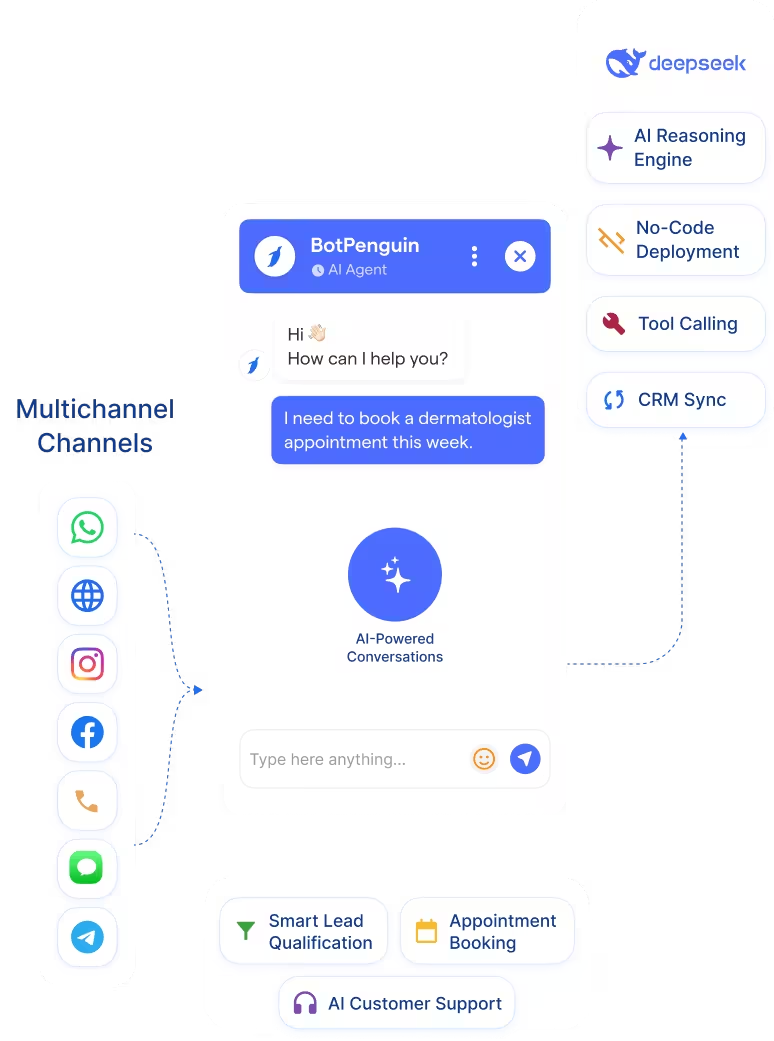
  • DeepSeek as the AI Reasoning Engine: Use DeepSeek V4 Pro to power reasoning, language understanding, and response generation inside BotPenguin Chatbots and AI Agents.
  • No-Code Deployment Across Channels: Deploy AI conversations across WhatsApp, website chat, Instagram, Facebook, Telegram, SMS, and supported business channels. BotPenguin manages the channel layer without requiring separate integrations for each customer touchpoint.
  • AI Agent With Tool Calling: DeepSeek V4 Pro supports tool calling. Combined with BotPenguin integrations, AI Agents can exchange information with connected CRMs, calendars, support tools, and other systems.
  • Multi-Channel Deployment: Manage customer conversations across supported BotPenguin channels from one conversational system. You do not need to build separate DeepSeek API implementations for each channel.
  • Lead Qualification and CRM Sync: Qualify inbound leads conversationally and collect details such as budget, intent, timeline, and contact information. Connect BotPenguin with your CRM to move qualified lead information into your existing sales workflow.
  • Human Handoff With Context: Move complex conversations from AI to a human team member when required. Your team can review the preceding conversation instead of making the customer repeat the discussion.
  • Customer Support AI Agent: Use DeepSeek-powered AI conversations to answer common support questions across WhatsApp and your website. Connected tools can supply customer or order information when the workflow requires it.
  • Inbound Lead Qualification: Qualify incoming leads through conversational questions. Capture budget, intent, company details, requirements, and timeline before sending the lead into your CRM.
  • eCommerce Assistant: Answer product questions, collect purchase intent, and support order-related conversations. Connect relevant commerce or order systems when real-time customer data is required.
  • Internal Knowledge Assistant: Connect BotPenguin with your business knowledge and use DeepSeek to answer internal team questions. This can support internal workflows through channels such as Microsoft Teams.
  • Appointment Booking: Collect appointment requirements conversationally and connect the workflow with supported calendar or booking integrations.
  • WhatsApp: Run DeepSeek-powered conversations for lead qualification, support, appointment requests, and business automation. See WhatsApp Chatbots
  • Website Chatbot: Add a DeepSeek-powered AI experience to your website for questions, lead capture, and customer support. See Website Chatbots
  • Instagram DMs: Use AI to handle Instagram conversations and qualify inbound leads before human follow-up. See Instagram Chatbots
  • Facebook Messenger: Use DeepSeek-powered AI conversations for support, lead qualification, and customer interactions. See Facebook Chatbots
  • Telegram: Deploy AI-powered Telegram conversations for customer-facing or internal use cases. See Telegram Chatbots
  • SMS: Use conversational AI for supported SMS workflows and customer interactions.
  • Microsoft Teams: Use AI-powered internal conversations for knowledge access, support, and business workflows. See Teams Chatbot

Live in Minutes, Not Weeks

Connect your DeepSeek credentials, configure the AI experience, and test your conversation through BotPenguin.

  1. 1

    Connect DeepSeek

    Step 1
  2. 2

    Configure Your AI

    Step 2
  3. 3

    Test and Go Live

    Step 3

What DeepSeek V4 Brings to BotPenguin AI Agents

Context Capacity

1M

token context window with DeepSeek V4 Pro and V4 Flash support context windows

Lower Off-Peak API Cost

50%

lower off-peak rates during designated off-peak periods

Maximum Output

384K

maximum output tokens supported by DeepSeek V4 Pro and V4 Flash

Connect Your AI Agents, Chatbots & Voice Agents to 80+ Tools With Zero Switching Costs

Connect BotPenguin's conversational AI to your CRM, payment gateway, calendar and eCommerce platform in minutes. No-code, no disruption. Your existing tech stack stays exactly as it is.

ChatGPT integration logoPabbly integration logoZoho CRM integration logoHubSpot integration logoTeamgate CRM integration logoZendesk integration logoWebHoper integration logoInsightly CRM integration logoNo CRM integration logoZapier integration logo
  • ChatGPT integration logo
  • Pabbly integration logo
  • Zoho CRM integration logo
  • HubSpot integration logo
  • Teamgate CRM integration logo
  • Zendesk integration logo
  • WebHoper integration logo
  • Insightly CRM integration logo
  • No CRM integration logo
  • Zapier integration logo
  • Copper CRM integration logo

DeepSeek AI on WhatsApp and Your Website Without Custom Development

Connect your AI model. Configure your conversations. Deploy across supported channels.

Frequently Asked Questions About the DeepSeek AI Chatbot Integration