CRM & Sales Management
Chakra CRM+BotPenguin

Chakra CRM Chatbot Integration Built for Omnichannel Lead Capture

Every lead your BotPenguin chatbot or agent captures on WhatsApp, website chat, or Instagram gets synced to Chakra CRM with contact details, source channel, and qualification answers. No manual entry, no missed sales opportunities.

About This Integration

Chakra CRM

Helpdesk & Support

Chakra CRM helps sales teams manage leads, contacts, deals, accounts, tasks, and pipeline activity in one place. It keeps customer data organized once qualified leads enter the CRM and your team starts follow-ups.

The BotPenguin Chakra CRM chatbot integration adds the omnichannel capture layer. Your chatbot or AI agent qualifies leads on WhatsApp, website chat, Instagram, and more, then sends structured lead data into the CRM. Contact details, source channel, qualification answers, and follow-up context can support Chakra CRM automation where configured. Available on all paid plans; test it free during your trial.

How BotPenguin Connects to Chakra CRM

AI Chatbot → Chakra CRM

AI Chatbot → Chakra CRM

Capture leads from WhatsApp, website chat, Instagram, and more. BotPenguin creates or updates Chakra CRM contacts with source channel, qualification answers, and conversation context mapped to CRM fields.

See AI Chatbots
AI Agent → Chakra CRM

AI Agent → Chakra CRM

Your AI agent qualifies leads in natural conversation, collects sales intent, and prepares contact, deal, or follow-up details for Chakra CRM before the chat ends.

See AI Agents
Automation → Chakra CRM

Automation → Chakra CRM

Trigger Chakra CRM automation from chatbot or agent events. Lead captured, contact updated, deal created, task assigned, or follow-up reminder triggered through connected workflows.

See Automations

What BotPenguin Adds to Chakra CRM

Understand what Chakra CRM is designed to do, where gaps can exist, and how BotPenguin helps create a more connected, automated customer journey.
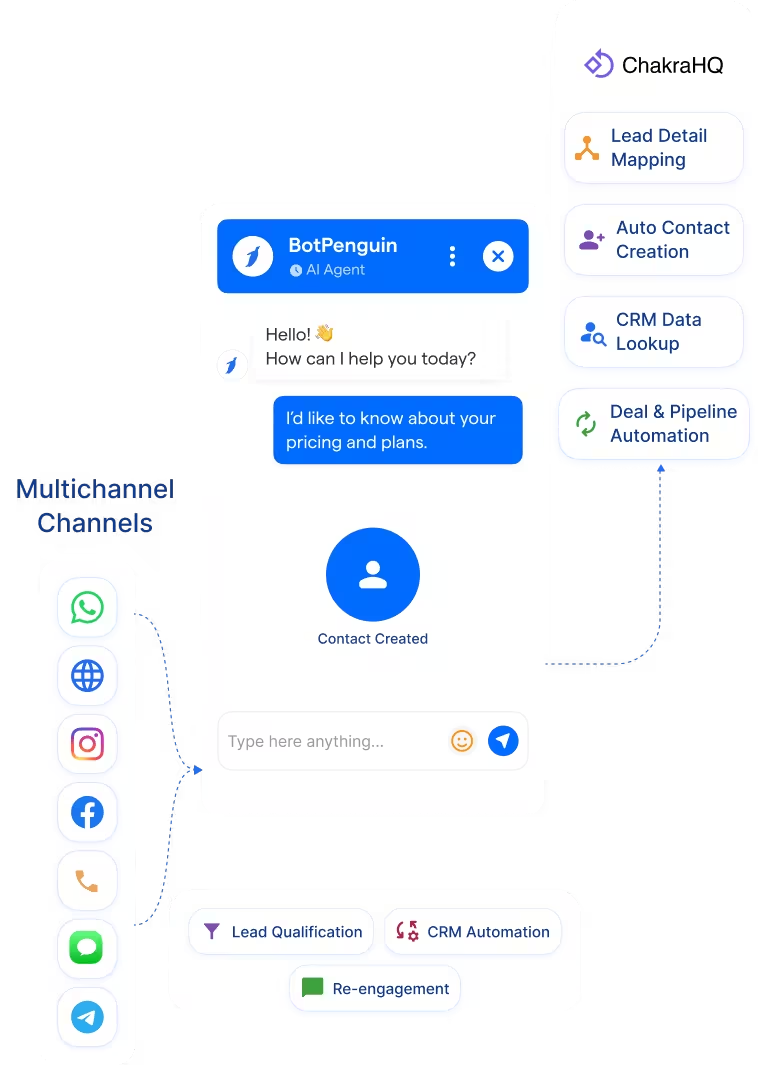
What Chakra CRM is Built For

Chakra CRM is built to manage leads once they enter your sales process. It helps teams organize contacts, track deals, manage tasks, update pipeline stages, and keep follow-up activity in one place.

The Gap

Lead conversations often start before they reach the CRM. A prospect may ask questions on WhatsApp, Instagram, or website chat, but the sales team still needs structured lead data inside Chakra CRM. Without that capture layer, context can stay scattered across channels.

What BotPenguin Adds

BotPenguin adds the omnichannel lead capture layer before Chakra CRM. Your chatbot or AI agent qualifies the lead, collects contact details, captures source channel, and sends structured data into Chakra CRM. Sales teams open Chakra CRM with cleaner records, better context, and fewer manual updates.

80+
Native Integrations available on BotPenguin
6
Chakra CRM Data BotPenguin Can Sync: leads, contacts, source channel, qualification answers, conversation notes, and follow-up context
0
Lines of Code Needed to Connect Chakra CRM to BotPenguin
<10 min
From Setup to Your First Test Lead in Chakra CRM

Everything the Chakra CRM Chatbot Integration Handles for You

Everything the Chakra CRM Chatbot Integration Handles for You
  • Auto Contact Creation: Create new Chakra CRM contacts from chatbot or AI agent lead captures, with mapped contact details attached.
  • Lead Detail Mapping: Map chatbot answers to Chakra CRM fields like budget, product interest, enquiry type, location, and follow-up priority.
  • Conversation Context: Save chatbot answers, summaries, and key lead details in Chakra CRM so sales teams get context before follow-up.
  • Deal and Pipeline Updates: Move qualified leads into the right Chakra CRM pipeline stage based on chatbot outcomes, where configured.
  • Chakra CRM Automation: Trigger CRM workflows from chatbot or agent events like lead captured, contact updated, deal created, or follow-up needed.
  • CRM Data Lookup: Use existing Chakra CRM contact data to personalize chatbot conversations for returning leads, where configured.
  • Lead Qualification: Route chatbot-qualified leads into Chakra CRM with contact details, intent, source channel, and follow-up priority already captured.
  • Appointment Follow-Up: Create Chakra CRM tasks from chatbot appointment requests so sales teams know who to call, when, and why.
  • Chakra CRM WhatsApp Lead Capture: Capture WhatsApp enquiries 24/7 and send qualified leads into Chakra CRM for morning follow-up.
  • Support Context Logging: Save chatbot support summaries as Chakra CRM notes so account teams can see customer context before responding.
  • Chakra CRM Automation: Trigger follow-up tasks, lead owner assignment, or pipeline updates from chatbot and AI agent events, where configured.
  • Re-Engagement: Use Chakra CRM data to trigger personalized WhatsApp follow-ups for cold leads, inactive contacts, or open opportunities.
  • WhatsApp: Leads qualify and sync to Chakra CRM through BotPenguin’s Chakra CRM WhatsApp integration, with conversation context attached. See WhatsApp Chatbots See WhatsApp Chatbots
  • Website Chatbot: Visitor enquiries create or update Chakra CRM contacts when the chatbot flow is completed. See Website Chatbots See Website Chatbots
  • Instagram DMs: DM leads qualify and move into Chakra CRM with source channel and lead details mapped. See Instagram Chatbots See Instagram Chatbots
  • Facebook Messenger: Messenger conversations log into Chakra CRM with contact details and follow-up context. See Facebook Chatbots See Facebook Chatbots
  • Telegram: Bot conversations sync to Chakra CRM as lead activity for centralized sales tracking. See Telegram Chatbots See Telegram Chatbots
  • SMS: SMS lead captures map to Chakra CRM fields with contact information and chatbot responses.
  • Microsoft Teams: Internal handoffs and lead alerts can notify your team when Chakra CRM follow-up is needed. See Teams Chatbot See Teams Chatbot

Three Steps to Sync BotPenguin with Chakra CRM in Under 10 Minutes

No developer needed. Three simple steps connect BotPenguin to Chakra CRM and prepare your first lead capture workflow.

  1. 1

    Authenticate Both Accounts

    Step 1
  2. 2

    Map Your Fields

    Step 2
  3. 3

    Test and Go Live

    Step 3

Why Chakra CRM Automation Matters for Sales Teams

Speed-to-Lead

21x

more likely to qualify a lead when businesses respond within 5 minutes instead of waiting 30 minutes. BotPenguin helps capture leads and move them into Chakra CRM faster.

CRM ROI

$8.71

average return for every $1 spent on CRM. Cleaner lead capture and structured CRM data help teams get more value from Chakra CRM.

Sales Automation

2 h 15 m

saved daily by sales professionals using AI or automation tools to reduce manual tasks like data entry and note-taking.

Connect Your AI Chatbot, WhatsApp Bot and Automation Workflows to 80+ Tools With Zero Switching Costs

Connect BotPenguin's conversational AI to your CRM, payment gateway, calendar and eCommerce platform in minutes. No-code, no disruption. Your existing tech stack stays exactly as it is.

ChatGPT integration logoPabbly integration logoZoho CRM integration logoHubSpot integration logoTeamgate CRM integration logoZendesk integration logoWebHoper integration logoInsightly CRM integration logoNo CRM integration logoZapier integration logo
  • ChatGPT integration logo
  • Pabbly integration logo
  • Zoho CRM integration logo
  • HubSpot integration logo
  • Teamgate CRM integration logo
  • Zendesk integration logo
  • WebHoper integration logo
  • Insightly CRM integration logo
  • No CRM integration logo
  • Zapier integration logo
  • Copper CRM integration logo

Connect Chakra CRM to BotPenguin and Turn Every Chat Into a Sales Pipeline

Free to start. No credit card required.

Frequently Asked Questions About the Chakra CRM Chatbot Integration



