AI Chatbot → Autopilot
Capture leads on WhatsApp, website chat, Instagram, and more. BotPenguin creates Autopilot contacts, applies mapped tags, and sends leads into the right journey.
See AI ChatbotsEvery lead your chatbot or agent captures on WhatsApp, your website, or Instagram gets enrolled in the right Autopilot journey automatically, tagged, segmented, and nurtured from the moment of first contact.
Autopilot (now rebranded as Ortto) is a customer journey and marketing automation platform. It enables businesses to build visual multi-step nurture journeys, combining email, SMS, in-app messages, and more, triggered by customer behaviour and data. It works best once contacts are inside the system and enrolled in the right journey.
The BotPenguin Autopilot integration, also referred to as the Ortto integration, adds the conversational capture layer. Every lead your chatbot or agent qualifies on WhatsApp, your website, or Instagram gets pushed into Autopilot as a contact, tagged, segmented, and enrolled in the correct journey immediately. BotPenguin captures the intent; Autopilot nurtures it. Available on all paid plans; test it free during your trial.
Capture leads on WhatsApp, website chat, Instagram, and more. BotPenguin creates Autopilot contacts, applies mapped tags, and sends leads into the right journey.
See AI ChatbotsYour AI agent qualifies leads in natural conversation, captures intent, collects contact details, and prepares the lead for the right Autopilot journey.
See AI AgentsTrigger Autopilot marketing automation from chatbot events like lead captured, product interest confirmed, appointment booked, or form completed.
See AutomationsUnderstand what Autopilot is designed to do, where gaps can exist, and how BotPenguin helps create a more connected, automated customer journey.
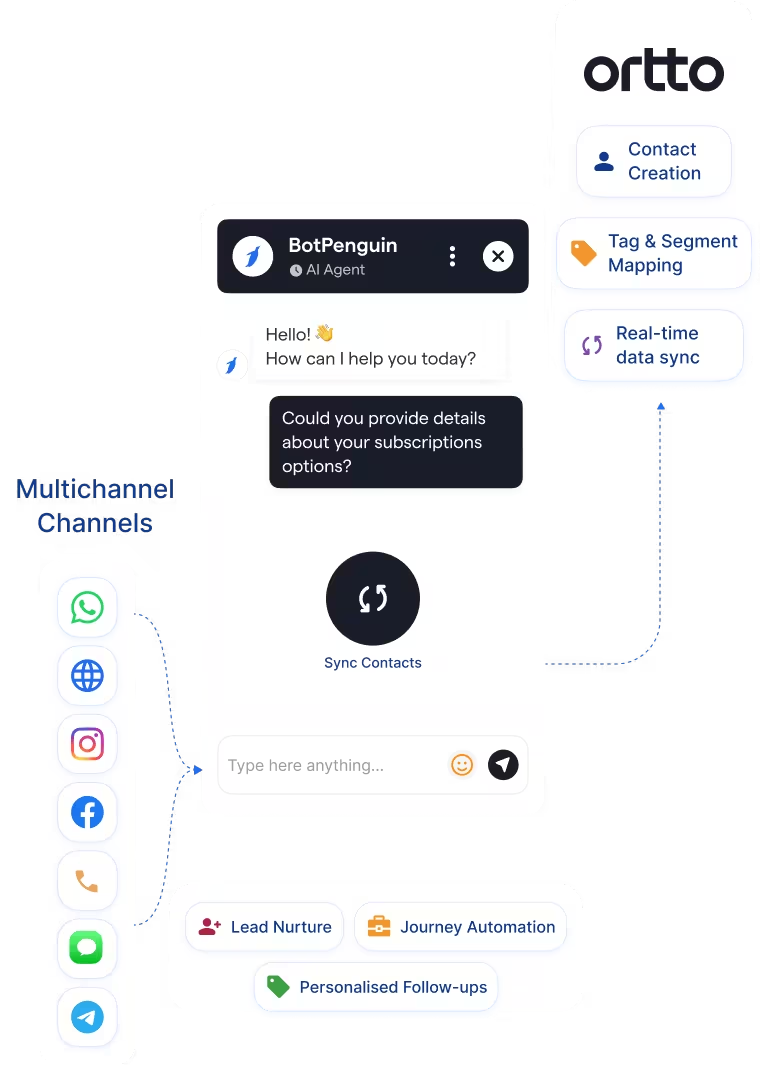
Autopilot (now Ortto) is a customer journey automation platform. It maps out multi-channel nurture sequences, email, SMS, in-app messages, and postcards, triggered by customer behaviour. Once a contact is in Autopilot, its journey builder and behavioural triggers deliver personalised experiences automatically.
Getting contacts into Autopilot from WhatsApp, Instagram, or a live website conversation still requires a form submission or manual import. Inbound conversations on those channels produce leads that stay outside Autopilot's journey system until someone extracts the data, losing the momentum of first contac
This is where an Autopilot chatbot integration closes the gap. Your AI chatbot or agent captures the lead the moment a conversation happens, on WhatsApp, website, or Instagram, qualifies them in real time, and pushes them into Autopilot as a tagged, segmented contact ready to enter the right journey immediately.

No developer or Autopilot API keys needed. Three steps to a fully synced customer journey pipeline.
Log in to BotPenguin, open your bot settings, and connect your Autopilot account. Authentication handles all permissions. No API keys, no developer involvement.
Step 1Choose which chatbot or agent answers map to which Autopilot fields, tags, or segments. Name, email, phone, and any custom qualifying field your journey uses.
Step 2Send a test contact through your chatbot or agent and confirm it appears correctly in Autopilot. Once confirmed, switch on for all live traffic.
Step 3Up to 30%
of abandoned carts recovered via WhatsApp chatbot, with every lead auto-enrolled in an Autopilot recovery journey.
Up to 40%
increase in trial-to-paid conversions after connecting chatbot signups to Autopilot onboarding journeys.
50%
more sales-ready leads generated after routing chatbot-qualified leads directly into Autopilot nurture journeys.
Capture abandoned cart leads via WhatsApp chatbot and enroll them in Autopilot recovery journeys instantly.
Capture trial signup enquiries via chatbot and enroll leads in Autopilot onboarding journeys with trial start date tagged.
Qualify buyers via WhatsApp chatbot and enroll them in Autopilot nurture sequences with property interest tagged.
Capture patient enquiries via chatbot and enroll contacts in Autopilot appointment reminder sequences.
Qualify consultation enquiries via chatbot and enroll prospects in Autopilot consultation nurture journeys.
Capture course enquiries via chatbot and enroll prospects in Autopilot admissions nurture journeys automatically.
Add policy enquiry leads to Autopilot with coverage details for personalized follow-up journeys.
Enroll travel enquiry leads in Autopilot with destination and trip details for targeted booking campaigns.
Connect BotPenguin's conversational AI to your CRM, payment gateway, calendar and eCommerce platform in minutes. No-code, no disruption. Your existing tech stack stays exactly as it is.
Free to start. No credit card required.
Is the Autopilot chatbot integration free?
The Autopilot chatbot integration is included on every paid BotPenguin plan at no extra cost. You can test it during the free trial without a credit card. View BotPenguin pricing to compare plans.
Is Autopilot now called Ortto?
Yes. Autopilot rebranded to Ortto in 2022. BotPenguin's integration works with the same platform under its new name.
Do I need to code to connect Autopilot to BotPenguin?
No coding required. The integration is fully no-code: connect your Autopilot account, map chatbot answers to contact fields and tags, send a test contact, and go live. Most teams finish in under 10 minutes.
Does the Autopilot integration work with WhatsApp?
Yes. BotPenguin's Autopilot WhatsApp integration lets leads captured via WhatsApp chatbot push to Autopilot as contacts with the correct tags, and journey enrollment is triggered automatically. The same applies to your website, Instagram, Facebook, Telegram, and SMS.
Can BotPenguin apply Autopilot tags and journey triggers based on chatbot answers?
Yes. Any chatbot answer can be mapped to an Autopilot tag or journey trigger through this Autopilot journeys chatbot flow, ensuring contacts are enrolled in the most relevant sequence.
What chatbot data gets sent to Autopilot?
You control what syncs. Name, email, tags, custom fields, and qualifying answers map to the corresponding Autopilot field. Nothing unmapped syncs.
Can BotPenguin re-engage contacts who have gone cold in Autopilot?
Yes. BotPenguin can trigger a WhatsApp or website chatbot outreach based on Autopilot contact data, re-engaging leads who haven't converted through their original journey.
Does the Autopilot integration support multiple journeys or segments per contact?
Yes. Contacts can be enrolled in more than one Autopilot journey based on different chatbot interactions, with segment data updated as new information is captured.



