Payment Integration
AllPay+BotPenguin

AllPay Chatbot Integration That Turns Chats Into Payment Requests

Let your BotPenguin chatbot or agent capture payment intent on WhatsApp, website chat, or Instagram and guide customers to the right AllPay payment flow. No manual follow-up, no missed collection intent.

About This Integration

AllPay

Helpdesk & Support

AllPay is a payment gateway used to process online payments, collections, and transaction flows securely. It supports the payment infrastructure once a customer is ready to pay, but the payment request often starts earlier inside a conversation.

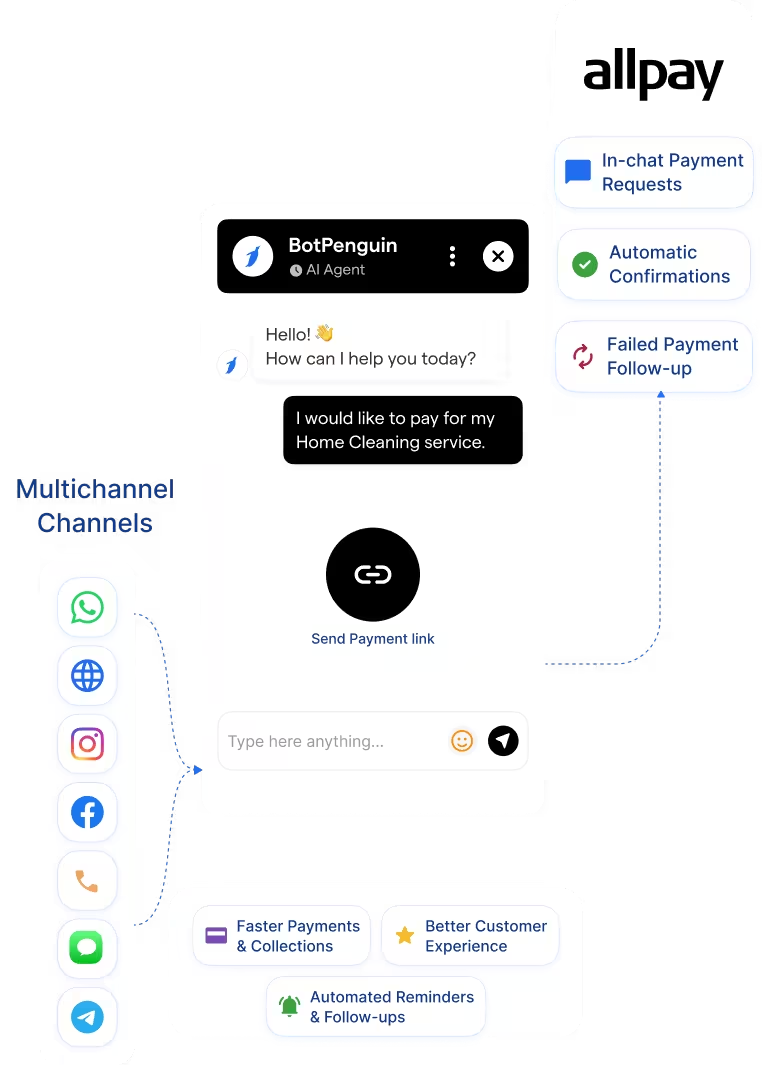
The BotPenguin AllPay payment integration adds a conversational payment layer. Your chatbot or AI agent captures payment intent on WhatsApp, website chat, Instagram, and more, then guides customers to the right AllPay payment flow. It supports payment requests, reminders, follow-ups, and AllPay automation where configured. Available on all paid plans; test it free during your trial.

How BotPenguin Connects to AllPay

AI Chatbot → AllPay

AI Chatbot → AllPay

Trigger AllPay payment requests from WhatsApp, website chat, Instagram, and more. BotPenguin captures customer details, payment intent, and order context before guiding users to the right payment flow.

See AI Chatbots
AI Agent → AllPay

AI Agent → AllPay

Your AI agent answers payment questions, handles objections, confirms payment intent, and moves the customer toward the right AllPay payment request before the chat ends.

See AI Agents
Automation → AllPay

Automation → AllPay

Trigger AllPay automation from chatbot or agent events. AllPay WhatsApp payments, failed payment follow-ups, reminders, and confirmations can run through connected workflows where configured.

See Automations

What BotPenguin Adds to AllPay

Understand what AllPay is designed to do, where gaps can exist, and how BotPenguin helps create a more connected, automated customer journey.
What AllPay is Built For

AllPay is built to support payment processing once a customer is ready to pay. It helps businesses manage payment requests, collections, confirmations, and transaction flows through a secure payment gateway.

The Gap

Payment intent often starts inside a conversation. A customer may ask about pricing, invoices, pending dues, or order payments on WhatsApp, Instagram, or website chat. Without a conversational layer, your team still has to answer questions, share the right payment flow, and follow up manually.

What BotPenguin Adds

BotPenguin adds the conversational payment layer before AllPay. Your chatbot or AI agent captures payment intent, answers basic payment questions, collects customer context, and guides users toward the right AllPay payment request. Payment reminders, follow-ups, and confirmations can run through AllPay automation where configured.

80+
Native Integrations available on BotPenguin
6
AllPay Payment Data BotPenguin Can Use: payment requests, customer details, order context, payment links, reminders, and confirmation updates
0
Lines of Code Needed to Connect AllPay to BotPenguin
<10 min
From Setup to Your First Test Payment Flow in AllPay

Everything the AllPay Payment Gateway Chatbot Handles for You

Everything the AllPay Payment Gateway Chatbot Handles for You
  • In-Chat Payment Requests: Trigger an AllPay payment link or request from WhatsApp, website chat, Instagram, and other chatbot conversations.
  • Payment Intent Capture: Let your chatbot or AI agent collect customer details, order context, amount due, and payment reason before sharing the payment flow.
  • AllPay AI Support: Use BotPenguin AI agent workflows to answer basic payment questions, handle objections, and guide customers toward the next AllPay payment step, where configured.
  • Automatic Confirmations: Send payment confirmation messages back into the conversation after the AllPay payment flow is completed, where configured.
  • Failed Payment Follow-Up: Trigger retry prompts, reminder messages, or follow-up workflows when a payment is missed, failed, or abandoned.
  • AllPay Automation: Start payment reminders, confirmation messages, and internal alerts from chatbot or payment events through connected workflows.
  • Payment Status Context: Use available AllPay payment status data to personalize the next chatbot message, where configured.
  • Cart Recovery Payments: Trigger an AllPay payment request when shoppers leave checkout without completing payment.
  • Service Booking Deposits: Collect booking deposit intent through chatbot conversations before guiding customers to the right AllPay payment flow.
  • Subscription Renewals: Trigger renewal payment reminders through chatbot or AI agent flows when a subscription payment is due.
  • Invoice Collection: Send AllPay payment requests through chatbot follow-ups for pending invoices, reducing manual collection calls.
  • AllPay WhatsApp Payments: Capture payment intent on WhatsApp and guide customers toward the right AllPay payment request or payment link.
  • Instant Checkout Support: Move customers from product enquiry to payment request through a guided chatbot flow, with confirmation shared where configured.
  • WhatsApp: Send AllPay payment requests through WhatsApp conversations when customers are ready to pay. See WhatsApp Chatbots See WhatsApp Chatbots
  • Website Chatbot: Guide website visitors from product or service enquiry to the right AllPay payment request. See Website Chatbots See Website Chatbots
  • Instagram DMs: Turn sales-ready Instagram enquiries into AllPay payment requests with customer context attached. See Instagram Chatbots See Instagram Chatbots
  • Facebook Messenger: Move Messenger conversations toward payment once buying intent is confirmed. See Facebook Chatbots See Facebook Chatbots
  • Telegram: Trigger AllPay payment requests from Telegram bot conversations for supported payment flows. See Telegram Chatbots See Telegram Chatbots
  • SMS: Send payment reminders or request links through SMS follow-ups where configured.
  • Microsoft Teams: Notify internal teams when payment follow-up, failed payment review, or collection action is needed. See Teams Chatbot See Teams Chatbot

Three Steps to Sync BotPenguin with AllPay in Under 10 Minutes

No developer needed. Three simple steps connect BotPenguin to AllPay and prepare your first payment request flow.

  1. 1

    Authenticate Both Accounts

    Step 1
  2. 2

    Map Your Fields

    Step 2
  3. 3

    Test and Go Live

    Step 3

Why Payment Automation Matters for Growing Businesses

Cart Recovery Opportunity

60 to 70%

average cart abandonment rate across ecommerce studies. BotPenguin helps recover payment intent by guiding shoppers back to the right AllPay payment flow.

Late Payment Follow-Up

36%

of monthly payments can arrive late for small businesses. Chatbot-led reminders help teams follow up before pending payments turn into collection delays.

Manual Payment Gaps

60%

of smaller middle-market firms report payment management challenges caused by manual processes. AllPay automation helps reduce manual follow-up where configured.

Connect Your AI Chatbot, WhatsApp Bot and Automation Workflows to 80+ Tools With Zero Switching Costs

Connect BotPenguin's conversational AI to your CRM, payment gateway, calendar and eCommerce platform in minutes. No-code, no disruption. Your existing tech stack stays exactly as it is.

ChatGPT integration logoPabbly integration logoZoho CRM integration logoHubSpot integration logoTeamgate CRM integration logoZendesk integration logoWebHoper integration logoInsightly CRM integration logoNo CRM integration logoZapier integration logo
  • ChatGPT integration logo
  • Pabbly integration logo
  • Zoho CRM integration logo
  • HubSpot integration logo
  • Teamgate CRM integration logo
  • Zendesk integration logo
  • WebHoper integration logo
  • Insightly CRM integration logo
  • No CRM integration logo
  • Zapier integration logo
  • Copper CRM integration logo

Move Customers From Chat to AllPay Payment Requests Faster

Free to start. No credit card required.

Frequently Asked Questions About the AllPay Chatbot Integration



