Scheduling & Appointment Booking
Acuity+BotPenguin

Acuity Scheduling Chatbot Integration: Book Appointments From Every Conversation

Let your BotPenguin chatbot or agent capture appointment requests on WhatsApp, website, or Instagram and book them straight into Acuity Scheduling automatically. No manual scheduling, no missed bookings.

About This Integration

Acuity Scheduling

Helpdesk & Support

Acuity Scheduling is a widely used appointment booking platform for service businesses: salons, coaches, clinics, fitness studios, consultants, and more. It manages availability, client intake, reminders, payments, and calendar syncing in one tool. Once a booking exists in Acuity, the whole post-booking workflow is automated.

The BotPenguin chatbot Acuity Scheduling integration adds the omnichannel capture layer. Your AI chatbot or agent handles inbound appointment requests on WhatsApp, your website, Instagram, and more, qualifying the client, confirming the service type and timing, and triggering the Acuity booking through Acuity Scheduling automation. Available on all paid plans; test it free during your trial.

How BotPenguin Connects to Acuity Scheduling

AI Chatbot → Acuity Scheduling

AI Chatbot → Acuity Scheduling

Capture appointment requests on WhatsApp, website chat, Instagram, and more. BotPenguin collects service type, date, time, and client details before triggering the Acuity booking flow.

See AI Chatbots
AI Agent → Acuity Scheduling

AI Agent → Acuity Scheduling

Your AI agent handles the pre-booking conversation, qualifies the client, checks service fit, and confirms timing before moving the user toward an Acuity booking.

See AI Agents
Automation → Acuity Scheduling

Automation → Acuity Scheduling

Trigger booking reminders, follow-ups, rescheduling flows, and appointment updates from chatbot events using Acuity Scheduling automation.

See Automations

What BotPenguin Adds to Acuity Scheduling

Understand what Acuity Scheduling is designed to do, where gaps can exist, and how BotPenguin helps create a more connected, automated customer journey.
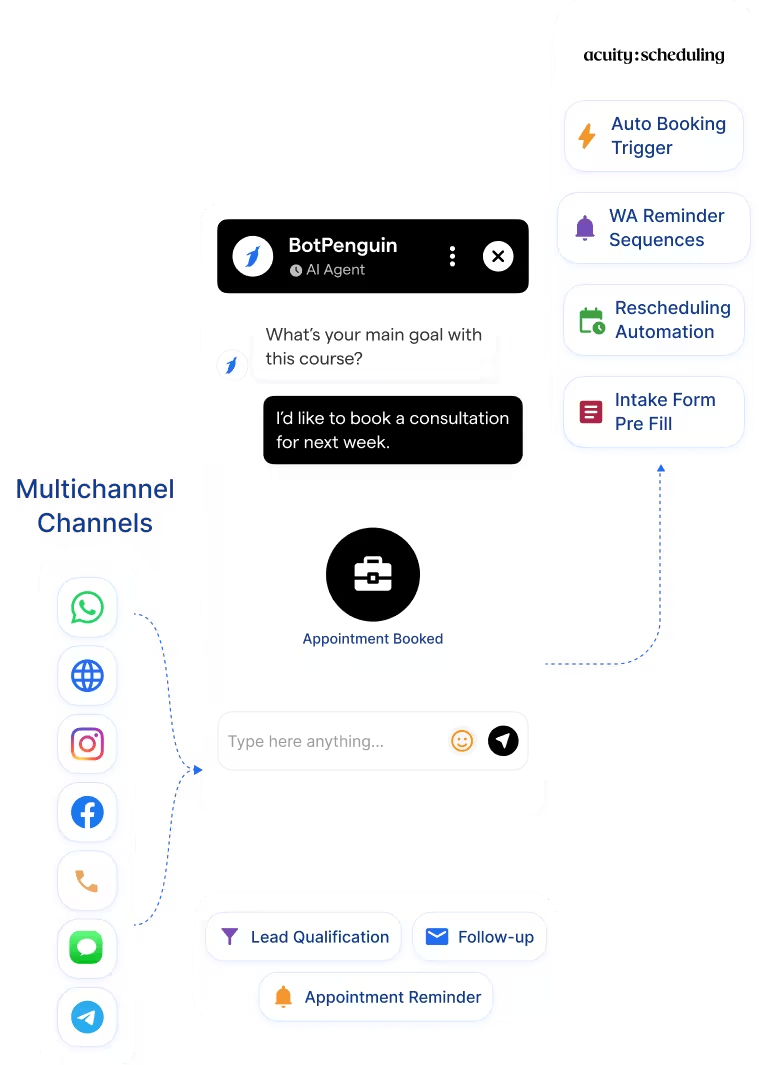
What Acuity Scheduling is Built For

Acuity Scheduling is built to manage appointment booking once a client is ready to book. Its calendar management, automated reminders, client intake forms, and payment collection all work seamlessly once the booking intent is confirmed.

The Gap

Getting to that confirmation still depends on a client finding your booking link, through your website, email, or social profile. Clients who reach out via WhatsApp at 9pm, Instagram DMs on a Sunday, or a website chatbot mid session do not automatically get into Acuity unless someone picks up the message and sends them a link.

What BotPenguin Adds

This is where an Acuity Scheduling chatbot integration closes the gap. Your AI chatbot or agent captures appointment intent the moment it arrives, on any channel, at any hour, qualifies the client in conversation, and triggers the Acuity booking flow through automation. The client goes from "I'd like to book" to confirmed appointments without a human in the middle.

80+
Native Integrations available on BotPenguin
6
Acuity Scheduling Data BotPenguin Can Use: appointment requests, service type, client details, preferred date, preferred time, booking notes, and follow-up status
0
Lines of Code Needed to Connect Acuity Scheduling to BotPenguin
<10 min
From Setup to Your First Test Booking Flow in Acuity Scheduling

Everything the Acuity Scheduling Chatbot Integration Handles for You

Everything the Acuity Scheduling Chatbot Integration Handles for You
  • Auto Booking Trigger: Chatbot captures appointment intent and triggers the Acuity booking flow with service type and client details pre-populated.
  • Service Type Mapping: Map chatbot answers to specific Acuity appointment types, so the right service gets booked based on what the client requests.
  • WhatsApp Reminder Sequences: BotPenguin’s Acuity Scheduling WhatsApp integration triggers automatic WhatsApp or SMS reminders from Acuity booking events, so clients never miss a slot.
  • Intake Form Pre Fill: Pass chatbot conversation answers to Acuity client intake forms, so clients do not repeat themselves.
  • Rescheduling Automation: Trigger rescheduling chatbot flows from Acuity cancellation events.
  • Two-Way Sync: Pull Acuity availability into Acuity Scheduling conversations to confirm open slots before triggering a booking.
  • After Hours Booking: Capture appointment requests via WhatsApp 24/7 and auto book into Acuity while your team is offline.
  • Lead Qualification Before Booking: Qualify the client's service needs in conversation before triggering the Acuity booking, ensuring the right appointment type is selected.
  • Appointment Reminder Campaigns: Send WhatsApp reminders 24 hours and 1 hour before Acuity appointments automatically, reducing no shows.
  • Rescheduling Via Chatbot: Let clients reschedule appointments through this chatbot acuity scheduling flow, with Acuity updating the calendar automatically.
  • Post Appointment Follow Up: Trigger WhatsApp follow up messages after Acuity appointments are completed, for reviews, rebooking, or upsells.
  • WhatsApp: Appointment requests qualify and sync to Acuity Scheduling instantly via the Acuity Scheduling WhatsApp integration, full conversation logged. See WhatsApp Chatbots See WhatsApp Chatbots
  • Website Chatbot: Visitor enquiries trigger Acuity Scheduling bookings the moment a chat ends. See Website Chatbots See Website Chatbots
  • Instagram DMs: DM leads qualify and push to Acuity Scheduling the moment they complete your flow. See Instagram Chatbots See Instagram Chatbots
  • Facebook Messenger: Conversations log directly to Acuity Scheduling booking records. See Facebook Chatbots See Facebook Chatbots
  • Telegram: Bot conversations sync to Acuity Scheduling as booking activity in real time. See Telegram Chatbots See Telegram Chatbots
  • SMS: Appointment captures map to Acuity Scheduling fields and sync as bookings in real time.
  • Microsoft Teams: Internal handoffs and escalations log to Acuity Scheduling from Teams, visible inside your team's workflow. See Teams Chatbot See Teams Chatbot

Three Steps to Sync BotPenguin with Acuity Scheduling in Under 10 Minutes

No developer or Acuity Scheduling API keys needed. Three steps to a fully synced booking pipeline.

  1. 1

    Authenticate Both Accounts

    Step 1
  2. 2

    Map Your Fields

    Step 2
  3. 3

    Test and Go Live

    Step 3

What Businesses Achieve with BotPenguin and Acuity Scheduling

Salons & Personal Care

Up to 42%

more after-hours appointment requests captured via WhatsApp chatbot and auto-booked into Acuity Scheduling.

Healthcare

3x

faster follow-ups on missed appointments, with automated WhatsApp reminders synced to Acuity Scheduling booking events.

Coaching and Consulting

Up to 35%

increase in booking conversions after deploying a WhatsApp chatbot connected to Acuity Scheduling.

Connect Your AI Chatbot, WhatsApp Bot and Automation Workflows to 80+ Tools With Zero Switching Costs

Connect BotPenguin's conversational AI to your CRM, payment gateway, calendar and eCommerce platform in minutes. No-code, no disruption. Your existing tech stack stays exactly as it is.

ChatGPT integration logoPabbly integration logoZoho CRM integration logoHubSpot integration logoTeamgate CRM integration logoZendesk integration logoWebHoper integration logoInsightly CRM integration logoNo CRM integration logoZapier integration logo
  • ChatGPT integration logo
  • Pabbly integration logo
  • Zoho CRM integration logo
  • HubSpot integration logo
  • Teamgate CRM integration logo
  • Zendesk integration logo
  • WebHoper integration logo
  • Insightly CRM integration logo
  • No CRM integration logo
  • Zapier integration logo
  • Copper CRM integration logo

Connect Acuity Scheduling to BotPenguin and Never Miss a Booking Again

Free to start. No credit card required.

Frequently Asked Questions About the Acuity Scheduling Chatbot Integration



