



Top 7 WordPress Chat Plugins Compared: Which Is Best in 2026?
Updated at Oct 24, 2026
9 min to read

AI Engine keeps AI closely tied to WordPress, with direct control over models and developer tooling. BotPenguin takes a broader approach, connecting WordPress to messaging channels, business workflows, human handoff, and no-code management from a single system.
WordPress’s AI Engine gets your website talking. It answers questions. It writes content. It sits inside your WordPress dashboard, keeping those AI tools close to your site.
But businesses working across multiple customer channels may need more than a WordPress-first AI toolkit… Something that books appointments, follows up on WhatsApp or Instagram, qualifies visitors, and works across channels, not just your website.
Think: an AI agent that works across channels while you're offline, not just while you're watching.
If you're seeking more ways to put that AI to work, an alternative like BotPenguin may be worth a look.
In this guide, you'll learn how BotPenguin compares as an AI Engine alternative and which option fits your business better.
Picking the wrong AI tool early on is expensive to undo later. Your choice now determines which channels you can reach, what you'll pay as you scale, and how much rework you'll face later.
Gartner found that at least 50% of GenAI projects were abandoned after proof of concept by 2025, partly due to rising costs. (Source: Gartner, 2026)
Here’s why understanding this difference matters:
Cost Creep: A cheap plugin can turn expensive fast once you add the integrations, add-ons, and workarounds needed to make it do more than it was built for.
Channel Lock-in: If your customers are moving to WhatsApp and Instagram, a website-only tool quietly caps your reach, no matter how good it is at what it does.
Migration Pain: Switching AI tools later can mean rebuilding flows, retraining teams, and migrating conversation data. Getting this right early saves that headache.
Team Bandwidth: The right tool decides whether your team spends time managing conversations or stitching together tools that don't talk to each other.
Growth Ceiling: Some tools are built to grow with a business. Others are built to do one job. Knowing which one you're picking matters before you're locked in.
The right choice depends on whether you need a focused WordPress tool or an AI system built to support broader business growth.
Comparing the wider market? See our guide to the best WordPress chatbot plugins.
If your needs extend beyond WordPress, BotPenguin offers a broader way to manage AI chatbots, agents, lead generation, and customer interactions across channels from one platform. This makes it worth considering alongside AI Engine before you commit to a setup.
AI Engine has a strong WordPress-first proposition. It combines model flexibility, native tools, and developer control without pushing users outside WordPress.
Here are a few capabilities to consider:
AI Engine is built directly for WordPress and currently has 100,000+ active installations. (Source: WordPress.org, 2026)
It brings chatbots, content generation, AI forms, media tools, and admin features into the dashboard, which suits users who want AI capabilities centered inside WordPress.
AI Engine supports OpenAI, Anthropic, Google, xAI, Mistral, Perplexity, OpenRouter, Replicate, Azure OpenAI, and compatible self-hosted options.
Because users bring their own API keys, they can choose providers directly and manage model access and billing themselves.
AI Engine supports conversation memory, file uploads, embeddings, PDF knowledge bases, semantic search, and function calling.
Its Pro tools can also connect chatbots with WooCommerce, appointments, WordPress functions, and custom APIs for more advanced site interactions.
Developers get APIs, REST endpoints, hooks, function calling, and MCP support.
These tools let you connect WordPress to external AI workflows while giving technical teams more control over how the chatbot reads data and takes action.
Overall, AI Engine is a strong fit for users who want WordPress-native control, broad model choice, and deeper technical access.
WordPress is one touchpoint, while messaging channels, lead handling, support, and business tools sit within the same operating setup.
BotPenguin takes a broader view of customer conversations.
BotPenguin treats WordPress as one part of a broader customer conversation.
You can manage chatbot interactions across websites, WhatsApp, Instagram, Facebook, Telegram, Microsoft Teams, and SMS without creating separate setups for every channel you use daily.
As an official Meta Tech Provider, BotPenguin also supports WhatsApp Business API onboarding and connects directly to Meta’s infrastructure.
On WordPress, the chatbot can qualify leads, book appointments, answer support questions, and connect with WooCommerce.
Captured leads can move into CRM systems, while support conversations can pass into connected ticketing tools for follow-up.
BotPenguin brings AI chatbots, autonomous agents, voice agents, and workflow automation into the same product ecosystem.
It also works with leading AI models from OpenAI, Anthropic, Gemini, DeepSeek, OpenRouter, and LLaMA, giving businesses more choice over the intelligence powering their conversations.
As your needs expand beyond website chat, you can add new AI capabilities or switch models without starting with an entirely separate tool.
Some conversations need a person, not another automated reply.
BotPenguin includes live chat takeover, a unified inbox, and customer profiles, so your team can follow the conversation and step in when direct assistance makes more sense.
BotPenguin offers 80+ native integrations across CRM, scheduling, support, automation, and productivity tools. (Source: BotPenguin, 2026)
Connections with HubSpot, Salesforce, Zoho CRM, Google Calendar, and Zapier help move chatbot activity into the systems your team already depends on.
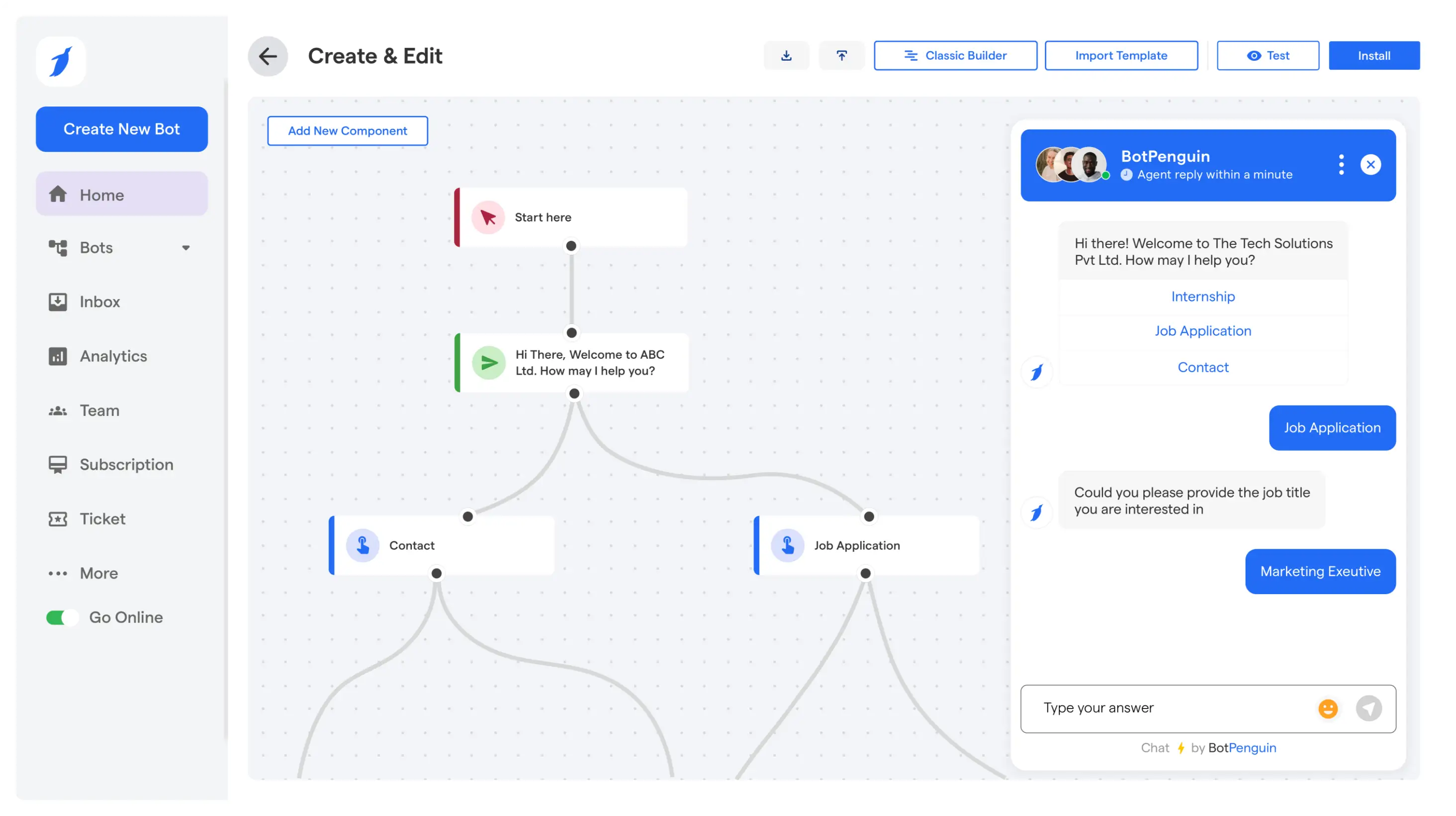
BotPenguin uses a no-code builder with custom flows, templates, training data, and WordPress plugin integration.
Teams can manage chatbot behavior from the dashboard without building the underlying infrastructure or depending on developers for routine changes.
That makes BotPenguin a stronger fit when WordPress is only one part of how your business talks to customers.
For more context, check BotPenguin customer reviews to see how users describe their experience, or review BotPenguin case studies to see how businesses put these capabilities to work.
In the previous sections, you saw where AI Engine and BotPenguin stand on their own.
Now, here’s how the core differences look when you place them side by side.
Data Portability: AI Engine stores conversation data on your own WordPress server. BotPenguin supports downloading chat transcripts and exporting data from its centralized inbox.
Uptime Dependency: AI Engine runs through your WordPress installation, so website availability depends on your hosting. BotPenguin operates separately, allowing connected messaging channels to function independently of your WordPress site.
Compliance Coverage: BotPenguin is GDPR, HIPAA, and CCPA compliant, ISO certified, SOC 2 attested, and VAPT-assessed by a CERT-In empanelled auditor. AI Engine provides GDPR tools and privacy controls, while broader compliance depends on your WordPress setup and connected AI providers.
Overall, the choice comes down to how much control, channel coverage, and operational flexibility your business actually needs.
The next section helps you decide between AI Engine and BotPenguin based on your current setup, team, channels, and growth plans.
Neither tool is “better” in the abstract. They're built for different starting points.
The right pick depends less on features and more on where your business actually is right now.
You’re a solo blogger or small site owner who wants AI features while managing provider costs directly.
Your developer already lives inside WordPress and prefers writing custom logic over configuring a separate dashboard.
Your traffic and leads come almost entirely through your website, with no real WhatsApp or Instagram activity yet.
You want to test AI features on a small budget before committing to a larger platform decision.
You want AI tools, chatbots, and custom workflows to remain closely tied to your WordPress environment.
Your team is non-technical and can't wait on developer time every time a flow needs updating.
You're already fielding customer questions on WhatsApp or Instagram and want one place to manage all of it.
Your business runs on appointments, orders, or support tickets that need to sync with a CRM or calendar.
You’re scaling past a single site and expect to add channels or team members within the next year.
You need a documented compliance posture (GDPR, HIPAA, SOC 2) for the industry you operate in.
Bottom Line: If WordPress is the whole picture, AI Engine fits. If it's one piece of a bigger customer conversation, BotPenguin is built for that picture.
AI Engine brings a broad range of AI capabilities directly into WordPress. If that WordPress-first setup fits your needs, it remains a strong choice.
BotPenguin fits businesses that need conversations to move beyond WordPress and across multiple customer channels.
As an AI Engine alternative, it offers no-code management, human handoff, integrations, and broader channel coverage from one system.
The better choice depends on whether WordPress is your main operating environment or just one part of a larger customer journey.
AI Engine is a WordPress-native AI plugin that adds chatbots, content tools, AI forms, media features, and developer controls. It supports multiple AI providers and lets users manage model access through their own API keys.
BotPenguin can be a good AI Engine alternative if you want WordPress chat connected with WhatsApp, Instagram, Facebook, Telegram, Teams, or SMS. It also suits businesses that prefer no-code management, human handoff, integrations, and centralized conversations.
AI Engine is centered on WordPress and gives users direct control over AI providers, API keys, and developer customization. BotPenguin is built around managed, multi-channel customer conversations, with no-code workflows, live handoff, and business integrations.
Yes. BotPenguin supports website chat alongside WhatsApp, Instagram, Facebook, Telegram, Microsoft Teams, and SMS. This makes it useful for businesses that want to manage customer conversations, lead handling, and support across several channels from one system.
AI Engine commonly uses a bring-your-own-key setup, letting users connect supported AI providers and manage model access directly. That gives developers more control over provider choice and billing, but it also means managing those external AI relationships themselves.
For non-technical teams, BotPenguin may be easier to manage because it uses a no-code builder and centralized dashboard. Site owners can also use AI Engine, but its deeper customization options are especially useful for WordPress developers.
Not always. BotPenguin is not a like-for-like replacement for AI Engine. Choose AI Engine for WordPress-centered control and developer flexibility. Choose BotPenguin when WordPress is one channel within a broader customer communication, automation, and support setup.
Power Up WordPress With AI Chatbots
Build AI chatbots, capture leads, support customers, and connect multiple channels with BotPenguin. Go beyond WordPress with AI-powered customer interactions built for growing businesses.
Start NowCheckout our related blogs you will love.
Updated at Oct 24, 2026
9 min to read
Updated at Oct 12, 2026
8 min to read

Updated at Oct 12, 2026
12 min to read
Updated at Oct 12, 2026
13 min to read

Updated at Oct 12, 2026
6 min to read
Updated at Oct 12, 2026
6 min to read
Table of Contents



