



WhatsApp AI Chatbot vs Rule-Based: What’s the Difference?
Updated at Sep 16, 2026
7 min to read
A WhatsApp chatbot can look free at signup and expensive after launch.
The price is rarely one line item. You may pay for the platform, Meta message charges, setup, integrations, agent seats, and automation limits.
That is why WhatsApp chatbot pricing feels confusing for buyers comparing tools.
In this guide, we break down what you actually pay when you go live, what affects WhatsApp chatbot cost, where free plans help, and when cheaper automation can deliver the same outcome.
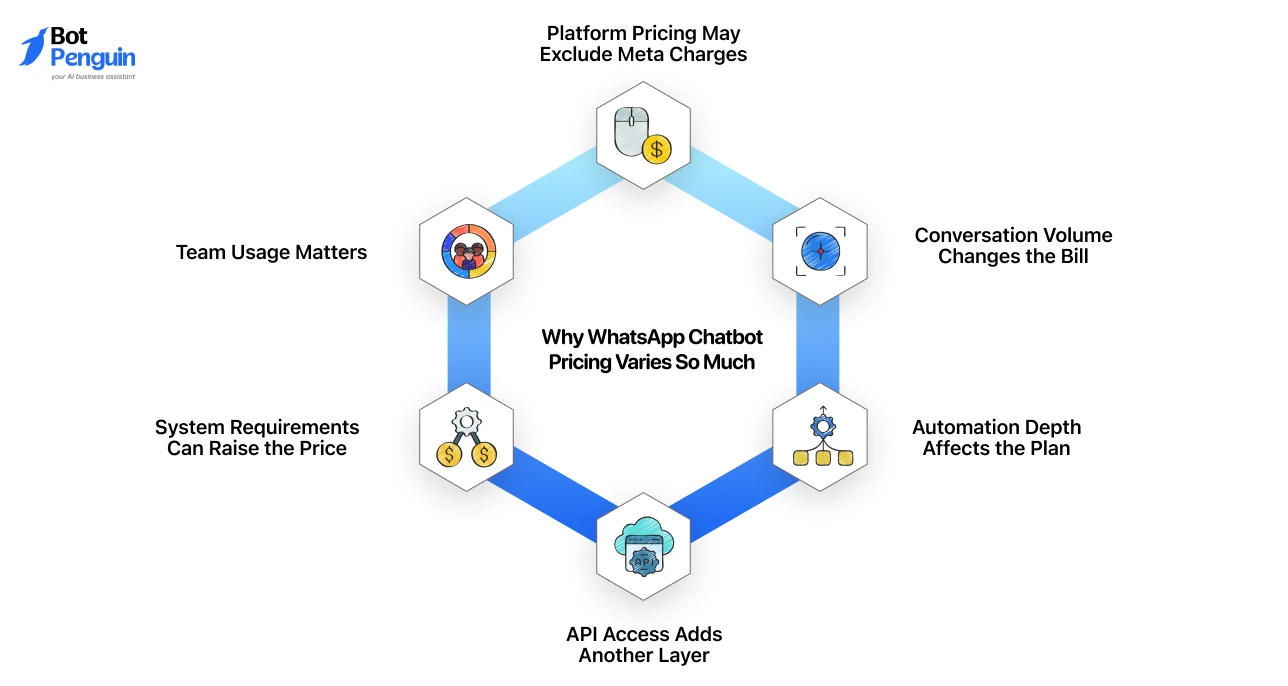
WhatsApp chatbot pricing varies because businesses use WhatsApp in very different ways.
One company may only need basic automated replies. Another may need API access, broadcasts, shared inboxes, routing, reminders, and customer support workflows.
If you are still exploring the basics, first understand what a WhatsApp chatbot is before reviewing pricing.
In practice, WhatsApp chatbot cost depends less on the chatbot alone and more on how deeply WhatsApp supports your workflows.
Meta moved WhatsApp billing to per-message pricing, with new Business Agent, service, and utility rates launching in August and October 2026.
Once you understand these layers, comparing WhatsApp chatbot pricing becomes much easier.
Platforms like BotPenguin, for example, combine key WhatsApp automation features in one platform, making pricing simpler to estimate.
The final WhatsApp chatbot cost usually includes Meta charges, chatbot software, setup, automation, and support needs.
Here is the quick breakdown of what it includes before comparing platforms:
Meta charges only for delivered template messages, based on category and recipient country, not flat per-message fees.
Categories are marketing, utility, authentication, and service.
Rates also swing hard by geography. Marketing message pricing varies by more than 10x across countries, from under $0.01 in India to over $0.12 in Germany.
So a support-heavy business and a promotion-heavy business rarely pay the same bill, even on the same platform.
For country-wise rates and billing rules, see WhatsApp Business API pricing in detail.
Once a customer messages your business first, a 24-hour window opens where replies are free, no template required.
A business that mainly answers customer questions can run a large share of its WhatsApp traffic through this free window and pay Meta very little for it.
Meta lowers rates for utility and authentication messages as your monthly volume grows.
Marketing messages don’t get this discount, no matter how many you send. This is worth checking before you scale a campaign.
High-volume OTP or order-update flows get cheaper per message over time. High-volume promotional broadcasts do not.
Meta has announced new pricing for Business Agent, service, and utility messages, rolling out in phases through the second half of 2026.
If you’re budgeting for the next 12 months, build in room for this. Rates on WhatsApp are not fixed for the long term.
Meta requires India and Brazil accounts to migrate to local currency billing (INR by Dec 2026, BRL by June 2027) or lose message delivery.
This covers the builder, shared inbox, team access, flows, routing, analytics, and support. Pricing may be monthly, annual, or usage-based.
This is the number vendors advertise.
It rarely includes Meta's charges or the markup your provider adds on top, which typically runs a fraction of a cent per message.
Some platforms charge extra for verification, template setup, workflow creation, testing, and onboarding.
Deeper WhatsApp Business API automation, like custom workflows or system sync, can add further cost.
Your first invoice may run higher than the listed plan.
The real cost is not one line item. It depends on Meta fees, platform pricing, setup scope, and how your business uses WhatsApp.
Some WhatsApp automation software platforms charge a simple platform fee, while others separate chatbot features, AI usage, message charges, users, or advanced automation into different plans.
Use this table for a quick overview before checking each platform in detail.
*Note: Pricing may vary depending on the platform plan, WhatsApp API charges, message volume, automation features, and add-ons. The prices mentioned are indicative and may change over time. Always verify the latest pricing with the provider.
Let's now break each one down in detail below.
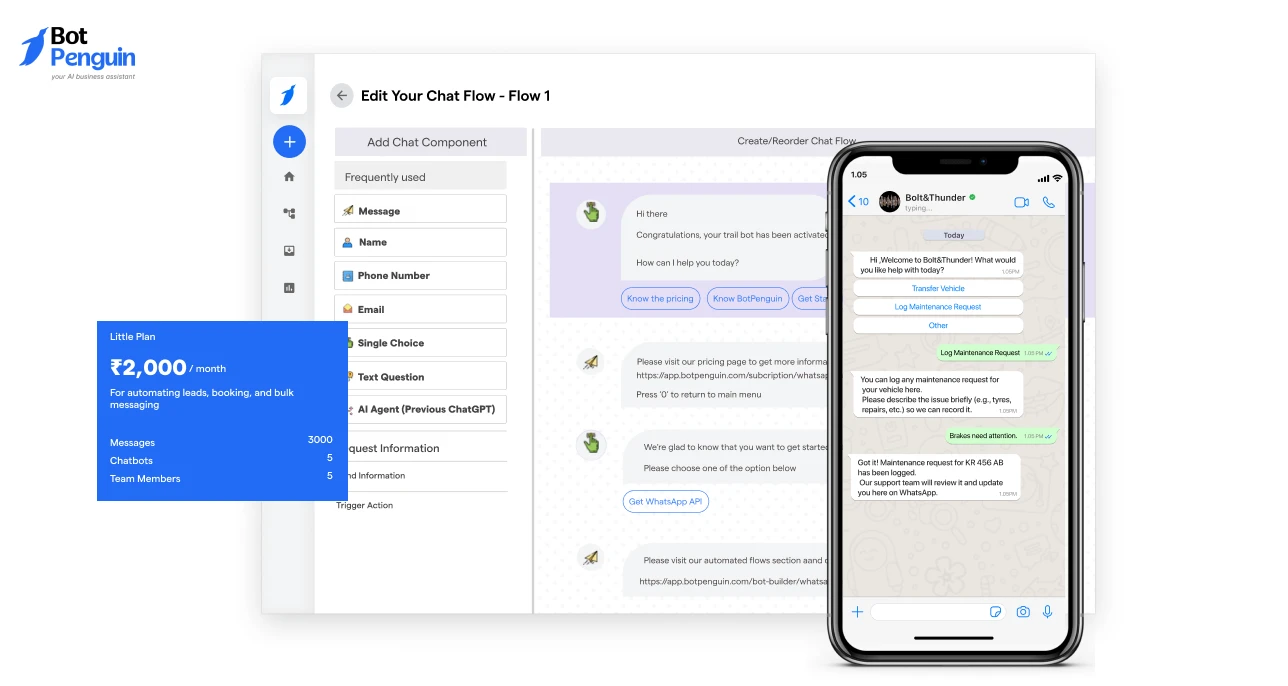
BotPenguin’s Little Plan starts at $15/month and is built for businesses that want WhatsApp automation without a heavy starting cost.
It includes 5 chatbots, 5 WhatsApp numbers, and 5 team members.
WATI’s Growth Plan starts at $49/month and is positioned for businesses that want WhatsApp-led customer engagement across inbox, campaigns, and commerce workflows.
AiSensy offers a free forever plan, but its paid WhatsApp automation features sit in higher plans or add-ons. Its paid plan starts at $45/month based on your provided pricing.
BotPenguin has the lowest listed starting price among these three. WATI starts higher but includes campaign and inbox workflows for WhatsApp-first teams.
AiSensy has a free entry point, but chatbot and AI capabilities may need separate paid add-ons.
Most buyers price a WhatsApp chatbot by looking at one number: the plan fee. That number rarely matches what you end up paying. A better estimate starts with your actual usage, not the vendor's homepage.
Here's how to build that estimate in five steps.
A business sending 500 messages a month and one sending 50,000 will not pay the same, even on identical plans.
Volume drives your Meta charges more than your software choice does.
Customer-initiated support chats often fall inside free service windows. Promotional broadcasts and marketing templates almost never do.
Splitting these two before you estimate keeps your numbers honest.
Team seats, inbox access, departments, and multiple WhatsApp numbers all affect your plan tier.
A five-person support team on two numbers needs a different plan than a solo operator.
Adding a WhatsApp number doesn't add capacity. All numbers in one portfolio share a single messaging cap, per Meta.
Business verification, template approval, workflow building, and onboarding support can add cost upfront.
Some platforms bundle this in. Others bill it as a separate service.
Add the platform fee, Meta's message charges, and any setup or add-on costs together.
That combined number, not the advertised plan price, is your real WhatsApp chatbot cost.
Once you calculate these five factors, comparing platforms becomes much easier.
Instead of choosing the lowest monthly plan, you'll know which WhatsApp chatbot offers the best value for your business based on your actual messaging volume, automation needs, and long-term costs.
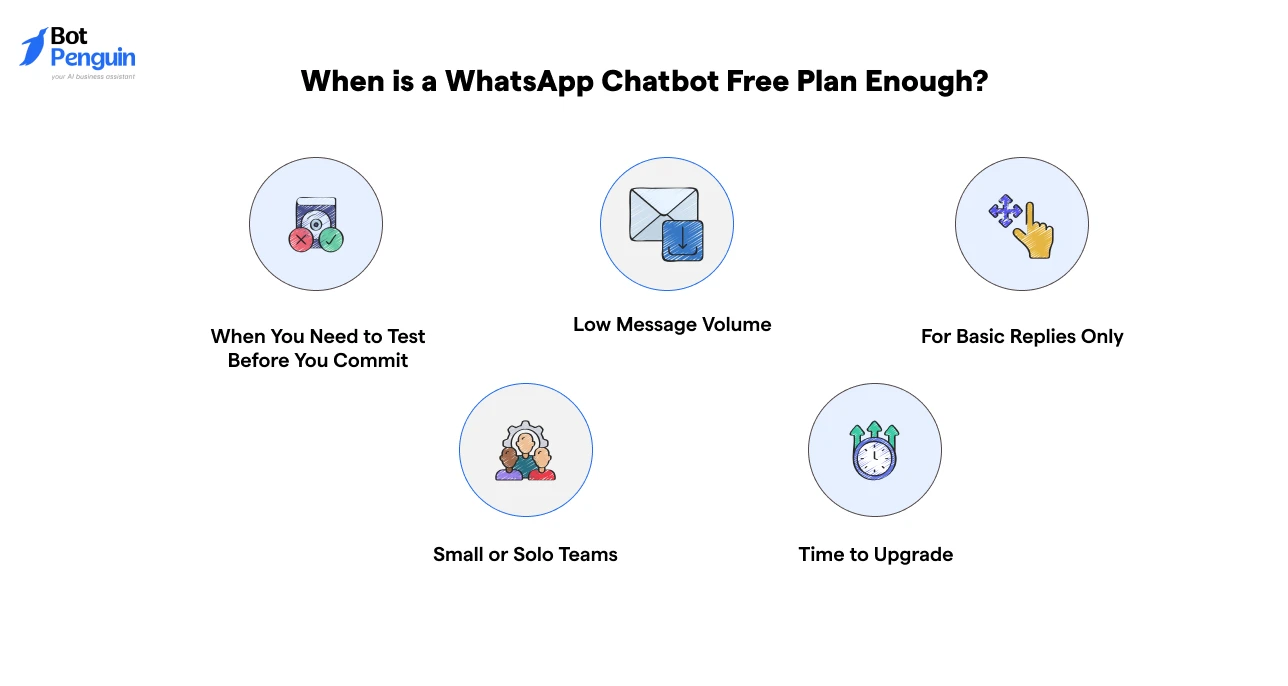
A WhatsApp chatbot free plan works well in a few specific situations. Beyond that, it starts holding your business back.
Here's when free makes sense, and when it doesn't:
Free works while you're small and testing. The moment your WhatsApp usage grows past basic replies, a paid plan pays for itself.
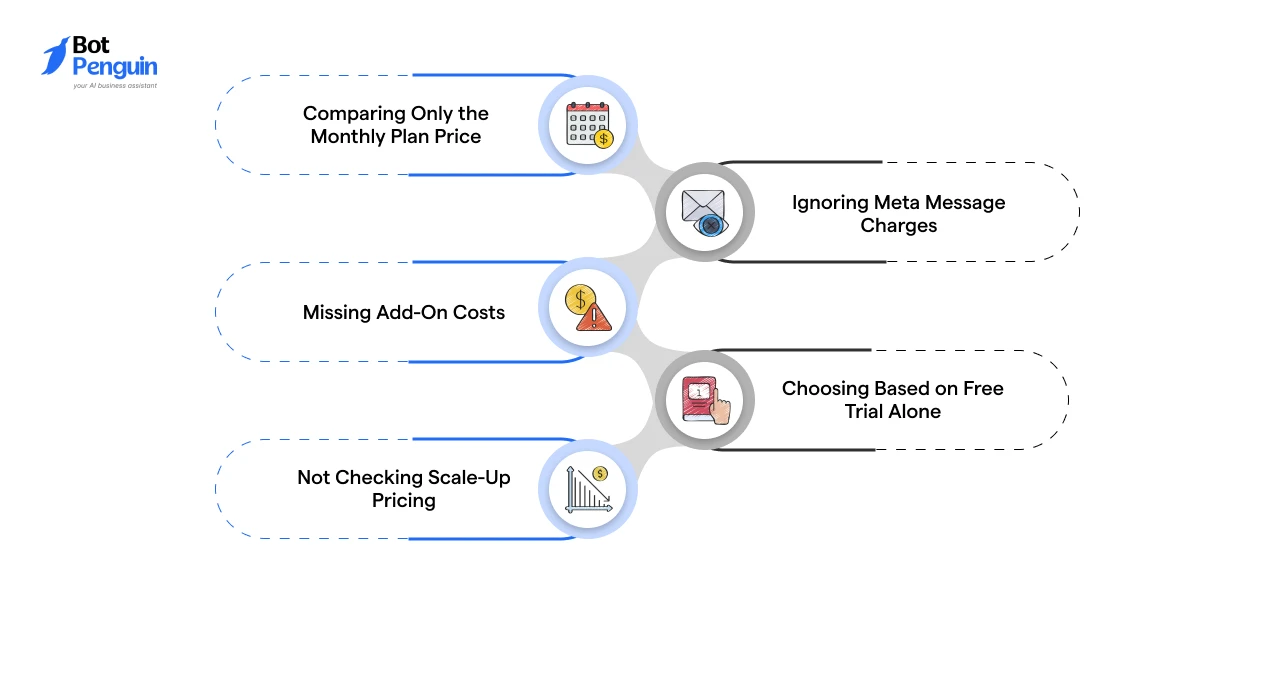
A low monthly price doesn't always mean a lower total cost.
Before choosing a WhatsApp chatbot, watch for these common pricing mistakes that can lead to unexpected expenses as your business grows:
Challenge: The listed software fee is rarely your total WhatsApp chatbot cost.
How to Fix: Compare the complete monthly cost, including Meta message charges, setup fees, users, templates, and any paid add-ons.
Challenge: Meta charges vary based on message category and the recipient's country.
How to Fix: Estimate your expected monthly conversations and ask the provider for a cost breakdown using your projected volume.
Challenge: AI agents, chatbot flows, APIs, extra users, additional WhatsApp numbers, and premium support often cost extra.
How to Fix: Create a feature checklist before comparing providers so you can identify which capabilities are included and which require additional payment.
Challenge: Free trials often exclude premium automation, higher usage limits, or advanced integrations.
How to Fix: Review what happens after the trial ends, including feature restrictions, usage limits, and the cost of upgrading.
Challenge: Costs can increase significantly as your message volume, users, automation, or WhatsApp numbers grow.
How to Fix: Ask how pricing changes at higher usage levels so you can estimate your costs over the next 6-12 months.
A few minutes spent reviewing the complete pricing model can save you from paying far more than expected later.
Compare the total cost of ownership, not just the advertised monthly plan, to choose a WhatsApp chatbot that fits both your current needs and future growth.
As you compare providers, look for transparent pricing with key features included. BotPenguin, for example, bundles core WhatsApp automation into its plans, making costs easier to predict.
WhatsApp chatbot pricing is easier to understand when you separate the layers. Your final cost depends on Meta charges, platform plans, setup, users, numbers, and automation needs.
Do not compare tools by the monthly price alone. Check what is included, what is charged separately, and what changes when your usage grows.
A free plan can help you start. A paid plan makes sense when you need more messages, workflows, team access, and support.
The best choice is not always the cheapest plan. It is the plan that fits your current needs and stays affordable as you scale.
WhatsApp chatbot pricing includes the software plan, Meta message charges, setup, users, automation features, and support depending on your platform.
Some platforms offer a free WhatsApp chatbot plan, but limits usually apply to messages, features, users, numbers, or automation depth.
WhatsApp chatbot cost can start free or from low monthly plans, but final cost depends on Meta fees, usage, and add-ons.
Your total cost depends on message volume, message category, country, chatbot platform plan, team size, WhatsApp numbers, and setup needs.
Billing depends on your provider. Some pass Meta charges through, while others show them separately or bundle them into platform pricing.
Prices vary because platforms package messages, chatbot flows, AI features, team seats, WhatsApp numbers, integrations, and support differently.
Reduce cost by choosing the right plan, avoiding unused add-ons, tracking message volume, using service windows, and comparing total monthly pricing.
Get Transparent WhatsApp Chatbot Pricing
Understand platform fees, Meta charges, and add-ons to estimate your real WhatsApp chatbot cost.
Get Started NowCheckout our related blogs you will love.
Updated at Sep 16, 2026
7 min to read
Updated at Sep 10, 2026
10 min to read
Updated at Sep 10, 2026
9 min to read

Updated at Aug 6, 2026
11 min to read
Updated at Aug 5, 2026
7 min to read
Table of Contents


