



WhatsApp Chatbot vs AI Agent: Which Fits Your Business?
Updated at Sep 10, 2026
10 min to read
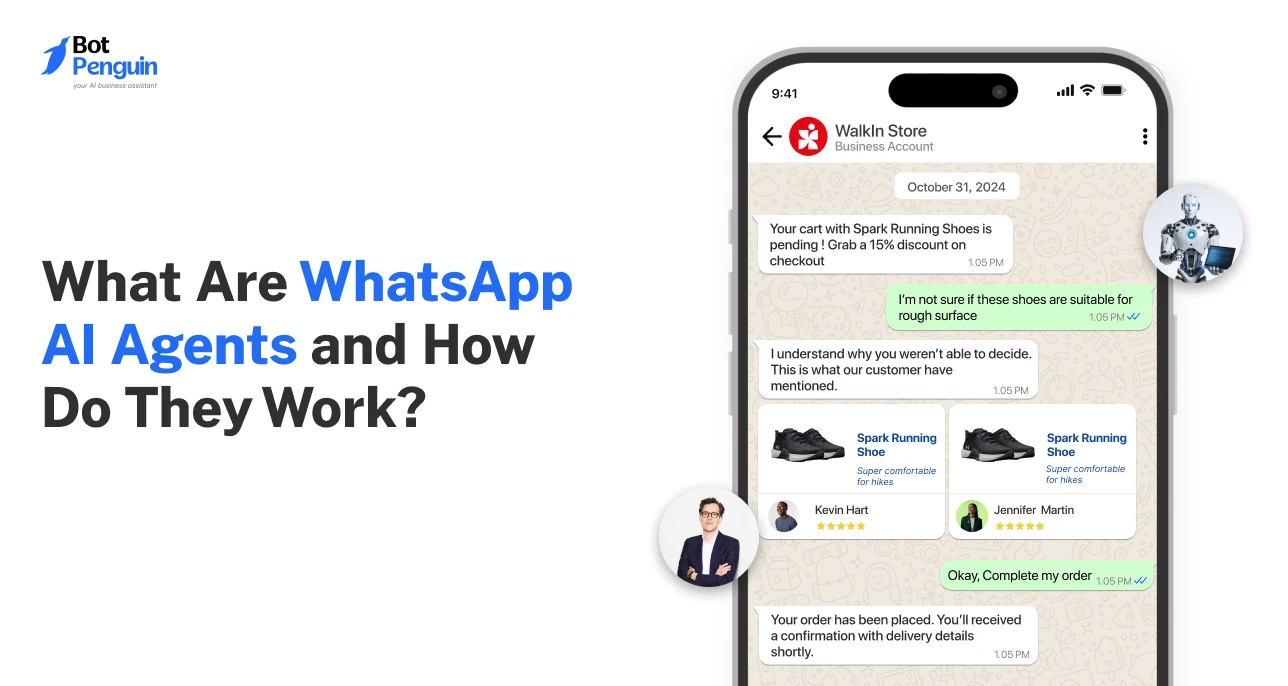
WhatsApp AI agents are AI-powered systems that understand user intent, pull business data, and complete tasks inside WhatsApp. They route requests, book appointments, resolve queries, and trigger actions across connected systems.
A thinking WhatsApp once sounded whimsical. Now, it’s becoming a reality.
Brands aren’t just using WhatsApp to send messages and answer queries anymore. They’re deploying AI agents that read intent, pull information, make decisions, and complete tasks within a single chat thread.
WhatsApp is quietly leveling up from a communication channel to an action channel. From qualifying leads to booking appointments and closing out support tickets, WhatsApp AI agents can handle work that once needed a human on the other end.
In this guide, you'll learn what WhatsApp AI agents are, how they work, and where they deliver the most value.
WhatsApp AI agents are AI-powered systems that operate within WhatsApp to understand customer intent, access business data, and reason through decisions.
They autonomously complete tasks like answering queries, booking slots, or qualifying leads, without waiting on a human agent.
Companies plan to integrate AI agents with chat platforms at a rate of 66%, signaling how central conversational channels have become to agent strategy.
Here's why they matter right now:
People would rather message a brand on WhatsApp than navigate a website form or sit on hold.
An AI agent meets them in the channel they already trust, instead of pulling them back into slower, older workflows.
The longer a lead waits for a response, the colder it gets.
Human teams, however well-staffed, can't be instantly available on every conversation; AI agents close that gap without a queue.
Order status, refund policy, rescheduling, cancellation: most support volume is the same handful of questions asked in different words.
When human agents are stuck answering these on loop, the harder conversations get less attention than they deserve.
Customers ask questions on their own schedule, not business hours.
A WhatsApp AI agent keeps things moving after the team logs off, so interest doesn't cool simply because no one was around to reply.
Rule-based bots only work if the customer stays inside the script. The moment someone asks something unexpected, the bot stalls or loops, and the customer is left annoyed.
AI agents reason through intent instead of matching keywords, so they hold up in real, messy conversations.
Ultimately, WhatsApp AI agents turn customer messaging from a slow support bottleneck into a 24/7 engine for sales and satisfaction, giving customers immediate answers where they already chat.
For businesses looking to put this into practice, BotPenguin supports WhatsApp AI agent workflows for sales, support, lead qualification, and routine customer interactions.
Every WhatsApp Business conversation follows a similar chain of events, even if the use case changes.
Here's what actually happens between a customer sending a message and getting a resolution:
1. Message Received: A customer sends a message, a query, a booking request, a complaint. This hits the WhatsApp Business API and routes to the agent instantly, no queue.
2. Intent Understood: The agent parses the message using NLP to figure out what the customer actually wants, not just the keywords used. It separates a real complaint from a casual question.
3. Context and Data Pulled: The agent checks CRM records, order history, inventory, or calendars to respond accurately. This context helps the agent choose a relevant next action.
4. Decision Made, Action Taken: Based on intent and context, the agent decides what to do next. It can answer, book a slot, trigger a refund, or escalate on the spot.
5. Handoff or Resolution: If the query needs human judgment, the agent hands off with full context, so the customer never repeats themselves. Otherwise, it confirms resolution directly in chat.
This end-to-end process automates recurring tasks, delivering instant resolution on WhatsApp while keeping human agents focused on high-value conversations.
Rule-based chatbots, AI-powered chatbots, and AI agents can all operate inside WhatsApp. Their ability to understand, decide, and act is what sets them apart.
The table below breaks down this difference:
Chatbots Deflect; Agents Resolve: A chatbot’s win is getting customers to self-serve. An agent's win is actually closing out the problem.
Rule-Based Bots Need New Flows; Agents Generalize: New scenarios often require fresh decision paths. Agents can reason through unfamiliar requests within their defined scope.
Being Wrong Costs More with Agents: A chatbot's mistake is just an unhelpful reply. An agent's mistake can trigger a wrong action, so guardrails are built in by design.
A WhatsApp AI agent can support more than just customer service.
Businesses use it across sales, bookings, payments, order updates, and post-purchase engagement, depending on the workflow they want to automate.
Each of these use cases has been explained below.
WhatsApp AI agents can qualify inbound leads in real time by asking the right questions before a sales rep ever gets involved.
Scores leads based on intent, budget, and urgency signals from the conversation
Instead of customers calling in or filling a form, the agent checks availability and confirms slots directly inside the chat.
Syncs with live calendars to show only real, open time slots
Customers can ask “where's my order” and get a real answer instead of a generic tracking link buried in an email.
Pulls live status directly from order management or logistics systems
The agent handles the bulk of repetitive support queries end-to-end, freeing human agents for conversations that actually need judgment.
Resolves FAQs around policy, returns, and account issues without escalation
Zuckerberg said over 60% of WhatsApp users in India, its largest market with 500 million-plus users, message a business account.
Agents can share payment links, confirm transactions, and follow up on pending payments directly within the WhatsApp thread.
Sends personalized payment reminders based on due dates automatically
Once a purchase is made, the agent can recommend relevant add-ons or restart the conversation.
Suggests complementary products based on the customer's purchase history
Together, these use cases show how WhatsApp AI agents can handle high-volume customer tasks while keeping conversations contextual and action-oriented.
These WhatsApp AI agent examples show how the same core technology adapts to different customer needs across industries.
Across industries, the pattern stays consistent: understand the request, access the right data, and complete the next action.
WhatsApp AI agent ROI depends on two factors: what the agent costs to operate and the value it generates.
Platform fees provide the baseline. Total cost also depends on query volume, architecture, integrations, and technical requirements.
Cost scales with model type, message volume, and token consumption.
A higher-reasoning model handling complex queries costs more per conversation than a lightweight model handling simple FAQs.
AI model pricing can vary sharply. For example, GPT-5 Nano costs $0.05 per million input tokens, while GPT-5.6 Sol costs $5.
Meta charges per delivered message on the WhatsApp Business Platform. Rates vary by message category, recipient market, and applicable volume tier.
These charges sit alongside your platform and AI costs.
Connecting CRM, calendar, payment, order, and support systems adds setup effort beyond the base chatbot build. Each additional data source is another point of configuration and testing.
Multi-step workflows (book, then confirm, then remind) take more configuration than single-response flows.
Similarly, a larger knowledge base or deeper business-data connection needs more prep work upfront.
Live-agent routing, shared inboxes, and escalation logic add setup costs. New handoff interfaces can increase them further.
Cost doesn't end at launch. Prompt updates, workflow adjustments, and periodic testing are recurring costs that keep the agent accurate as your business changes.
Beyond the use case-specific metrics already covered above, these are the core health indicators for any WhatsApp AI agent:
*Note: The ranges above are directional benchmarks, not guarantees. Actual numbers will vary based on your industry, use case complexity, and how the agent is configured.
Overall, the WhatsApp costs matter most when weighed against measurable gains in resolution, conversion, efficiency, and customer experience.
With the costs and benchmarks clear, the next step is setup. A no-code platform is often the preferred route for faster deployment.
A no-code WhatsApp AI agent can be set up without building every workflow from scratch. Here’s a step-by-step overview of the setup process:
1. Define the Agent’s Goal: Start with one clear objective, such as lead qualification, appointment booking, order support, or customer service.
2. Connect WhatsApp Business: Link your WhatsApp Business account through the required Meta setup and confirm the phone number you want to use.
3. Choose a No-Code AI Agent Builder: Use a no-code platform like BotPenguin to configure the agent, connect WhatsApp, and manage conversations from one interface.
4. Add Business Knowledge and Data: Connect FAQs, product information, policies, CRM records, calendars, or other sources the agent needs for accurate responses.
5. Set Actions and Guardrails: Define what the agent can do, such as booking appointments, updating records, or escalating conversations to human support.
6. Test Real Conversation Paths: Test common requests, unclear questions, failed actions, and handoffs before allowing the agent to handle live customers.
7. Launch and Review Performance: Track resolution rates, task completion, escalations, and customer responses. Update instructions and workflows when recurring issues appear.
A no-code platform can reduce setup effort by handling much of the configuration without custom development.
WhatsApp AI agents can handle complex customer interactions, but deployment still comes with practical challenges.
Most can be managed with the right data, guardrails, and escalation setup.
Customers often phrase requests in unclear or indirect ways that confuse rigid logic.
Fix it with strong intent-recognition models and fallback prompts that clarify instead of failing silently.
Outdated or disconnected data sources lead to wrong answers, damaging customer trust.
The workaround is syncing the agent directly with live CRM, inventory, and order systems instead of static content.
Agents that over-automate frustrate customers with complex or sensitive issues.
Set clear escalation triggers upfront, and make sure full conversation context transfers to the human agent instantly.
Meta's messaging categories, templates, and opt-in requirements can trip up unprepared setups.
Minimize this friction by working with a platform that handles template approvals and compliance natively.
Sales and support teams often resist handing conversations to an agent they don't fully understand.
Start with low-risk use cases and share performance data to build confidence gradually.
Overcoming these deployment challenges isn't about avoiding complexity, but planning for it, ensuring your WhatsApp AI agent delivers consistent accuracy, smooth human fallback, and long-term team adoption.
BotPenguin helps businesses deploy WhatsApp AI agents with CRM integrations, human handoffs, guardrails, and compliance tools, making it easier to manage reliable customer interactions at scale.
You can also review BotPenguin’s features, security and compliance, and customer reviews before getting started.
WhatsApp AI agents aren't a future concept. They’re already booking appointments, qualifying leads, and closing support tickets, right inside the chat window customers already use.
The shift from chatbot to agent comes down to one thing: action. A chatbot can talk about a task. An agent can go do it.
If your team is fielding repetitive queries, losing leads to slow response times, or manually coordinating bookings, this is worth exploring. Start small. Pick one use case. Measure what changes.
The businesses winning on WhatsApp aren't just messaging customers anymore. They're getting things done.
A WhatsApp AI agent is an AI-powered assistant that automates WhatsApp conversations, understands user intent, responds naturally, and performs tasks such as answering queries, booking appointments, and retrieving real-time business data.
A chatbot follows predefined scripts and keywords, while a WhatsApp AI agent uses large language models to understand intent, maintain context, and handle dynamic queries beyond programmed responses.
They support customer service, lead qualification, appointment booking, order tracking, reminders, cart recovery, multilingual support, and human handoff.
Yes. No-code platforms like BotPenguin, YourGPT, and Interakt let you build WhatsApp AI agents without coding, handling API setup, AI integration, and workflows for quick deployment.
Compliance depends on your platform and setup. Ensure GDPR-compliant data storage, customer consent, and deletion support. WhatsApp Business API encrypts messages in transit, but businesses control how they handle stored data.
Costs include WhatsApp Business Platform messaging charges and platform or AI model fees. Pricing varies by country, usage, message category, and provider, while no-code tools may charge monthly subscription fees.
Yes. AI-powered WhatsApp agents automatically detect and respond in multiple languages, allowing businesses to serve global customers without creating separate flows for each language.
Build Smarter Customer Experiences With WhatsApp AI Agents
Answer questions, resolve queries, and complete tasks on WhatsApp. Give customers faster, more helpful support with AI agents that understand context and take action.
Start NowCheckout our related blogs you will love.
Updated at Sep 10, 2026
10 min to read
Updated at Sep 10, 2026
10 min to read
Updated at Sep 10, 2026
10 min to read
Updated at Sep 10, 2026
10 min to read
Updated at Oct 8, 2026
14 min to read
Updated at Oct 7, 2026
12 min to read
Table of Contents



